Every day we offer FREE licensed software you’d have to buy otherwise.
Text to MP3 Converter 4.3 was available as a giveaway on August 24, 2025!

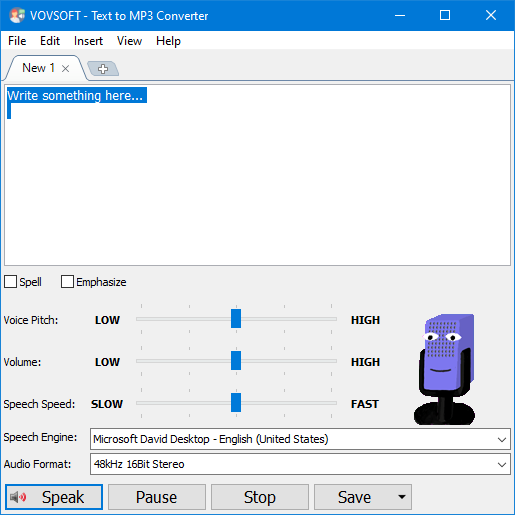
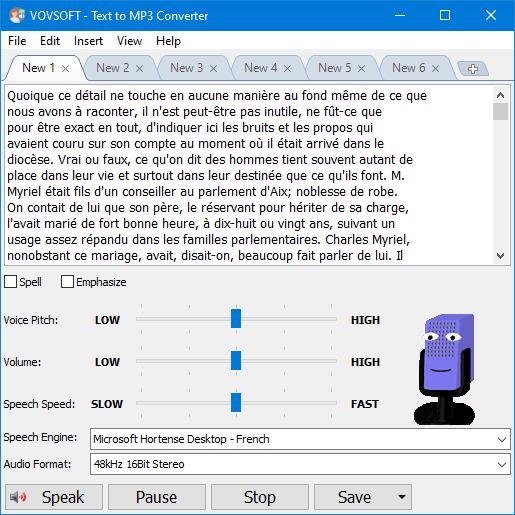
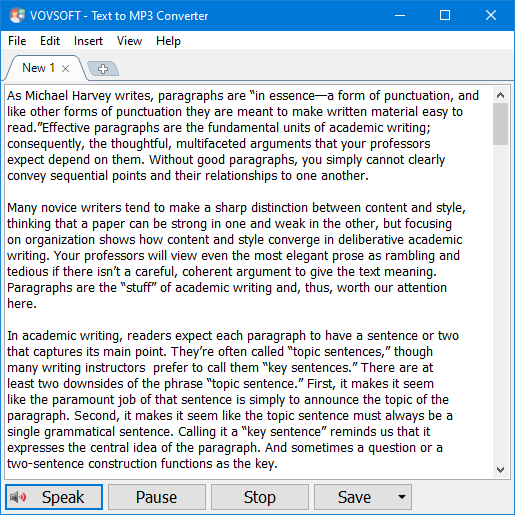
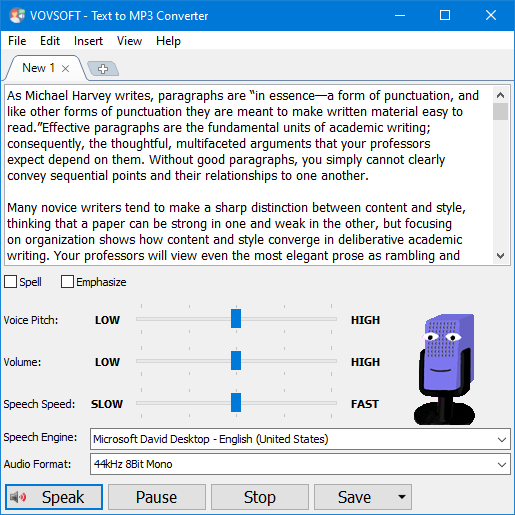
If you need to convert some text to audio or you're just looking for a way to preview some content without having to actually spend time reading it, Vovsoft Text to MP3 Converter can do both, offering you choices for the used speech engine, as well as the output audio format. The two main options offer users the choice of increased quality (WAV) or a more compact recording (MP3). "Speech Speed" option allows from 10x slow to 10x fast playing and recording. If you seek a basic application that can help you perform text to audio conversions, without having to resort to complex steps and configuration processes, try out this simple yet quite capable software.
In addition to text files, this software also supports loading PDF files and Microsoft Word documents. This MP3 maker software can be used for Word to MP3 conversion by loading DOC and DOCX files on your desktop or laptop computer. You can even use "Batch Conversion"to convert multiple files at once.
Besides the robotic voices offered by Windows, this program also allows you to use natural voices (Alloy, Echo, Fable, Onyx, Nova, Shimmer) provided through the OpenAI API. Additionally, the program supports the Replicate API, which offers sample voices and voice cloning.
System Requirements:
Windows 11/ 10/ 8.1/ 8/ 7
Publisher:
VovsoftHomepage:
https://vovsoft.com/software/text-to-mp3-converter/File Size:
18.7 MB
Licence details:
Lifetime, no updates
Price:
$19.00
GIVEAWAY download basket




Comments on Text to MP3 Converter 4.3
Please add a comment explaining the reason behind your vote.
iPhone app giveaways »



Android app giveaways »




Seems to work great!
Save | Cancel
GO to the web site it tells you there
Save | Cancel
What languages does the program support Text to MP3 Converter 4.3
Save | Cancel
Danish támogatja mert https://vovsoft.com/software/text-to-mp3-converter/
Save | Cancel
Hey GAOTD - Thank you and to the developers for this offering today- much appreciated. I was needing something like this and am excited to try it. I also appreciate the easy license key process!
Save | Cancel
Bo : I downloaded it and , since I operate in France and answered "YES" when beginning the installation , it installed automatically the French version and it works perfectly, even for long texts (even at least 10 pages)
Save | Cancel
After typing in a short sentence, the program missed the first word. When I repeated the "speak"command the second time, it did catch the first word. I was hoping for a more smooth speak pattern. This still has some slight halting between words.
Save | Cancel
Downloaded and installed without any problems. Tried it out and it worked as advertised. Thanks GOTD.
Save | Cancel
Dear Bo. There are many available languages: English, Abkhazian, Albanian, Arabic, Bulgarian, Chinese, Czech, Dutch, Finnish, French, German, Greek, Hebrew, Hungarian, Italian, Japanese, Korean, Norwegian, Persian, Polish, Portuguese, Romanian, Russian, Slovak, Slovenian, Spanish, Swedish, Turkish, Ukrainian, Vietnamese. Please, look at the Vovsoft site.
Save | Cancel
In French it works. Splendid! Thanks to vovsoft
Save | Cancel
The website says the following languages are supported: Arabic, Bulgarian, Cantonese, Catalan, Chinese, Croatian, Czech, Danish, Dutch, English, Finnish, Flemish, French, German, Greek, Hebrew, Hindi, Hungarian, Indonesian, Italian, Japanese, Korean, Malay, Norwegian, Polish, Portuguese, Romanian, Russian, Slovak, Slovenian, Spanish, Swedish, Tamil, Thai, Turkish, Vietnamese.
Save | Cancel
Is it only avaible in English language or does it support minor languages too. ( i.e danish?)
Save | Cancel
Bo,
"How to install a new Text-to-Speech language
You can install many TTS enabled languages (Voices) using Windows Settings (Control Panel). Depending on your Windows version, go to "Region & Language" area, then "Add a Language" by selecting it or downloading a language pack. Finally, restart the program to detect the installed languages. ➡️ More Info
Text-to-Speech languages and voices available in Windows
Arabic, Bulgarian, Cantonese, Catalan, Chinese, Croatian, Czech, Danish, Dutch, English, Finnish, Flemish, French, German, Greek, Hebrew, Hindi, Hungarian, Indonesian, Italian, Japanese, Korean, Malay, Norwegian, Polish, Portuguese, Romanian, Russian, Slovak, Slovenian, Spanish, Swedish, Tamil, Thai, Turkish, Vietnamese."
source: How to install a new Text-to-Speech language
You can install many TTS enabled languages (Voices) using Windows Settings (Control Panel). Depending on your Windows version, go to "Region & Language" area, then "Add a Language" by selecting it or downloading a language pack. Finally, restart the program to detect the installed languages. ➡️ More Info
Text-to-Speech languages and voices available in Windows
Arabic, Bulgarian, Cantonese, Catalan, Chinese, Croatian, Czech, Danish, Dutch, English, Finnish, Flemish, French, German, Greek, Hebrew, Hindi, Hungarian, Indonesian, Italian, Japanese, Korean, Malay, Norwegian, Polish, Portuguese, Romanian, Russian, Slovak, Slovenian, Spanish, Swedish, Tamil, Thai, Turkish, Vietnamese.
See https://vovsoft.com/software/text-to-mp3-converter/
Save | Cancel
Bo, It show french in one of the examples, so I would assume it does. I don't see any way to change the language. It uses the Windows voices so I'd imagine it uses the language of your computer.
Save | Cancel
Bo,
Scroll down the page and see what language packs they have "How to install a new Text-to-Speech language"
https://vovsoft.com/software/text-to-mp3-converter/
Save | Cancel
Bo, see the webpage:
Language: English, Abkhazian, Albanian, Arabic, Bulgarian, Chinese, Czech, Dutch, Finnish, French, German, Greek, Hebrew, Hungarian, Italian, Japanese, Korean, Norwegian, Persian, Polish, Portuguese, Romanian, Russian, Slovak, Slovenian, Spanish, Swedish, Turkish, Ukrainian, Vietnamese
Save | Cancel
Bo, there is one Danish Microsoft voice (Helen).
Save | Cancel
Bo,
Language: English, Abkhazian, Albanian, Arabic, Bulgarian, Chinese, Czech, Dutch, Finnish, French, German, Greek, Hebrew, Hungarian, Italian, Japanese, Korean, Norwegian, Persian, Polish, Portuguese, Romanian, Russian, Slovak, Slovenian, Spanish, Swedish, Turkish, Ukrainian, Vietnamese
Save | Cancel
Bo, check their website.
Text-to-Speech languages and voices available in Windows
Arabic, Bulgarian, Cantonese, Catalan, Chinese, Croatian, Czech, Danish, Dutch, English, Finnish, Flemish, French, German, Greek, Hebrew, Hindi, Hungarian, Indonesian, Italian, Japanese, Korean, Malay, Norwegian, Polish, Portuguese, Romanian, Russian, Slovak, Slovenian, Spanish, Swedish, Tamil, Thai, Turkish, Vietnamese
Please note that some TTS languages provide male voices, some TTS languages provide female voices, and some TTS languages provide voices for both genders.
Save | Cancel
Bo, The website says "Text-to-Speech languages and voices available in Windows
Arabic, Bulgarian, Cantonese, Catalan, Chinese, Croatian, Czech, Danish, Dutch, English, Finnish, Flemish, French, German, Greek, Hebrew, Hindi, Hungarian, Indonesian, Italian, Japanese, Korean, Malay, Norwegian, Polish, Portuguese, Romanian, Russian, Slovak, Slovenian, Spanish, Swedish, Tamil, Thai, Turkish, Vietnamese
Please note that some TTS languages provide male voices, some TTS languages provide female voices, and some TTS languages provide voices for both genders."
Save | Cancel
Bo, it supports the languages you have installed under windows, you can optionally install more language variants to get more voices/accents in windows e.g. I have installed English UK as default and English US and English Canada as accents for more voices. Only negative side effect is it adds a language selector to the systray area on the task bar taking up a small amount of task bar real-estate. As far as I am aware the user interface probably does not support right to left text input and display but I could be wrong, if it doesn't and is required feel free to use the help menu feedback option to send the developer the suggestion/request for future dev ideas.
TK
Save | Cancel
Bo,
Category: Audio & Multimedia - Speech
Supports: Windows Windows 11, Windows 10, Windows 8/8.1, Windows 7 (32-bit & 64-bit)
Language: English, Abkhazian, Albanian, Arabic, Bulgarian, Chinese, Czech, Dutch, Finnish, French, German, Greek, Hebrew, Hungarian, Italian, Japanese, Korean, Norwegian, Persian, Polish, Portuguese, Romanian, Russian, Slovak, Slovenian, Spanish, Swedish, Turkish, Ukrainian, Vietnamese
Save | Cancel
Bo,
From the website cited on this page:
Language: English, Abkhazian, Albanian, Arabic, Bulgarian, Chinese, Czech, Dutch, Finnish, French, German, Greek, Hebrew, Hungarian, Italian, Japanese, Korean, Norwegian, Persian, Polish, Portuguese, Romanian, Russian, Slovak, Slovenian, Spanish, Swedish, Turkish, Ukrainian, Vietnamese
Save | Cancel
Bo, the second picture is literally in french
Save | Cancel
Bo, it claims translation in numerous languages; and although I didn't see Danish on the list, they seem to be accepting help with translation:
https://Vovsoft.com/translation/
Save | Cancel
Bo, It doesn't mention Danish in the list, but there are many other than English...
"Language: English, Abkhazian, Albanian, Arabic, Bulgarian, Chinese, Czech, Dutch, Finnish, French, German, Greek, Hebrew, Hungarian, Italian, Japanese, Korean, Norwegian, Persian, Polish, Portuguese, Romanian, Russian, Slovak, Slovenian, Spanish, Swedish, Turkish, Ukrainian, Vietnamese"
Save | Cancel
Pete, Danish is already in the program if you scroll all the way down in the voice list.
Save | Cancel
The confusion, IIUC, seems to be User Interface vs. Text To Speech languages:
(a) it apparently supports Danish TTS
— Vovsoft.com/software/text-to-mp3-converter/
(b) but their UIs haven't yet been translated into Danish
— Vovsoft.com/translation/
Save | Cancel