Every day we offer FREE licensed software you’d have to buy otherwise.
Giveaway of the day — AceThinker Video Master 4.8.2
AceThinker Video Master 4.8.2 was available as a giveaway on April 14, 2021!

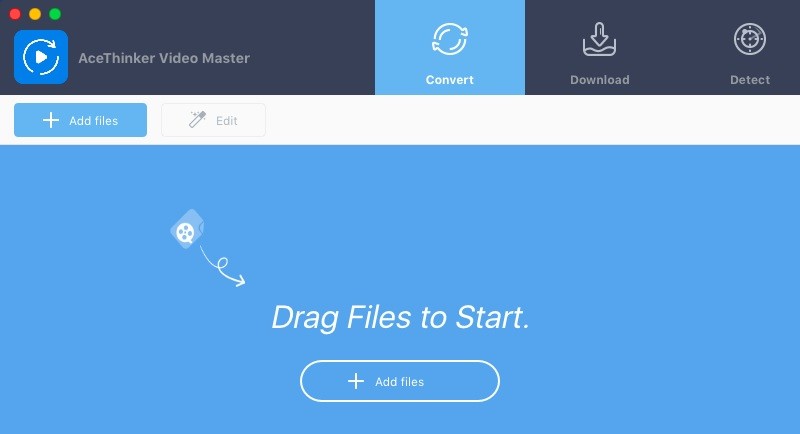
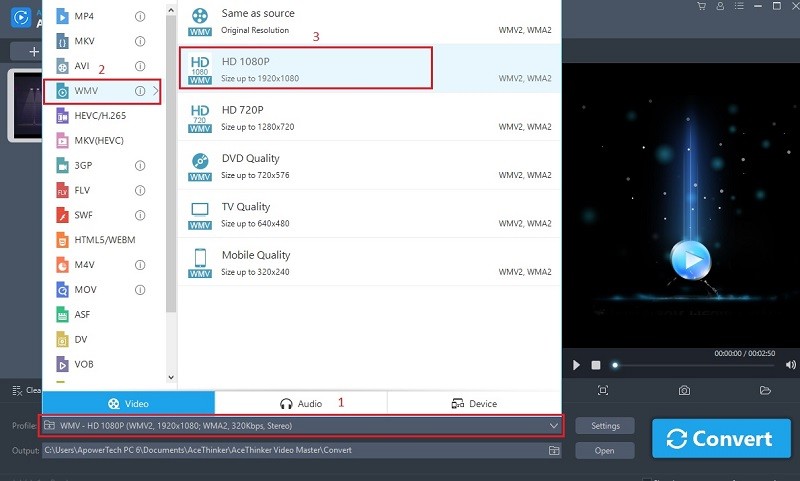
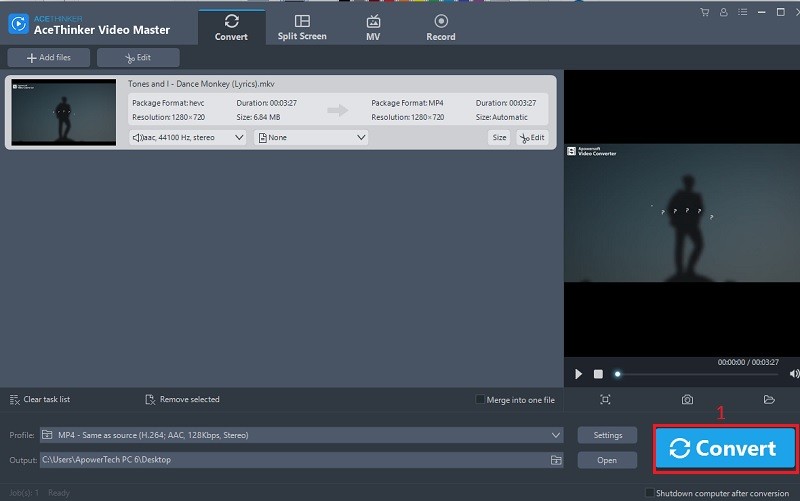
Video Master is a universal video and audio converter with basic editing features. It is capable of converting videos into various multimedia formats for different devices easily and fast. The tool also includes the Split Screen and MV Maker features with lots of available presets to make a presentation neat and more appealing. The screen recorder feature is great for capturing desktop activities and converting them for later viewing.
- Convert your media files to portable or high-quality video/audio formats.
- Edit your video by using trim, watermark, annotation, visual effects and more.
- Record screen along with audio, annotation and task manager.
- Premium features of video recorder, MV maker and more.
System Requirements:
Windows 7/ 8/ 8.1/ 10; Mac OS X 10.8 and above
Publisher:
Acethinker SoftwareHomepage:
https://acethinker.com/video-convert-masterFile Size:
86 MB
Licence details:
1 year license
Price:
$29.95
Featured titles by Acethinker Software

AceThinker Online Video Downloader enables you to download videos from 100+ platforms by simply entering the link. It’s 100% free with no restriction to duration of the the video or others. Within a few clicks, you can save the video in the desired resolution and format in a few minutes.

One-click to grab audio directly from Sound Cloud, Audiomack, Grooveshark, and many other popular music and radio stations. It also enables you to extra audio from the music video on Dailymotion, Vimeo, and similar video sites. Get the audio you want for free.

A collection of free PDF converter apps for you to easily turn PDF documents into other formats including JPG, PNG, Word, PPT, Excel and so on. These tools also enable you to publish various files into PDF with pages arranged in sequence.
The online app which provides screen capture, image editor and uploader. Simply click to launch this app from your browser and you’re able to capture any part of the screen with ease. You can also touch up your screenshot before saving it to local drive or sharing via social network.
GIVEAWAY download basket




Comments on AceThinker Video Master 4.8.2
Please add a comment explaining the reason behind your vote.
iPhone app giveaways »





Android app giveaways »





Hello Everyone,
Thanks for your interest in AceThinker Video Master. On behalf of tech support team, we would like to express our sincere gratitude to you. In order to help you better utilize this tool, we just place this post here with useful guides and more. Also, if you have any suggestions or questions regarding this product, you could either send your feedback here or post in the support center as mentioned below.
Note: Please follow the instructions of Giveaway of the Day to install this software on your computer. Once registered, you will get a full license with free update for one year. Please beware that it’s for one year only, but we provide free tech support for you during this time.
Important!
Learn how to register this software (choose one that suits you below)
Option 1.Registration guide: https://acethinker.com/video-convert-master/register-video-master.html
Option 2. Step by step text guide:
• Get installation file as well as instruction file from Giveaway of the Day (click the green button at the beginning of this web page), and then install the program properly on your computer.
• Follow the instruction to obtain keycode from AceThinker campaign page. Once clicking “Get giveaway Version” button, you’ll see a pop-up window which contains keycode.
• Now go to run the software, click “Active” on the welcome window (or click the user’s icon on top-right menu), and then enter your registration keycode directly into the field.
• Click “Confirm” to finish your registration and enjoy!
IMPORTANT: Don’t worry if you’re not able to register the software, just send your email address associated with the user account to us and we’ll help you unlock it. Our support team will help you within 24 hrs: support@acethinker.com or https://acethinker.com/support/contact-us.
Also, if you have already registered Video Master before, you may not be able to register again to extend the license. However, please don’t worry, you just need to drop a message to support@acethinker.com and we’ll help you extend the usage time for another year.
AceThinker Support Team
Save | Cancel
AceThinker, Can this handle subs without destroying the timing when you trim ,crop, and join videos
{Expected response} Hay we are a all-in-one video subs are a completely different program
recently tried a couple all-in-one's and they worked for video but not subs
Save | Cancel
MOV, the tool features a built-in editor which enables you to trim or crop video clips with subtitles. You may make a copy of your current video and test it with our software, thanks.
Save | Cancel
PITA to activate. Then says watermark will appear. Uninstalled.
Save | Cancel
If you installed this program with a previous giveaway offer, you will no more be able to reinstall it with this new free offer; you have to buy the license.
Save | Cancel
I'm disappointed. Download online video option is missing.
Save | Cancel
Installed and registered (at least it said so - no config or preferences to check )
Record allowed me to select an area and after I clicked OK, got the countdown 3-2-1 but then nothing - no control bar to pause, stop or see levels etc.
Please help...
Thanks,
Nick...
Save | Cancel
Win 10 v1909 Dell laptop
Save | Cancel
Tried re-install, reboot, temp Avast off, installed your trial .exe also with the same result :(
Save | Cancel
Nick B, please send an email to support@acethinker.com and we'll help.
Save | Cancel
The screen recording feature is good. But unable to open my camera. I was using Chromacam for changing my video background. Although I select Chrmacam from the drop down option of the camera, the video is not apearing.
Save | Cancel
I can not get it to register. I followed all instructions in the read me.
That little SIGN UP/ REGISTER screen won't work right!
I do EXACTLY what it says, and I can't get past the CODE.
It WON'T WORK
Save | Cancel
Earl "LeeBird" Hayes, please send over an email to support@acethinker.com and we'll help.
Save | Cancel
Copy manual code from site
Save | Cancel
Installed in the same file as last time (July 17, 2020) - NO REGISTRATION FORM - but Expiry date: July 21, 2021 on my account.
Save | Cancel
If you have previous version installed you have to uninstall and remove all entries of previous installation. After doing this you can install the new version.
Save | Cancel
Erich, as said in our notification in the first comment: " if you have already registered Video Master before, you need to drop a message to support@acethinker.com and we’ll help you extend the usage time for another year."
Save | Cancel