Every day we offer FREE licensed software you’d have to buy otherwise.
Giveaway of the day — PCBoost 4.4
PCBoost 4.4 was available as a giveaway on May 8, 2015!
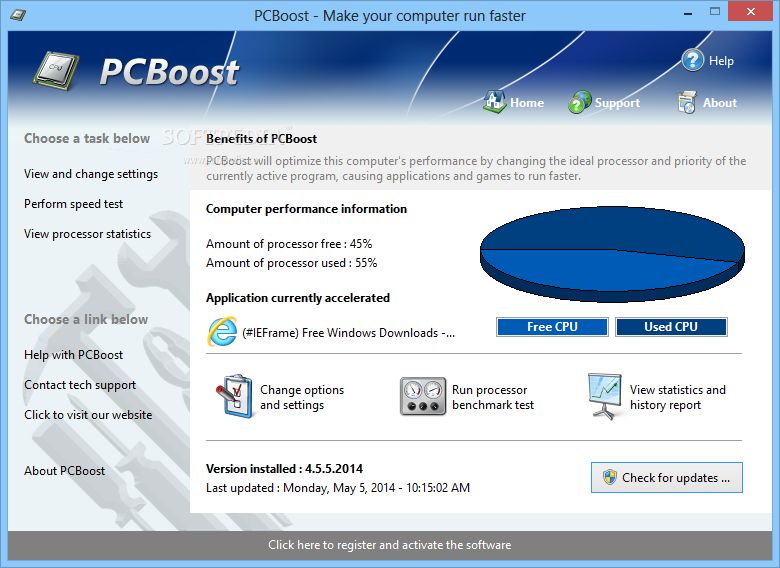
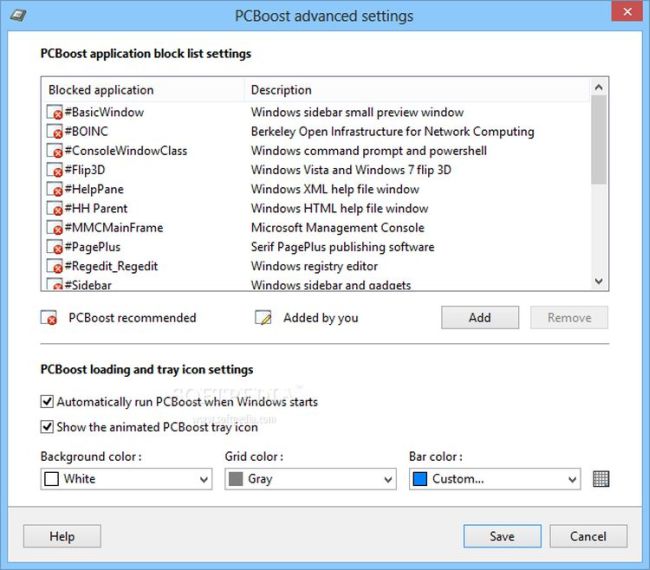
PCBoost can make your games, video production software, photo editing software etc. run much faster. Now your programs and games will work faster on your computer without purchasing a new hardware. It allows your computer to allocate more CPU power to currently running application.
PCBoost monitors which application is running now, then it makes the CPU give this application priority over all other applications. If you switch to another program or game, PCBoost will instantly notice this change and instruct the CPU to set the old application to a normal priority and the newly active application to a higher priority. This approach allows the current and active program always use as much CPU power as possible.
System Requirements:
Windows 2003/ 2008/ Server 2012/ XP/ Vista/ 7/ 8 (x32/x64)
Publisher:
PGWARE LLCHomepage:
http://www.pgware.com/products/pcboost/File Size:
10.2 MB
Price:
$9.99
GIVEAWAY download basket




Comments on PCBoost 4.4
Please add a comment explaining the reason behind your vote.
iPhone app giveaways »





Android app giveaways »





I learned something today. Do check out this great tool to send many photos called Binfer. I have sent many pictures with Binfer. It’s a nifty little tool. A nice photo sharing tool to add to the list.
Save | Cancel
Running an HP quadcore with 4 gigs of memory 3 allocated to Vista Operating System.
I am impressed with this program because it allows setting the normal priority level from which the program can operate around, that would be the processor performance settings under change options and settings. Normally programs run with a normal priority. PCBoost allows the above setting to run all of the programs at some predetermined priority and modify actively viewed programs from that level.
I use three very data dependent programs to monitor stock prices. Any one of them takes a bit too much of the processor it appears to me. But you are only looking at one at a time, I use dual screens for all three and want to see each displayed on dual screens. So when I switch from one program to the other I have no need to see the former (that is still bringing in data and needs to keep up but is not in view at the moment). I was impressed to have the task manager running along with Lasso and PCBooster and see the priorities change as I clicked on each in succession. Because of the processor performance settings mentioned above they are all running Above Normal unless selected as the active program which then runs them on High. Before PCBoost each program ran on Normal and apparently all together used only a portion of the CPU capability, say 20 or 30%. Now with all running Above Normal and the selected program running on High I see spurts of CPU use up to 50 or 60%. That is very interesting and I should mention also that before, now and then, I would get a "white out" where the computer apparently was falling behind or some program took more than its share of the CPU and it would take a few seconds or a minute for the "white out" to resolve itself. I haven't used PCBooster long enough to see if it helps that problem or not. But running Lasso along with PCBooster (which I am doing now) I see an interesting cooperation. Lasso will "restrain" a program to keep it from using more than its share while PCBoost will raise the priority of the program you are looking at. I am sure the Windows operating system has a high level of sophistication in this area, as pointed out by others, but that would be likely a compromise design meant to make a more universal OS rather than customizing for a particular set of computer programs. Once you have your unique set of programs running, assuming they take more than a small portion of CPU capability, you can dynamially change the priority with PCBoost while Lasoo restrains those trying to hog the CPU. Hopefully together you will end up with a much greater utilization of the CPU while avoiding slow downs or white outs. I am on thin ice here, I realize there is a lot more going on than I know about in the OS. If anyone can take my observations above and comment with the OS in mind I certainly would like to learn more about this area.
I did follow someone's suggestions in the advanced systems settings and managed to use my external drive as well as the C: drive for paging and extra memory availability. Not sure it will help but I more than doubled the hard drive paging area. Will see.
I had to install PCBoost twice, the first time something went wrong. I had no way to exit the program, there was no short cut on the desk top, something was wrong. Nothing to uninstall in the Control Panel, I almost gave up. But I did reboot and use ccleaner and tried again. Second time all went well. I now have a keeper but the program only costs $9.99 so it was no big gain. Good luck to you all still getting ready to try it out.
GJW
Save | Cancel
All cleaning and tuneup programs have plus and min points as also their own view of improvements
Most import is that you check and understand the changes. If some functions are turned of that you use alot, that could be very irritating and ometime even lose speed in the process.
disactivate programs that you don't use. clean tempfiles regular and ones a while defrag disk. simple and saves time (and you know your machine better after a while)
I did not test this program itself
thanks for the offer
Save | Cancel
thanks
Save | Cancel
I have used Minimem 2.1.1 quite successfully, where you can actually OPTIMIZE apps and system files with memory leaks. HOWEVER, LEARN HOW TO USE IT OR YOU WON'T UNDERSTAND IT: http://minimem.kerkia.net/
download here: http://www.freewarefiles.com/Minimem_program_43491.html
Save | Cancel
Well, starting from this statement: "programs and games will work faster without purchasing new hardware"; I would like to write a little addendum to my previous comment (#9).
This is the same kind of topic when we discuss about video converters. Unless we're talking about vectorial graphics, there is no way for a program to add details to a video that doesn't have. If you upscale a picture from 320x200 to 1920x1080, it will not be magically enhanced.
So there is no way for a program to give you more speed than your system can already give you*. As I stated above, you can play with some parameters (do a spin in the System properties) and priorities and affinities (with a process manager like whose I suggested). You can close programs you don't need, too. But if you actually need better performances, probably you have to buy a more powerful system.
*note, this is not completely true. There are tricks to speed up your hardware. I'm talking of BIOS fine tuning and overcloacking. But again, you have to know (very well) what you're doing!
Save | Cancel
I counted the word CPU in the description above. 4 times.
Apparently this is the fundamental basis of the software.
It concentrates on the CPU.
ONLY the CPU.
However, the entire PC is a system. Not just the CPU.
The data or code flows through or is commanded by the various connected hard ware components and these may slow down the execution of the program at any point.
In addition, we have not looked at the various software that we use.
Some software is so badly written that it is the culprit for slowing down the program execution, by going into loops or looking for something before the next step.
Save | Cancel
good!,
Save | Cancel
These "boosters" are a relic from the Windows 98 days, when Windows didn't have a kernel capable of co-operative multitasking. Well since WinXP that is not the case and by using this "booster" all you will do is SLOW YOUR PC DOWN by disabling its ability to multitask wisely.
Picture you have say 5 programs running on your computer, okay? Windows will use a "round robin" style approach if your PC does not have enough cores for the job and let each program have a slice, what this does is disable the round robin by shoving a single program to the front and saying "ignore the other programs ONLY focus on this one" to the detriment of the others, so while that program might get done a whole 1%-5% quicker it will SLOW DOWN everything else causing the work you have to do to take more time since Windows can no longer optimize your cores based on load.
All of these "boosters and optimizers" are simply working from the old Windows 98 mindset, that the heart of Windows is so poor that a third party program can divide up resources better than the Operating System can and that just isn't the case anymore, so if you want a bit of advice from somebody who has been building and servicing PCs since the days of Windows 1.0? Leave these relics where they belong, in the past.
Save | Cancel
Thank You Mr. Keven,
The Advice 5/5 Received. ^_^
Save | Cancel
Windows can optimize its performances by itself. This job could be done better with a little help. When I say "a little help" I mean something you can do to better fit Windows standard behavior to your real needs.
Open [Control Panel]->System->[Advanced System Settings]
Select tab [Advanced]->Performance->Settings
Select tab [Advanced]
Now if you use your computer as a tool for your daily tasks (Office apps, games, watching videos, navigating the Internet, almost one task per time) select [Programs].
If your computer acts as a server for your LAN, smart TV, downloads and similar tasks, select [Background services].
Do you want more? Then you can use a program like "Bill2's Process Manager" that's an advanced task manager. It permits you to create rules for your programs. You can configure it to automatically raise or lower priority when a program is active or minimized. You can manage unresponsive or cpu intensive processes. If you ever tried "Process Lasso" this is similar but free and portable and highly configurable. Keep in mind that optimizing a computer running Windows is not something that can be actually done automatically. You have to know what you're doing. Despite of its interface, Windows is a very complex operating system. If you give a program "real time" priority and it freezes your system and you're forced to reset, don't blame me. Who causes his evil cries himself!
Save | Cancel
Till now I did not see any program can made my PC running faster! After 20 years of experiens i thing only Microsoft is able to create such program , but they to not wont to!
Save | Cancel
"active program always use as much CPU power as possible."
'CPU power' don't mean jack when the problem is slow read/write to disk, 'net, SD card, et al. Most of the time this is when the system seems sloow.
Save | Cancel
Hello, It seems to do what it claims here... My pc is already fast, but I am always trying to make it go a little bit faster...
Thanks to GiveAwayOfTheDay and PGWare for this utility ! I'll keep it and I'll test it further...
Save | Cancel
Surely you are being frank, Frank
Save | Cancel
I don't need any optimizing tools, because I have plenty of power - and that keeps me from voting at this program. However thanks a lot for the offer to the developer and GOTD.
Btw I fell over a portable suite, with a load of tools, you can use to automate the tweaking og your pc. Please, take your time and check the features out - and not least : be very careful using the build in one click optimizer. I don't use that feature. Hosted and reviewed by Softpedia : http://www.softpedia.com/get/PORTABLE-SOFTWARE/System/Portable-Argente-Utilities.shtml
A usefull little tool is CleanMem (which doesn't move to pagefile, when you empty it : http://www.softpedia.com/get/Tweak/Memory-Tweak/CleanMem.shtml
Both is freeware, off course. Have a nice weekend. Greets from Denmark.
Save | Cancel
Here's where I had a problem with CleanMem:
when you use the Monitor Mem feature, it goes out to the Internet. Now, why would an app need to go out to the web JUST TO MONITOR THE MEMORY I USE ON MY PC? It should not. It should ASK YOU PERMISSION.
Therefore, CleanMem should be used WITH CAUTION.
I have tools on my PC that detect any app that goes out to the Internet for ANYTHING. One such app is PrivateFirewall 7.0, which monitors this for you so you can give permission or deny any app that wants to go out to the Internet and THAT is the way it should be.
You may also want to consider another excellent Firewall in PeerBlock. It is not just for P2P apps and torrents. It is also for all your available ports (8080 and http) in seeing what external IPs (domains, services, companies) are coming in and then going out (which could be TRACKERS THAT YOU MAY NOT WANT), for instance, your email and other apps, including portable apps. There is a free version and the paid version for $9.99 per year for updated filters, WHICH ARE THE VERY BEST. The free version is good too as it updates only once per week, whereas the paid version updates daily. So, if you are a P2P or Torrent person, gleaning the Internet for movies, music, etc. to download, PeerBlock IS A MUST HAVE.
I use MiniMem which does everything I need it to do and yet it does not go out to the Internet.
Save | Cancel
Your computer is running slow because of too many programs running at the same time, so adding another program will fix it? What's wrong with this picture?
Save | Cancel
Memory optimizer programs are best way I know to slow a computer with multiple programs loaded. They fail to let Windows use it's cache properly by giving one program preference over another and slow the whole system. If you want a higher priority on your Windows system just right click the program process in the task manager and set the priority. People who think they are creating more ram by using these speed ups are only going to cause more headaches due to compatibility and ram used by the Speedup program. Most people with speed issues have other problems than ram. Usually malware or a underperforming video card due to very old systems running games or video beyond what the system was configured to due. I do not recommend any speedup programs of this nature even if they are free.
Save | Cancel
Thank you. Please Superram6 giveaway of the day I'd love to put it up as the low-end computer performance.
Save | Cancel
Wise Memory Optimizer does everything that Superram does and does not cost a thing. http://download.cnet.com/Wise-Memory-Optimizer/3000-18512_4-75786613.html
Save | Cancel