English
Every day we offer FREE licensed software you’d have to buy otherwise.
$39.90
EXPIRED
Giveaway of the day — Ocster Backup Pro 4
Ocster Backup Pro 4 is a great backup software that was designed from the start to work fully automatic.
$39.90
EXPIRED
User rating:
420
31 comments
Ocster Backup Pro 4 was available as a giveaway on August 16, 2010!
Today Giveaway of the Day

The best phone data manager for iPhone and Android.

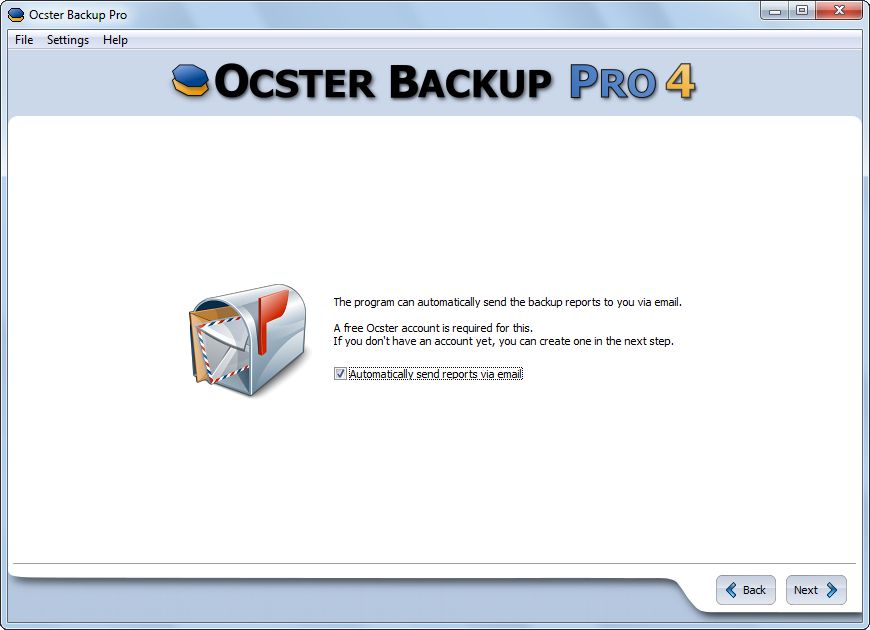
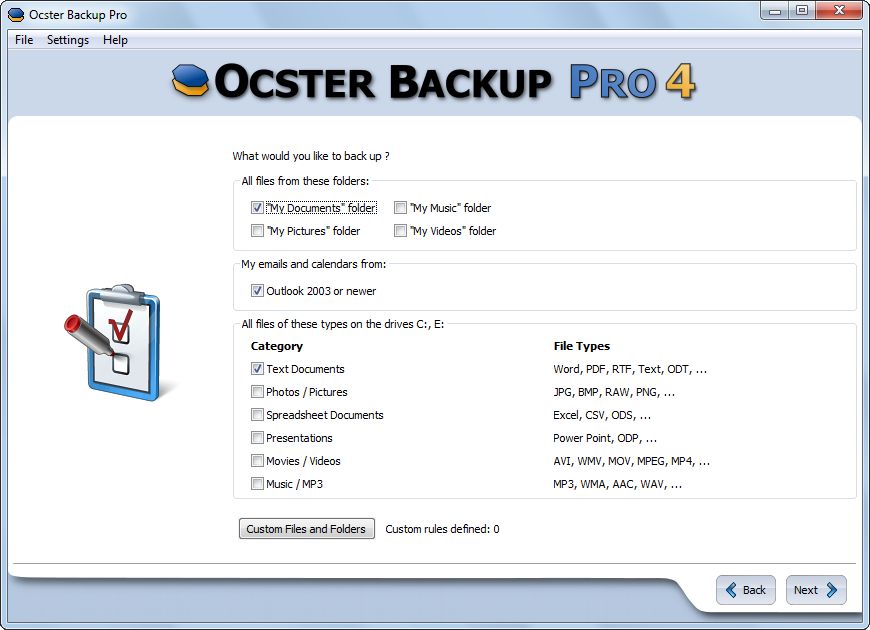
Ocster Backup Pro 4 is a great backup software that was designed from the start to work fully automatically. You simply specify what and when you want to back up and then the software takes care of the rest. A special new feature called "Automatic Pausing" will automatically pause the backup process when you need the full power of your computer. Never be bogged down by your backup software again!
New in Version 4:
- Automatic Pausing: Ocster Backup Pro 4 aims to never slow down your computer when you need it. It monitors the resources other programs use and automatically pauses when it detects that it might slow things down
- Outlook support: makes backing up your Microsoft Outlook emails and calendars really easy (works with Outlook 2003 or higher)
- Improvements "under the hood": enhanced performance, compatibility and other aspects of the backup service
System Requirements:
Windows XP/ Vista/ 7
Publisher:
OcsterHomepage:
http://www.ocster.com/ocster-backup-pro-4/enFile Size:
20.7 MB
Price:
$39.90
How would you improve Ocster Backup Pro 4?
GIVEAWAY download basket

Developed by Informer Technologies, Inc.

Developed by IObit

Developed by Garmin Ltd or its subsidiaries

Developed by ArcSoft
Comments on Ocster Backup Pro 4
Thank you for voting!
Please add a comment explaining the reason behind your vote.
Please add a comment explaining the reason behind your vote.
iPhone app giveaways »

There's nothing you can't do with a good Arduino Bluetooth connection!
$2.99 ➞ free today

$0.99 ➞ free today

Discover the lighthouses that have guided mariners along America’s coasts, rivers and Great Lakes for generations.
$2.99 ➞ free today

Discover The Elements, With a new card design that is easy to use during study sessions.
$1.99 ➞ free today

Download and play computer videos, animation, movies and other media files in any format.
$0.99 ➞ free today
Android app giveaways »

The awesome Zombie Age series returns with a lot more of savage zombies, deadly weapons and unique heroes.
$0.99 ➞ free today

Capture, train, and evolve to become the champion in one of the biggest monster battling RPGs!
$0.99 ➞ free today

Improve your IQ and exercise your brain by playing Color Spin: A meditative color puzzle.
$2.49 ➞ free today

$3.49 ➞ free today

$3.49 ➞ free today
For those who do not already know: If you create a backup with this program, and for some reason have to use a different computer, or reinstall your computer, you can go to the ocster website and redownload the software. Then just enter your code again and you are back to normal. When you activate your account with ocster, they automatically keep a record of your product keys so you have easy access to your software again.
Save | Cancel
I got this free several weeks ago after someone posted details of a free offer in the forums, and today it wanted to upgrade to version 5, so we are getting an old version. Pity they wern't willing to give us their latest version. Paragon always give their older versions away for free. :=)
Save | Cancel
@ Chirs (inside joke here) #23:
FTR, I have yet to have an issue with the Windows 7 backup utility, it has always seemed to run quickly and I've never encountered a corruption - but to be fair, I don't use it nearly as often as ATI Home since this is my favorite.
Win7 has never done me wrong (I've attempted/tested several restorations and was pleasantly surprised at how well it went) but I really only recommending it since it's easy, free and native.
Anyone who's really concerned with being able to restore every single bit of data should take the time to find and vet an application that does exactly that.
But I do have a few rules/habits that might help someone avoid the problems you'd described:
I. Avoid long backups by running them right before bedtime - or while away from the computer.
II. Always validate backup archives, always.
III. Make multiple archives if you have doubts. If one is corrupt move on to the next.
IV. Layered protection. I manually create restore points weekly on my machine, create full backup images with Acronis bi-monthly, and create Windows backups monthly - I've also saved the first image from the fresh install, just in case it all goes to hell.
Re, today's gaotd:
Anyway, with all of the good free (or really good paid) versions out there I just can't see putting my trust in a product that I won't know if I can trust until it's too late.
Save | Cancel
I have not tried this software. But i have tried one that is free totally. It is www.easeus.com . I can say for sure that it does work, it has saved me a couple of times. Highly recommed, and it is totally free. On this website there is another free program that works great also. It is easeus partition.
Cleck it out
Save | Cancel
In my part of the world , an octster is a word for an armpit , which is what this program could be described as. Sooooooo many alternatives out there, sorry no dice with this one.
Save | Cancel
Thanks, as always, mike for your very useful software analysis. And a special AMEN for your view on the desirability of portable - what we used to call "standalone" or "self-contained" or (probably the best name) "free standing" - software because of the elimination of conflict/damage woes. It's practically a fetish with me. For any simple application, especially, I make a point of looking for free standing solutions first.
That's why I'll likely avoid today's giveaway - which is not a slap at the developer. I appreciate you joining us here and thanks for the offering. Without going into detail for the newer visitors, completely free standing software kind of goes against the GOTD model, so I don't want to be too naive about it, but mike's analysis brings up a good general point, IMHO. The bigger a software's footprint the less likely some of us are to embrace it, especially for a relatively simple function.
IMHO, again, I think that's part of the lesson that even Microsoft has now learned with Windows 7: complexity for the sake of complexity is usually a bad idea. (IMHO always bad) K.I.S.S. should be the desired design model. As in automobile design, all the bells and whistles in the world won't make a lemon into lemonade. And I say that as a Vista user who actually likes it - when it isn't broken. ARGH!
But that lemonade part is just a general metaphor. I'm not talking about today's software with that. If you folks at Ocster will consider slimming down it's impact a little, I might give it a try. Seems interesting.
Save | Cancel
Good program - not sure? - but problem giveaway of day gave me so much software - that I need to back it up! Got so much software from giveaway of the day - I need three more computers!!! Need a bigger house to accomadate more computers!! Need a better job to pay higher taxes to pay for a bigger house!!!
So need three free computers from giveaway of the day to accomadate all the software that giveaway of the day has given away and a free bigger house to accomadate more computers and need giveaway of the day to give me a better paying job to pay for house taxes incurred by them tequiring me to do this!
Save | Cancel
It is disappointing that this program uses a proprietary format for backups. Luckily, as Ashraf said, there is a 30 day trial you can use to access your backups.
I use Goodsync and Acronis True Image Home. They're both great programs, but you do have to pay for both (except for Goodsync... it has some limitations after 30 days).
Another freeware that's out there is SyncToy by Microsoft, available here: http://www.microsoft.com/downloads/details.aspx?familyid=c26efa36-98e0-4ee9-a7c5-98d0592d8c52&displaylang=en Not too sure if I found any "automatic" features, though.
Save | Cancel
I don't like proprietary software period. If something goes wrong with the company, all of your back up data may never be accessed again.
Second, having the program run in the background all of the times is a no go for me and the ability of the software to send and receive messages in the background to other web sites is a security threat to me. I already passed on this offer.
Save | Cancel
Why would anyone want to pay for back-up. XCOPY with the appropriate switches set can do the job probably better. Besides you can see it in DOS or windows. You can make it run every time to power down or using the windows built in task manager.
Save | Cancel
@Darkman #9: CAUTION: I have Win 7 Ult x64 and have used the built-in Backup program with an external eSATA linked WD 1.5GB drive (USB is a bit slow, and this drive had eSATA) - the other day I decided I needed to restore one of the files I had backed-up - guess what? It could not be restored - yes the program 'found' the file in the backup set, but I assume it was 'corrupted'...got me thinking so I tried restoring a directory - ony 4 out of about 30 files were able to be restored, same message about being 'corrupted.' So, yes I spent the next few hours doing a drag and drop backup of all my data, verifying it as I went along. Now at least I know I have a reliable backup of all those priceless family photos and videos scanned in over the years. With any backup and restore proggram, I suggest one do a check and see how it works out. Now, I don't know what the issue with my high-end computer was, the software, the hard drive, the eSATAT link...but the bottom line is, it didn't work so good.
BTW, all the C: images worked fine with system restore using the Win 7 program.
Save | Cancel
Ocster still has a lot of issues. For me, these are mostly in line with the speed in which their backups are running. For larger back up schemes, this is simply too slow to utilize, which is one of the same problems I had with their previous versions.
For the users that are worried about being unable to restore their data should their system die, Ocster has always had, at minimum, a free trial in which you can utilize to restore what you had backed up on a secondary device.
Additionally, as Ashraf already cited, having your password remain visible is an issue. In the offhand chance that you forget to remove it, you're leaving all of your data open to a liability that shouldn't even exist.
@ #19 Matt,
Per GFI's website, their Home Free Edition supports the following:
Windows XP Home, Windows XP Professional SP2, SP3 (x86 and the x64 versions), all editions of Windows Vista except for Vista Starter (x86 and the x64 versions) and Windows 7 (x32/64 bit)
Save | Cancel
I'll pass on this, as I have previously done when the supplier of the program have not foreseen the vast amount of traffic GAOTD will generate on their website.
"I think I will give away my program to make more potential users aware of it." - Great idea
"I need to be in control, so I need to build a customer database so that I can contact all the people who downloaded and installed for free". - Not necessarily a bad idea.
"My website crashed due to the amount of traffic from the GAOTD-promotion". - I wonder why. Did you do any kind of research before you decided to try out GAOTD as a means to get your software "to the people"? Statistics? You probably got a whole lot of it, prior to deciding to use GAOTD. I mean... gazillion new downloads, and all users routed through your website. Bottleneck?
But actually, the main reason I will not download this program is that I realized... I do not want the backup of my important papers in another location on my computer. Or in my house, even.
This program may offer an FTP-solution (I believe they do), but there are tons of places out there that offers free online backup/storage. And they have their own systems for backing up and transferring files. THAT is what I need. Automatic copying of my important files to a place away from home.
Thanks for the effort GAOTD-Team and Ocster, but I'll pass on this. But you DID make me go online and GET one of those free online backup/storage-systems, and for that I am truly grateful.
Save | Cancel
Ashraf was a little non-specific on running the recommended freeware alternative GFI Backup on Windows 7, indicating that some users had reported success.
Any folks here have conclusive experience on running GFI Backup with WIndows 7 Pro (32 bit)?
Thanx.
Save | Cancel
Reply to comment #8: Cobian stores everything in the standard zip format.
Save | Cancel
Attempted to bring up the web site numerous times. I go to the company web site for ALL programs offered. This one continues to show it as a broken link. I will not be downloading ANY software that I cannot research a bit.
Thanks but no thanks.
Save | Cancel
I use BestSync2010, it make a sync of selected folder or drive, you choose to make a compressed sync or not on destination... it has ftp transfer too... and best off all its FREE....
http://www.risefly.com
Save | Cancel
If their web page doesn't work properly so I can activate it how do they expect me to have confidence in their products? Sorry, they go on my "never buy from these people" list and "don't trust their products".
Save | Cancel
I will stick with my free Paragon 2010 with its' recovery disc.It has saved my butt numerous times.
Save | Cancel
I use Cobain at home. It creates zip files and will do incremental OR differential backups. I use ToDo backup at work. It is a drive-level utility but you can mount the backup files as virtual drives. Awesome when you are rebuilding a system. No need to think. This grabs it all.
Save | Cancel
Unfortunately, I cannot contact their site.
It is out of order.
See this warning
http://dl.dropbox.com/u/1291141/GOTD/Ocster_11.30.png
CU Ootje
Save | Cancel
it's still a version behind the current Ocster release, but after working on v3 for way too long and never getting it running as far as I could tell, I'm going to give v4 a chance. some of the new features sure seem promising.
Save | Cancel
Not too keen on the proprietary format (not for a one-time freebie that is, I happen to use - and very highly recommend - Acronis TI myself, with its "tib" format) as I imagine a good number of folks, somewhere down the road, will be forced to shell out the dough for the paid version in order to reclaim their backed up data.
My personal fave of the gratis ilk would be Easus Todo; it is stunningly simple, painless to use, and always free. Back up is roughly 3 or 4 clicks start to finish, and recovery almost as simple:
http://www.todo-backup.com/download/
BTW, Windows 7 has a rather remarkably thorough backup utility right in the Control Panel ("Backup and Restore").
Save | Cancel
What backup programs DON'T use proprietary formats? Aside, that is, from standard archiving programs like zip, tar, and cpio.
Save | Cancel
THE BAD
- Imaging a drive with 20Gb used space took over 4h.
Thanks but no thanks.
True Image Home does the same in 6-12minutes.
Save | Cancel
I already have Ginie backup pro for data backup which i dont use it even on once in a blue moon. Dont know how i can use this.
data backup is not my thing. I copy my data to a separate drive and later burn it to a DVD. i think thats enough of a data backup.
But a program that can sync back the program with its Registry would be great.
No thanks for this: but someones trash is someone elses gold.
Save | Cancel
Ashraf forgot to mention a great free alternative: Cobian Backup 10.
It's a decent backup software 100% stable on both 32 and 64-bit Windows.
http://www.cobiansoft.com/cobianbackup.htm
Save | Cancel
My concern is that if I ever do need this the software will have expired. The newer external hard drives (like Western Digital) have a backup software that comes with it.
Maybe the developer will chime in and assure us this won't expire in 4 or 6 months.
No thumbs up or down as of yet.
Save | Cancel
D'll'd O.K. Installation fast and immediate after providing email details.
Only problem is that the online back-up option with Ocster Secure Storage is limited to 10gb escalated to 100gb max. For s-one working with a huge amount of graphics, this is very minimal considering that an external hard-disk with more space that 100gb and usable for other data storage PLUS backup would cost the same as 49.90 USD or less and wouldn't require an internet connection to access.
Ashraf, I await your take on this app.
Thanks anyway.
Save | Cancel
Just a warning. If this application uses a proprietary format for backups, then it means that you'll have to have the application installed in order to access your backups. Since this is a giveaway and you cannot reinstall it, it might be wise to make sure that you can access that data some other way. If you have to, for one reason or another, reinstall your OS, or something of that nature, you may not be able to install this application and will be forced to purchase it, or won't have access to your data.
Just a warning for those who are unaware, because a proprietary format means that it can only be opened by the Ocster. That's why some backup programs will allow you to choose a non-proprietary format such as ISO or ZIP, etc.
Wouldn't like to see anyone lose a huge backup and/or be forced to buy software which they might not otherwise buy.
~Cheers
Save | Cancel
The Good
* Straightforward and easy to use.
* Nice, aesthetically pleasing interface.
* Allows users to backup individual files or whole folders.
* Includes handy "shortcuts" for easy backup of common folders, and file extensions.
* Has the ability to easily backup Microsoft Outlook (2003 and higher) emails and calendars.
* Includes an "exclusion" filter which users can use to exclude specific files, folders, or file extensions from being backed up.
* Has an "automatic pausing" feature that automatically pauses/resumes backups based on current computer usage (i.e. if you are doing something on your computer that is resource intensive, the backup will be automatically paused and will be automatically resumed when computer resources are freed up).
* Allows users to restore files/folders selectively.
* Has multiple methods of compressing and encrypting backups.
* Allows users to schedule backups to automatically occur.
* Gives users the ability to keep extensive reports and automatically e-mail the reports.
The Bad
* Uses a proprietary format for the backed up data.
* When restoring backups, password is left in the password field (and appears the next time user runs a restore) unless user manually removes it.
* Lacks different backup methods.
* Aside from Microsoft Outlook, lacks the ability to easily backup third party software related data.
* Automatic backups can only be scheduled for a daily or weekly basis.
* Sending out backup report e-mails requires users to register (for free) with Ocster - no ability to use own e-mail address.
Free Alternatives
GFI Backup
Backup4All Lite
FBackup
For final verdict, recommendations, and full review please click here.
Save | Cancel