English
Every day we offer FREE licensed software you’d have to buy otherwise.
NoWires (Adobe Photoshop plugin) was available as a giveaway on March 6, 2010!
Today Giveaway of the Day

AI Data Recovery Software to Recover Deleted and Lost Files!
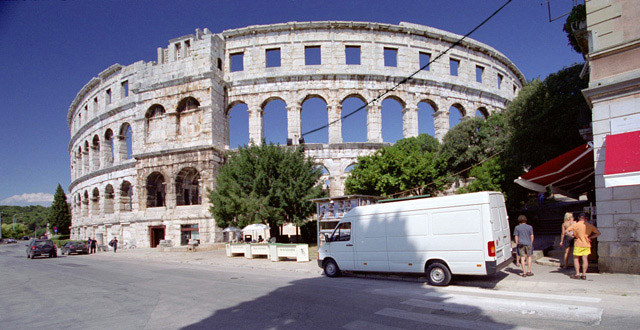
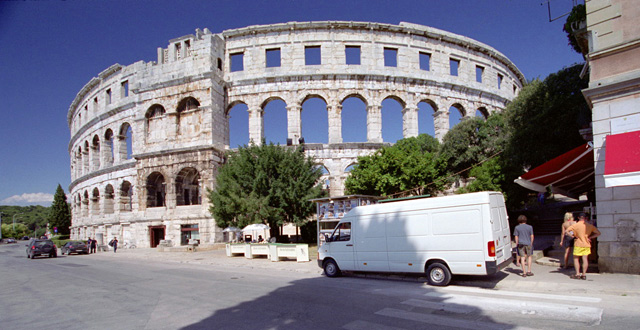
Get rid of the nasty wires crossing your photos just in several clicks! NoWires automatically removes telephone, electric, and other wires from your digital images.
NoWires integrates with Adobe Photoshop or Adobe Photoshop Elements and can be used though Filters menu.
Removing wires is very simple: just select start and end points of the wire and press OK button. All other work will be done automatically by NoWires.
NB: to install and use the plugin it is necessary to have Adobe Photoshop installed on the PC.
System Requirements:
Adobe Photoshop 7.0–CS4 or Adobe Photoshop Elements
Publisher:
nowiresplugin.comHomepage:
http://www.nowiresplugin.com/File Size:
1.06 MB
Price:
$29.95
GIVEAWAY download basket

Developed by CyberLink Corp.

Developed by PhotoInstrument

Create, manage, copy and edit custom images.

Developed by Mirillis Ltd.
Comments on NoWires (Adobe Photoshop plugin)
Thank you for voting!
Please add a comment explaining the reason behind your vote.
Please add a comment explaining the reason behind your vote.
iPhone app giveaways »

Learn the Bible by playing Bible Bowl with quizzes built for study and competition prep.
$0.99 ➞ free today

$0.99 ➞ free today

$0.99 ➞ free today

ReNext becomes: The layer between human intention and ultimate goal/dream.
$0.99 ➞ free today

$0.99 ➞ free today
Android app giveaways »

$0.99 ➞ free today

Material You Square is a line Square icon pack with a design inspired by material you.
$1.49 ➞ free today

Welcome to Sports Master, the ultimate trivia game designed for sports enthusiasts!
$2.49 ➞ free today

Synonym is a word that has the same or nearly the same meaning as another word in the same language.
$1.99 ➞ free today

$1.49 ➞ free today
it does not work with Vista 64bit/ Photoshop CS4 64bit
Save | Cancel
If you zoom right in on their first photo at the lower point of the wire connection, you will notice that it (the wire) ends in mid air! As an install tech of wires over 40 years I haven't seen this type of install work at all.
I think it was put there digitally and the pics displayed are simply reversed?,, for the purpose of sales.
Save | Cancel
MV's Wire worm...a whole better,and its free
Save | Cancel
After looking at the homepage of this plugin the wire in the photo seem like a self edit effects not original from the photo so they can easily removed it using adobe...I'll say not worth of dowloading...
Save | Cancel
MY PROS AND CONS ON "NO WIRES"
Anyways... this looks like a neat Photoshop tool!
PROS:
-gets rid off what they "lines" or things that you don't want in SIMPLE BACKGROUNDS ONLY
-It's very lightweight; 334KB!
-Setup detects what kind of Adobe Photoshop you use
-Works with even the old version of Photoshop! I have 5.0 and they detected it! :D
-Works surprisingly well... most of the time, like it really covers it!
-ajustable "width" of "line eraser"
-has zoom in and out for precision
-you can "draw" from one point to another on where to erase the line.
CONS:
-it's an addon for photoshop, no other softwares
-works PERFECTLY only for backgrounds with no stuff behind or over the wires... hard to explain
-wires with lots of stuff behind it in the background doesn't works well. You could still see "weird pixelated stuff" like comment #2 said.
-the window where you edit the stuff is small... not resizable. :(
Final Verdict
Give it a 3.5 / 5. It doesn't "completely" take off the line, but for takes of "most of it". Like I said, a bit pixelated on pictures with lots of stuff in the background, but its an over all not-too-bad addon! Nice job there NoWires!
Hope that helps!
~Joji~
Save | Cancel
Initially I was keen to install this photoshop plugin as a useful labour saving tool.
My first impression was how basic it looked…My first attempt was
removing a telephone cable which gave a good result.
My second try was a thicker power cable in the same photo.
After ten tries it failed to remove the cable and sadly it just made a mess of the repaired area.
Unfortunately you have to reopen the plugin each use, and reset the zoom level…very tedious when making many attempts to remove a power cable.
It also leaves a ghost trail that has to be cleaned up with the photoshop clone tool.
The repair area is a rectangle, so if you have a curve in the wire it has to be enlarged to cover the whole repair repair. Other tools use a ‘paint the cable’ method, concentrating on the affected area.
Inpaint is fast but may take a few goes to get a good result
I am surprised that photoshop allows such a poor quality tool to gain public confidence by using their highly reputed platform.
There is a need for labour saving tools to eleviate fiddly chores, perhaps Photoshop may consider adding their own plugin?
Save | Cancel
The - ultimate test - for nowires plugin ... and all alternatives mentioned above and below !!
http://www.darkroastedblend.com/2009/05/cable-blues-tangled-crazy-wiring-part-6.html
Save | Cancel
You can use this with other software but if you don't also have Photoshop loaded on your computer you can't even install this.
VERY STUPID!
Save | Cancel
What it said was "Please specify the software which you will use, and check next." Except, there was no place to do that, just a big green space on which no "specifying" of anytning was possible? The other other options were "back" and "cancel." If you clicked "next" it would just go back to the same request for specify.
Save | Cancel
Clone stamp is the only way to remove these types of things to your satisfaction.
Save | Cancel
Sorry, but no: this definitely doesn't do what it says on the tin.
I've used PS for 13 years and am a member of various PS communities (which include Open Source developers for PS plug-ins.) This isn't an OS offering and candidly, it isn't up to OS standards anyway.
I've tried it out but its pixel proximity engine (the algorithm for moving adjacent pixels into an existing image area so as to obscure that area -- which is all that this 'wire' obfuscator is) simply isn't up to the job.
Better freeware PS plug-ins already exist -- just Google for 'em. And GOTD offers 'In Paint' as a giveaway now and again -- well worth looking out for as it's PS-independent anyway,
Thanks GOTD, but no thanks.
Save | Cancel
I have Photoshop on machine, but this prog still would not install. It said I had to tell where to install it (am guessing to the PSshop) but there was no option to do that, such as a box where you write the destination it, or an explorer where you could select, etc. Tried twice and same thing. Would not install. Anybody else have this issue?
Save | Cancel
Inpaint is good. the latest version i got by GAOTD is working well and do the job well but older version have trouble. also i appreciate all my friend who share knowledgable tips. thanks GAOTD and all of you
Save | Cancel
any program as expensive as photoshop should already have this built-in
Save | Cancel
Install on OS Win 7 / CS2 and no issues on install. Overall this is a good FREE plug-in... not worth paying more than a couple bucks for unless you don't know how to do this manually.
I personally think this works better than expected. It has flaws but it can be used to delete in pieces for a better effect than doing the whole line at once.
I will keep it for future use but probably wont use it much... it was FREE though so THANK YOU.
Save | Cancel
Inpaint would not only remove the wires it would remove that entire bodacious truck! : )
Seriously though, InPaint wasn't all that great early on. But it has gotten much more sophisticated in its recent versions. The programmers are getting a much better handle on what to do with such a utility. And, its a more universal application than this.
This is too much, and too restrictive for very limited use, (Wires).
Other than the possibility of InPaint though, I prefer doing this manually, rather than install a specific plug-in just to do this for me. Better control of the end-results.
-JC
Save | Cancel
Nope, I don't have Photoshop, but I was able to use the plug-in with Irfanview fine. And I agree with others, Inpaint has a much better result. I took a winter picture I took last month, and took out a section of wire. With NoWires, it left behind blueish green pixels, which made the picture look even worse. With Inpaint, you couldn't even tell there was a wire, except where it crosses a tree. I couldn't get PSP 10 to recognize the plugin, but I'm not exactly sure where it should go or how to access it.
Save | Cancel
Downloaded and registered with no problem XP Media Center SP3. It left remnants of wires with blue sky background and was useless trying to remove wires where trees were behind wires in background. Inpaint did a far better job in both instances.
Save | Cancel
Today on FREEDOWNLOADADAY.COM: PHOTO WIPE.
Similar. No Photoshop needed
Save | Cancel
Yeah I use Inpaint for this, it seems better than this program. I also can do this with my Microsoft Picture It program.
Save | Cancel
#11 and #20
Just wandering OT a bit if I may? Picking up from the comments about using innounp. My own habit for easily working with command-line option programs is to utilize a VERY old program called Parameteriser
There are probably other similar programs available now, but I've been using Parameteriser for longer than I care to remember, and it still works really well (on XP). Great addition for occasional DOS game players who might not be very tech-savvy.
After installing Parameteriser, if you were to drag today's setup file alongside innounp.exe, then right click on the innounp.exe, and select Parameterise... all you would need to do is enter -e Setup.exe in order to extract the 8BF file. Parameteriser also remembers the last ten entries input, in a user-friendly drop-list box.
Save | Cancel
Re: BuBBy's suggestion about trying the plugin with other Adobe 8BF compatible programs.
Just to save the trouble downloading....it isn't a possibility to try using this plugin with other software. If you don't have Adobe software installed, today's setup program will just terminate abruptly with the message:
"Please install Adobe Photoshop product before installing plugin."
Save | Cancel
#17, I picked up the INPAINT when it was on GOTD and it's worth not only the wait but the purchase. With too many people giving negative responses, I'll stick to the Inpaint.
Save | Cancel
@ Tina:
Great, thorough & detailed accounts of testing the software.
Wish more reviews here were like yours, so those with much less experience like myself can benefit from them......
& less here were about how things.....won’t work on Win7 or X64, or making comments against others, etc.
BTW, of all the wonders of the world to photograph, the screenshot picture example itself is of a beautiful ancient building; that unfortunately is so unprofessional--marred by a huge ugly white van in the center & lower right, with several people that have their backs turned—that just removing the wires is the least of the problems with the esthetics—like how about a better angle ?!!
Thanks anyway GOTD, look forward to another chance tomorrow.
Al
Save | Cancel
No sense in getting a program that only does half a job. Free or not, doesn't change the fact that this program still needs improvement. Another better free alternative is Inpaint, takes out more than just wires and works great.http://download.cnet.com/Inpaint/3000-2191_4-10765498.html Its easy to use and very effective.
Save | Cancel
I run setup and get to Please specify the software which you will use with NoWires plugin, then click Next.
But nothing shows to pick. I have a half dozen prgs that take photoshop filters,...Click on the box, nuttin,..
I moved it into a couple of different folders,...????
Useless.
Thanks anyway.
Save | Cancel
I'll hold out and hope for another entry by the folks at Inpaint (http://www.teorex.com/inpaint.html). That was a very promising program. Saved tons of time when omitting not only wires, but anything else. I used in conjunction with PSP 10X and really liked it. Lost it when I upgraded the machine. Thanks GOTD creating an environment where ideas can be developed while providing free goodies for the testers.
Save | Cancel
Rubbish! This plugin is so bad! random white blotches if your working near the edge of a picture, no options for wires that bow or curve, as they ALL do! Its called gravity. Waste of time, worst thing I have ever downloaded from your site...
Save | Cancel
Plug-in installed with ease in PhotoShop 7.1. Haven't tested the giveaway much but I won't write it off hastily. Try removing an unwanted line in small increments instead of in one go. At the very least, this plug-in may prove useful in cleaning-up B&W line-art.
Save | Cancel
Try Wire Worm @ http://www.vicanek.de/plugins/wireworm.htm. A terrific plugin, free, I've used it many times and works great. There are a few other plugins there as well. Well worth a look.
Save | Cancel
Installed and activated perfectly on Win 7 Ultimate x64, Tested on 2 PC's one with Photoshop CS4 installed and one with Portable Photoshop CS4 both ran well, although the plugin did not fully remove the wires it did help to make the process of manually removing them a little faster,So for me this is a keeper but $29.00Usd may be a little expensive.
Thanks GAOTD and Thanks Nowiresplugin.com
Save | Cancel
This is not a true freebie, it's just a plugin - You can find thousands of free Photoshop plugins simply by googling. Very poor effort GAOTD :(
Unless I spend however much $$$ paying for Photoshop (or getting it illegally which I do not advocate), I can't even test this giveaway. Sorry I can't give any helpful comments about it but the fact that it's not actually free speaks volumes.
Save | Cancel
No thank you. I take 100's of photos & use MS Digital Editor 2006 to get rid of unwanted scratches etc.
Save | Cancel
Thanks for the opportunity to try... Sorry, but manual does work better.
Save | Cancel
As there are a number of users who are upset because they do not own Photoshop or Photoshop Elements - these are not the only programs that work with Photoshop Plugins.
Photoshop Plugins are more like a defined standard that several other (even Freeware) programs support and can work with. (Just as how some users who get upset when GOTD has a video converter that converts to MP4 because they do not own a Zune player or something - the files can be played by more than just the one device/program).
If you don't own Photoshop - try another program - like one of the others listed here:
http://thepluginsite.com/resources/freeplugintools.htm
Example of todays giveaway running under the current version of Irfanview.
GOTD - NoWires (Photoshop Plugin)
If you need help getting the 8nf file from the setup - because you don't have photoshop or photoshop essentials - take a look at the "Inno Setup Unpacker" or "Universal Extractor" that can be used to break the setup file into it's component files.
Save | Cancel
The result is convincing.
Only those areas of the picture which contain the wire are altered.
Here a sample picture from the site used by me.
I put a contrast enhanced difference (pre and after) picture by layer on it (gray blocks).
http://www.imagebanana.com/img/rsyqjvmh/sample02afterX.jpg
But it does not work with Paintshop Pro or else :(
So I think I will need to buy Photoshop, too.
But ok. Only a few more than 30 bugs .. ehm bucks :P
Save | Cancel
It seems to me that the wire has been draw over a neat image. I have not Photoshop, so I cannot try this plugin, but it sounds strange to me that a web site is devoted to a program's plugin...
Save | Cancel
Installed and activated correctly and trouble-free with Win7 & PhotoShop CS4.
This software is marginal at actually removing anything. I tried two photos with tele wires and both came out looking smudged where the wires were. I also tried a photo where there was an unwanted line - not a wire - and it produced the same results. It took more work to repair the job NoWires produced rather than just using Clone Stamp and the Smudge Tool already on Photoshop.
Clone Stamp was more exact, but a manual process. Certain versions of Photoshop CS4 include a tool called Vanishing Point which works just as well, if not better, as NoWires. However, I would say NoWires is faster and easier to use.
I'll pass next time but thanks to GOTD for the opportunity to try NoWires!
Save | Cancel
Thanks; this giveaway will inspire me to reinstall my favorite photo editing software. I've not bothered for a couple of years. :)
b.t.w. there will be no game giveaway again. Check out the game discussion forums for recent game postings (look for week 77 and I'll be posting some more later today and/or tomorrow week 78). Westward II is available for free from Sandlot games.
Save | Cancel
*From a VERY experienced Photoshop user*
Does NOT completely remove wires.
I tried this on a few photos and it kind of lightened the wires, but when viewed at full size the lines were still visible.
When using it on a wire that was close to the streetlight on a pole it did created a funky sort of pixelated mark.
These photos I tried this on have complex backgrounds. The wires are against trees and mountains.
Doesn't work at all on wires that are vertical on a pole or looped.
When installing it would not allow me to choose where I wanted it to go. My plugins are in a folder outside of Photoshop (as Adobe strongly recommends), and it would not allow me to install there, only into Photoshop's directory.
When you launch the plugin it launches in a window that resembles plugins from 1998. You can NOT make its window full screen nor can you re-size its window. I was working with a photo that is 41.778 inches wide X 27.778 inches in height. Too much awkward scrolling both horizontally and vertically with such an unfriendly window.
Honestly you are better off using Photoshop's own patch tool.
29.95 is far too much to ask for what this -doesn't do-.
Save | Cancel
Installed and activated without any problems on Win XP SP3.
I am an amateur photographer and use PS-El6. This sounded like an excellent idea. In practice, it leaves anomalies along the course of where the wire I tried it on, was removed from. I did a better job just using the healing brush tool. And have done a much better job previously, using the clone tool.
All in all, I don't think a lot of this plug-in. I intend to uninstall it, if that is possible.
It may be useful if the wire(s) cross a clear area, but no use amongst trees or other background objects.
Save | Cancel