Every day we offer FREE licensed software you’d have to buy otherwise.
Giveaway of the day — Network Assistant 4.5
Network Assistant 4.5 was available as a giveaway on June 12, 2009!
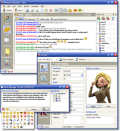
Real-time network communication utility for the office environment, including channels-based chat, shared whiteboard, message board and instant messaging. It is intended to be used in small office or home office (SOHO) local networks, does not require a dedicated server and may be used instead of WinPopup. Easy to install and use, Network Assistant features file transfers, remote services (processes control, screenshots, activity tracking) and more.
Key Features:
- Serverless technology;
- Channels-based chat;
- Instant messaging;
- Shared whiteboard;
- Graphical emoticons;
- Message board;
- User details;
- File transfers;
- Remote processes control;
- Remote screenshots;
- Remote clipboard viewing;
- Computer usage statistics tracking;
- Remote alerts;
- Multilingual user interface
System Requirements:
Windows Vista/XP/2000/ME/98/NT4/95; Protocols supported: UDP, TCP
Publisher:
Gracebyte SoftwareHomepage:
http://www.gracebyte.com/nassi/index.htmlFile Size:
3.28 MB
Price:
$25
Featured titles by Gracebyte Software
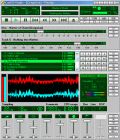
A full-featured AudioCD player with a stylish digital graphical interface. Offers all the things you would expect from a CD player plus many extra features: full CDDB support, direct/fast track access to CD features, an advanced sound visualization system, an integrated audio mixer, a powerful disc database manager, 4 view modes, 6 playback modes and more.
GIVEAWAY download basket




Comments on Network Assistant 4.5
Please add a comment explaining the reason behind your vote.

iPhone app giveaways »





Android app giveaways »





This was amazing! Thank you!
Save | Cancel
Hello,
This is a message from Gracebyte Software:
Unfortunately, this first offer from Giveawayoftheday.com contained only 1-user free registration. But this was really FREE for one user.
Now we have applied to giveawayoftheday.com for re-offer with extended conditions (2 users license). I hope giveawayoftheday.com will accept it and GAOTD's site visitors will be satisfied.
WBR,
Gracebyte Software team
Save | Cancel
This is day two and Network Assistant is still working great on all four computers. We could always share files and plotter/printers on our network. We just couldn't send messages between Windows versions without emailing. Now we can. And licenses on all four computers works fine. Too bad so many of you haven't set up your networks correctly. (Just read all these dumb messages above.) Criticizing what is offered for free? Someone is entirely too spoiled and needs to grow up.
Save | Cancel
Excellent product. We have four computers in our home and operate two home-based businesses. Two of the computers have Vista and two have XP. We've never been able to send messages between the two versions. Until now. Network Assistant works great on all Windows versions.
Save | Cancel
It looks like I never had a chance to download this product as I didn't received ti until today, Saturday, June 13th. Looking at the message's source, it didn't arrive until Saturday, June 13th. LOL! Oh well, it looks like it got mixed reviews.
Save | Cancel
We downloaded the software separately onto 4 computers in our home network (XP pro x64 and XP Pro)and used the separate license codes that came up on the screen on each computer. It installed well and was very easy to configure and use.
Unfortunately, when we turned our computers on this morning and tried the program again, all we got was license violation messages and a return to it being a trial copy on each computer. Oh well. It would have been nice.
Save | Cancel
Oh. I was confused of the term astroturfing. So I looked up the definition e-squared suggested. www.wikipedia.com/astroturfing.
I also looked up a couple more. It's not really dangerous. Just misleading the public is all.
Heres a definition
http://www.answers.com/topic/astroturfing
Or google wikipedia astroturfing. Will give other sites
Save | Cancel
May I add, this program was editors pick of ZDnet in [b]1999![/b] it was 10 years in devloping.
Or then again, it might be 10 years old.
Save | Cancel
Oops www.welloiledpc.com not welloiled.com Sorry
Save | Cancel
Welloiled. Why is your site listed as auto-turfing? a-squared anti malware warned me about entering your site www.welloiled.com
Save | Cancel
Very disappointing because I have registered it and it keeps telling me that this is a 30 day trial and unregistered. Very disappointed as my husband downloaded it also and we need to talk between the two computer sometimes and this was going to be a great way to be able to do this. If you are going to give something away, it should work as promised. Empty promises is going to make it impossible for the citizens of the cyberworld to trust you, so get this straightened out immediately.
Save | Cancel
The program does 'work' I can see others on my network but after getting the violation notice all computers have the UNregistered version, cannot get it to do anything meaningful after that. After registering and closing the program window, I noticed it was still running, closed completly. It allowed me to reregister, close completly, and as soon as it opens- violation, and UNregistered. Entered code in license manager, no change. Let's ask Gracebyte Software to re-offer a real try-out of their software, or $25 consultant fee taking 1 hour out of our lives in return of this feedback. Are they really interested in customer service or do they want to keep that black eye for life.
Save | Cancel
Personally speaking, GAOTD do a fine job because it gives us all an opportunity to evaluate software. The fact that it is free means that you are always going to get the moaners coming out of the woodwork. Perhaps there should be a nominal charge as this should make moaners vanish into thin air.
Constructive critism is welcomed but unfortunately I see some get too personal in the way they are attacking GAOTD. I say to GAOTD - this site is greatly appreciated!!
Save | Cancel
It works well on my home PCs. I use it to tell (remind) the kids to get on with their homework - and I'm not even in their room.
Save | Cancel
downloaded and installed ok on my first 2 pcs, got an error that the liscences were invalid on the 2 machines I had set it up on when I installed on the 3rd pc, they all still work (to a point)
the "view processes,view screenshot,view clipboard and view nassi" details are all greyed out on all of them and no help from the help file, it's basically a home network chatbox as it is. if the other functions worked and I could remotely control my other pc's with it it would be a keeper.
Save | Cancel
I too have had the same problem of not being able to successfully register a second computer on my home network. Even if you use "License Manager" in Administrator mode and enter the code for one or more additional computers, the program will never allow more than one registered copy to be active at any given time. All others revert to unregistered copies. Obviously, this reduces this software to nothing more than a 30 day trial and guarantees its removal when the trial period is over - never to be installed again. After all, the name of the site is "Giveaway of the Day," not "Trial Software of the Day." If I want trials or shareware, there are alot of other places to find that.
That said, while there are some things I like about this program, I still have mixed feelings about it. I like its ability to send files. Usually my wife and I either send files via external email or, if the file is too big, hand carry it to the other computer via flash drive. Unfortunately, this program (Nassi) requires the recipient to "accept" the file, making the sender wait for that event to occur. I also like the chat feature. If I didn't have unlimited text messaging, that might be a more valuable feature for me. A couple of my kids have their own computers as well and I can see where the message board would come in handy from time to time. (assuming I could get them to check it!) Unfortunately, money's tight, and at $23US per license (4-9 licenses), I don't see this being cost effective for home network use.
Save | Cancel
All you have to do is download a copy and register it on each computer you have networked. Then it works fine, and doesn't give you any violation message. Program then works as advertised.
Save | Cancel
I Emailed the developer over the registration problem because I noticed when I used the registered version on one of my computers it un-registered the rest of them. From the posts mentioning the message about the registration conflicts I assumed that all you got was the message, then all would be hunky dory with respect to using the program between all of my computers
I received a reply shortly after saying that you could still use the program in an unregistered state then put (30 days) after the sentence. whether or not this means you can use it for 30 days then it will cease to work between computers I'm not sure.
However, he went on to offer me licences for all my computers for the one time sum of $25 (one licence normally costs $25, so this seems quite a generous offer as he's offering me three licences on top of the one he gave away to everyone)
I've recently purchased a similar program (that someone mentioned in the forums called Simudude, (that also costs $25, though I got it for half price during a weekend deal) though it doesn't have the messaging service, so I'm not sure whether to take up the offer, because most of my computers are all in one room anyway so why I would require an I.M. is ludicrous.
Save | Cancel
#50-sorry, forgot you also tried it on 3, & say it worked fine. Thanks! So, what way of registering the key on all those 3? You downloaded & installed/activated from all 3 separately, right? DID IT CONTINUE to work fine? Thanks again.
Save | Cancel
This is obviously needing some input from the makers! Too bad they aren't having someone check here today!
It seems to me, from reading every post above, that only 1 person tried downloading this from each seperate pc in network, & then tried it out. That person found that it didn't work with all 4 PCs they tried it on, so isn't gonna work for them.That seems to be the only 1 who tried doing it the right way & gave us a report.
I can understand a couple peeps trying it the wrong way & posting, but for so many???
TRY DOWNLOADING from each PC you want to try it on, give it a try, & let us know, ok?
I can't try it yet til my daughter gets home to put it on her PC, so we can try it.
Save | Cancel
Absolutely Terrible Program. Worthless And Boringggg, Yawnnnn... @lfr@n You Need To Step It Up. 10 Thumbs Down
Save | Cancel
Sorry, but at least for me, the license pop up keeps coming up randomly. That makes this nagware, not free. And it's become quite annoying.
Save | Cancel
Some people must be sooo lazyyy...i don't get it?
Every single computer get's a license,like allways..
Just look at comments 9,12,13,14
Test it,before you burn it down. :mrgreen:
Just a bit of perseverance and all the violations will magicly disappear.
Anyway,thanks GOTD,for a nice and interesting programm.
Save | Cancel
#49
I entirely agree with you. But you are dealing with the internet, where everyone can hide under a false identity and let their unwanted opinions fly. Unfortunately it is not only on this site.
I do also agree that GAOTD has been offering too many of the same types of software, or some like today's. But unlike others, I do not comment, I just quietly move on and check back tomorrow!!
Save | Cancel
Two computers can be used by using #65's suggestion. Register the First computer and install on the 2nd computer but leave it in evaluation mode. Go to administrator mode on the first computer click on help then license manager. Refresh if necessary to see the second computer then highlight it and click on manage. Enter the registration code and click on register.
Save | Cancel
Tried this and got the License violation message myself, I was only curious about this app after reading all the comments and wanted to see for myself if I too would get the same message. For me, an app like this would not suite any of my needs because why would I want to chat or send IM to the people here in my home for when they are either in the same room as me or in the next room. Most of the features in this program is not a desirable feature for home users. Now the remote part and file sharing might be handy, BUT...and I do say But,,, that if all you want to do is something like Remote Admin stuff and share/install files from one pc to another, I highly suggest using TeamViewer which is FREE for personal use at home and does a wonderful job.
http://www.teamviewer.com/
Since I've used TeamViewer, I'll not go to another soft to replace it. Also TeamViewer allows for you to remote any other pc in the world, no limitations, both parties would need it installed on their pc...another BUT.... there is also a portable version too which is limitless. As far as todays giveaway, I will have to uninstall and pass up on it. In my opinion, TeamViewr outbeats all. Thanks GOATD and Gracebyte for the offer but today, this is not for me. I am also not going to vote because I dont see what a vote would really do for a program. Is best not to vote then to vote on something one is unsure of. Have a good day Folks
Save | Cancel
Go here and you can see a pic of two of my networked computers running this and a pop up window of the message I just sent to the laptop.
http://i45.photobucket.com/albums/f55/bubba423/IMG_1073.jpg
This pic will only be avialble or 72 hours..
It works for me. On 4 networked computers where I downloaded and installed it from each computer
Save | Cancel
how the hell are we supposed to use this in a home office?
it only for 1 computer!!!!
you could have least put a few more licences because i thought it would be free for more than one pc but
'''licence voilation'''!!!
next time have the decency to let people have at least 4 licences....
or more!!! this is just stupid!!!!!!!!!!!
Save | Cancel
Browsed the included help file and found this "Network Assistant has the great feature of remote registration/unregistration. This feature (License Manager) is especially useful for administrators of big networks. Using this feature a network administrator can quickly manage Network Assistant licenses within network. For example, it is possible to register all Nassi-enabled network computers with single registration code from one computer with several mouse clicks in several seconds." Tried it by registering on my main PC then leaving it unregistered on a laptop then used the license manager on the registered one to setup and register the other. Worked! Cheers GAOTD and Gracebyte ;)
Save | Cancel
Shoot me for this if you will but would I be correct in saying that if it were doenloaded to a laptop from another address (Brother for example) and installed there then brought back to connect up to form part of your network then the problem goes away, surely.
Save | Cancel
Completely agree with opinons of #45 and #46. Most of these comments have become just whining and weeping even without as much as downloading the software. And they expect high-quality software all the time. What you put in is what you get. Remember the popularity of this site is judged by the number of downloads. It doesn't matter how much you whine or beg.
So its no use to comment about something you don't even have a clue about. Its like reviewing a movie without even watching the trailer!
Save | Cancel
I have a four-computer home network. Two computers are running Windows 7 (one is 32-bit, one is 64-bit), one computer running Windows XP Pro 32-bit, and one running Windows Vista Home Premium 32-bit. The program installed on the Windows 7 32-bit but it could not access the network and there were a ton of errors in the program's error log. Scratch one computer. Installed fine and was able to access the network on the Windows 7 64-bit system. No error in the program's error log. Installed fine on the Windows Vista PC but when it connected to the network, it saw the Acer and killed the program on both computers saying there was a license violation. Uninstalled program from all computers and threw it in the trash bin. Not worth a lot of effort in my opinion. Much easier to just fire up Windows Messenger if I want to chat with my wife on the other side of the house (big house). NOT A KEEPER!!
Save | Cancel
Wouldn't let me use it on two computers in the same network, kept popping up with a 'license violation detected' and not letting me use the GOATD license on both computers.
Save | Cancel
You can try, among others, borg chat, google around for it. It doesn't have all the fancy stuff but it's a cool (and kinda' old) program.
Save | Cancel
This is geared toward peer-to-peer "serverless" networks. Duh. OK... if you have that kind of SOHO set-up I can definitely see where these tools would be of use to you.. you can send an IM to your teenage daughter who is in the other room telling her it's time for beddy... etc.
You can easily just download this and install on multiple machines with the current GAOTD licensing, I totall don't understand what everyone is whining about needing more licenses blah blah blah .. JUST DOWNLOAD AND INSTALL ON EACH MACHINE ON YOUR HOME NETWORK - that's all you have to do mates.
-Ricardo (AKA Plum Rabbit)
Save | Cancel
On the GOTD license: no point in posting about this being commercial software. GOTD uses a "one size fits all" license that makes primarily commercial software, basically, an unrestricted demo instead of a giveaway. But, you can still use this software in home networks and in a non-profit environment. No sense posting complaining about this, since they're unlikely to either change the license or turn down money from too many developers who offer them commercial software. Knock yourself out, if you want, but it probably won't help.
There's nothing in the GOTD license which specifies it's for users. The license is, basically, by computer. So you can download as many unique copies with different keys to different machines as you want.
Save | Cancel
#1 - Very good to see the folks from WellOiledPC posting here - AT LAST we have a qualified experte analyst in the house. Their website looks like 1996...;-) but the information there is great. WELCOME!
#2 - This product would have been great.... 7-8 yrs ago. Today,it's headed toward being a blooming buggy whip. We manage IT for companies 1-100 users in the UK. Practically everyone we work with is moving away from "small office networks" in favor of various flavours of cloud computing. Not having to maintain an office server is a big relief for small businesses everywhere and to be honest, we have as much or more work as ever because we're hosting the "cloud". We have clients now with 20-30 employees doing _everything_ online, even their company financial accounting. So... products that add-in to a conventional Windows office network are going to see smaller and smaller userbase as time goes on.... and products that can aggregate and tame the various existing online services will see a continuing rise in userbase. I can see why this outfit would want to be on GAOTD to try and prop up awareness for their product but unfortunately, it's one for the antique shoppe soon.
Ricardo aka "Black Rabbit"
Save | Cancel
Correction to my eariler comment (22), you do need multiple licenses to run on multiple pc's the software offered is for 1 copy of licensed software.This is ok running on 1 pc so you will then need to download a second copy onto a second pc but you will only be able to run in evaluation mode for 30 days.
So as far as i can see if you like the software after 30 days you will need to buy multiple licences.
It does what it says on the Tin.
Save | Cancel
I've been using something like these on my network. It's called Network Chat and WinVNC. This should be better though. Can't wait to try it out.
Save | Cancel
On the website of the makers:
Important Notes
Network Assistant is licensed on per computer basis, not per network, per site or per company (except unlimited site license).
The minimal quantity of ordered units is 2. If you want to buy only one unit (in addition to earlier ordered units), please, contact as at sales@gracebyte.com .
If you buy N users license (N units) you can use it on not more than N computers within your network (unless you have unlimited site license). Therefore, you may want to buy an additional M users license (M units) when your network will grow, for example.
Conclusion: One Free GAOTD license is useless, you need to buy at least one more license for the second PC.
Silly offer today...
Save | Cancel
And still one-third of people vote it up
GAOTD, do yourselves a favour. Drop this pointless charade of voting, this package, which can't actually be used, just shows up how shallow and unreliable te whole voting thing is.
Save | Cancel
THIS WILL INSTALL ON ANY COMPUTER AND RUN!
You guys need to get a grip. If you do not have a home network just shut up and try again tomorrow. I have 6 networked computers in my home and so far I have installed it on 3 of them and it WORKS FINE and has a nice interface. I downloaded it from each of the computers, installed it, it runs fine, shares files easy, the chat client works fine, a nice program.
For you guys complaining about this site is for personal use software not commercial use software... SHUT UP! I got a news flash for you, if you have a computer at home, you have a home office. Duh.... If you do not have a home netwrok... SHUT UP! Some of us DO!
Come back tomorrow and there will be something else for you to bitch about.
You guys BITCH WAY TOO MUCH in here. You gripe about things you have no clue about.
Thank yu GAOTD team, this software does as advertised and runs fine for those that have a use for it.
Save | Cancel
I would like to draw attention to comment #21...
QUOTE:
What a joke, GAOTD has been slowly going down gurgler with the same old software being put up, problems with activating software, GGAOTD DEAD with a poor excuse as to why there’s no games and now something that is utterly useless. Does anyone check the software before putting it on the website? Maybe it’s brain fade, the recession kicking in… swine flu perhaps???
END-QUOTE
I've mentioned it before, and so have others, ...with all the nit-picking juvenile complaints on this site, and with members not following the intended protocol of the site, less and less companies will want to put their products on here. What has been predicted is now coming true, and everyone is complaining, even though they were forewarned.
Maybe, just maybe, now some of you whiners will consider using this site correctly. BUT...I bet I just wasted a few minutes of my time mentioning this, for I doubt the whining will ever cease. Sooner or later, the offers will be worthless, and people will stop visiting, and the site will shut down. What a shame.
If I were a software company, no way would I put my offer on this site, just to watch some of you tear into it just because it isn't something you have a use for. Start using the site as intended, and maybe some good offers will start showing up.
Save | Cancel
This is an excerpt from GraceByte website
Network Assistant is licensed on per computer basis, not per network, per site or per company (except unlimited site license).
The minimal quantity of ordered units is 2. If you want to buy only one unit (in addition to earlier ordered units), please, contact as at .
If you buy N users license (N units) you can use it on not more than N computers within your network (unless you have unlimited site license). Therefore, you may want to buy an additional M users license (M units) when your network will grow, for example.
The cost of $25 covers just 1 unit which is free today, so in order to use it on more than 1 PC in your SOHO be prepared to shelve out $25 or more for additional licences, or bite the bullet and get unlimited licences for only $1599
Save | Cancel
#24, I agree completely. I am habituated to do START -> Run -> CONF as I am yet to figure out where MS hid the NetMeeting shortcut :-)
Save | Cancel
A free alternative for a LAN-only messenger/presence program is Tonic from http://www.r2.com.au/ (among others)
Save | Cancel
I agree. If I have to purchase a second (or third or fourth) key to make this software work, then it is not free. Yes I can run it on one machine, but it doesn't do anything unless there is another instance running on my network, and right now we can only do that in demo mode.
Right now it is demoware, not giveaway. We can use it in demo mode for 30 days. It's not bad to be demoware, just don't claim you are making the software available for free.
The GiveawayOfTheDay folks need to pull this software right now, or else include a few more licenses that work. Anything else is false advertising.
Save | Cancel
From the company website: "The minimal quantity of ordered units is 2." So why give away one???? One doesn't constitute a chat.
Save | Cancel
Ok this software looks user friendly and nice. I recommend downloading it even if you only have a small home network. This software should be given a 70% thumbs up rating at least!
Save | Cancel
Well, it looked very interesting.
I'm looking for something like this for my company to get those buggers off from all these messengers. I wouldn't mind to get a 2-3 user key for evaluation and if it works as promised to buy another 10 or so licenses. How on earth do you want us to test with a 1 user license? I'm not that degenerated yet that I would talk to myself :)
Save | Cancel