English
Every day we offer FREE licensed software you’d have to buy otherwise.
$39.95
EXPIRED
Giveaway of the day — My Audio Studio
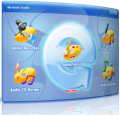
My Audio Studio - a set of audio recording, converting, editing, extracting, audio CD burning and ripping applications to create your masterpiece.
$39.95
EXPIRED
User rating:
529
90 comments
My Audio Studio was available as a giveaway on July 23, 2009!
Today Giveaway of the Day

Specialized TikTok Video Downloader.
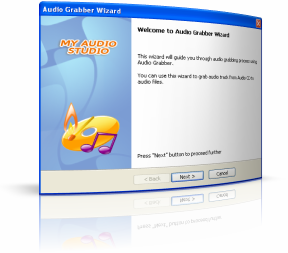
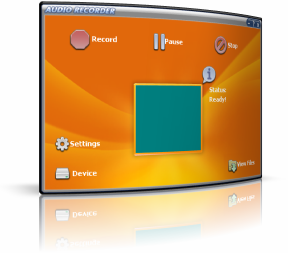
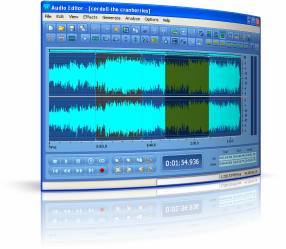
Designed for audio industries, My Audio Studio is a digital audio facility dedicated to offering services of top quality and most cost-effective solutions to customers to suit the continuously evolving production needs. Whether it's sound recording, audio conversion, video to audio extraction or CD burning, our purpose is to get you to the finish line on time, on target and on budget!
Features:
- Record audio from microphone, CD, video, and any audio you can hear from your PC.
- Convert audio files as you want, whether you need MP3 in pocket player or WMA for Web delivery.
- Visual editing and applying of effects help you with your master piece production.
- Video to audio extraction get all sound out from video of tons of formats.
- Ripping function brings every track in CDs to your professional productions.
- Use the burner to create your own audio CDs.
System Requirements:
Windows 2000/XP/2003; Intel or AMD or compatible processors at 1000 MHz minimum; RAM 128 MB; 50 MB of free hard disk space; Sound card; CD-RW drive; Administrative permissions are required for installation
Publisher:
MyAudioStudio SoftwareHomepage:
http://myaudiostudio.com/index.htmlFile Size:
14.7 MB
Price:
$39.95
Comments on My Audio Studio
Thank you for voting!
Please add a comment explaining the reason behind your vote.
Please add a comment explaining the reason behind your vote.

iPhone app giveaways »

$2.99 ➞ free today

$0.99 ➞ free today

$0.99 ➞ free today

$0.99 ➞ free today

$0.99 ➞ free today
Android app giveaways »

Collect recipes from around the world and create the ultimate food truck!
$0.99 ➞ free today

$2.49 ➞ free today

A strategic combat game about a forgemaster who accidentally awakened a dragon.
$0.99 ➞ free today

$0.99 ➞ free today

$0.99 ➞ free today
If all you want is to convert audio types, then my first suggestion is to go to:www.softdir.net,I get my software converter form softdie.net,nd they all do great work.
Save | Cancel
Does anyone know if you can record music files which are too large for a CD to a DVD instead? If so, are there any restrictions?
Thnx,
Dan
Save | Cancel
I have Vista 32-bit sp1 and I cannot fully install this program. I, also, have 2 dll's which will not register. I have tried the suggestions offered here and from a Google search without success. I really wanted the extract-from-video ability. Oh well....
Save | Cancel
Thank you! I'm getting into the Musical Production business, and this is really going to make things easy to start off with!
Save | Cancel
Hi,
Does anyone know whether this allows multiple files to be merged into one track?
Save | Cancel
Installed works fine here. #18 I dont know what Your fuss is about, and also learn to spell ex: "a wait of time?"... I suggest You F8 into safe mode, uninstall everything you dont really need, use a recommended optimizer like Registry Winner, use it installed on separate hard drive, then use it to backup registry, use it to optimize your system for "HOME USE" or whatever suites you, then clean the registry with it, and backup registry and favorites with it again. I say all this because obviously Your system needs maintenance due to installer errors and quite possibly many other types of errors, following my advice will have Your system in top shape, and remember security is of utmost importance also. So make sure You have it.
Enjoy Your PC Time.
StanDP.
Save | Cancel
Seems like a OK program. Installed OK on Vista 64. But there one problem: I tried to convert several different WMA files to different formats and keep getting a error message; Format not supported. Tried this on both a Vista and a XP machine. Anyone else got this problem?
Save | Cancel
4 the developer: the 'help' could b better; in fact, seems incomplete. I tried to access the same type of information for 'Audio Extractor' and 'Audio Grabber' as you give for 'Audio Editor' and 'Audio Recorder' but just found it in a listing at the introduction page, nothing more. Please complete your help feature.
I've only used 'My Audio Studio' 4 a little while and haven't tried everthing yet, but other than the incomplete 'help' feature, I do like the way it works.
Save | Cancel
I'm sad to say!, that since I wrote above (#54) I've had numerous troubles since intalling this software. I've decided that I must do a complete wipe of my C: drive and re install the whole bloody lot!
I've tried reg cleaners and all sorts but I cannot get my 'usual' wav editor to function properly again. The installation of this program knobbled the thing totally and I'm more than a bit pissed off. I suppose it was just too good to be true.
Sorry folks, I really wanted to be a fan of this one. It was SO promising.
NOW!, where's my XP install disk?!
Norman.
Save | Cancel
This is an awesome little audio pkg. It installs beautifully on Windows Vista Home Premium using the name and password in the readme file. It is very easy to use and has so many features. Thanks GAOTD, this is a winner!
Save | Cancel
This is a nice and simple suite of apps good for quick work so I figured I'd grab it.
I don't see it mentioned above but I'm having a problem with the display of the app when I bring it up. I can see about 3/4 of the screen and the right hand and lower sections are chopped. I can just see a slim bit of the appps. I can run them and they are sized normally so I can live with it but it's odd.
D
Save | Cancel
When I read the various posts, it gives me an impression that many are posting without reading the comments at all, which seem odd since finally they post comments in the same place too, which is obviously hoping for others to read their comments.
Post #27 by PESfan and post #30 by Fubar, both mentioned very clearly that this software is the same software but offered by different sites. I thought this should have set off an alarm to GAOTD and users at large not to patronize websites which potentially would be infringing on copyrights of the original software vendor.
If it was in fact the same vendor using different websites to promote its same software, then we must ask ourselves why it is doing that. Isn't this odd that most of those who commeted here just don't give a hoot about this?
Save | Cancel
Another big problem is that this soft and other softs in context of globalization ,uniformity language only in english.First:in this world are many others languages.To learn another languages it is stress not only for me.Soo please make efforts to translate to relax my brain.Don't believe that english is the best languages from world.Now peoples from each countries try to translate software or to make soft in their languages soo if you think that english is enought for this world you are in wrong judgment.
Save | Cancel
Like so many of these audio recorders that have proceeded this one, it, too, doesn't record streaming audio from the Internet. The only one that I've seen GOTD make available is called simply, Audio Recorder, and I haven't seen it in a very long time. Can't even find it with a Google search, which finds a lot of others. So, it's thumbs down for me on this. I guess if it were the only one presented in a long while, it might be worth looking at, but with Audacity available as a full featured and free audio mixer/recorder with sound sources from your sound card, this one is a pass for me. Installed and removed today.
Save | Cancel
Damn it !!
#34 and #43 Fubar and Funkster, I'm so happy to have you back !!!! Its been over a year since you disappeared and your input on the S/W offered here is crucial! Promise that you'll stay and review the future offers for us! Every day ! And send back Ashraf please ! Each one of you is taking the reviews on different levels and that's good: you cover a much wider audience.
#65 Hey Doc, try to restart your computer and reinstall My Audio Studio from the very beginning. It may do the trick. Something is conflicting with the new S/W so let Windows put everything back where it belongs and start from scratch. It's a bit the same like when you forget a scissors in your patient's stomach.
Save | Cancel
Thanks gaotd...
Installed on Vista 64 HomePremium, without any problem and extracted audio from video, very simple and useful.
Save | Cancel
Worked like a charm extracting audio from FLV files.
Issues installing under Vista 32bit but just ignored all of the dll files that were crashing the Microsoft Server registration and ran without issue.
Save | Cancel
I don't have succes to merge files so i will use:Free Audio editor with my trick or Gold Wave Editor Pro from GAOTD.
Save | Cancel
I could not install this software on Vista Home Basic: Always prompted with a registry error message nearly at the end of the installation & after an icon is built on the desktop. When I close that error message it would pop out again & again till I would click on quit & the installation would then roll back & nothing is installed. At the end, I followed MichaelMooreFan's instructions on comment 26 above & I could finally install the program. That method of task manager works. thank you very muck MichaelMooreFan! ;)
Prioritaire
Save | Cancel
#7 George.
Do you have any games with/on/for game giveawayoftheday?
Other posters: I admit not helpful right now, but you never know, in the long run it may just pay off. Million to one chances always pay off.
Afterall, have you ever heard of a million to one chance that didn't come in?
Save | Cancel
A great program. I have extracted sound from several video clips to generate 100% successful, quality audio. My_audio_studio software is easy to use and fast to convert. I recommend this software.
Save | Cancel
@19
Like others, I want to note the importance of posts stating free alternatives. That's one of the reasons why I visit the site. I would gladly take a free alternative with slightly fewer features rather than a one time offer that offers a bit more. In fact, half the software I install from visiting this site are the free alternatives that get mentioned. Needless to say, I am thankful for the one-day offers as well.
Save | Cancel
REf. my comment #57. I installed this on my desktop computer which has Windows XP and everything was fine. Can anyone tell me about the error message (that I described in my previous comment) toward the end of installation when the program is going through the registration process?
Save | Cancel
Great software! Installs fine, works flawlessly, looks nice. What more can one ask for? Thanks, GAOTD and MyAudioStudio Software!
Save | Cancel
for #65.Problems is only at your configuration or device, not in this soft.
Save | Cancel
If you look up,you don't see that is for Vista.
Save | Cancel
Not installing on Vista 64 - got an error message about failed registration. Repeated tries are useless.
Really would like to try this - any suggestions?
Dan Morton
Save | Cancel
This is a great program for what I needed today! It records streaming audio and converts to mp3, then played in my Itunes! Great sound quality and very very user friendly! Installed easily on my Vista64.
Save | Cancel
CAN SOMEONE PLS HELP!
I installed the prog w/o any problem, but when the prog opens, I see what looks like 5 menu items (icons) within a small rectangle. Two of them are Audio Recorder, Audio Editor, but others are outside the rectangle and their names cannot read. I couldn't 'maximize' the rectangle. There doesn't seem to be anyway to do it (dragging the perimeter lines etc.)
Can someone pls help?
Thank you
drvajra
Save | Cancel
Didn’t install on Vista . got an error message on registration.
Save | Cancel
Here's another vote of thanks to the folks that point out freeware similar to GiveawayOfTheDay's offerings. PLEEEZE keep doing it. It's that variety of choices that keeps me coming back to look here each day.
Save | Cancel
Installed on Win 7 RC and runs fine. Ripped some sound and music from a couple vob files. They sound fine to me. To me it works as advertised.
The good thing about FREE alternatives are:
1. They are free, today, next week, next year, ect. ect.
2. Should you re-format your computer like some of us do from time to time, because for me it is simply easier than to try to get rid of a lot of stuff. I keep an ISO image of my computer that way I like it and it only takes a few minutes to get back to that state. When that happens, you cannot use the GAOTD any more even if you liked it.
3. Free alternatives anre ALWAYS free and can be re installed at any time.
3. I for one get tired of paying money for software that after you get it installed, is CRAP! 30 years ago, there was no such thing as downloading a demo. You bought the box off the shelf, when it was crap, and a LOT of it was, you were screwed. If a free alternative is crap, and a LOT of those are also, you have not lost anything.
I use Audacity and Sound Edit Pro (paid version).
Todays GAOTD is a thmbs up, but I will lose it when I go to Win 7 in October.
Keep the FREE ALTERNATIVES coming. I have got qa lot of them from here, namely Format Factory. A GREAT conversion program....
Save | Cancel
Free alternatives:Free audio editor,Free audio convertor(at the same url),Any audio convertor,Audacity,MP3 my Mp3,AoA Audio extractor,Cd Burner XP.A lot of programs.
Save | Cancel
CON:
Windows Media Audio 10 Professional
VBR Quality 98, 44 kHz, 2 channel 24 bit 1-pass VBR
This is the standard format that I use for recordings, if it is 2% lossey, I have never noticed the difference in waveform analysis with Adobe Audition or Cool Edit Pro 2
This program won't handle these formats. Seems to only recoginize WMA 9 codec or earlier.
PRO:Probably a good program for most un-initiated audiophiles.
OTHER:Thankfully, I had purchased Tunebite Plantinum for around $30.
It handles every audio format conceivable, and high quality video as well. It is promoted as a DRM remover, which works well, but it also does one hell of conversion of regular files. A lot faster than doing it in the 2 prgms I mentioned above.
PRO:Again, this program has it's merits to some.
Downloaded it and give it a try, it might just fit the bill for you.
Save | Cancel
I like it... it's a "clean" piece of work that does an extremely good job... lol, even extracts from Metraske, which is always a consideration with me. I run XP 64, on a 64 bit system... no problems there, either.
Hmm... do you think we could run classes for people on spelling? Seems like software writers have no clue. Lou.
Save | Cancel
I have Vista Home Basic and when I tried to install this program I got an error message stating Microsoft(C) Register Server has stopped. Unable to install
Save | Cancel
Product blurb says "Designed for audio industries....most cost-effective solutions to customers....on target and on budget."
Terms and Conditions says "3. Strictly personal usage."
Either way, this isn't bad software. I do use Audacity for most of my audio needs, but I'm willing to give this a try as well. Thank you GAOTD team.
Save | Cancel
To #27: It's the same company, just different URL!
Save | Cancel
I didn't expect to be, but, I'm very impressed. Not had time to really check everything or if their are annoying bugs but it's surprisingly good and friendly too.
The biggest delight of all is the editor. It's the best CoolEdit Pro2 substitute I've discovered yet. It seems to have all the really nice user-perfect mouse control interface that CE had. Excellent! (why do other software developers fail to understand what we need most?)
Well done folks!
(does this program now run indefinately on my computer?)
Norman.
Save | Cancel
On my Win 7 system, the experience was not so good. IMHO it's nothing special compared to Audacity and it failed to record streaming audio.
Save | Cancel
Installed great for me on Windows XP. Have NOT tried Vista, but I want to.
My only problem so far - and it could be operator error - the instructions don't seem to match the program. I can't get this to record from my sound card. The HELP file makes suggestions that just aren't in the program.
Has anyone here been able to record from their sound card? And if so, what did you do?
Thanks!
Rory
Save | Cancel
@19 Personally I appreciate someone pointing out free alternatives.
Save | Cancel
To improve functionality of Audio extractor module i think that it is util to exist posibility to drag and drop url adress for download and convert like in this free soft:
http://www.any-audio-converter.com/
if it want to be all in one.In audio editor i don't see function merge.I can merge only an mp3 file with a recording from microphone.I make a little selection where i want and start recording from microphone.But i don't have succes to merge 2 mp3 files.Probably i don't know to make this.
Save | Cancel
Installed on XP PRO 32 w/SP3 without problems.
Installation in Vista Bussiness 32 was impossible, same with administrative rights. I tried several times and several ways and in all I received the message "Register Server has stopped working".
Save | Cancel
XP SP3, Lots of Ram, AMD X3 processor.
It downloaded it and it installed just fine. I tried testing it by ripping an Eagles CD. It would not recognize the .CDA format, a standard CD format? I ripped it with Spyder Pro and Ashapoo Burning Studio Pro without a problem. So I don't understand why it won't do something as simple as ripping a CD. It will not stay on my PC. Thumbs Down!
Save | Cancel
Thanks for this great software, GAOTD !!
Save | Cancel
#34+ Fubar, Many thanks for your always helpful comments,
but particularly today for getting back to us on the Windows
Defender alert as a false positive. That's very helpful.
Audacity is a great program, but mine mysteriously stopped working
and seems to be utterly unfixable, so I relish any alternatives
here. And today's has plenty on the plus side.
Thanks GOTD and MAS.
Save | Cancel
#14, #27,
You are exactly right. It is also exactly the same as mp3 music editor and almost identical to Smart Audio Editor.
I'd suggest uninstalling the previous apps and keep this one as it combines all programs in one interface.given away here recently.
This is exactly what I mean about the affiliate programs and re-branding and repackaging of apps.
The audio recorder didn't work for me.
Save | Cancel
#32 Patty & #39 deanimator
Patty, My native tongue is not english
deanimator, do you want to be my English teacher, if not do not take the mike out of people who use this site and do not speak English as there 1st tougue,
Anyway I have recorded some great music of some video's, some live music which were never put down to tapes etc
Good work GAOTD
Save | Cancel
@Fubar, #34: You are right !! , I got the same thing on my second pc (last days of vista ultimate, will be moving to Win7 shortly), but I am not in the middle of scanning things. So I was able to sort it out just a few moments ago and it definitly is a false positive. No worries. I'm sure you'll find the same after you're done scanning ofcourse, but I thougt I'll be nice to let you know in advance. On XP (SP3) no sign of contamination either.
Save | Cancel