English
Every day we offer FREE licensed software you’d have to buy otherwise.

model2icon was available as a giveaway on September 13, 2009!
Today Giveaway of the Day

The best protection from Ransomware and data hijacking ever!
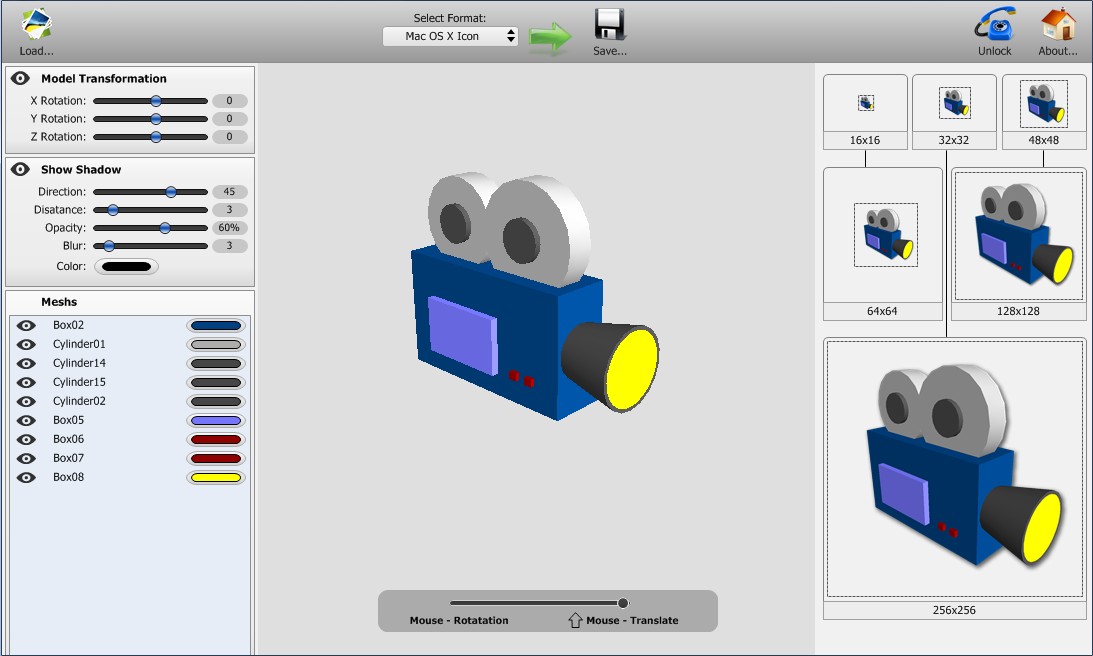
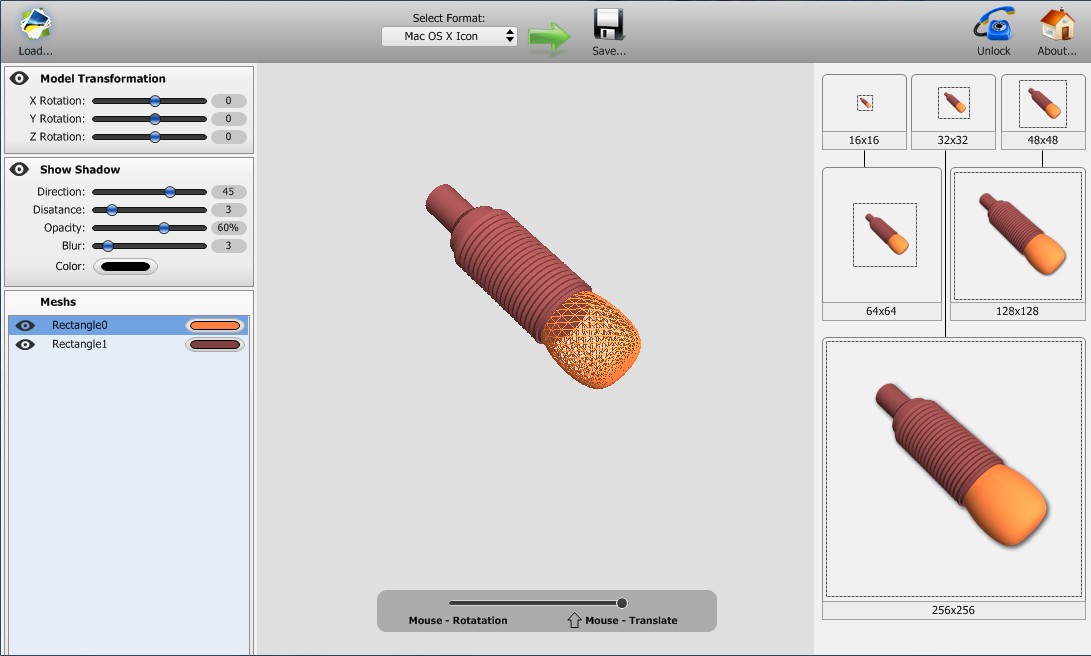
model2icon converts 3D models into Windows icons. You can find many models on the Internet and convert them to icons for use on your desktop, in applications and much more. With model2icon you can convert 3D model to Windows Icon with a single action.
It supports Windows Vista 256x256 icons with alpha channel. model2icon allows to customize 3D model before converting. Support 3DS, MD3 file format.
System Requirements:
Windows 2k/XP/Vista/7
Publisher:
BinerusHomepage:
http://www.binerus.com/model2icon/File Size:
2.11 MB
Price:
$29.95
GIVEAWAY download basket

Developed by CyberLink Corp.

Developed by PhotoInstrument

Create, manage, copy and edit custom images.

Developed by Mirillis Ltd.
Comments on model2icon
Thank you for voting!
Please add a comment explaining the reason behind your vote.
Please add a comment explaining the reason behind your vote.
iPhone app giveaways »

Island Escape Survival Games is an intense, open-world survival adventure where players are stranded on an island.
$0.99 ➞ free today

$1.99 ➞ free today

Most meal planners hand you an empty week and wish you luck. 7Mealz Meal Planner hands you a system.
$0.99 ➞ free today

$0.99 ➞ free today

Harness the incredible strength and abilities bestowed upon you by the military's experimentation.
$0.99 ➞ free today
Android app giveaways »

$19.99 ➞ free today

Step into the medieval kingdom of Maryland, ruled by King Henry, and prove your strength in Sword Fight!
$0.99 ➞ free today
A stunning action RPG filled with heroics, adventure, and a diverse assortment of creatures and fiends.
$0.99 ➞ free today

$0.99 ➞ free today

Simple clock widget is widget app for adding beautiful word clock on home screen.
$0.99 ➞ free today
I can only recommend my software Greenfish Icon Editor Pro 2.0 :) which is a complete freeware icon editing toolkit; after rendering 3d models to 32-bit PNG, you will be able to make ICO files from them using GFIE, for free.
Save | Cancel
"I’m certain everyone knows that you can take a .bmp or a .jpg and just change the extension to .ico.
Don’t they ?"
I'm certain that there are many people wondering why an icon won't resize, or why their desktop takes minutes to load...
Don't try this at home or anywhere, folks.
Save | Cancel
People are missing the fact that you can change the color of separate parts of the 3d object. Using print screen is OK if you don't want your icon in different colors.
Save | Cancel
Use a good 3D viewer (freeware) - set up your image - use screen shot (PrtSc key) - edit image if necessary - use a REAL icon program to create icons in many formats. Sorry... model2icon is a waste. Have any of the positive commentators even tried this yet?
Save | Cancel
Well, I don't know what's going on. It must be my machine, because this is the second time in a week that I haven't been able to get the giveaway to even start on two OS's.
1) On Win-XP Home all that I get is the top title bar of the program. My normal Desktop is below that on the screen.
2) On win-2K Pro It doesn't even do that, but at least I get a notice box that says: "model2icon.exe has generated errors and will be shut down by Windows. You must re-start the program. An error log has been created."
I can't find the error log. (I always have hidden files showing so it's not hidden, although I don't know why it would be). Any ideas??
Save | Cancel
Sorry for number 3 is not for you my comment,is for number4 that was 3 before,is for Happy.
Save | Cancel
In Icon Fx and Greenfish Icon Editor Pro 2.0 you can have trust because are on my computer and is very good scaned ,i don't find anything wrong at this and are good like free alternatives.
Save | Cancel
Very nice! Installed the proggy and took the default "myicon.ico" image and opened it in Startdock's Icon Developer for a closer look.
This is going to be a big hit in the 3D community.
If you find no use for this app I urge you to head over to Daz3D and pick up a copy of DAZ|Studio. This is a free app that comes with a basic free 3D package to give you more options for your icons. If nothing else,it'll give ya something to do on a lazy Sunday afternoon at the very least ;)
http://www.daz3d.com/i/software/daz_studio3?_m=d (Sorry I don't have time for fancy clickable links.)
I thank you GAOTD and Binerus for a great app, and play toy, lol.
Save | Cancel
I give this four thumbs down, well two thumbs and two toes. The emperor has spoken. This thumbs down/thing up is only supposed to be used with gladiators I thot. It's just a big cliché now.
Save | Cancel
I'm certain everyone knows that you can take a .bmp or a .jpg and just change the extension to .ico.
Don't they ?
Absolutely useless program.
Save | Cancel
What's the point? You can just take a screen-shot and make an icon yourself... There's no purpose to purchase software that's so limited.
Save | Cancel
Installed and works fine on XP home PC. Super easy to use but that's because there are only a few choices on the interface. I like that you can select parts of your 3D object and color them separately.
I would have liked the ability move parts in x,y and z. I only saw rotate and zoom.
The 256x256 is a limitation but it is for icons and most icons are small.
I also would like to be able to change the intensity of the lighting.
Overall, it's a fun and easy solution for people who don't have Poser or DazStudio posing software or other 3D aps like Cinema or Hexagon. Most of these programs will render and export a png. With Model2Icon you can make icons quickly and with little effort.
Save | Cancel
Controls are sliders as said above; hard to return back to absolute zero unless typing in was possible, which it is not.
If you need it fine. Produces images from 3DS and MD3 Models only.
This is basically a waste of space. Nothing special here folks.
Save | Cancel
I'm going to try this. Figure I can take the icon into XaraXtreme and vectorize it and make it any size or file size I want. Looks fun.
Save | Cancel
Program appeared to install and activate but no menus, no anything, Just a cube in the middle of the window. that's all. Unless something happens very soon It's delete ware
Save | Cancel
I suppose this is handy though if you are using high end 3d products, POV, Bryce, etc. it's probably not going to be difficult thing for you to make icons from them. It will certainly be fun to play with so I'm sold.
Save | Cancel
The program is unusefull! Better Photoshop...
Save | Cancel
For others:what i write it make referance at a free alternative not at
model2icon.
Save | Cancel
This program seems redundant.
You could just open the model and take a screenshot, and edit that in an image editor...
Save | Cancel
For 3.You are infected with adware Releckvant someoane in temporary file.Is not enough to cancel instalation,your adware is on computer.Use Iobit and before this<stop System restore,make scaniig entire computer,remove selected adware with Iobit and next start System restore and everything will be ok.This is why i say that always after a new instalation of soft free or comercial it must to scan entire computer.
Save | Cancel
When will I see something useful, well-coded again on GAOTD? Is this something like an all-year summer gap of sorts?
Now I'm looking for a RSS feed for 'useful software' - there must be something out there. I understand the thought behind this site... but I doubt that throwing free crap to the masses is a way to get them as customers for the paid progs.
GAOTD is becoming a turn-off to me and I'll now unsubscribe.
Save | Cancel
Clean install. Appears to use the mesh but not the textures of models. Click and drag outside image to rotate, use mouse-wheel or slider to zoom. Clicking parts of an image shows related mesh. Clicking outside restores solid image. You can change mesh colors, and enable/disable meshes and shadows with their buttons on the left.
Yo, #1, Ashraf, this is like what, the tenth time we've had icon-related stuff, and you still don't know and don't read the comments about icon files being able to contain multiple icons? You still don't know that's why the uncompressed size is so large? On Vista, you can click on an ICO file and the default viewer, Windows Photo Gallery, will show you all of the embedded icons, but only if they're all uncompressed, Microsoft never got around to updating the viewer for Vista. #3, Happy Person, we can see the features right from the screenshots on this page, as well as the product-page link which GOTD provides on every offering. As for checking whether it's registered, judging from the screenshots on this page, if there's no Unlock button, it's registered.
Typical Binerus bugs. Doesn't default to saving Windows icons on a Windows PC, some sliders don't update when you manipulate the image with the mouse, doesn't generate proper icon files, doesn't support Vista 256x256 icon compression. I recommend loading and saving the icon file with any icon editor which can be configured to support Vista icon compression, and which will output a proper icon file (IcoFX is free). Whether or not the fixed file shows up correctly depends upon whether Windows bothers to update its icon cache.
Since nobody reads updated comments and most people are clueless about the features which Windows has, see my Tabbles comment #123 if you're interested in what Windows can already do. I neglected to mention Windows also supports group operations, although for tags you may want to use software which supports specific file types, such as Windows Photo Gallery.
Save | Cancel
it is very good and it makes desktop look better
easy to use
consumes less memory
give away is the best
Vicky
Save | Cancel
Downloaded it fine, it has very little in the way of options and could not find my picture files, either in vista pictures or piccasa -very limited functioning. This is a basic version to get you to buy the paid version -that is obvious. Only one icon cube to -spin around if you have the time for it - I don't. It should have other icon types or forms in this version - note - its not enough to download.
Save | Cancel
yes it's very good, it allows for colour editing of subdivisions of your 3d model and works well on windows vista
Save | Cancel
Downloaded and installed on Windows XP 2003 64 bit. No Problem.
made a couple of icons from my 3Dmax meshes. (even a very large file)
looks great with my Bumptop.
Thanx Binerus and as always, Thanx GAOTD.
Save | Cancel
if you go to the site you can download a manual for it. i'm waiting to see how many like it b4 i get it.
Save | Cancel
This post is not mentioning current giveaway has a virus positive. Rather the free alternative mentioned by post #3 .
#3 IconMaker mentioned scan shows infected on my eset nod32.
some others do as well.
http://virusscan.jotti.org/en/scanresult/22947a7bc3a27052c1ff00320361cc6561260cc6
Save | Cancel
the 3d objects are just single colour shaded no uv info no materials or textures.which seems very drab.unless i have missed something
Save | Cancel
OH NO, it only creates icons/png images at 250x250 max! Why not 600x600 so I can turn the 100+icons on my desktop into my wallpaper.
Don’t look now but I think a 250x250 icon is normally 350 KB’s in size. I mean why would I want a 250x250 icon to be 1MB in size?
Of course you can control a PNG’s color because it’s an image with its own color to start with.
Golly Gee, I guess any program has a default setting, but normally with use the program remembers the last setting used.
YOU mean I might have to use a slider to change some settings? This might take up all of my day and wear out my mouse pad. And I just paid all of $.69 for it.
NO DOCUMENTATION? Now this is something one should never put up with. Even though this program is designed for those who know how to do 3D rendering (Most of us don’t), I’m sure with the World Wide Web out there one can easily search out some kind of help files (I only found about 50 different sites but I’m sure most 3D modeling works on the same principle).
If you’re into 3D modeling and want to create some nice icons, then give this program a try. Personnally I like mine just as they are, and I have no need for creating any for web pages either. I’m sure a lot of people out there do have the need. Thanks GOTD for offering something different.
Save | Cancel
Nice, unusual and doesn't take too much space
Suggestions to developper:
- check your spelling ("Rotatation" "Disatance"...)
- would be nice if the "Load.." function could start from the folder opened last.
- would be nice to be able to adjust rotation and shadow parameters not just with sliders but also by entering numbers directly
For those interested... also works under Windows 98SE
Humphrey
Save | Cancel
In response to #3, Freeware Option - Icon Maker:
"Icon Maker contains RelevantKnowledge", a PUP (potentially unwanted program) which specifically states:
"... This software allows millions of participants in an online market reseach community to voice their opinions by allowing their online browsing and purchasing behavior to be monitored, collected, aggregated, and once anonymized, used to generate market reports ..."
This warning pops up (at least they are honest about it) when you begin the install. I did not go further.
Save | Cancel
As there's no detailed help included, I'll add one further comment which may not be immediately obvious from the graphically symbolised help in the program - In order to translate (i.e. reposition) your 3D geometry before saving an icon file, simply hold down the SHIFT button whilst using the mouse.
Save | Cancel
With regards to possible confusion about only saving in 256×256 resolution....the icon format used here is identical to that used in the earlier Binerus offering of Icon Commander - where I then commented (in post 37) that there is more going on than meets the eye. A complete set of all six icon sizes is in fact contained in the one saved icon file.
For those who may remain confused....I'll add just a little more (hopefully helpful) comment here. If you open a Binerus generated icon file with IcoFX then simply delete (by right-clicking) any unwanted extraneous icon image sizes in IcoFX's side bar (CTR+ALT+S), all you need to do is simply re-save the file again (file menu), and you'll be left with just a solitary icon which will be whatever size you opted to keep present in IcoFX before re-saving.
Early days yet - but I've an interest in 3D, and I think I'm going to like this program a lot. Also good to see that Binerus are no longer plagued with the Win32.Induc.a (Delphi related) virus which (through no fault of their own) hampered earlier giveaways. Thumbs up from me today!
Save | Cancel
HELP GOTD
Please DONT submit the last post. I posted before proofing.
PLEASE post this one.
4.Download quick & Easy.
Really nice looking prog and VERY easy to use.
As #2 said its a fun prog but does have a few good uses as well as making icons.
Er #3. Please dont mention the developers typos when you list MESHS as one of the features and then go on list
* Minor spelling typos-which speaks to quality control issues. as a criticism.
Thanks GAOTD
Save | Cancel
Re #3. Any person who is tempted to download and install IconMaker should be aware that 1. The programme is a Keylogger. 2. The programme installs Spyware.Marketscore on your system. 3. Attempts to access the Internet through svchost.exe. 4. Modifications are made to your Registry. The programme offered by GAOTD has no such problems. Thanks GAOTD.
Save | Cancel
Pro... Runs nice,, for someone who uses 3D ware almost continually, the interface is familiar.
Con... Only imports TWO of approximately 20 formats used for 3D CG. 50:50.. 1 thumb up, 1 down. Lou.
Save | Cancel
GOTD Bring back icon commander please.
Save | Cancel
@Happy Person
"Icon Maker" is filled with virus/malware/general crapware...
Save | Cancel
With every respect, this would seem to be one of the more recondite offerings I can recall in terms of imagining any actual usefulness for me or for anyone I can think of. Am I missing something here?
Save | Cancel
Love it. It is what it is, there are no "cons" or other reasons not to download this, unless you never work with graphics. It's a nice little one-trick-pony app that will allow you to take a SketchUp (for example) or any .3DS model... manipulate/rotate it simply ( more easily than in the native app in some cases), add a basic shadow and color tweaks, and then save out as either an icon file (not that useful) or a .PNG (the kind of app that if you need it - is very useful, if you don't need it, you won't know what it's for or care...) . Useful for web developers or bloggers who want a quick flat file of their 3D model. Are there other ways to get that...? Of course, dozens of them... but this is a nice quick tool with no learning curve at all (sliders and visual/tactile feedback are all you need - self explanatory) and the price is just right ($0).
Ashraf - once again, you might want to stop writing just to see piles of words with your name attached and actually do a little research before bloviating your "review". You'll find all the documentation/help you need on the vendor's website where there is a complete section called "MANUAL". Really all that's necessary for a #30 utility with one screen and one purpose, don't you think? It's not AutoCAD or 3D Studio... or even Paint.net I think most everyone who visits here will figure it out very quickly.
-Ric H.
aka Red Werewolf
Save | Cancel
PROS:
* Downloaded, installed, activated fine on Vista Home Premium x64 SP2 system.
* Visually appealing, intuitive, easy-to-navigate Graphical User Interface (GUI).
* Supports MAC OS X, Windows, PNG.
* Supports 6 icon sizes: 16x16, 32x32, 48x48, 64x64, 128x128, 256x256.
* Allows user to adjust settings for: model transformation, shows shadow, meshs, mouse rotation/translation.
* Smooth program operation - easy and quick to create icons.
CONS:
* No Local Help Guidance within program.
* Registration information is not displayed in program.
* No developer contact information listed in program.
* Minor spelling typos-which speaks to quality control issues.
SUMMARY:
Program does what it says it will do. Thumbs up for today's GiveAway. Thanks, GOTD and Binerus.
FREEWARE OPTIONS:
(link removed - download contains spyware/malware)
Save | Cancel
Looks like a rather harmless toy to have around so I put it on my old machine until I get tired of it. It does make nice icons and they can be quite interesting.
Save | Cancel
I know it's horrible.. but why?
Do we NEED a program to take a screenshot of a 3D object?
Most of the programs that we use to make these in the first place have the ability to export a snapshot of the model in any format. Then you just set it to ".JPG" 256px by 256px then just rename it .ico.. it works.
If it's not built into the program there's an amazing button called "Print Screen" that would let you import the model into paint.
And why icons? It's just not that widely useful, anyways.
This is not a 30 dollar software. This is not a free software. I should be paid to waste my bandwidth on such a thing.
Save | Cancel
The Good
* Very easy to use.
* Can create Mac OS X icons, Windows icons, and PNG images.
* Allows for model customization (rotating, zooming in/out, removing parts) before converting.
The Bad
* Only creates 256x256 icons/PNG images.
* Output icons are always 350 KB in size.
* You can't control the icon/PNG image color type.
* Has Mac OS X icons selected by default whenever you open the program.
* Changing some settings only works via slider.
* Lack of any sort of documentation/help section.
For final verdict, recommendations, and full review please click here.
Save | Cancel