Every day we offer FREE licensed software you’d have to buy otherwise.
Giveaway of the day — Magic Skin Filter
Magic Skin Filter was available as a giveaway on August 21, 2011!

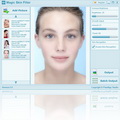
Beauty your portrait photo using Magic Skin Filter! Magic Skin Filter is a powerful and easy to use automatic portrait photo smooth skin software that lets you beauty your portrait photo in seconds! With its intuitive user interface, just a few clicks, you can increase brightness, smooth skin, erase the spots for your portrait photo.
Key features:
- Smooth skin, increase brightness and erase the spots for your portrait photo;
- Intuitive user interface;
- Automatic prevent excessive blur function;
- Skin recognition engine;
- Batch processing function.
System Requirements:
Windows XP/ Vista/ 7
Publisher:
PixelApp StudioHomepage:
http://www.pixelapp.com/Magic-Skin-Filter.htmFile Size:
2.03 MB
Price:
$19.95
Featured titles by PixelApp Studio
Magic Collage is an automatic and easy to use photo collage creator software that lets you to create impressive photo collage automatically in a few clicks! Magic Collage creates photo collage by using a special photo processing engine that can automatic place and arrange the photos from different graphic, shape and text that you specify.

Make your landscape photo unique, Using Magic Landscape Filter! Magic Landscape Filter is a professional and easy to use reversal film simulation filter software that can make your landscape photo more colorful and more vividly! As we known reversal film are chosen by professional photographer, because it can offer better color reproduction. Through Magic Landscape Filter, you can convert your photo to professional reversal film photo in a few click!
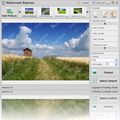
Watermark Express is a powerful and professional watermarking software that helps you to protect your digital photo easily! With Watermark Express, you will be able to add text, EXIF information, image, logo watermark to your photo to protect your copyrights, and with it batch processing function that can helps you to process hundreds of photo in minutes.
Free Photo Converter is a powerful and 100% free batch photo resize and photo format converter software that allow you resize and convert your digital photo in a few clicks!
SpringPublisher is a professional and easy to use desktop publishing software. With its included various templates and online template store, powerful multi-layer editor, detailed help-files, SpringPublisher enables you to design and print Business Card, Flyer, Postcard, Letterhead and other artworks within a few minutes.
GIVEAWAY download basket


Comments on Magic Skin Filter
Please add a comment explaining the reason behind your vote.

iPhone app giveaways »





Android app giveaways »





Critics of WayneW, note that he is not "flaming" or "insulting" but politely stating a simple fact. Poor grammar is a turn-off, as shown by the fact that so many more people have "found this comment useful" than have not. It suggests a slap-dash approach. If a company takes the trouble to produce good software, then it will usually also take the trouble to have its English corrected by a suitable person. If I were marketing a product abroad I would have my translations properly corrected first: it would be disrespectful to my customers not to do so.
Save | Cancel
Hi,
1. @27 Vision Master: "Im wondering how many women would use this program rather than Dove’s facial cream??? interesting… will this put Avon out of business? has the plastic surgery community finally met its match?"
> A really refreshing comment and a worthwile suggestion to may! For that price ($19.95) your girlfriend/spouse won't get the effects SUGGESTED by PR-people who will try to sell similar creames at tenfold that price, but, as the saying goes "it's the gesture that counts", (and what lies behind it)... And "beauty lies in the eye of the beholder" (etc.) ;-)
2. Earlier today I tried to post a suggestion in the "Share your ideas" section, but it seems to have been filtered away...
Namely to add a module that would enable the user to do the opposite of beautifying (i.e. "uglyfying"(?)) a portrait with at least some basic effects to create caricature-like results. Seems to me a lot more fun to do and I'm fairly certain that the recipient of such "caricature" - if well done and without the intention to hurt(!), might even be more pleased than when confronted with a flattened (smoothed) out, blurred (what have you), characterless portrait... Any opinions on this proposal anyone? Some results mqy be obtained through morphing techniques also.
3. A good, attentive portrait photographer will have no need for "photoshopped" or otherwise enhanced results. It's so easy to prove this point that it would be a waste of time and space to add or refer to the hundreds of thousands examples...
Anyway, for those who might have a real use for it, enjoy playing around with this piece of software. It's free and (hopefully) won't offend anyone who thinks her- or himself beautifull enough as she or he is in real life.
Greetz to all,
Patrick.
Save | Cancel
Here's another example using a previous giveaway, Zoner Photo Studio 13. Note that the "Before" in this case has been processed by Zoner Magic Wand with Blur (of the selection), the "After" is the original example02 as processed by Magic Skin Filter. Can't do as precise of a Magic Wand selection as PhotoPerfect, but very quick.
Save | Cancel
I enjoy greatly trying/using software such as this. I do use PS and always enjoy finding similar or ever basic alternatives even if they only do basic functions/effects.
I will say this soft needs some serious improvement. They try to accomplish an improved affect by simply altering contrast and adding blur, which is not a very useful or professional way of improving any skin alterations unless combined with levels (which one can usually accomplish on it's own without the aforementioned alterations).
This probably shouldn't even be released as freeware as is. In the future when they improve this to some extent then their asking price would be exceptable.
I will say though that PixelApp Studio's other software is rather professional and well worth checking out.
Save | Cancel
Nice. This software works great on all your skin pictures.
Save | Cancel
Well, I like the way it softens my photos and all. But my husband doesn't. Says it makes everything just look blurry. Needs more control over what is being softened. I have MS Picture It installed and it already does this. BUT, I do see where this would being great for older people who aren't quite as pc savvy as some others. And it really does make a much older persons picture look really nice. Price is a little much, imo. But it is very easy to use.
Save | Cancel
Here's a very quick example I did using Magic Skin Filter's example02 from their website, their before, my after using PhotoPerfect's Magic Wand Mask with Soften (the word "before" is part of the original image).
Save | Cancel
This is not as good as some programs I have or used before, such as Photoshop and Paint Shop Pro. I work with a lot of graphic programs and they did a better job than this filter. Most filters are free and work just as good or better than this one. I tried it but dumped it afterwards, as some of the filters/programs I have I like better. It might be good if someone who wants just a basic filter with their programs, but for me it would be just a waste of computer space, as it does the same thing of what I already have.
Save | Cancel
I think software like this is totally dishonest and why anyone would use it is beyond me? Its not an improvement, its a lie to everyone as your altering your appearance over showing who you are. Flaws and all! However, that is my opinion and I guess others will use it. By chance if you go to meet Mr or Ms right after they view your profile, don't be surprised if they walk away if you do appear very different than your picture. They may view that as dishonesty which if done from the beginning most likely means you are! Oh and I also agree with Europe where they stopped allowing images that they saw so altered by filters, that actors are no longer allowed to be shown if they look totally different than they do. Why anyone would hide their age or a few blemishes is simply ridiculous. Or have we truly become a society where any imperfections are seen as gross? Don't use it ladies and gentlemen! Be proud of yourselves, flaws and all! Trust me! I landed a man half my age by being me and we are married now. So be YOU! Regardless, thanks GOTD for the offer. I will pass!
Save | Cancel
Unfortunately the program can not be processed each match, but the whole make-up photo! In the end, everything seems too artificial and unnatural. This I do not need.
Save | Cancel
This porduct works pretty well, and is easy to use!! Magic Skin Filter works so well that it even made a picture of my wife look good!! I mean it took away all the age spots, blemishes, and wrinkles!!
Save | Cancel
It's a nice simple application for the basic user who does not have advanced Photoshop skills and wants to tweek portrait shots. Lovely softening of images, especially when tested with my close up newborn photography. However I can not find any features in the program that I cannot achieve when editing in camera raw.
Save | Cancel
#2 Everyobe's 1st language is not English! Please have some respect and do not be so insulting!
Save | Cancel
@2 actually one of the biggest turnoffs is seeing a linguistic chauvinist in action, citing (poorly explained!) grammatical prescriptions as if they were natural law.
Save | Cancel
WayneW so, how is your Chinese (or Russian, Bulgarian, Croatian or any of the other numerous native languages of these developers)?
Does it make you feel superior to flame people for spelling and grammar, when it's safe to assume that English is not their native language and they are using translation software to create a description for software you are getting for free?
Let me ask you this: Can you write a similar piece of software and translate it to, say, Urdu?
Much excellent-functioning software is not developed by native-English speakers. Unless the translation is so bad that the product becomes useless to me in English, I am willing to accept a few grammatical errors in exchange for getting it free.
Between the grammar/spelling cops and the obligatory "make it portable" guy, the utility of these comments are less than that of the worst of the worst free software I have seen here.
Try contributing something constructive. Or, as it is said:
"Those who can, do. Those who cannot, criticize the grammar."
Save | Cancel
installed okay but they should of used someone better looking in the examples like megan fox or susan boyle
Save | Cancel
If they place such terrible image destroying samples on their websites you know enough. This looks more like an easy moneymaker.
Save | Cancel
It's a ZIP SFX that extracts an MSF.msi & setup.exe
'Magic Skin Filter.exe' is standalone program.
Register button, confusing.
Internet Automatic or Offline Manual?
Since your are given the code, you would /think/
Offline, but that is not the case. (Offline uses
a "Hardware ID:").
So you use the "Automatic" mode. Paste the given
registration into the box & then it "processes".
Takes a long time. Long enough that Windows
feels the program has crashed. Wait it out & you
get a "succeed" message.
Cannot close the program from the Taskbar, right-
click?
Cannot drag/drop a picture into the program, must
use 'Add Picture'. Add Picture does allow you to
select more then one picture at once.
Before/after can be seen by clicking on the image.
Yet another image "adjusting" type program. This
I might generally call "blur". You may or may
not like what it does?
Output (i.e. Save) does not give a default output
filename. You might expect orig_name.X.jpg or
something like that. Output format is only JPG.
A second Output *does* then default to the last
used filename & also the last used directory path.
So, after the first File, Output, you Add Picture
from a different directory, file name, when you
go to Output, you are presented with the prior
filename & directory path. Wrong.
When you Output, the file is re-processed, which
doesn't really make sense as all changes are
processed as you make them?
Perhaps on Batch Output that could make sense?
But then it is not clear if Batch Output would
batch (& re-process) to the last used settings
or if each picture is written out to its' own
settings? (I believe it is the former.)
Batch Output retains the original file names.
Batch Output overwrites existing files, period.
Output prompts on an overwrite.
Output re-processes even if you have made no
changes to the picture since the last Output.
Output file size seems to double compared to the
original.
Window dialog can be maximized (but not otherwise
resized). Add Picture shows a thumb, name, size
resolution & color depth. Generally a good
layout, except that the up/down-arrows (if you
are displaying more then 8 picts) does not "flow"
but rather pages to the next set of images. Flow
might be better method. Up/down-arrows give no
indication that there is or is not anything more
to follow. You can right-click a thumb & delete
it from the list.
Save | Cancel
Magic Skin is a small program designed to do one thing and judging by the responses it does it quite well. To compare Photoshop ($700) with Magic Skin ($20) is a little strange and may reflect the program knowledge base of the owner of Photoshop. Magic Skin, even shown on their website, tends to mute the sharpness of the images and in doing so provides a method sometimes effective in photography. That stated, I find no need of a program such as Magic Skin because it doesn't allow selective areas to remain sharp.
Save | Cancel
the before & after pics on the web site just look like a soft focus or blur filter. At the very least, use the 'sharp blur' algorithm of
http://www.complang.tuwien.ac.at/schani/sharpblur/index.html
Or perhaps 'smart blur' which is spelled out here in detail...
http://asserttrue.blogspot.com/2010/08/implementing-smart-blur-in-java.html
I'll stick with the old free GAOTD version of Portrait Professional.
But what I really want is a library of skin textures that can be applied to replace the original skin texture. Don't think anyone has invented that yet?
Save | Cancel
Todays offer is absolutely not a serious tool, at all ! Even the build-in MS Paint can do better and that says it all !
- To install the software, you need to unpack it twice !?!
- The program file is only at 919 KB, so there isn´t much to slow down your PC...
- Wrong !!! The program use 4.6 second before you see anything at all !!! My laptop isn´t that slow...
- The program use 25 second to do its job per picture, (3.2 MP, 2048x1536 pixel)
- You have 3 sliders and 1 button to do all the adjustments ! Each time you move any of the sliders then it takes 2-3 second for the program to make the change on the picture.
The laptop I used for the test have Win7 64-bit OS, i5-450M, 4 GB (DDR3), 1 GB (GDDR5) onboard.
Save | Cancel
It does not work on multi face pictures, the depth was gone, the blurriness was way to high, the contour of the face changed and the details were gone. Some of the faces turned out to look same.
Uninstalling it.
Save | Cancel
Pass in favor of PhotoShop. Thanks for photo offers lately GOTD.
Save | Cancel
Expensive for what it is, and the install routine is ridiculously fiddly. Program itself works OK though.
Save | Cancel
FastStone which is Free is a much better program.
Save | Cancel
Not bad if you just want to touch up a few photos for electronic use (i.e. wallpaper, screensaver, etc.) but worthless if your trying to clean up a image for printing. Your better off using GIMP or PS to "beauty the portrait" if you want precise control. This little program is really just a big waste of space right now with its extremely limited usage.
Save | Cancel
Im wondering how many women would use this program rather than Dove's facial cream??? interesting... will this put Avon out of business? has the plastic surgery community finally met its match?
stay tuned for version 1.2
from the site page all i see is that it blurs up the picture using a few simple tricks....if its real photo editing, try photoshop, or any of the other top of the line tools available. changing lighting, or any of these simple tricks is not something that really needs a separate tool like this one.
Save | Cancel
If you haven't got any kind of image processing programme at all then this might be worth looking at. All it really does is put a slight blur over the photo. You can do the same in Photoscape, to my mind the best free photo processing prog - http://www.photoscape.org/ps/main/index.php - which gives you a lot more options. Only thing lacking is an option to make Layers, which is what you really need to get serious about retouching. There are a lot of tutorials on YouTube. I'm a Photoshop user so don't need something like this, but I have suggested it to several beginners. If you're seriously in need of a programme like this then you can get Portrait Professional - http://www.portraitprofessional.com/ - for a knockdown £29.99 at the moment. It does tons more than Magic Skin, allowing fairly fine control over how much and where, also allowing a degree of face sculpting. It's used by a lot of pros (including me) as it can provide a very quick fix (as long as you don't over-egg the pudding). Don't believe me - on the site there are a lot of reviews which are genuine. Maybe GATD can get it for free for us?
Save | Cancel
I am no computer expert far from it. But this is yet another program where I read that people here are having such a hard time installing and call it "complex". Really? COMPLEX? I didn't read the instructions and mine installed and registered seamlessly all in less than about 2 minutes. I'm on Vista Business (unfortunately).
It is a straightforward program that adds a healthy glow and erases small blemishes. It does what it says it will do. I would pay maybe about a third of what the developer is asking for it on a whim. And by the way there is a way to see your original and compare results - go over to the file the original is in and open it up!
Save | Cancel
System Requirements is not just Windows, but also .NET Fremework. It seams as .NET 2.1 is enough. Why bothering to list Windows as a requirement when the real requirement, .Net Fremework is not included on the list?
This is not s proper 'Skin Filter' because it does not recognize skin in particular. It's just 'blurring' or 'smudging' the picture when the filter is enabled. This happens to the whole picture, not just those parts that have skin. This is probably done by replacing each pixel in the picture by the average of the surrounding pixels, thus removing some of the fine detail in the picture.
Save | Cancel
Took a look at their website and agree with Comment #1 that the before examples look better to me than the after pictures. I edit a lot of pics each week and generally grab all gaotd offerings related to image editing but will pass on this as I can do the same thing better with other software. I highly recommend Zoner Photo Studio 13 that was a gaotd a few weeks ago. This does what this software does and so much more. If you missed ZPS13 last time it was offered at gatod be sure and grab it if it is offered again. I now have ZPS12 Pro and love it.
Another gaotd program I use frequently is CodedColor Photo Studio. If you don't have CCPS be sure and grab it next time it comes around. This one has been offered several times at gaotd.
These two gaotd programs in addition to my purchased Sagelight Image Editor make up my primary image editing tools. Many features are duplicated in each but but the application of those features are better to me in one than the others. I have come to the conclusion that short of spending the bucks for Photoshop there is no one program that will satisfy all my image editing needs.
Thanks gaotd, keep those image editing tools comming.
Save | Cancel
This is a very little tiny bit of a program. The functionallity could be paralleled with various other software and very likely with more control (like selection etc.). Still it could be a quick thingy to have around perhapse (I'm not convinced yet).
To adjust pictures with this kind of touch-ups is typically something you would like to do on individual base and not in batches.
The registration (allthough you probably don't notice that) is more af a deal then the program self with encrypted license-files, hardware codes and internet-activation.
I am tempted to say: Today we got a registrationtool with a little extra photo-functionallity on the side.
Save | Cancel
Lovely painterly effect- if a little plastic in finish - I will treat as a filter and modify images in photoshop as a layer - I will find this a useful tool - but like many tools it will require creative thinking and tweaking - thanks for the free upload - will definitely use this tool as part of my art making
Save | Cancel
Basically a variable soft focus program. It does have a "skin recognition" feature, but I did not find that this differentiated effectively between skin and the rest of the picture; everything seemed equally blurred. I suggest that a photo program with a smudge tool would be better for removing minor blemishes: for example, the old Microsoft Photo Editor 3.01 which came with Office 2000 is now available for free download and has this together with many other useful tools, such as an image softener.
Save | Cancel
I also prefer the 'before' pictures. The 'after' pictures look like a skin complaint has been added.
Save | Cancel
@WayneW: currently #2
Dear WayneW , if one is such an arrogant, conceited, narrow minded individual that minor, petty things matter and disturb your enjoyment and objective evaluation of a product then maybe one is better of avoiding the wares of up and coming developers and purchasing at full price from larger corporations whose product description does not offend you, cause you stress or your gout to flare up old boy.
A better approach may have been for you to contact the developer, quietly, offering your obviously dazzling grasp of English grammar to check and correct their copy for them at no charge.
Save | Cancel
This program managed to tick all the wrong boxes very rapidly; it implied that it would be installed to C:/, in fact what it meant was that the installer would be placed in this directory.
Once installed, but not registered, I proceeded to test the program on a few portraits, and it took my breath away with its lack of quality. This software is unfinished and should not be put on the market until a preview of the results is available and a more attractive interface is made. On top of this the results produce a somewhat blurred image, we pay a fortune for those extra pixels and top quality lenses, and it blurs it! Needless to say it hasn't a cat in hell's chance of staying on my hard drive.
Save | Cancel
@6 There doesn’t appear to be a default ‘before and after’ view -
I always make a copy and make changes to copy just in case - compare origenal with copy!
@9 Finally, there is no way to save in another format as JPEG -
If I havea pic and want change it I upload it online to various online photo storage as an example tiny pics which convert to jpeg or immagine shack that converts pic to png - copy pic from web!
Save | Cancel
In the examples on their website, pay attention to what it did to the lips, teeth, and hair. They lost their beauty as it tried to fix the skin. With no selection tool, it's up to the so-called "Skin recognition engine," which seems to be pretty inaccurate.
The examples are all of removing freckles. Maybe it's a "freckle removal engine." In most cases (including in the cases of these female models) I happen to think that freckles are a beautiful feature on a woman that shouldn't be edited out.
Save | Cancel
Using the default settings, I tried the program on a thumbnail and on a low-resolution image and the results were impressive, even under magnification. The softening effect is generally applied to the whole image, which simplifies the operation for impatient users. Special-effects software like this one, are most effective when used on photos with a resolution of 72 dpi or thereabouts.
Some of the current related freeware...
Vicman Photo Toolkit / Photo! Editor:
http://www.vicman.net/phototoolkit/index.htm
Mediachance Free DCE:
http://www.mediachance.com/digicam/enhancer.htm
Neat Image - 'Demo' Edition:
http://www.neatimage.com/win/standalone/download.html
Retouch Pilot Lite:
http://www.colorpilot.com/retouch.html
Save | Cancel
WinXP SP 3
Same as comment. 10. I was searching for the desk top short cut, so I went to the folder I had chosen to install and found it was only the setup file, so double clicked and installed and it created a short cut and registered ok.
I know the notepad license details tells you it is a double install ,( who reads them first ? ) but I would rather GAOTD put it next to on the download on web page as well.
I agreed with registration succeed instead of "succeeded" , these are little nuances , which all software companies should get someone who speaks English to check their wording, to at least make it look like professional outfit.
I have not had a chance to try it yet , but I would say that anyone who is not a graphic design artist who forks out for photoshop and has hours to waste trying to learn how to use it , is sad .
So any simple prog photo enhancing tool should be welcomed and treated as a fun alternative.
Save | Cancel
As mentioned, running the GOTD Setup merely extracts another setup.exe and a .msi, select a folder to put those in, run the extracted setup.exe which calls the .msi. Requires .NET 2.0 and DotNetFX. As mentioned, this softens the entire photo as shown in their examples, even if you enable skin recognition. I obtained better results quite quickly just by using a softening brush in an image editor.
Save | Cancel
The program looks like it may be useful once you figure out how to install it.
First, you have to choose an install directory. This isn't the directory where the program will be installed, it is where the installation files will be extracted to. The default shown was C:, so I chose C:\Tmp because I didn't want the files extracted into the root directory.
After the files were extracted, no install menu appeared so I had to search for where the install files ended up. I found them in the directory, C:\Tmp\Magic Skin Filter. From there I ran setup.exe which installed the program in the "C:\Program Files\PixelApp Studio\Magic Skin Filter\" directory.
I used the "automatic registration" and inserted the serial number, which gave me this message to confirm registration, "Register succeed,Thanks for your register!"
I tested the program on a picture of my wife. The program worked adequately if you want a program that is simple and doesn't have very many features. If you have more experiencd than a beginner, you probably would want to use a program that has more options...
Save | Cancel
Extremely basic application. It changes just the brightness and contrast of the image. It has also a "skin recognition" algorithm, not selected by default, but I can't see any difference when it is enabled.
Furthermore, there are many problems.
The installation is unnecessarily complex. The main installer extracts Setup.exe and MSF.msi in C:\MagicSkin (ignoring the fact that it is forbidden to write to C:\), and you have to run MSF.msi to install the software. (Setup.exe is useless.) So, the user has to run an installer to copy another installer in a forbidden location, and use that second installer to install the program!
Big problem: this program requires to be run as administrator. Why? It's a very simple image editing software, that should never need to modify the system after its installation. Such programs should be banned.
There are also important limitations in the GUI. The program is extremely slow to do its work, and there is absolutely no way to show the original image (except as a ridiculously small thumbnail). So, without being able to compare the result with the original image, you have to assume that the result is correct, save it, and compare it with another program.
Finally, there is no way to save in another format than JPEG, and you cannot specify the JPEG compression ratio!
Conclusion: Just a little toy, badly written and badly designed. Selling that kind of program is a rip-off.
Save | Cancel
Somewhat adequate. Sucks plenty of CPU performing the smoothing, and experimenting requires patience as every tweak requires you to wait a while for the update. Has some issues with skin in high(ish) contrasting shadow. The results look soft and the default brightness is too strong for my taste. Definitely usable for most home requirements. Certainly cheaper than buying and learning photoshop. I would keep this just for batch updates of sets that I didn't particular want to spend time fiddling with and the results were not going to be used for large prints.
Save | Cancel
Installed on XP with no problems.
It's extremely basic.
Does what it says. Made the stubble on my sons face almost unnoticable.
The lack of any selection tools means its mainly good for Passport type photos. I've not got many of them!
It had trouble working with black and white and toned prints, so only really good for colour.
The 3 slide bars are the only tools but even these don't let you preview the effect, you have to wait for it to process your input.
Not something I'm going to keep.
Save | Cancel
Installed ok on win 7 x64. Tried it on a picture taken in front of a stone wall. Enabled skin recognition. Program smoothed out the skin textures, but in doing so took out some of the sharp detail of the wall. There doesn't appear to be a default 'before and after' view. You see the result, but I stumbled upon pressing the right mouse button which would appear to toggle between the two. I'll try out some more pix.
Save | Cancel
Works well, but would like to see this as a add-on (plug-in) for other phot-editing suites including the freeware ones. As a standalone I think it's rather expensive.
Save | Cancel
Worked in Win 7 Pro 32-bit. You can choose Brightness, Smooth Amount (more = blurrier pic = less pimples etc.) and Smooth Power (very similar to Smooth Amount). The installation and registration process could be less complicated though.
Save | Cancel
I think looking at the examples on the website is important to understanding what this software does and does not do.
It works on my W7-64 machine, super easy to use. I also tried the batch option. I think I had better results adjusting each picture by itself.
It does "blend" in wrinkles and skin blemishes in faces but it also makes most faces seem as if it is .. less sharp, almost a blur with a monotone flatness that doesn't appear natural to me.
Is it valuable? Sure, If used with a light touch. But it is no match for most picture editors that give you more precise control at the expense of a few minutes more labor. If pictures are worth re-touching, I would take the time to use a tool with better results.
Best,
Amy
Save | Cancel