English
Every day we offer FREE licensed software you’d have to buy otherwise.
$15.00
EXPIRED
Giveaway of the day — Kahlown
Kahlown is screen capturing, screen recording (AVI or WMV) and screen spying software.
$15.00
EXPIRED
User rating:
241
49 comments
Kahlown was available as a giveaway on April 15, 2011!
Today Giveaway of the Day

Professional and efficient Video Converter!
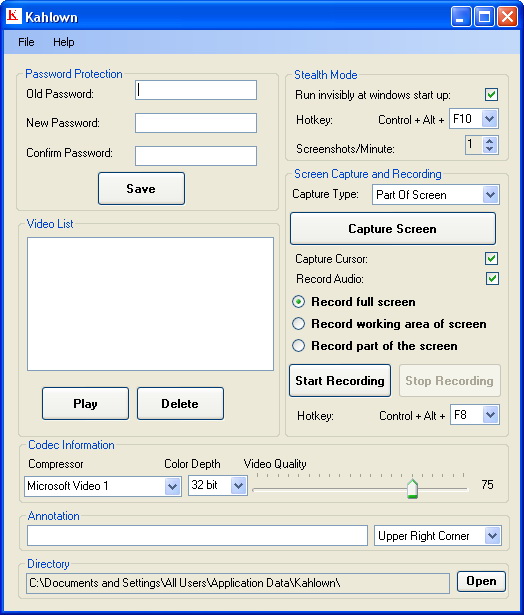

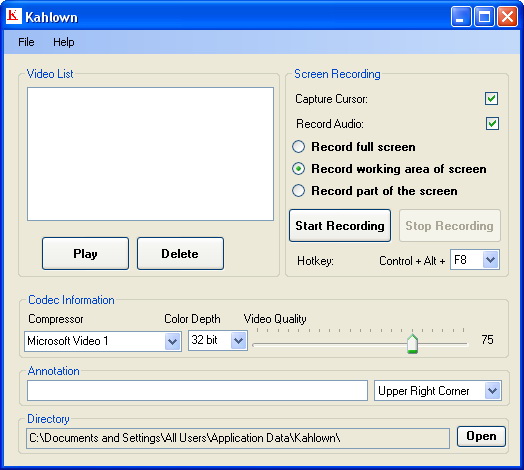
Kahlown is screen capturing, screen recording (AVI or WMV) and screen spying software. Kahlown provides a string of screen capturing and screen recording features. There is also a Stealth mode for you to record screen invisibly and monitor children.
Key features:
- Capture video games into video files;
- Create screencast videos;
- Create training videos and presentations;
- Record videos and publish to illustrate features or teach;
- Keep an eye on children and keep them safe online;
- Save articles and read them later.
System Requirements:
Windows XP/ Vista/ 7
Publisher:
LeSoftRejionHomepage:
http://www.lesoftrejion.com/Default.aspxFile Size:
5.13 MB
Price:
$15.00
GIVEAWAY download basket

Developed by MPCSTAR

Transform media files for playback on various devices.

Developed by Program4Pc

Developed by VSO Software
Comments on Kahlown
Thank you for voting!
Please add a comment explaining the reason behind your vote.
Please add a comment explaining the reason behind your vote.
iPhone app giveaways »

$0.99 ➞ free today

$2.99 ➞ free today

Exercise your brain by improving your vocabulary with the word world and have a good time with unique matches!
$0.99 ➞ free today

$2.99 ➞ free today

$2.99 ➞ free today
Android app giveaways »

Calculate date related operations like total years, months, days, weeks, hours, minutes and seconds between two dates.
$0.49 ➞ free today

$11.99 ➞ free today

$2.99 ➞ free today

$0.99 ➞ free today

The fence has fallen down again, one after the other, no matter how many zombies you have killed.
$0.99 ➞ free today
Version 3.9 is available for download.
Synch audio video lag in video (AVI) files.
Please visit following link for more information.
http://www.lesoftrejion.com/synch-audio-video-lag.aspx
Save | Cancel
Thanks, but I'm happy enough by simply using the Search function in the modern Start Menu, which is ten times faster than going through multiple menus looking for a program.
Save | Cancel
As promised we have released a new version with some improvements, We will be adding all the enhancements one by one in coming future.
Following features have been added to Kahlown Version 3.8.
Configure the output folder and save videos and screenshots wherever you like on your machine. You can always go back to original configuration by clicking on "Restore default configuration" menu under File menu.
Increased the time limit for tool tip, Now it is visible for 15 seconds instead of 5 seconds.
We also added program's shortcut at user's desktop, Please delete it who wants to run Kahlown in stealth mode so that others do not see it.
Please make sure that user has read/write access to the folder that you configure.
Please download version 3.8 from http://www.lesoftrejion.com/
Please keep in touch for the feature that you were looking for and we didn't have at this time.
Thanks everyone once again for you honest reviews.
Save | Cancel
Remeber this:
Terms and conditions
Please note that the software you download and install during the Giveaway period comes with the following important limitations: 1) No free technical support; 2) No free upgrades to future versions; 3) Strictly personal usage.
Save | Cancel
I was going to pass on this until I saw the developers chime in. It's worth the install just to see the improved versions.
Save | Cancel
OK I changed setting on my player... and it is ok now... Sorry. Surprised that would even be a setting options on Winamp.
Save | Cancel
What I recorded played back upside-down and backwards (text is mirror image... yikes!) That can't just be an incorrect setting. I have Windows 7.
If this is the way it works for me, of course I will uninstall it immediately... I registered it as instructed... so it should be fine.....
Any thoughts?
Save | Cancel
Hi Furbar, I totally agree with comments form #37. I read the commentators evaluations to learn, not to be insulted. Some do live with a negative thought process and actively look for someone to accuse or criticize. Usually nothing said to them will enhance their self awareness. I look forward to see your return and to help me learn from your advice. Thanks Furbar for sharing your knowledge.
Save | Cancel
1) Change the name of the prog. It looks like and sounds like Clown which is negative . Preferably a name with Screen capture in the title , so search engines find it.
2) On install you want it to install in one go, not download and go through 2 hoops to have to find the installer and then install.
3) Make it give you the option of creating a desk top short cut on install. I know it is simple to do yourself/ or everyone here , but lots of people out there don't know how to.
4) Have install detect whether the computer need any codecs and tell you which ones. I should imagine most people would want all codecs included with the install rather than fiddle about with more hoops to go through.
Save | Cancel
#37: George, I completely agree with you and as a somewhat newbye, I welcome the return of Fubar's comments.
Save | Cancel
I look at Kahlown this way.
1) Screen Capture Software
Capture full screen or working area, selected region, window, web page, and URL etc
with annotations..
Any other software price between $25 - $60
2) Screen Recorder Software
Record full screen or working screen, and selected area, with annotations and cursor.
Video and audio, support multiple codecs, support hot key of your choice.
Any Other software price between $25 - $300
3) Screen Spy Software
Record video or capture screenshots at regular interval.
Stealth mode, Password protected access and also hot key of your choice.
Again price between $25 - $200
Now Kahlown has all those features just for $15 and here at GOTD you get all that for free.
I believe there are some issue depending on the operating system (XP, Vista, Win 7) or the type of system (32 bit or 64 bit), but I don't think that any other software is completely bug free.
One more thing you cannot say for sure that any software would fulfill all of your needs or desires. :)
Save | Cancel
Please take a look at videos to find how it works.
YouTube Channel for all videos
http://www.youtube.com/watch?v=ZmVLgvkCAIg&feature=player_embedded
Videos at LeSoftRejiion.com
http://www.lesoftrejion.com/Videos.aspx
How to capture anything from screen.
http://www.youtube.com/watch?v=ZmVLgvkCAIg&feature=player_embedded
Save | Cancel
I like all those options that you can use to capture still images or screenshots of web page and URL.
Screen monitoring is also good, you can record video or just capture screenshots.
I saw a difference in screen recording, If you use hot key (Control+Alt+F8) it records better video than "Start Recording" button.
I like it because no other software provides all these features in a single application just for $15.
Save | Cancel
Can I just say "Thank you, GoTD" for offering a neat program which I intend to try out and will hopefully enjoy using? In spite of all of the negative comments I see here, this program seems to me to be something that I can use and as I've seen mentioned, it's free, so why not try it out? It isn't like I'll lose anything major, and I'm very likely to actually gain from the experience! Thanks again!
Save | Cancel
Help! i keep trying to set it up, but it only "installs" then when i look it up in the directory to open it up to use/register it, it isn't there (or in program files or anywhere else) only the
setup file. So i try it again, same thing. what am i doing wrong??
Thank you all!
Save | Cancel
Fubar, hang in there. I scan through the comments, looking for yours first. You come across as quite knowledgeable, but, perhaps, a little too authoritative for some readers. Personally, I like that, and I always take away from your contributions more good information than I had at the start. I was sorry to see you go some months back, but glad you are getting back into the foray.
Save | Cancel
@ #9, #12
So you want to spy your kids huh?
This shows total lack of:
1) pedagogical principles and methods,
2) trust -between you and your children,
3) communication, persuasion abilities etc
Exception: Phobias: You have a lot of it, caused of course by your ignorance -the lack of the above.
Instead of focusing your efforts to teach your children from day 1 about what is right and what is wrong and also teach them how to protect themselves, you choose to spy on your kids and then make things even worse. You should start training yourself ASAP with any way you can.
If you have money, start with an expert. If not, there are many valuable books you could purchase if you search for them.
BTW, don't forget that your children won't get better than yourself. They will copy what you do, not what you say. You have to make sure you're perfect (at least in front of them). So you should focus on your self first.
So such software is unethical. Especially advertising its spying features.
Save | Cancel
I like it and it works for me very well..
Save | Cancel
Thanks for offering a screen capture software. I really dislike the one that came with Win 7. I love snag-it, and keep hoping for one like the old version that was free. I don't think I will download this one, sadly. Maybe another one will come up.
About monitoring your children...I do..but not my kids.. I watch what windows come up when they go to sites...some of its porn. I also watch what others say to my kids. my kids belong to online gaming, and what I see from adults, well, the adults obviously, are not mature and have issues. sorry, just my 2cents. so yea, us parents do monitor our kids, but because of who else is out there moreso.
Thanks again for offering...and thanks for the games you offer too!
Save | Cancel
I see so many members not agreeing with Kahlown Program. So I hesitated to download it at this time. Comments on a screen saver was brought up so I would like to add "Greenshot" as my favorite at this time. Works great on Vista 64 and Windows 7. Oh, by the way it is "FREE". Also saves part or all of screen. Thanks GAOTD for presenting Kahlown for our advice.
Save | Cancel
First, I want to thank GOTD and all the developers who submit these new apps for our review. Thanks also to all those who take the time to render their opinions - good or bad. The GOTD is becoming a site to regularly visit for recommendations when I discover a new need.
Second, having these apps offered for free isn't enough justification to ignore the problems. They are not completely "free". Having been a beta tester for a lot on new apps and OS's I spend quite a bit of time addressing and reporting problems. That's our part of the deal.
Third, if an app has so much that needs improvement, the developer should delay submission to GOTD. As we see, many get frustrated with the errors and will not return even after it's fixed. You don't sell your product by giving away bad samples.
Fourth, I personally like almost all the reviews. I appreciate those who take their time to share opinions, problems, and alternatives. The only ones I'd like censored are the ad hominem attacks. (Thankfully those are extremely rare.)
Last -- I found Kahlown to be a little too unreliable on my Win 7 64 bit OS. I haven't had time to track down just what the conflict is, but thought I'd share that small tidbit before I spend a couple of days on the effort to get more details.
Save | Cancel
I will not install a screen capture application with a stealth mode feature. hackers use keyloggers with the same ability quite often, but it is easier to discover a hacker if you have the tools to counter keyloggers. if you install it yourself though, all the hacker needs to do is to... run it and can spy easily on what you do on your PC.
actually, vendors that include such feature, usually intend it for spying purposes (not only on your kids) but also in order to install the program on someone els' computer.
Save | Cancel
Thanks everyone for all of your honest reviews. We will try our best to improve the software as much as we could based on your reviews.
We apologize for the inconvenience that this software could have caused to anyone.
There has been a confusion regarding the installation package.
You should use the one which is installed at "C:\Program Files\LeSoftRejion\Kahlown" or you can download the package directly from http://www.lesoftrejion.com/.
Please remember all future upgrades are free and believe me you will see new version releases with all these fixes one by one in near future.
Save | Cancel
For screen recording I still like http://www.screencast-o-matic.com/. It records without downloading or installing anything- then hosts it for you online, allows you to add notes and narration, and allows you to download the file as an mp4 which plays everywhere.
For still screen capture, nothing beats Snag-it. But since that's not free, the best alternative is FastStone Capture 5.3 (version 6+ isn't free). See http://www.oldapps.com/fast_stone_capture.php.
Thanks GAOTD, but I'll pass on this one.
Save | Cancel
I have to agree with many others on here. Maybe the developers could have waited until they had a few more issues resolved. Since they chose not to wait, they will likely get a lot of bad reviews here. That's sad since nobody really has a right to complain about something that is offered for free. You invested nothing - yet you seem to expect free software to conform to your very specific needs.
Thanks to those who simply state their experiences and leave it at that. And again, please stop slamming the offerings because you think you have a better alternative.
I also notice a lot of complaints here about free software not running on older versions of windows. Maybe you need to upgrade your windows version since most developers really do not care a whole lot about creating something new to be used on some antiquated OS.
I really like this site but the reviews are not much help when they are just slamming the free product or trying to promote a different one that they prefer. Often the suggestions for other programs are for paid software. Most folks don't look here with the idea of paying. Mention other freeware if you must but remember that your preference may be simply that you have learned the product and really didn't want to learn to use the new offering.
Save | Cancel
:) And a big "THUMBS UP" from me for it's ability to take screen shots by URL!
You can see an example here (left-click on the image to enlarge it):
http://img191.imageshack.us/img191/1903/giveawayurlscreenshot.jpg
Save | Cancel
to Question: you can change or delete the watermark. Choose Annotation in the buttom of teh window and fill it with the information you like
Save | Cancel
Children especially teens will eventually find something that is not cool to watch and then they get addicted, if you find out then ban them from the computer it gives them time to adjust to the new world they have viewed and stop going there. These sites will also destroy your computer that is why you want to monitor your children. Can you imagine sitting there and a sex act pops up on your screen ? been there done that and I banned the granddaughter who was under age from my computer . She eventually realized that it is wrong to do that and is not viewing those sites any longer. the one clue is you will get emails from the sites with all kinds of trash and horrid scenes inside.It takes a long time to rid the computer of these ills. Along with the pop ups.
Save | Cancel
Why do I see Kahloan watermarks (top right corner)?
How to remove them?
Save | Cancel
@ 16: vince
In the bottom part of GUI there is a big white rectangle named "Annotation" - clean all text in it, this will remove the watermark.
"Working area of screen" does mean "without taskbar, quick launch etc...".
For help - point at any item on GUI with your mouse pointer.
The only inconvenience i noticed is the short time of showing tips.
For me as an "non-english speaker" is difficult to read them.
Save | Cancel
#16, vince, that's not a watermark, it's an annotation which you can set to anything you want, or none. See the first screenshot on this page, near the bottom. I didn't have any problem deleting the videos, but I also didn't encounter any errors (Win7x64). But as I stated in my comment #14, I agree that you can do better until the developer improves this program.
Save | Cancel
This is my first posting on here... and thought I would through my two cents in.. It installed fine on Win 7 x64. It installs into two places C:\Kahlown and C:\Program Files (x86). The first one is the install files directory and the second one is the launch directory. I think the program needs to do its own installation directory cleanup after it finishes installation. It never did delete the installation directory. It did not put a desktop icon on the desktop I guess part of the stealth option used in the program. For those not caring for the stealth part and need the icon you will find it in the C:\Program Files\LeSoftRejion directory. Also the Program is the full version for those interested not the lite. Which is common here at GOTD. As the software vender stated above it does not load the codecs for use in the program. I suggest getting them also do not use the media player codec in win 7 not compatible.
I would like to thank GOTD and LeSoftRejion software for a free download of software that could be a useful utility.
Save | Cancel
@ 7: Rick Frog
Run this executable to use desktop GUI:
C:\Program Files\Kahlown\Kahlown.exe
Make shortcut to it on the desktop, if you want.
The only thing i notice is the lack of appropriate icon for shortcut links. So we have to use one of own choice from default win set.
Video recording (full screen & part of it) works just fine in my Windows XP Pro SP3.
I had to download & install 1 additional codec from here:
http://www.lesoftrejion.com/Support.aspx
Save | Cancel
This software is no good at all. Both screen capture and video recording leave the kahloan BIG watermark.
Lack of configuration features. Error most of the time. Unable to delete the video and need to restart the program, again and again.
Also just cannot get it to record only the specific window.
The option " Record full screen " just the same as " Record working area of Screen ". " Record part of the Screen " never seem to work - always error.
The freeware like Hypercam anytime out perform this one.
Save | Cancel
@8
yeah right I agree with 5that but most people don't want them getting involved with unknown people or even pedophiles...
Save | Cancel
I'm all for developers coming out with new products and earning a living, but this was not well thought-out at all. As usual, if you're going into a crowded market, you have to have something to offer. First, the name. To an English speaker, "Kahlown" looks like it's pronounced "clown". Not a good start. One must always be aware of language differences. As noted, the installer has obvious errors, it may have been rushed for GOTD. One should always allow for modification time if you have to do something special for an event like a GOTD debut.
The biggest problem is that there's very little here. You're going up against the excellent FastStone Capture ($20) which has a couple of high-quality screen-capture codecs, numerous features, simulated mouse clicks (audio), vastly superior screen recording features, etc. There's the Ashampoo screen capture stuff which we were given recently, the upgrade to the better version with screen recording is like $6. There's the excellent free version of Microsoft Expression Encoder SP1.
Kahlown has numerous issues. The codecs can't synchronize the mouse with screen actions at all. Adding audio resulted in corrupted files.
#5, Sandra, for your own use there's the excellent TimeSnapper Pro ($25). There's a freeware version but it's nothing compared to the full version. For monitoring children, newer versions of Windows and Internet Explorer have Parental Controls. You can buy spyware/monitoring software, but your should always tell your children that they are being monitored. There are various other programs for parents to control Internet access.
#7, Rick Frog, this program has a UI as shown in the screenshots at the top of this page. It sounds like you damaged the installation.
Since no one reads comments which are held in moderation until late, my comment #55 for NeoDownloader addresses a number of issues which people here on GOTD bring up all the time.
As for people getting upset about my defending myself the other day, if the moderators wouldn't allow people to post personal attacks against me then I wouldn't respond. They certainly don't hesitate to delete my posts for any/no reason at all.
Save | Cancel
Hit record and then used the stealth mode now I can't get back in to it and when I try it just says use the keys which I am . CTRL, ALT and F10. Says it will start and stop but screen does not open. Without help this is not good!
Save | Cancel
#8 obviously is NOT a parent. Let's hope it stays that way.
I did download this program and installed it.. This software should be in beta and not full release. Not yet anyway.
Save | Cancel
I installed the program and codecs on my Win 7 32bit machine. Is there a way to activate recording by motion detection? I'd like be able to set it up before leaving for work and see any captured activity only if there WAS some when I get home at night. Thanks!
Save | Cancel
In XP Pro claimed it could not set the hot-key then that it could not activate, removed from computer.
Save | Cancel
#8 speaking as a mother... NOT that I spy on my children BUT all children online NEED to be at the VERY LEAST monitored!! .. trial and error is one thing at home but mistakes on the net are FOREVER! ..
now about this program...
I have been searching for a good screen recorder.. thanks for all the comments!.. I think I'll wait and see with this one.. ☺
Save | Cancel
Why would you want to spy on your kids? Children need to learn to make there own decisions about what to view and do online. That's how they grow up.
Save | Cancel
Ok. Windows XP Pro SP3
This program instals to the C Drive.. I do not use C drive as my boot drive so that's a pain well I had to change that. So no problem it installs sort of & it registers sort of..
however there is no Desktop GUI what am I supposed to use to control the program and record part of or the full screens where is the screenshot trigger and mouse control for recording video of my web cam or other things ?
Since there is no help file or read me how am i supposed to figure out how to use this supposedly easy program.. So where are the bleeding instruction to this program ?
Why is there no graphics interface? Is this supposed to be a strictly Command only progam or what? Since there is no tool bar on the task-bar how am I supposed to know it is even running ?
& by the way using the Ctrl Alt F10 hotkey does nothing to show me any ways to use this program.
Why is there nothing showing? Also Why did I have to go into program files to register it? after registration it then does nothing at all.
this is a complete waste of my time, I will stick with programs of mine that actually work. And if you are looking for programs that are free and do a better job than this one see the posts above mine for free ware programs ones that do work on Windows XP.
I give this a big thumbs down and rate it as horrible.. not worth the time or the money when there are so many programs that do this ones job and for the same or even less money..
Save | Cancel
Please visit following link to download missing codecs. Not all codecs are installed by default.
http://www.lesoftrejion.com/Support.aspx
Save | Cancel
I appreciate the password protection. I will use it on my kid. But anyway, I like to monitor myself as kids are pretty intelligent and can figure out how to break a password!
Save | Cancel
This program is double packed, it extracts a .exe and .msi files by default in C:\ and extracts a folder named kahlwon with the two same files.
JFYI: Any of the two exe can be used.
Save | Cancel
+ Nice to have all scrolled page screenshot.
- Opens screenshot in Paint with low color levels (or maybe the colors are taken not very correctly?)
- No shortcut for fast printscreen
- Does not screenshot scrolled page from other browsers.
Save | Cancel
The software looks ok, thank you GOTD. However, after recording screen once, using XVid codec, I'm unable to do it again, it says that Xvid is not installed... Don't know... Possibly need to install some other codec, but first time it worked...
The setup process is bit messy - need to unzip file, then extract the installer, and then we can see 4 installers (looks like duplicated).
Save | Cancel
I prefer Frap it is better still.
Anyway this software is for free so cant complain much.
Thanks anyway to the GotD team.
Save | Cancel