Every day we offer FREE licensed software you’d have to buy otherwise.
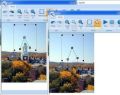
Giveaway of the day — InPaint 2.3
InPaint 2.3 was available as a giveaway on January 4, 2010!

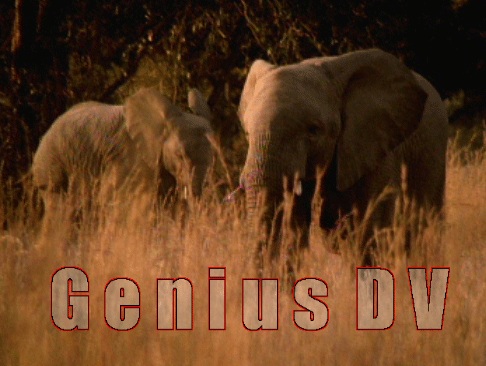
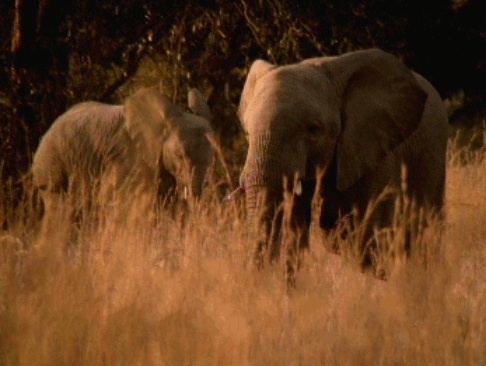
Inpaint reconstructs the selected image area from the pixel near the area boundary. Inpaint may be used to remove undesirable objects from still images.
Delete any unwanted object from your photo, such as extra power-line, people, text... The program will automatically inpaint the selected area to erase it.
If some unexpected object spoils an otherwise good photograph, Inpaint may be used to remove it. Simply select the object. No need for fiddly messing about with the clone tool!
It is alarmingly simple to use. Draw a selection around the object you wish to remove from the picture, and run smart remove selection. Inpaint will fill the selection area with intelligently generated texture drawn from the surrounding image data.
You can always find InPaint video tutorials here.
System Requirements:
Windows Vista/2003/2000/XP; 2000 MHz processor 256 Mb RAM
Publisher:
TeoreXHomepage:
http://www.teorex.com/inpaint.htmlFile Size:
3.78 MB
Price:
$39.99
GIVEAWAY download basket


Comments on InPaint 2.3
Please add a comment explaining the reason behind your vote.


iPhone app giveaways »





Android app giveaways »




This definitely looks like an amazing piece of software.
Save | Cancel
Tried to download yesterday and kept getting the error message.
Now it's not available !!!
Save | Cancel
Tried this on an image I shot yesterday of the sea, with a wave in an unfortunate position. I was surprised at how much better InPaint was able to blend the bad area into the rest of the sea image; much better than I could do with the Healing Brush of Photoshop CS4, and although not perfect, easily made so by some simple adjustments later, in Photoshop. A keeper!
Save | Cancel
Sorry to post so late, but you test when you can test. Hope some one sees this when it will do some good. Had the previous version of this, but messed up the registration. As said, new user interface with much larger toolbar. Also, dropped the free form "lasso" tool and replaced it with a free form polygon tool. Basically, draw your own custom shaped box. Used it to remove text from a couple of pics with mostly uniform backgrounds. Worked impressively. As mike said, rather than expecting this to do everything, you could combine it with another tool, like Image Mender that was given away here before and maybe will be again. (As always, thanks mike for your detailed insights.)
I analyzed the install and the footprint is pretty light. The program, which only installs a handful of files in it's own directory and nowhere else, adds only about 42 registry entries, almost all having to do with it's appearance. The other is it's registration key, btw. Of course, I wish it would store it's appearance entries in a data/preferences file in it's own folder - and I don't see the point, since nothing appears to be adjustable and they've even removed the View selection from the earlier version - but it's still almost freestanding, which is a big plus for me.
I tried to perserve my older version in case something went wrong - because I forgot it was unregistered - and you can. However, it messes up the old link and doesn't remove the old startup menu entry, which is in a folder named for the developer, Teorex. Now of course, it's under Inpaint. It does that, but doesn't remove the old folder. Kinda sloppy.
This is one of the Giveaway's "Hits" of 2009, and thanks for offering it again, in a new version to boot. :)
Save | Cancel
I was able to download and install the R2.3 which replaced my earlier R2.0 version. However, activate.exe does not work (with an error message: "fail to connect, please try again later"), so now I lost the R2.0 which I got from GOTO last year as well. :-(
A good program except now I can't use it after trying today's GOTO ....
Save | Cancel
I was able to download with firefox and the program was installed OK. However, the activate.exe gave me "Unable to connect, please try again later" error message.
I tried version 2.0 and it works fine.
Save | Cancel
Running XP Pro SP3 -
Getting a program crash, with the following error in the application log:
Error Code 1000
For some reason, I am getting Faulting application inpaint.exe, version 2.3.0.0, faulting module inpaint.exe, version 2.3.0.0, fault address 0x000034e1.
The photos I am testing on is large. I have made a change and saved.(very nicely, I might add...well done). But attempting to edit the photo again, I get the error. Have had 3 crashes in 5 tries.
Was orginally upgraded from GAOD version 2.0 of the program. Did an install over to start. Now I've uninstalled / reinstalled and will retry.
Anyone else seeing this? Other than the reinstall - of which result are not yet known, any ideas?
Save | Cancel
Windows XP PRO - SP3 - - I uninstalled InPaint Version 2 and then installed this new Version 2.3. No problems. This version blows the old version away! Photocorrection and detail removal is UNBELIEVABLE! It seemlessly removed text and/or body parts and the result was undetectable. Version 2 could never do this. I am totally impressed and thank you InPaint & GAOTD!!!
Save | Cancel
Norton says Activate.exe is a threat for my computer. I need key...anybody plz help me.
thanks
Save | Cancel
@Comment#42
u ppl sucks, i always thought that u ppl are from good side but no u r also the same like others
i downloaded ur InPaint 2.3 and it’s activator was a virus
my norton internet security notified me and deleted the activator
Just in case you crawled out of a cave somewhere, there is now a thing called false positives. It happens when your antivirus confuses a key or serial generator, in this case an activator for a Trojan Virus. I've been a GOTD visitor for 3 years now and I have never encountered a virus, not even once.
Good luck with your "Norton Internet Security".
Save | Cancel
@Comment#42
u ppl sucks, i always thought that u ppl are from good side but no u r also the same like others
i downloaded ur InPaint 2.3 and it’s activator was a virus
my norton internet security notified me and deleted the activator
Just in case you came out of a cave somewhere, there is now a thing called false positives. It happens when your antivirus confuses a key or serial generator, in this case an activator for a Trojan Virus. I've been a GOTD visitor for 3 years now and I have never encountered a virus, not even once.
Good luck with your "Norton Internet Security".
Save | Cancel
Well, I can't find the readme.txt or the registration key, so this program is worthless to me.
Do I sound frustrated? Good, because I am.
Save | Cancel
Great software. Tried it out with several photos and it managed to remove the objects.
The only beef I have with it is that it also strips the EXIF data from the photo.
Save | Cancel
Great program. Tested it with several of my photos and it managed to remove the objects.
Only beef I have with it is that it strips the EXIF info from the file.
Save | Cancel
Downloaded but will not activate. I het a popup window that states the following: " Failed to Connect. Please try again later" I have tried several times.
Save | Cancel
Installed without problems WinXP-PRO-SP3.
Tried it and it works just fine as promised, thanks very much!
Eldad
Save | Cancel
It downloaded ok but when I try to register it it pops up a small window that says: "Failed to Connect. Please try again Later"
Save | Cancel
How do I register this program? I never saw a registration number. Love the program but would like to save my work! Thanks!
Save | Cancel
How do I register this program so I can save my changes?? Loved testing it out but would really like to save all my work. Never saw a registration number. Thanks!
Save | Cancel
Definitely getting better and better. Had already used the last two offerings and was quite happy. Just installed this version this morning and tested it and can tell you that this one's a keeper too. Thanks GAOTD and TeorX for sharing with us this gem. :)
Save | Cancel
It is asking for a serial key, where am I supposed to get that? Thanks.
Save | Cancel
Usually, I have no problems. Downloaded, ran setup, then prior to running program, ran activate, successfully activated. Ran program and get WARNING block that states that file is corrupted and may have been manipulated or is infected with a virus or cracked!! Feel like a jerk, cuz I went and deleted 2.0 prior to installing this and now I've got nothing! Any ideas??
Save | Cancel
I think I see a pattern. The crashes appear to happen when the boundary area is smaller in one dimension than the selection area.
Save | Cancel
It's crashed on me a couple of times now. No explanation. I just lose my changes. I have to save after every good change. MRU is not updated when it crashes.
Using it zoomed to max is a problem. Hard to mark polygons I want. As I resize the boundary area a couple of times now it has jumped to my selection area and changed it. Then it resets the boundary area back to default. Real bother.
Save | Cancel
#42 - You have to temporarily disable Norton's SONAR function when installing the GAOTD programs. That is the module that is erroneously reporting the setup.exe programs as viruses even when they are not. GAOTD programs are clean; you can verify that by running the suspect file through Jotti's Viruscan.
Save | Cancel
It is an improvement over V2.
I like the polygon selection option, but I wish the polygon selection extended to the "boundary" area. I keep picking up unwanted stray colors. They mention this possibility in the help file, but the boundary area selection is too inflexible to handle the problem, especially when selecting polygons. After a very brief play time I think one secret is to zoom way in and fix small areas. I do have a little problem getting the polygon points to stick where I want them when it's zoomed in, it seems to want to jump to it's own points, like zoom to grid in some apps.
There is online help (better than many other GOD candidates) but it is rather skimpy. I hope they expand on it in future versions.
It's a keeper.
I did have a little problem initially. Did the install and activation but activation did not appear to "take" since I could not save. I had to shutdown and restart a couple of times before I could save changes. I wish there was a clear indication in the "about" dialog of the status of the app, unregistered (trial), registered (full function).
Save | Cancel
Downloaded installed and activated on window 7 x64 but the only active buttons are Help & About. How do we work this software?
Save | Cancel
I've been using InPaint 1.0 from an ages old giveawayoftheday. It is great for quickly removing many types of items from photos. Some items still require photoshop, but once you learn to manipulate the background square this proves a quicker, easier alternative in many instances. Doesn't do anything but this, however it does it pretty well. Thanks for another good one giveawayoftheday!
Save | Cancel
Firefox 3.015 here with DownThemAll - no gateway problem!
Save | Cancel
Awesome program! Perfect removal of wires on an otherwise perfect mountain or sunset picture!
For the bad gateway problem (I have been getting it a lot here lately), try to right-click and "save link as."
Works for Firefox anyway...
Two thumbs up — thank you GOTD and TeoreX !!
Save | Cancel
ATTENTION DEVELOPERS! GAOTD STAFF!!!
I've d/loaded and installed it, but the registration falls over constantly.
Only a few hours left to register it......
Save | Cancel
"Giveaway of the day is adware/spyware-free. " but not free of programs you were not informed you were downloading and you don't know you did until it is already installed, made a list of programs on your computer and "checked for updates" with out my permission. i will never download anything from a site that can not be trusted to tell you the whole truth.
Save | Cancel
I don't know what is wrong. The program works fine but I can't save changes. Save is grayed out. Too bad, I'd like to have kept this to try for a while. Using WinXP and don't see others complaining of this issue.
Save | Cancel
I use a download manager so I didn't have any problems downloading with Firefox. Loaded right over version 2 with no problems.
Got the GOTD activation page so I assume that it activate ok.
I played with it a little & it seems to be working fine. Does a nice job on something simple, but I have had a chance to try it on a more busy photo.
Works well with Vista Ultimate 32 bit.
Thanks GOTD & Teorex. I've always enjoyed this software... it saves me time & extra work that it would take me in Photoshop.
Save | Cancel
Never mind, #51, I just got it downloaded.
Save | Cancel
Did not work on windows 7 64
Save | Cancel
Downloaded and (apparently) activated OK on Win7 x64, but when run it gives an error message titled "Inpaint.exe" that says "File corrupted!. This program has been manipulated and maybe it's infected with a Virus or cracked. This file won't work anymore." Any ideas, anyone?
And what the heck is this "stickr" thing?? I don't remember installing anything like that....
Save | Cancel
This does work as stated but it changes the size of the original photo, which may be a problem if you're low on disk space!
Save | Cancel
I hate this sticker on the side, before I could copy any comments about programs to keep now all I get is a stick it picture.
Save | Cancel
This sticker is a pain, before I could copy any comments I wanted to keep about a program, now all I get is a stick it picture
Save | Cancel
I tried to run Activate.exe, but Norton internet security 2010 removed the file and said with red text "This file is High Risk".
Is there a virus in this file or is it just a False Positive ?
Here's the logfile from Norton :
-----
Not Available
____________________________
____________________________
On computer as of
04.01.2010 at 23:33:13
Last Used:
04.01.2010 at 23:33:14
Startup Item: No
Launched: Yes
____________________________
____________________________
Few Users
Fewer than 100 users in the Norton Community have used this file.
____________________________
High
This file risk is high.
____________________________
Threat Details
SONAR Protection monitors for suspicious program activity on your computer.
____________________________
Origin
Downloaded from Not Available
____________________________
URL Not Available
UNTESTED
Source
activate.exe
____________________________
File Actions
File: c:\users\hjem\downloads\inpaint23\activate.exe
Removed
____________________________
File Thumbprint:
Not Available
____________________________
Save | Cancel
Program in itself worked fine. However it would not allow me to save
or to save as.
Save | Cancel
This is frustrating, I downloaded the file twice (2nd time from the mirror) and after I set it up I get this warning message when I attempt to open it:
"File corrupted!. This program has been manipulated and maybe it's infected by a Virus or cracked. This file won't work anymore."
I am running 64 bit Windows 7. Can this be fixed before the offer expires?
Save | Cancel
It appears that GOTD no longer supports Firefox for commenting or downloading. Who in their right mind at GOTD sat down one day and said.
"HEY LETS NOT SUPPORT THE MOST POPULAR BROWSER ON PEOPLES COMPUTERS. LETS ELIMINATE ALL THOSE PEOPLE FROM USING OUR WEBSITE. YEAH THAT'S IT, WHO NEEDS THEM."
Can someone make sense of that for me. Obviously I am now on another browser just so that I might comment here.
Thank you for listening.
Save | Cancel
Installed on Win7 x64, and won't run.... box pops up with title "Inpaint.exe" and it says "File corrupted! This program has been manipulated and maybe it's infected by a Virus or cracked. This file won't work anymore."
That brings me to a screeching halt, which is too bad because I was looking forward to using it. Any ideas, anyone? And, what the heck is this "stickr" thing??
Save | Cancel
#31, PCbaga: I just installed v2.3 over v2.0 without uninstalling v2.0 first, without any problems. I then checked (in XP) C: Program Files > Inpaint, and only the current files are there. So it also cleaned up after itself.
Hope this answers your question.
Save | Cancel
Installed on Win7 x64, and won't run.... box pops up with title "Inpaint.exe" and it says "File corrupted! This program has been manipulated and maybe it's infected by a Virus or cracked. This file won't work anymore."
That brings me to a screeching halt, which is too bad because I was looking forward to using it. Any ideas, anyone?
Save | Cancel
I still get the "failed to connect" error, i posted on forum, can ne1 help? I don't get wat else to do!
Save | Cancel
Downloaded and installed fine. I cannot get it to activate. I repeated get "Failed to Connect. Please Try Again Later". Please Help!!
Save | Cancel
The activate is not working in Vista 64. I don't get the Save menu enabled. Can somebody help?
Save | Cancel