Every day we offer FREE licensed software you’d have to buy otherwise.
Giveaway of the day — Image Assistant
Image Assistant was available as a giveaway on March 7, 2011!

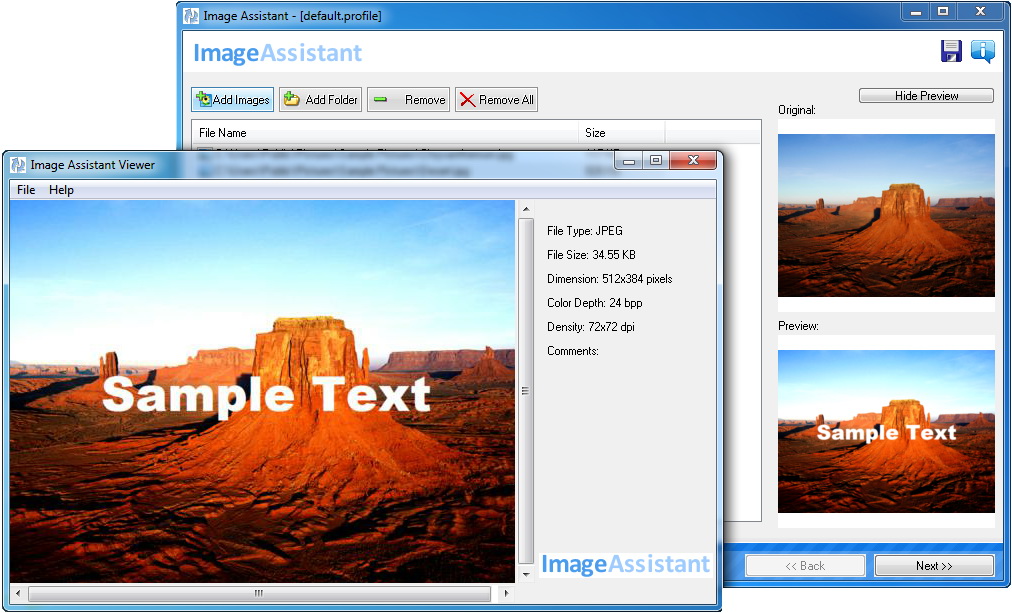


Image Assistant is an advanced photo converter that supports over 90 different graphic image formats, and gives you a wide variety of ways to enhance and alter images. With batch image converter, getting your photos to fit wherever you want them to has never been easier! Resize, rotate, watermark, and even convert your images with ease. Customize pictures by converting them to sepia or add a border.
With image resizer you have full control over the name for your resized images. Image Assistant is also a perfect utility for creating thumbnails. The program works with the major image formats, including JPEG, GIF, BMP, PCX, TIFF, PSD and PNG.
Key features:
- Convert pictures between the most popular image formats;
- Batch image processing;
- Live preview;
- Rotate and mirror;
- Add image/text watermark on output image;
- Auto renaming;
- Cool graphical/color effects;
- Built-in Google Picasa uploader.
System Requirements:
Windows 2000/ 2003/ XP/ Vista/ 7
Publisher:
ExtraLabs SoftwareHomepage:
http://www.extralabs.net/image-assistant.htmFile Size:
5.09 MB
Price:
$24.95
GIVEAWAY download basket


Comments on Image Assistant
Please add a comment explaining the reason behind your vote.
iPhone app giveaways »





Android app giveaways »





saw no options for sepia or adding borders, anyone find these customizations?
Save | Cancel
#1, Len, you might investigate PT Lens for lens distortions. Works fine for me.
Save | Cancel
This is what I've come to appreciate about GOTD, the comments about all the well written freeware alternatives that are available.
Save | Cancel
Not as unique as expected I'm afraid hence why pay whilst there are plenty free tools available?
Agree with #14 but XnView scores a wee bit better... I would go for that one.
Save | Cancel
After reading the overwhelming negative responses to this software offer, I decided I would withhold judgement until after previewing the software site....that is until K9 Web Protection automatically blocked the site with this warning:
"Category Blocked
The site you tried to visit belongs to a category that your computer is set to block.
http://www.extralabs.net/image-assistant.htm is blocked because it is currently categorized as:
Spyware / Malware Sources
Sites which distribute spyware and other malware. Spyware is defined as software which takes control of your computer, modifies computer settings, collects or reports personal information, or misrepresents itself by tricking users to install, download, or enter personal information. This includes drive-by downloads; browser hijackers; dialers; intrusive advertising; any program which modifies your homepage, bookmarks, or security settings; and keyloggers. It also includes any software which bundles spyware (as defined above) as part of its offering. Information collected or reported is "personal" if it contains uniquely identifying data, such as email addresses, name, social security number, ip address, etc. A site is not classified as spyware if the user is reasonably notified that the software will perform these actions (i.e., it alerts that it will send personal information, be installed, or that it will log keystrokes).
Computers / Internet"
That decided it for me...No way I'll take a chance on this when there are free (safe, proven and true) alternatives out there.
Save | Cancel
Well the description looked good, shame the program is so basic. Wasted time downloading and trying, but have now uninstalled. Plenty of free software that is far better.
Save | Cancel
Another free program that works well is: http://bluefive.pair.com/pixresizer.htm
Save | Cancel
So many free tools (XnView, FastStone, IrfanView, etc., etc...) resize images in batch mode (and do very much more than that, also in batch) that it almost seems dishonest to attempt to sell the same functions (but reduced in features) for any price whatsoever. These days, and for many people, $25 is a chunk of change to pay for something available in a much better form for free. It's almost as if the developers of this similar tools are trying to take advantage of the ignorant public who absolutely would prefer XnView or FastStone for free if they just knew about them.
Save | Cancel
I saw a comment there is a tutorial on resizing - if I have to watch a tutorial on a simple step then it's questionable if it's worth it - I could not figure it our myself, I thought I clicked everything; oh well, it installed perfectly and ran and "converted" ok, but I'm not impressed; needs more user-interface work. Thanks for the opportunity to test it.
Save | Cancel
Didn´t find program's "Unique features" (see their Homepage) unique!
The following Software is free, portable and has lossless features:
- IrfanView: lossless rotate and crop (menue "Options", not: "Image")+ simple batch rename + OCR + ...,
- JPEGCrops lossless crop for other photo and screen formats, not cutting off feet etc.
- Ant Renamer Portable (and others) automatic file renamer.
State of the art is "lossless" JPEG-manipulation if possible! And I will never understand why many programs for picture manipulation etc. are not portable and need to bloat the registry! Image Assistant's homepage seems to ignore portable and lossless. Having installed about 100 programs + lots of portables, I'm a little bit shy about adding and trying just for fun.
Advice: Some time or the other I have to restore my Windows (Vista/XP) partition from backup-image. Some good programs on my separate program's partition which were not offered as portable, needed no renewed install and were still fully functional.
Save | Cancel
Completely unimpressed and immediately uninstalled it. Why on earth would you pay for this, when there are so many free options? Absolutely nothing new here.
Save | Cancel
One question: does this allow you to rotate pictures without loss of quality?
Save | Cancel
I found this had few options (no cropping that I could find, for example), and I couldn't get any large images accepted.
Save | Cancel
Too bad not for MAC
Save | Cancel
So why would you pay for this when FastStone Image resizer does the same things and is free? The FastStone products including their
terrific free Image Viewer have an excellent reputation and this piece of software has none. I don't have any connection with FastStone. Just been a very satisfied user for many years.
No thanks, I'll stick with the freebies I know and trust.
Save | Cancel
So, Picasa does it, FastStone does it. What's so new and fancy it would need a separate program ?
Save | Cancel
underwhelmed. FastStone Photo Resizer at least lets you set parameters for effects. this uses FreeImage [ http://freeimage.sourceforge.net/index.html ] as it's core, and doesn't go much farther. I didn't see a place to add new effects. thumbs down.
Len, there's at least one free photoshop/dog+world plugin for barrel and pincushion out there. [I use it in XNView] and the free PhotoFiltre has one too. Google and be free.
Save | Cancel
Easy download, installation, and registration. Initial experience with program is as expected (add basic effects, watermark, etc.) but I didn't see any help button, document, etc. other than the brief comments at each step. The developer's web site has only two flash tutorials (how to resize and add a watermark) and four screenshots. There is a forum on the web site but the entries don't appear to be very helpful either. That's about it. I suppose the author felt it was simple enough software that most users will be able to figure it out on their own. I'll have to experiment with the program some more to determine if it's worth the price after today's free offering.
Save | Cancel
I'll be giving this a try, see what it has over.... well, FastStone Photo Resizer to XNView. something really new would be handy.
Save | Cancel
I would add support for barrel and pincushion distortion correction, and make them adjustable for different cameras. If you did that, I would buy this just for that.
Save | Cancel