English
Every day we offer FREE licensed software you’d have to buy otherwise.
$25.95
EXPIRED
Giveaway of the day — Icepine Video Converter Pro
Icepine Video Converter Pro - Convert and enjoy your favorite movies anywhere!
$25.95
EXPIRED
User rating:
239
22 comments
Icepine Video Converter Pro was available as a giveaway on December 13, 2009!
Today Giveaway of the Day

Drastically reduce image file size while preserving stunning quality.
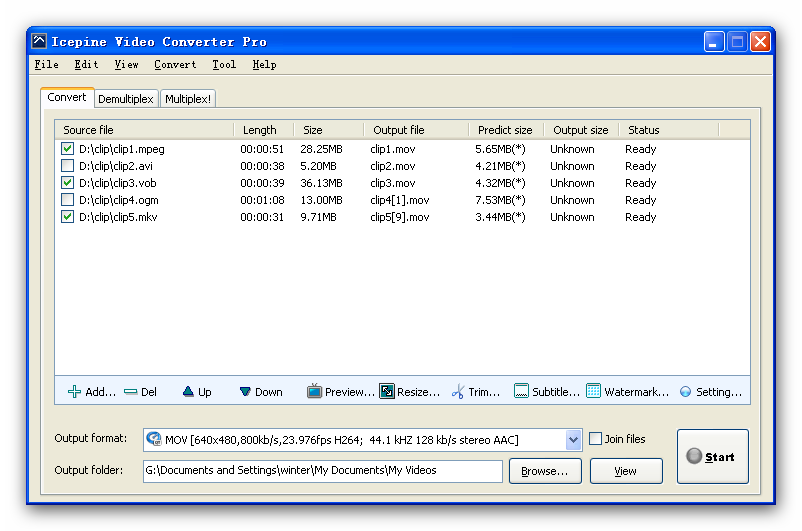

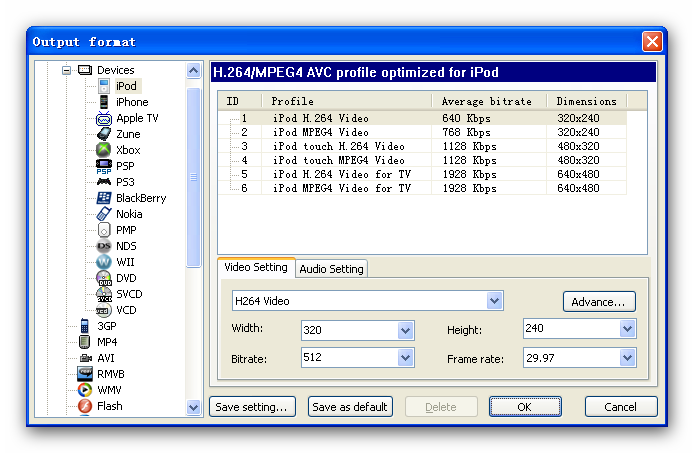
Icepine Video Converter Pro is a powerful and easy-to-use tool for converting between almost all popular video and audio formats.
Key features:
- Convert video to iPod, iPhone, Apple TV, PSP, PS3, Xbox, VCD, DVD, mobile phone, MP4 players and etc with just several clicks.
- Convert to all popular video formats with high quality. Support converting HD videos including H.264/AVC, AVCHD, MKV, TS, and etc.
- Demultiplex, multiplex video files.
- Convert and burn DVD, SVCD, VCD.
- Join video files together.
- Trim video files.
- Edit video and audio, support subtitle overlay, watermark effect, levels adjust, video crop, video resize, audio equalizer, audio normalize and audio gain.
- Transfer converted video files to PSP, iTunes.
- Extract soundtracks and still images from your video.
System Requirements:
Windows XP (SP2 or later), Server 2003, Vista, Windows 7
Publisher:
Icepine SystemsHomepage:
http://www.icepine.com/index.htmFile Size:
9.04 MB
Price:
$25.95
GIVEAWAY download basket

Developed by MPCSTAR

Transform media files for playback on various devices.

Developed by VSO Software

View the feedback from multiple IP cameras.
Comments on Icepine Video Converter Pro
Thank you for voting!
Please add a comment explaining the reason behind your vote.
Please add a comment explaining the reason behind your vote.
iPhone app giveaways »

Point-Taken replaces the messy parts of scoring with a clean, fast, and reliable digital score pad.
$0.99 ➞ free today

ApiClientSync is a fast, fully native API client for developers who want powerful tools without unnecessary complexity.
$0.99 ➞ free today

This app will help you do a simple vocal warm up quickly anytime, anywhere without music instruments.
$0.99 ➞ free today

$0.99 ➞ free today

This app will take your strength to the next level by incorporating tempo lifting into your workouts.
$0.99 ➞ free today
Android app giveaways »

$0.99 ➞ free today

$4.99 ➞ free today

Merge Cafe is a brand new merge game where you can combine tasty treats to make them even sweeter.
$4.99 ➞ free today

$1.79 ➞ free today

Beautiful transparent Square icon packs in neon colors with lines around them.
$1.49 ➞ free today
#23 Gmman
But not when he gets it wrong on almost every occasion. It's not useful at all.
#21 malimar snoot is exactly right.
Save | Cancel
# 9 - geedeepee (is that really a name ?)
No reason to beware !
And you were not hijacked !
You just went far down the webpage and downloaded an adware/spyware packet,
although the icon clearly said: "CARE", and the text said: "If you want to keep your
system healthy, we recommend Advanced System Care".
And then you clicked on the small-lettered: download
How have you escaped today's GOTD's text, screenshots, ratings, system
requirements, publisher, homepage, file size, and price ?
Right underneath this it said with BIG LETTERS: "Download Icepine Video
Converter Pro now" and a button was provided
It's beyound me !
-----
# 17 - Bestvisrtersoftsre (is that really a name ?)
Your link's no. 4 software is broken and does not lead to anything
Correct link is: vdownloader.es
This eminent programme downloads amoung others YouTube, Google Video,
Blip.tv, MySpace, PornoTube, YouPorn etc. etc.
The recent Nov. version has the new YouTube parser and can even download HD
It also downloads RTMP streams from MTV, CBS, RTVE etc.
Saves videos in many formats, see full description and screenshots on their
neat webpages
Already 2 mio downloads from Brothersoft and 3,5 mio from themselves
and download.com
-----
# 18 - Cal-el
.FTV also supported on abovementioned programme
Greetings from Tobiasson, Oslo, Norway, Europe
*
Save | Cancel
@21: Calm down. At least what he's doing is somewhat useful. It's not just for himself. Having a quick review of a giveaway helps people decide whether or not to try it. Sure, he's getting a bunch of clicks from here, but it's just a side effect. You can't prevent people from reviewing programs just because they link to their own site.
Save | Cancel
Normally I wouldn't want to post without commenting on the software, but mike, I really don't think you get enough credit for your excellent and detailed analysis and explanations of many of the giveaways, especially the media related ones.
Thanks again for all the help.
Save | Cancel
@#1 -Ashraf --
I checked your site on Alexa.com ... you are getting 41+% of your visitors from Giveawayoftheday. That's almost half of your traffic!! So your strategy of driving traffic to your site from this one is paying off handsomely. Do you think everyone else who comes here realizes that's what you're doing?
- Mali.
Save | Cancel
Might be just me but.. converted MP4 file to avi - vision is great .. but no sound at all. Tried twice with the same result- is this a bug?
Save | Cancel
To those people who keep recommending the "freeware" program, "Super:" super is total crap! If you want to junk up your system, use "super." Never again!
Save | Cancel
It looks like it doesn't regognize .flv files at all.
Save | Cancel
SUMMARY: – Strengths outweigh weaknesses. Program is definitely a keeper. Thumbs up. Thanks, GOTD & Icepine Systems.
FREEWARE OPTIONS:
HandBrake
Super
MediaCoder
Great, top 10 free video converters,
http://www.freevideoconverter.org
Save | Cancel
I was looking for something like this earlier this week. So, I have played around with a lot of similar software. It seems to do fairly well, and is defintely not as complicated as erightsoft.com (the leading free software for video conversion). However, for whatever reason I can only get it to convert a little over a minute of the video. I assume it is a problem on GAOTD's side with the activation key. I will uninstall and reinstall and see if that helps.
Save | Cancel
Does this software work with MTS files created by many HD Camcorders these days. Any preferences for editing MTS files? JVC doesn't provide editing software with their GZ-HD300
Save | Cancel
There are a lot of video converters, & most are based on collections of the same free-ware &/or open-source code -- question is what does Icepine Video Converter Pro offer that others don't? To answer that question...
It doesn't have a skinned (stylized) program window [GUI], which to some is a plus. The window can't be re-sized, which is becoming so common, even on apps costing 3X as much, that I've stopped counting that as a con. While the program's exe file shows version 2, it could (& should) benefit from further development, in general making things easier to find & [much] more intuitive. And while it does have a help file to show you how to use the app, it doesn't have word-wrap on [viewed in XP], & the spell-checker was apparently off when it was written [not a huge deal, but so simple to correct/avoid, I have to wonder why it wasn't].
Icepine Video Converter Pro works at roughly average speed [compared to other video converters], though in XP it uses more of your CPU, at ~47% with a quad vs. the usual ~25% [25% usually indicates just one core]... Using more of your PC/laptop's CPU is a good thing, as long as it makes converting faster. It offers a few video filters, though if you really want/need to use filtering to improve the quality of your video, you're *MUCH* better off using VirtualDub &/or AviSynth [both free]. You can trim the length of your imported video clips, but doing so is a bit awkward -- you use times rather than the far easier dragging or inserting in/out markers with a video preview. Previewing itself is handled by Windows' Media Player, which is a definite Con -- wmplayer simply cannot handle enough of the formats you might use. Icepine Video Converter Pro has quite a few templates that are stored in .ini files rather than the usual .xml -- this *might* make editing/fine tuning those templates easier. Beyond the templates you can make most settings manually as well, but it would be Very nice if you could set peak as well as average bit rates [right now you can only set average, which is 1/2 or 1/3 of what you need with variable bit rate encoding].
Icepine Video Converter Pro does handle subtitles, but I'm not sure how handy that is... Many DVD ripper/converters will add permanent subs [they're basically pasted on top of the video & then encoded that way], but I've always wondered who can read them when watching [often tiny] video on a hand-held player?
[Otherwise if subs are important to you: there is no standard way of handling subs outside of video DVDs -- MKV comes closest *with the right software*, followed by DivX, & some special mp4 type codecs (Nero Digital for example) display embedded subs when using *their* player. Windows Media may be the easiest to use with/for switchable (on/off) subs, followed by Real, but both require special software & methods to set-up that unfortunately almost no one uses. Flash video is the most difficult, & expensive (i.e. software required) format to add subs to, though YouTube is trying to help there.]
In the help file the developer notes that DivX is the default encoder, rather than the usual [& free] Xvid -- if you want to watch video converted to DivX there is a free version of the codec, but you might be better off setting up Xvid to handle the task... Xvid is more common, has much less impact on your Windows install, & since it's free, you don't have to worry about feature-limited versions. And Xvid normally takes the place of DivX quite nicely, even on/in DVD players that handle the format.
Digging a bit deeper into the tech aspects, Icepine Video Converter Pro is nice in being self-contained, with very few registry entries... Often suggested alternatives including Handbrake, Format Factory, Super, MediaCoder etc Are Not! Depending on what else you have installed (or may want to install) they can easily cost you an all-nighter trying to get things working again. You can find several alternatives at videohelp.com -- don't know if it's still available (live), but yesterday Asraf's & other sites detailed how to get (the older) version 7 of Cyberlink's suite for free -- WinX_HD_Video_Converter & Fast_Video_Converter [appear to be the same app] have both often been available for free lately, & the latest version seems to work quite nicely, with a bit of a speed boost too -- if you run an ATI graphics chip/card, check out their CCC converter, as well as A's Video Converter, which make use of the GPU to get often incredibly fast conversions [in win7 64 I've (briefly) hit (reported) 800 fps encoding 720 x 480 mpg2 to 320 x 240 wmv].
Save | Cancel
Vista 64 bit. Very fast conversion, quality is very good and many choices available. As I do many conversions this is a keeper. Thanks GOTD!
Save | Cancel
oops! that should be USE not ise
Save | Cancel
what format does a standard dvd video player ise to play videos on your tv? why all the conversion programs if there is one standard for playing videos on your tv/.
Save | Cancel
Program installs easily (XP3). Activate works after installation as per instructions. I really like what I see here. THANKS for the PROGRAM!
Save | Cancel
Just want to say that this app installs perfectly on Windows 2000 (pro sp4), though this isn't mentioned anywhere by Icepine. A nice little program, seems to work well so far, but still testing it. As HappyPerson mentioned, there's good a local help file.
Save | Cancel
PROS:
* Downloaded, installed, activated fine on Vista x64 OS.
* Activation "activate.exe" file must be run before opening program.
* Registration is successfully displayed in program.
* Detailed, complete local Help File provided within program.
* support email address provided in Help File.
* GUI is simple, clear, easy-to-navigate, easy-to-understand.
* supports numerous input/output video & audio formats.
* Program may be installed on 2 computers, as long as user operates only 1 instance of the program on 1 PC at a time.
* supports drag-and-drop for source video/audio files.
* allows for multi-plexing and de-multiplexing.
* allows for preview of source file.
* supports subtitles.
* fairly easy and simple to use - i.e., low learning curve.
CONS:
* window may not be maximized or re-sized.
* video input format (moonshell DPG) not supported.
* video output formats (AVCHD, DV, OGM, Matroska MKV) not supported.
* audio output formats (CDA, other playable in WMP) not supported.
* subtitles (DVD, SRT, SSA, ASS, VOBSUB (IDX/SUB)) are not supported.
SUMMARY: - Strengths outweigh weaknesses. Program is definitely a keeper. Thumbs up. Thanks, GOTD & Icepine Systems.
FREEWARE OPTIONS:
HandBrake
Super
MediaCoder
Save | Cancel
Small size install pack, and superb powerful! Works perfect under Windows XP, SP2. Different from Ashraf, my favorite alternative convert tool is FFMpeg, a free cross-platform solution to record, convert and stream audio and video, and I love command-line tool.
Save | Cancel
A smart little tool, but it seems highly priced for what it is. As Ashraf said, there are two FREE alternatives!
Save | Cancel
These converters are two a penny, and mostly free but I will give anything a try. This is a little different from the others in that it has demultiplex/multiplex (which apparently only works on avi files?).
So, I chose a clip of one and half minutes and first of all de-multiplexed it, which means separating the audio and video. Well, no choice of formats! But it worked.
Next, put it back together (multiplex). Again, only goes back as an avi! It should have been identical to the original, and it was as far as I could see and hear although the file size was a few bytes less. So far so good!
Now to convert it - I tried mpeg4 but it didn't like that - so mpeg1 was attempted. Seemed to have a few brief stops during the conversion, probably memory problems, but it completed successfully.
Finally, play the end result!
Oh dear, the audio is a whopping nine seconds ahead of the video! I've never had that bad audio/video sync before! However, quality is good.
Looks like a work in progress to me. I hope the developers will also change the general layout because a number of "features" simply were not easily visible. I will stay with the free stuff for now.
Save | Cancel
The Good
* Supports audio and video conversions.
* Supports many input and output formats.
* Supports output profiles for various electronic devices.
* Supports the ability to do stream copies.
* Has abilty to mux and demux.
* Has built in PSP transfer-er and DVD/SVCD/VCD burner.
* Can do various video including but limited to watermarks, trimming, and adding effects.
* Can do various audio edits including but not limited to trimming, and adding effects.
* Gives user large freedoms in terms of selecting codecs to use.
The Bad
* An error window pops up when trying to set video height and width as "original" for some output formats.
Free Alternatives
iWisoft Video Converter
FormatFacotory
For final verdict, recommendations, and full review please click here.
Save | Cancel