Every day we offer FREE licensed software you’d have to buy otherwise.
Giveaway of the day — Halloween in the Attic 3D Screensaver
Halloween in the Attic 3D Screensaver was available as a giveaway on October 24, 2010!

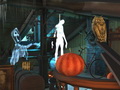
Have you ever wondered what happens in the attic of your house on All Hallows Eve? Are you brave enough to venture into the dark unknown? You'll see it is far from being peaceful and quiet. At night your storage of old and forgotten things turns into a shelter for spooky ghosts, devilish Jack O'Lanterns and other creepy characters. Sneak upstairs and explore the mysteries of the scariest night of the year with this 3D Halloween screensaver.
Features:
- Full 3D environment
- High-quality animation
- Extremely realistic, colorful graphics
- Create the holiday atmosphere right on your desktop
- Spooky Halloween music and sound effects
- Digital Clock
System Requirements:
Windows 9x/ 2000/ XP/ Vista
Publisher:
Astro Gemini SoftwareHomepage:
http://astrogemini.com/halloween-in-the-attic.htmlFile Size:
10.9 MB
Price:
$9.95
Featured titles by Astro Gemini Software
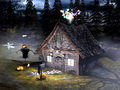
The Moon is full! Spooky Halloween is here! Haunted house deep in the woods invites you for a visit. Scary ghosts welcome you from a distance. Witches on broomsticks are rushing across the sky. There is something going on in this house as you see sparks of magic fire shooting out of the chimney. Chilling sounds and devilish Halloween music add to this mood of your darkest nightmare.
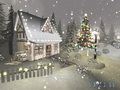
This terrific 3D screensaver will help you feel the magic of the Holiday Season. You will find yourself in a quiet winter forest with a few cottages scattered around. Everything is covered with snow and the nature is waiting for a miracle to happen.
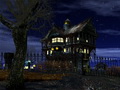
A deserted mansion on the hill suddenly came alive! It's Halloween and all the creatures are on a wild rampage. Vampire bats circling in the air are looking for prey, Jack O' Lanterns have gone crazy and there is some kind of odd celebration going on inside. Create a true atmosphere of haunted Halloween on your screen with all the favorite characters in the most realistic 3D setting.

Experience the serene atmosphere of a quiet winter night with this outstanding Winter 3D Screensaver. It will take you away to a peaceful setting with a few cottages covered with snow, with smoke coming out of chimneys and slowly rising as there is no wind to disturb anything in this quiet winter paradise. Relaxing music and high quality 3D graphics will help you forget about the busy world around.

Thanksgiving! It's a special time of caring and sharing, remembering the best and being grateful for all the wonderful things in your life. Visit Harvest Time Farms, a place that perfectly captures the essence of fall and the sentiments of the season. You can almost feel the autumn breeze as you watch the lively surroundings of a rural house on a sunlit hillside. Let thankfulness fill you heart on this day of love and plenty!
GIVEAWAY download basket




Comments on Halloween in the Attic 3D Screensaver
Please add a comment explaining the reason behind your vote.
iPhone app giveaways »



Android app giveaways »





Giveaway of the Day - Halloween in the Attic 3D Screensaver
Great for halloween day, it really make sense of the day halloween. I very like it.
Save | Cancel
I installed the software without problem on XP sp3, only to find out the sound effects were there but, no video. Just a black screen with the time and FPS active. I went to the website and re-downloaded. Now I only have an un-regisrered trial version. Will see how long this lasts. Hopefully for the week through Halloween!
Save | Cancel
Installed, registered and ran fine on WIN7-64. The 3-D effect was okay for an animation. The scenery repeats a lot - too bad there aren't more different scenes than there are. Not a big deal, though. It's a screen saver, not a slideshow. The theme was definitely Halloween and not too scary for children. The music wasn't very creepy... it was more like game music from something like Tetris. Not bad... not particularly spooky. More cute than scary.
Save | Cancel
by the way ... setting rez to 800x600 gets the best results on slower machine (and even fast ones)
however it failed to connect to install it.;
Save | Cancel
Personally, I found this screen saver to be quite nice. Looks more like a child's screen saver, but, hey, this one was free. Extrememly to install and activate. Thanks GOTD, and God bless each and every one of you.
Save | Cancel
For some reason, this does not run on my system. The "Loading" screen flashes, the music starts to play, and the screen goes black. I've rebooted my system, uninstalled & reinstalled the screen saver, and the same thing happens. So this gets an unfortunate thumbs down from me.
Save | Cancel
I installed it on my XP Pro SP3 and it runs for a few seconds and stops. Nothing more. Like it is a preview or something. I have it set to initiate screensaver after two minutes of idle PC time t test it, and it starts but lasts only a few seconds and then stops. I have checked all settings and other screensavers work fine. When the Halloween screensaver runs it works ok, looks nice, but, just don't last. My little ones are disappointed.
Jan :)
Save | Cancel
Comment by dwm @ No.14 = "Who cares if a screensaver is power hungry. It’s a screensaver."
Hi Folks . . .
Dwm - I've seen some poorly thought out comments on here in the past . . .
BUT yours is an all time CLASSIC !!! Do you even know what a screen saver is for ???
Contrary to the belief of some - LCD screens CAN & DO SUFFER FROM SCREEN BURN - I have 2 dead laptops - ( from customers who DIDN'T BOTHER with screen Savers ) - in my loft which have appalling burn on them - you can quite clearly see shapes etc. over the screen - while it's switched OFF !!!
Those who insist that screen burn is a thing of the past - need to experience the reality BEFORE making their sweeping statements. Besides - on my PCs - I use 1x Hitatchi Dual Input 21" CRT screen & 2x Hansol 19" CRT Screens - reason ? - They work really well & you have to spend A LOT of money to get an LCD screen that looks even close to the quality of these CRTs ! I have the space for them - so why should I spend money I don't have - just to keep up with those who do ? Especially when it means taking a reduction in the quality of the picture !!!
Before I even got to your remark - I was planning on asking if that the developers of this software could offer a reduced consumption feature in their future releases / updates because - unlike those who have powerful CPUs & GPUs in their powerful PCs & Laptops - I DON'T - neither does a hell of a lot of people who are still using the same XP PC that they were 4 or 5 years ago ! - Everytime someone mentions the fact that many are still using older machines - there's always some genius who suggests that we by a new machine coz that's what they did ! Well I'm sure many people would love to be able to afford a nice new PC ! I personally have a couple of powerful PCs BUT I don't run them very often due to the cost of my Electric. I'm on a key meter so IT MATTERS ! - I'm out of work so running my PCs 24/7 isn't an option. Instead I run a couple of my Laptops - which together use less electric than 1 of the PCs !
Anyway - back to the Screen Saver - You'd have a much bigger purchasing Audience - if you made your Screen Savers - Backwards Compatible. You can make them run at FULL POWER - High FPS etc. for the High End systems & you could offer a switch or menu of reductions etc. in the settings panel for those of us who's machines just get a great picture - that STUTTERS ! Since I have several Screen Savers which can do exactly what I'm asking for - it proves that it's not difficult to do. Obviously you want to be improving the depth / reality etc. for those who have powerful machines & Win 7 64 bit on them - BUT - DESPITE being the FUTURE Technology - THEY are no where near the majority - Win 7 64 Bit isn't even a full standard yet - 32 bit is just as popular - as are 32 bit machines ! You could quite easily offer the ability to lose FPS & lower the Resolution etc. to give us something which is still pleasant to look at while not killing our machines performance in the process.
If I'm trying to transfer my CDs to MP3 OR listen to Internet Radio - Live Streaming etc. - the last thing I need is for gaps in the recordings OR in the streaming - purely because the screen saver kicked in & the system couldn't handle both ! - IF I have to disable the screen saver - It's self defeating !!!
Even though I'm running XP SP2 on my Laptop - ( Win Seven on my PCs ) - I have got the real Windows Vista Sidebar on my Desktop with all the Genuine Vista / Seven Gadgets I can find on the net ( I'm currently going through several Hundred to see which are any good & which are light on Resources. Windows Vista Sidebar uses around 7 - 8% of my CPU upto 16% when busy. The reason I mentioned the Sidebar is because - as a result - I also have the Top Process Gadget which shows constantly which programs are hogging the CPU so I know EXACTLY how much I've got to use & I know when it's being dragged down - even with the Process Lasso running that we got here a few weeks ago !
One day - We'll ALL have Super Fast PCs & Laptops & Slow / Stuttering graphics will be history - BUT WE AIN'T THERE YET - so until we get there - how about remembering that there's A LOT of customers who have been left behind - purely because they haven't upgraded yet. - There are also those who could afford to upgrade BUT as I mentioned before - IF their PC works perrfectly for everything they need it to do - They are NOT going to spend money needlessly - just to run a screen saver at full speed !
When you consider HOW MANY USERS STILL have older machines & XP or even 98 / 2000 running - that's a lot of customers that COULD be buying this product - IF it worked for them.
I have a customer whose young son bought the PC game "Spore" early last year with his Birthday Money because he'd seen it at his school mate's house & so he wanted to have it on his Dad's PC - Great - He'd got it - except He's never seen it working yet - because the Game requires Pixel Shader 2 or 3 ( I think ) - His Graphics card doesn't support it & because the game's creators didn't bother to offer a reduced graphics option in the game - the poor lad's never seen the game out of it's case & his dad feels guilty because he can't afford the new graphics card !!
This Screen Saver has exactly the same problem ! - I'm NOT trying to suggest that you DON'T strive to utilise the power of new modern hardware - just please remember - NOT EVERYONE HAS IT YET !
I wouldn't be surprised if most of those who mentioned it being a Resource Hog - had more powerful systems than mine or many others - so what hope do we have ?
PLEASE give consideration to Backwards compatibility for those not as fortunate - who knows - it could even make you some money !!!
We've not got rid of the effects of the Recession yet - ( infact - the way the Government is going here in the UK - We'll not be to long before we're back IN IT !!! ) - So not everyone is going to be buying NEW PCs any time soon !
----------------------------------------------------
IF any GAOTD users want details of Vista Sidebar for XP / Gadgets that work or other GUI to improve XP - ( I have TONS of it ) - without killing your machine's performance - please contact me & I'll share what I can OR send you in the right direction of the best places to get them FREE :o)
You can contact me on XP.Pro@NTLworld.com & I look forward to being of assistance if I can !
PLEASE remember to add me to your Approved list so you can receive my replies as a couple of other GAOTD users have struggled !
Sorry it was such a short post today :o)
Congrats for still being awake !
This Post is alss available IN HARD BACK !!! :o)
I hope this has been helpful for some of you :o)
Apologies for any Typos ...
Cheers for now & HAVE A GREAT DAY FOLKS !!
- - Mike - -
- Macs-PC -
LIVE in the UK ! :o)
Save | Cancel
I installed this on my Windows 7, 3gb ram laptop running at a whopping 1.8 (single core) with ATI Mobile Radeon XT1200 with dedicated 256 ram and it runs smooth. I haven't noticed any drop in frame rates.
It's a fun screensaver for Halloween and who can say anything bad about that? :)
Save | Cancel
It's a problem when your screensaver is power-hungry because it increases power consumption and internal heat during what is supposed to be an idle for your computer. The purpose of a screensaver is ideally to give the screen something to do that's more interesting than "turn off."
Save | Cancel
This is cool, hey and it's free. Ignore the negative comments from the others. Hey, at least is not another video audio converter. Mother of all creatures Big and Small, how many audio video converters does one person need anyway. I just wish they had given it away at the beginning of the month of October! Oh and Boooo!
Save | Cancel
Who cares if a screensaver is power hungry. It's a screensaver.
Save | Cancel
well not for me i do not use screen savers. if i am not using the computer i shut it down. no need for it.
Save | Cancel
Downloaded and I do agree I would like better music, but I like it. I have Win 7 and it runs fine. I was unsure of it, when I checked first my mail this morning, to find so many people giving it a thumbs down and it was like 6 am central. Not too many comments but so many negatives. It could be better, but it is free, and I thank GOTD for sharing it.
Save | Cancel
oh and it worked on windows 7 64bit
Save | Cancel
It would be nice to add support for multiple displays. This is a very interresting saver, though as someone else stated it does gobble up the resources
Save | Cancel
Like others, I had no problems with download or install on XP SP3. Perhaps I am way too easily entertained, but I found this cute-fun for the Halloween spirit. It is not scary but that is okay. Saying that, I did forget it was on and heard the unfamiliar voice speaking, that did scare the life out of me! Being in a another room and hearing a stranger in the house can inspire a moment of fear. Thank you for the offer! Happy Halloween!
Save | Cancel
problem fixed thru a system restore.
BEWARE: program seems to Corrupt a few BASS.DLL files
please use caution
Save | Cancel
Installed and worked fine with Windows 7 64bit.
Save | Cancel
big thumbs down this programe has now caused all my screen savers to now have a BASS.DLL fail before they will start thus they do not work as you must now clear fail message for them to start up.
seems all of gemini screen savers are huge memory cpu hogs.
will never download any of their software ever again.
Save | Cancel
Installed it onto XP 32-bit (Service Pack 3) without problems. No activation was needed, no difficulties were encountered.
The screensaver setup window (via control panel) does seem to use a lot of the processor power. I couldn't really run anything else usefully while I set the parameters (you may want to turn the music off!).
When the screensaver was running, I got 150-180 fps, which seems excellent.
The machine I used is nothing special:
Processor: AMD Athlon(tm) 64 Processor 3500+, ~2.2GHz
Memory: 3582MB RAM
DirectX Version: DirectX 9.0c
Card name: NVIDIA GeForce 8800 GTX
Not the most impressive graphics, but hey, it's only a screensaver!
All that said, I think that it is well worth installing, as it is free.
Save | Cancel
Downloaded and installed fine XP SP3. A little cartoony but works well and certainly fits in for the season. Would like if possible GOTD to see the Thanksgiving and winter screensavers. Thanks GOTD
Save | Cancel
This screensaver is power hungry! It was taking 50% of my CPU just while selected in the Display Properties dialog box.
Overall though, I don't see anything terribly wrong with the screensaver. Might be nice to have your own choice of background music but it was nice to have the gamma adjustment option at least.
Save | Cancel
This is amazing screensaver. It is not very scary for me but it will be very scary for someone. If custom Music is available for the screensaver, i think it would be more interesting for the User.
Save | Cancel