Every day we offer FREE licensed software you’d have to buy otherwise.
Giveaway of the day — Full Uninstall 2.10
Full Uninstall 2.10 was available as a giveaway on June 12, 2012!

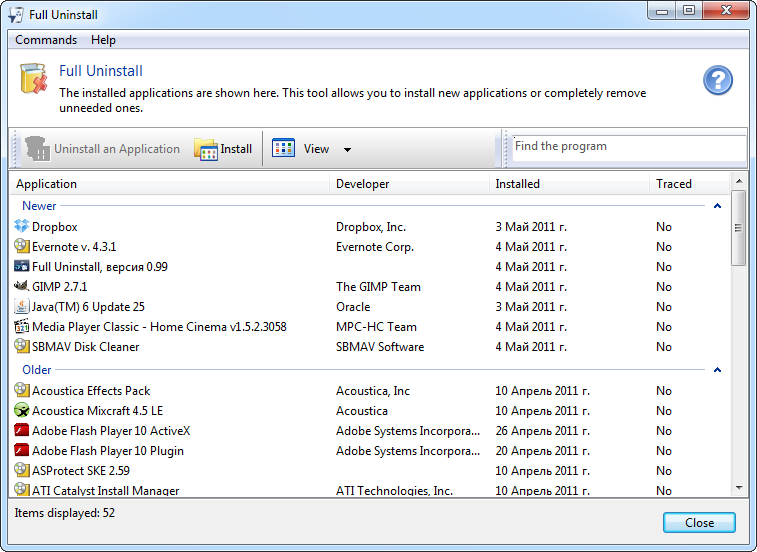

A common problem we often face with, when uninstalling unnecessary software, is various traces left in the system: unneeded files or folders on a disk, registry entries and so on. This can happen even if an application was removed correctly with its own uninstaller - a special program provided by a vendor to uninstall the application.
The Full Uninstall program is intended to solve this problem: It allows you to COMPLETELY uninstall unnecessary applications from your system.
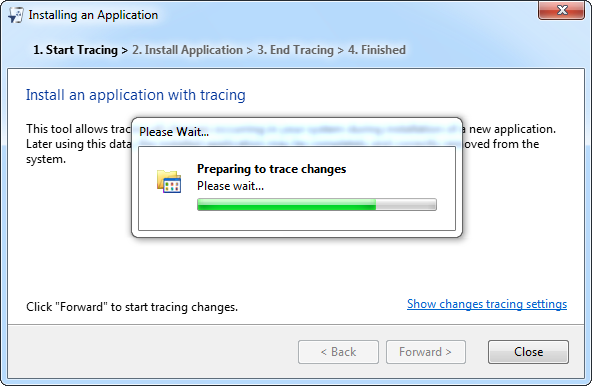
The main function of the tool is the complete removing of programs from your computer. Full Uninstall monitors all changes made to the system during the setup process of a certain application. You can easily learn what file or registry entries were modified during the installation. Using these data, Full Uninstall completely removes an application when you order it to.
System Requirements:
Windows XP/ Vista/ 7 (x86/x64)
Publisher:
ChemTable SoftwareHomepage:
http://www.chemtable.com/full-uninstall.htmFile Size:
4.14 MB
Price:
$29.95
GIVEAWAY download basket




Comments on Full Uninstall 2.10
Please add a comment explaining the reason behind your vote.

iPhone app giveaways »


Android app giveaways »





Let's see; 10 minutes after the start of this giveaway and there is a comment (#2) extolling the virtues of this unknown software that is so new it hasnn't yet cleared up an allegedly false positive with AVG. My personal opinion would be that the comment is pure hype from someone who is somehow connected to the developer, and the same conclusion for the 135 or more alleged votes in favor of that comment. I didn't just fall off the turnip truck yesterday, know what I mean.
Save | Cancel
I tried several times to install - it kept giving me an error message that it has stopped working... Please let me know if I could try again tomorrow. Thanks
Save | Cancel
Another replica of the build-in software... there is missing some features in todays program, so I will not have two of the same program running on my PC. The main difference is the LOG file that make it possible for "Full Uninstall" to know what have been installed, AFTER "Full Uninstall" have been installed !
"362 days of free updates", wow... if you trust that then is there a little chance that you maybe get more features within that "362 days of free updates" ! Well... I dont personally trust that... why ? Todays version 2.10 was made to fit Windows XP and cant do no more than that version of uninstall !
Todays software prove that there IS something left in the registry, which some people in this forum say is wrong ! BUT the main concern I have... is that, if "Full Uninstall" or any other program make a log file then what happens to the shared tweaks inside or outside of the registry ?
I still uninstall difficult manually, because it is more safe than ANY software can offer !
Save | Cancel
I'm sad: this license have one year limited, not a lifetime license...
Save | Cancel
#14 {Even the free version of Avast won’t let it install.}
This is not true. I had Avast running while I installed and activated this Full-Uninstall GOTD software. Avast did not stop it.
Personally I like Your Uninstaller! and prefer it.
It was given in a previous GOTD.
Save | Cancel
#66. Edu,
Yes, but then I use Ccleaner's registry Scan & Fix, and it appears to have done the same job, than today's Giveaway. For free.
Save | Cancel
A very good freeware alternative is Comodo Programs Manager. If I didn't have it, I might have tried today's special after reading all the positive comments.
There is a ChemTable program I like very much: Registry Life. It is a registry cleaner, which I know many devotees of this site don't like. But I think it does a great job of clearing out deadwood that you would never even imagine was hiding inside your registry. I have tried it on both XP and 64-bit Win 7.
It is freeware, but it tries to install Full Uninstall unless you make the appropriate correction during the installation.
Save | Cancel
@ 77 (joe wissel) - Go to "Other Functions" in a Program:)
Save | Cancel
I have had the same problem as #29 and 37 with Windows 7 64bit. As soon as I enter the registration number, whether by cutting and pasting or manually, the program closes. So far, no one has addressed our problem.
Save | Cancel
About (previous giveaway) Your Uninstaller:
Works good for me (i.e. has made no damage) and updates without problems. I think that is the right way. I expect it to warn me before the next major, non-free upgrade. Like some other well made 'giveaway' programs do.
Save | Cancel
@ Journey, I have used Revo Uninstaller & Uninstaller Pro & it works the same way as total uninstall. I checked a few out by installing a software that was about 6MB using 2 uninstallers & after installing I uninstalled one & each found remnants left by the the software so I came to the conclussion that none are perfect.
Save | Cancel
To #54
It looks like you haven't tested that giveaway today, it already has this option to view found traces BEFORE the user chooses to delete those after the standard uninstall routine. If you apply to remove, it simply is your own fault because you can see what will be deleted long time before you do so. I have never seen an uninstaller that shows traces of an installation before you prompt to uninstall, this here did.
Most installers with uninstall routines should warn you, when some files of the installation - that were there before - will be removed. That is not the job of 3rd party uninstallers in first place. It's the job of the software vendor which uses already installed files and replaces them with newer/own one's using it's own installer to check for those dependencies.
But sure, checking for dependencies when uninstalling is always a good idea for an automated uninstaller. So you propably used an automated uninstaller, this here isn't, it's half-automated. And maybe that is the better way (because it gives you full control to apply what will be deleted instead of wiping it straight away)
To #63
FU 2.10 shows 166 registry entries and 42 disk items on it's own installation, dunno what more to expect (so i assume that 99% of it would be erased). Uninstalling an program with itself is also not funny but more dumb.
For me it's not an ultimative perfect unfailable uninstaller (you will not find that anywhere, either with that name nor it's functionality), there is much room for improvement and space for more features to add. But from what i have tested so far: it's fast, it's easy to understand, it's safe and you get an uninstaller that is able to remove most of the traces from installations.
Also i look forward for the included 363 day update period and expect improved upcoming version(s).
So thanks for the giveaway, will see how it goes in further testing.
Save | Cancel
Many Uninstallers BREAK Windows because only the programs uninstaller knows how to uninstall itself properly!
Save | Cancel
System: Dell 530, Dual-core@2 GHz, 2 GB RAM, Vista Home Premium, AVG Free Edition.
The program installed flawlessly, AVG Free Edition did not object.
I was startled by how fast the list of programs came up. REVO (which I have used for ages) always takes several minutes to generate the list on MY computer. This one took less than a second to generate a list of 240 installed items, and cleanly removed the items I requested. Apparently, the issueds above with AVG and so on have been dealt with during the day, as in the system noted it works great. Thanks for the program. I'm keeping REVO as backup, but so far I like this one a LOT.
Save | Cancel
I have used most as well though not Full Uninstall. I have used Advanced Uninstaller Pro, Your Uninstaller, Revo Uninstaller Pro & a couple of others I do not recall. Has anyoe used the above 2 & used Full uninstall ^ tell me the difference?
Thanks!
Save | Cancel
I use Comodo Program Manager which does the same thing plus offers to backup the uninstall so that you can easily re-install it again at a later time. But,
There's another way that hasn't been mentioned yet:
Cameyo is a freeware app that watches while you install a new program and records all the changes made to your system. Then, when the program finishes the install process, Cameyo undoes it, returns your system to the place it was before the install took place, and then recreates the process all within a single .exe executable, portable version of the program.
You can then move the app to a zip drive or to another computer or, remove it completely, leaving no trace.
Save | Cancel
where do you register the key code
Save | Cancel
Unfortunately, I have other results, concerning the false positive.
Nobody can enforce you, not to install this software, so, use this software at your own risk.
If people cannot patch their machines for whatever reasons, you will not know that your system has been compromised.
Keep that in mind.
good luck
stay safe
Save | Cancel
I've used many uninstallers, although one of my favorite, thorough programs is the "Your Uninstaller". GOTD gave it away some few months ago. Here's a link for trail/purchase. Thanks for today's GOTD. I'll try this one out!
http://download.cnet.com/Your-Uninstaller/3000-2096_4-10143715.html
Save | Cancel
... echoing #34's request for a compare of this one to (previous giveaway) Your Uninstaller!, and thanking for #49 for coming through on that.
Am inclined to pass on this one unless it has some substantial advantage over Your Uninstaller!, which I've been happy with.
Not to mention other GOTD goodies, such as WinUtilities and Glary Utilities!
Save | Cancel
CCleaner has many issues and bugs! Webroot, Norton, and Anti-Keyloger have all dectected problems with CCleaner. It is always best to run a check on any program, mainly free programs. The Norton community is on top of all the programs with issues and we post them in our community updates!
Save | Cancel
AWESOME! I had a program I kept trying to uninstall from the add/remove programs in control panel (Win 7, 64 bit) and it wouldn't go away. I installed this program, it found the bits that were left in the registry and deleted them. The program is now GONE! Thank you so much! This is a real keeper!
Save | Cancel
I would just like to make a comment. I have been coming here for years now and I have written a few comments, here and there. I have seen a lot of bad comments posted here that, those that posted should never have written. Give away of the Day, doesn't have to give product "FREE" to one and "ALL" just to be trampled on. I don't know about computers that much, but when I come here to check on what the FREEWARE is for the day, I want to download....but.... everyone gets on here and starts...Oh, this is great software...then the next person says, this is not good, I wouldn't download it...then they tell you about other FREEWARE that is better, in their point of view and it really is VERY CONFUSING as to whether we should download it or NOT. Your average people are scared to death to even try something new because they are afraid they are going to KILL their computer. We don't have the knowledge to FIX our computers if we do something wrong, or delete something we shouldn't have. You start talking computer talk on here and we FREAK...should we or shouldn't we. For people that don't want this FREEWARE, why can't you just, not post anything instead of trashing the product. IT IS FREE FOR GOODNESS SAKE...IF YOU DON'T WANT IT THEN DON'T DOWNLOAD IT! For the TECH's out there, it seems like one tries to outsmart the next one, which throws us people that would love to try something new, into being scared to death. If you have tried it, then leave a comment for the next person that might be interested. And if you haven't used it, please don't get on here with your tech talk cause you are scaring people away. It sounds like this FREEWARE is for TECH'S only...maybe!!!
Save | Cancel
#39's comment about excellent freeware "Comodo Time Machine": I have
experience with it causing BSOD on two hard drives. The program
was hastily introduced without much testing with a few updates &
shortly abandoned,in light of the immense problem that it was
causing among its' users. Comodo's Forum is riddled with very few
solutions among postings and there is hardly any defense for it to
be still available.
Save | Cancel
I installed the application on win7 64K. Registration worked OK. I tried out an installation. The progam indicates which registry keys are changed and which files are added.
This seems a nice program for applications that we install and are not sure whether we will keep them.
Thanks GAOTD
Save | Cancel
As stated above Advanced Uninstaller Pro 11 is currently free: http://www.advanceduninstaller.com/.
BUT be careful with the toolbar it offers to install.
Even with the toolbar install NOT CHECKED I(default) it was still installed on my system. Hopefully, that has now been fixed.
However, Advanced Uninstall did remove the toolbar as I have yet to find any remains of it to date.
Save | Cancel
NO uninstaller works completely 100% of the time. That's just a fact, to do so, it must both monitor the original install, AND continuously as the application operates. Uninstalling an application whose install was not monitored is a crapshoot (usually uninstallers can only catch a little bit extra that was not covered by the application's own uninstall routine).
One common drawback to all uninstallers is that it is not possible to always discern actions by the installer or application and activity generated by other processes & background Windows activity. Thus the logs created can result in damage to other applications or your system when an uninstallation is initiated.
I personally hate continuous monitoring - between the clashes with anti-malware software (anti-virus, firewall, etc.), fun with administrative rights in 64 & 32-bit modes, etc. - you end up with a bogged down system that occasionally results in a deadlocked situation (hung apps, or worse, a hung system).
One example of an application that no uninstaller I have tested has properly uninstalled is Kingsoft Office - it creates a huge number of registry entries that are not covered by its own uninstall routine, and modifies entries as it is operated. Though a nlce MS Office replacement, it's footprint is worse than MSO. As I have mentioned before, post-uninstall missed registry entries can result in an unstable system, especially whenever a right-click (context menu) is pressed - the orphaned registry entries can result in a slow response (attempting to "self-heal"), Windows Explorer crashing, or a system crash (sometimes delayed, sometimes a BSOD, sometimes a hung system).
Can you have more than one uninstaller running at the same time to monitor an install? Yes, but most combinations of multiple uninstallers don't work and it just adds to the entries that need to be removed.
So the moral of the story is that with any uninstaller, check the log, modify (remove) inappropriate entries as necessary. Always creating a restore point is a good idea, and don't have ANY other applications or unnecessary services running when installing a new program. Of course, the best way is to install into a virtual machine, use the app and monitor the changes within the VM to create a correct uninstall log (after removing the background Windows entries) - but that's a lot of work and resources required.
Full Uninstall is better than the average uninstaller, so it might be good to add to your toolbox - it takes a great deal of testing to establish any real conclusion.
Save | Cancel
I used the program to uninstall a simple tool bar and now my computer refuses to work, it cleaned out an important start up file. Thanks but when I get done paying 200.00 or more to get my computer up and running I am uninstalling this program asap.
Sharon
Save | Cancel
#15. AUS_Doug "Ccleaner has always done the job for me."
Ccleaner is not an Uninstaller. It simply runs the Uninstaller that comes with the program you want to uninstall.
Save | Cancel
Stop using AVAST or AVG for your security protection and end all your secruity headaches and the process of installing programs like this one.
Both of the programs listed below are absolutley FREE and by using both of them your problems should be over !
Microsoft Security Essentials (FREE)
http://windows.microsoft.com/en-US/windows/products/security-essentials
Malwarebytes Anti-Malware (FREE)
http://www.malwarebytes.org/products/malwarebytes_free
Remember: You cannot have AVAST and Microsoft Essentials running at the same time.
Save | Cancel
Hi, When you look at set of your PC Tools (and Uninstallers play very important role among them!) - remember what you keep in your kitchen utensils draw/cupboard, your tool-tool box, garden equipment.. How protective you become over that favorite old knife.. with broken handle:) that served you so well over years, the one removing all traces of peel - where brand new "swiss razor" only promises to do it better and faster, and yet.. in the end you'll reach for your little "ugly duckling" and run it through it's paces to finish the job in a decent manner:)?
And what is that kitchen fork with only two teeth doing in your garden tools, or a crooked screwdriver with best "end" capable of reaching most awkward orifices? You get my drift, lol.
That is why people will always keep their favorite Uninstallers, swear by them, keep them, but - by all means will try anything new and reserve judgment with open mind. That never hurts.
For that reason I will go for Full Uninstall 2.10, having most of mentioned here "prime" Uninstallers, but keeping my trusted old..jv16 Power Tools (first Licensed Uninstallers I bought years ago:) always in a draw..
Is there out there some "Mama of All Uninstallers"?? I don't know. Perhaps. It's worth remembering that some Programs you no longer want to keep, or look risky, came with enhancements(!) to your System (graphics look better, games are playing faster..), and if not careful - you might strip yourself from them as well?
I personally prefer Uninstallers capable also of Toolbars removing (like IObit), or those listing all Windows updates (Total Uninstaller), as you might want to get rid of some of them when they noticeably slow your PC down - not always possible with conventional Add/Remove, or most annoyingly not showing dates of installment.
Some Programs (Corel springs to mind, there is huge number of others) have their own "native" Uninstallers design to specifically do that one job. Are they more thorough than "universal" ones? Common sense would say yes, but..?
Lastly - always try to examine what's to be removed and while it is harder to comprehend registry keys - you might keep something valuable in Folders about to be obliterated! IObit did that for me once and I learned my lesson hard way:)
Thanks GAOTD for what looks and sounds a decent Tool!
Save | Cancel
Also, one "funny" thing...
Uninstalling this program leaves both software and registry traces of the same program that's supposed to remove all traces of installed software.
So, developers of this program weren't able to provide the FULL uninstallation of their own uninstall software.
Oh, the irony.
Actually, it's not a nice present i though it would be but thanks nonetheless. Uninstalled and skipping from now on.
Save | Cancel
Thanks for this nice present.
However, this program doesn't remove all the traces. I tested it by installing PotPlayer through this program, then uninstalling Potplayer through Full Uninstall.
Afterwards, i manually scanned registry via regedit typing Potplayer into search field and found few leftovers of Potplayer.
If it doesn't remove ALL the tracers (software and registry entries) then what's the point of this and any similar programs?
Save | Cancel
Like 37, after entering registration key, browser opened but had only a blank page and did not fully complete. What gives?
Save | Cancel
Downloaded without a problem, installed without a problem, registered without a problem. Uninstalled a program I was not able to uninstall through Control Panel (kept getting you have to be administrator to uninstall this program... or something to the effect), and it uninstalled without a problem... Uninstalled a couple more programs I've been meaning to uninstall, everything went without a hitch. Love the fact that it creates a restore point before eliminating everything! LOVED the program, two thumbs up...works magnificently!!
Save | Cancel
Yes its annoying when part of installed program fail to be removed but my experience has shown that there is no better solution that by the comes free, to Restore system to a date prior to that install. Always work, works on may other situations like hijacketed home page etc, is free and system will appreciated it at best!
Save | Cancel
I hope we'll not discourage the discussion of free alternatives too much in this blog. That's one of the most important features here, to know what other similar options (especially in FREEware) there are available to choose from and compare to. And to read suggestions based on comparable performance. In many cases folks may not be aware of such similar programs at all. So that can be very helpful.
Most of us rely on what others have experienced with similar products, and listing free alternatives shouldn't be thought of as discouraging what's here at the moment. Nor is it in any way critical of GAOTD or this site. Its only sharing very valuable experiences, getting the best possible bang for the buck, and learning from each other.
So if you have a good alternative, by all means please do discuss it and link to it, so we can all share in your valuable experience.
In this case, there are numerous viable alternatives, but this one clearly is a headliner among the cream of the crop, and certainly worth a good eval at the very least.
Caio! : )
-JC
Save | Cancel
Well I have been using Your Unin-staller! for quite sometime and although it does a good job I am still waiting for the ultimate Uninstaller to come out where it takes every bit of the program out of your computer.
What I mean by the ultimate is that it takes everything out including what it in the registry. I cannot even begin to tell you how many times I bring up regedit and find leftovers in the registry.
Wouldn't it be great when a software company can perfect a program to really uninstall everything!
Have a great day everyone..Kev
Save | Cancel
If you got advanced system care the other day you really dont need this and asc is way better then this. For people that don't know i have looked in to the program and it is fine suck a a virus they need to spend some money and get the program signed so this don't keep happening. to be honest it's not bad just need people to give feed back if they fid any problems. A big thanks to Chem Table and gotd for bringing us this software and for gotd for all there hard work day in and day out.
Save | Cancel
I give this program a thumbs up!! I have tried to uninstall a rather difficult program befor with no luck, this did the job!!
Save | Cancel
First of all, NO uninstaller works 100%, 100% of the time. I have tried at least the top 15 or so out there, and here's how I know (and how you can tell) if it works or not:
Install the uninstaller, then install a 30-day (or whatever) trial version of a program strictly according to the uninstaller's steps. DO NOT install the program in the default location, but change the location (I create an "Applications" folder under Program Files/Program Files x86 and install all programs in those locations). Also, make sure you run the program at least once before you stop the uninstaller to catch extra registry keys created on first run. Then, wait a few days, run the uninstaller and remove the trial program. Reboot your computer, then install the trial program again.
If it 'remembers' the install location you'd used before, then the uninstaller didn't really work. After install, run the trial program; if the number of trial days left doesn't reset to 30 (or whatever), the uninstaller didn't rally work.
I'm going to give this program a try, but again, NO uninstaller I have EVER tried has actually worked consistently. When they claim or advertise "completely removes", I expect it to do just that, every time, or they're simply lying. I'd be surprised if this one actually works. Unfortunately, I won't know for a day or so, and it will be too late to comment on it here.
Save | Cancel
My fear is that "complete" uninstallers will remove DLL's, etc. that other programs use - which has apparently happened in the past when I've had to re-install the other program or locate a copy of the suddenly-missing DLL.
I much more comfortable run the freebies CCleaner and Glary Utilities to catch the registry items and unused files left over after I uninstall with either the program's uninstaller or through the Control Panel.
Save | Cancel
I downloaded Full Uninstall 2.10 from giveawayoftheday.com,
but it does not install at all.
Just after accepting terms and conditions it immediately takes me to next screen where it says "closing installation"
:-((((
Save | Cancel
NR 39/Giovanni. I always enjoy your counter points about "other" software, so thanks. I downloaded and installed this offer along with the advanceduninstaller you mentioned. I ran the "cleanup portion" of the program and it found about 170mb of trash. I then ran CCLeaner and it found an additional 378mb. So, I give that program a big thumbs down. The problems I've seen is the all-in-one programs always skimp on code blocks of the additional fluff ware they add on. It reminds me of those old all-in-one stereos we use to buy, the ones with a record player, tape deck (both 8track and/or cassette and radio. It might have a good radio, but the other items were garbarge. I rather install stand alone utilities then have one that is half effective. Keep up the good work!
Save | Cancel
The install and registration was flawless on a 32 bit windows 7! However, like #33 on future updates that is already checked after install; does this unmistakably make clear that we will get future updates? And, as far as using the program, it is way to early for me to rate it! Lastly, i am a bit disappointed that the program did not pick up on the drivers that are installed. So, i will respectfully reserve my yea or nay to the provider and giveawayoftheday.
P.S. Additionally i noticed that you cannot pin it to Taskbar nor
start up; what’s up with that?
Save | Cancel
Thank you. Been a fan of this program for a long time now. Very happy to get it for free.
It is my preferred uninstaller, along with Revo which I use occasionally.
Save | Cancel
#34 still using Your Uninstaller Pro given here. Seems to do Update without losing reg license. Shows icon for each program. Highlights at top the most recent install. Later moves it into the rest of installs as it sees you haven't pulled the recent one. Fast with 4 modes tho deep 3 & 4 appear about same. Gives list of what data is going to be deleted after first scan. There are also some additional tools like Trace Eraser, File Shredder, Disk Cleaner and Startup Manager. About in league with Revo Pro & ZSoft under W7 x64. After reading comments on this one I want to read a few reviews at the usual d/l sites since this one has such mixed reviews. Thanks for offer & comments.
Save | Cancel
A reliable uninstaller is of course one of the most important programs at the computer. However, it seems like, there's a lot of free solutions doing the job just as well. Revo is, as everybody reading this thread the preferred one,but the Free Version demands a little more knowledge than the Pro version. Have that in mind. For the moment I'm using Advanced Uninstaller Pro v.11, and that's freeware. Anyway, I'll try today's offer, compare it to Advanced Uninstaller and return with my review (for what its wort to you guys) Btw, Thank you, Giovanni (comment no'39) for your activity. 'till now, you have brought a lot of freebees to our attention. Sharin' is carin' ;o)
Advanced Uninstaller Pro is at the moment freeware : http://www.advanceduninstaller.com/
Thanks to the team behind GAOTD and to ChemTable for letting us try yet another uninstaller for free (30 bucks sounds ekspensive btw) Greets from Denmark.
Save | Cancel
Running XP sp3 32 bits. Installation was OK, no reaction of Prevx.
After desinstall MaskmyIP free,"Full Uninstall" did not found (unlike Revo and Total Uninstall):
- Log entry of MUI Cache
- files in c:\documents ans settings\All users (and current user)\application data\MaskmyIP
Anyway, the speed of scans is remarkable and I will keep it to test it further. Thanks !
Save | Cancel
Here is my evaluation.
Overall, it has a lot of potential, with just a few caveats, and some areas for improvement.
1.) installer is Clean as per my Avira 2012.
2.) Must turn OFF the Auto Check for updates that the installer last screen defaults to.
3.) Installs OK to Win XP Pro SP3.
4.) Run the Full Uninstall application to view it.
- When you click on an installed (but not traced) app, such as ANYTHING installed prior to Full Uninstall, it requires a minute or two while it analyzes what bits on the HD might belong to it.
Click 'View all traces' to show those results, and you can have the target of found bits opened by either Win Explorer (file manager) or Reg Edit.
5.) TEST: Trace an dummy/test app install.
Allow it to prepare to trace. Then install (or whatever).
Click "Forward" when finished with the installation.
- I Am relieved to see it did NOT install another background service to my computer.
- Reviewing the Finish results shows a lot of system activity changes while my test installation was taking place.
- Click the Show Notation Conventions (icon key) is very handy, Nice.
6.) TEST REMOVAL/UNINSTALL of my dummy-test app.
- It traced 155 reg entries, 40 file system entries.
Of which I actually made only: 3 reg entries, 6 file system addition -- all rest were various OS and background activity.
- So, What will happen to these non-related OS and background changes?
The CHM User Manual suggests to review the list and Remove unrelated items.
This should be done either after the install monitor, or prior to using this tool to uninstall an application.
- I made manual backup of a few unrelated file additions just incase the Uninstall removed them. It did. :( , but I have my backups.
- OS, system related changes that took place seem to be, for the most part, ignored by the Full-Uninstall removing process.
Click to perform the uninstall.
- It creates a Restore Point, Which is a good partial safety net.
BUT - (a) it's a chore to have to restore if needed, and
(b) Restore Point will never save personal user data files (as the two that it tracked but were my data files so never get into Restore Data files).
- On the down side, the items it removes are immediately and completely removed, bypassing the Recycle trash bin. So no easy recovery there.
- When the uninstallation of your app (my test app) is finished, it presents a report of what changes it made. Mostly it reverted a ton of MRUs and shell bag references (none are critical).
- It did remove my actual test app items of 3 reg entries, 6 file system additions.
- But, when you click to close that window of the changes it made, that list is gone forever, so no way to check back on what was removed.
- So I would say it was successful, at least, in this limited test.
- with room for improvement.
- Useful, as long as one is aware of how it is going to work, and best ways to work with it.
Save | Cancel