Every day we offer FREE licensed software you’d have to buy otherwise.
Folder Marker Pro was available as a giveaway on December 22, 2007!

Folder Marker Pro is your smart assistant, an ardent fighter for your convenience and comfort. This handy shell extension is especially designed for office work. It lets you mark out important folders with color-coded or image-coded icons in order to make them easier to spot among the hundreds of other similar-looking yellow folders. You can mark folders by priority (high, normal, low), level of project completeness (done, half-done, planned), by work status (approved, rejected, pending), and type of information stored within (work, important, temp and private files).
Folder Marker Pro is the most functional version of all the Folder Marker's editions. It supports all functions of Folder Marker Home and Folder Marker Free plus allows customizing Network folders and contains additional icons for office work.
System Requirements:
Windows 98/Me/NT/2000/XP
Publisher:
ArcticLine SoftwareHomepage:
http://www.foldermarker.com?discount=giveawayofthedayFile Size:
1.66 MB
Price:
$29.95
Featured titles by ArcticLine Software

Web Form SPAM Protection is a utility to protect forms from being scanned, analyzed and used to send SPAM emails. It encodes form source code, so that form spiders can't work with it and can't use it to send SPAM emails. Web Form SPAM Protection can work both with HTML documents (located on the Internet or on a local computer) and with a separate form source code.
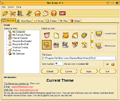
This program is intended for all fashion-conscious PC users who are willing to go beyond desktop beauty standards and make computer desktop the ultimate expression of their style. Bee Icons allows changing over 250 system icons by applying themes to them. Download 200+ free additional icon themes from here.
A freeware enhancement add-on for Windows lets you mark out folders with color-coded icons to make a search for important information a "one-glance" affair. Simply select the folder you want to mark out, right-click on its icon and select a color-coded icon from the drop-down menu. The icon will be assigned to the folder at once. This edition of Folder Marker contain only basic functions so it is good for beginners.

Free collection of ready stock icons for professional use, provide you with a wide array of glyphs that let you create an engaging front-end for your software without the need to spend weeks on designing your own icons. Icons available in all sizes.
GIVEAWAY download basket



Comments on Folder Marker Pro
Please add a comment explaining the reason behind your vote.

iPhone app giveaways »





Android app giveaways »





Good stuff, very handy proggy for sorting through my many boring yella' folders. Thanks GAOTD and Articline!
And yes, yes, yes, XP users, lucky people you, we know you have folder changing options already built in. So please, we don't need to hear it AGAIN. As for me with win2000, this proggy is a bonus.
Merry Christmas GAOTD staff.
Save | Cancel
Thank you #14!!! that is very helpful, I kept losing the place my software icons were in... Thanks again!
Save | Cancel
Cool! Kinda like Gnome's folder-icon thingy :)
I will use this for a long time! And, I will put the freeware version on my mom's compy, to :D
Thanks GAOTD and ArcticLine!
Save | Cancel
Nice proggie, esp. with Win98 where "Properties > Customize > Change Icon" is not available.
Due to the menu slowing down I had to disable the entry in the right-click-menu with Nir sofer's ShellExView. Still useful though, with some extra features not found in the freeware version.
#36 For Partitions you may use an autorun.inf and ico-file in the partition's root, same way as it is done for autorun-cd's.
Save | Cancel
Thank you GAOTD! I've been thinking about buying this very program for about a week, and here it is FREE! It installed easily, works great. The right-click on a folder to change it feature was what I wanted. Thanks again!
Save | Cancel
PRO:
The Software does what it is meant for.
Folders in any view size ("symbol" or "detail") are coloured.
The Method is really good because it relies on Windows-system-mechanism with two new small files which are put in the directory ("dektop.ini" and "folder.ico").
CONTRA - and the reason why uninstalled it:
The shell-integration is a new entry in the right-click-menu on a directory. Normally the context-menu needs 0.1s to pop up, but with FolderMarker installed you have to wait approximately 0.7s .
That does not sound dramatically and for the standard user it is surely not a catastrophe.
But for the power-users among us which rely on a fast responding on a mouseclick that is not really useable.
After uninstalling the application, the system reacts as fast as before.
To the manufacturer of FolderMarker: Please repair this annoying misfunctioning then you get a very attractive piece of software!
Save | Cancel
Fun - But slows down right click menu considerably - Folderico and iColorFolder do not - Thanks and Happy Holidays to all!
Save | Cancel
Please note that the entry of the Help menu call "Automatically check for updates" is on. If you update this software you will lose your GAOTD license. Turn the automatic updates off!
Incidentally turning automatic updates off is the second thing I do after installing ANY GAOTD. The first one is to check if the software is indeed licensed and not a trial version.
Cheers to all in the oncoming non-denominational festivities!
Ok,
Now Leave Me Alone
Save | Cancel
Go Lockett go. I tried this program and it messed up my icons also. I will try it again ,AFTER they fix it.Im reinstalling the free version. I have had good service from it for 2 years. Im also going to check out the freebys the others have talked about . did not know about them.Thanks GOTD I stop by dailey so see ya next time.
Save | Cancel
If the colors of folders are changed with FolderMarker, are the other programs (e.g. Adobe Bridge etc) displaying the folders in new colors? If yes, it could be helpful to distinguish between different photo folders (hundreds of them in format yyyy_mm_dd).
Save | Cancel
Usefull extra ! :
you can copy your own icl files (icon libraries) into the ICL-folder of 'Foldermarker' or into the THEMES-folder of 'Bee Icons' !
Use ICLbuilder to put your icons into ICL:
http://eng.softq.org
Save | Cancel
Hmmm...not bad but from the other hand I could right-click, hit Properties, hit Customize, and then hit Change Icon.
Save | Cancel
Well, I install it, try to mark a icon on the desktop -- and Folder marker marked this folder, but also rearranged all my icons on desktop. Thanks, no.
Save | Cancel
THANK YOU GOTD!!!!!! Seriously, I have been dying to get my hands on this but seriously can't afford to drop the money on it. It is a GREAT program (had a free trial), and while it may not seem like much, it is seriously helpful for quickly navigating through piles of folders.
Save | Cancel
>Ivan Hoe
We "sleazy and good-for-nothing bums and wombags" can complain obnoxiously about a wonderful product if we want to. You can heap mindless praise on a horrible product if you want to. But is it "thoughtcrime" to have an opinion different from yours? By all means, say that you liked it - that you loved it and would buy it for a friend - if you want to. If someone hates it and wishes that they could erase every copy ever downloaded, it's OK to say that, too. But don't tell me to shut up because I don't agree with you.
I found it amusing that, rather than judging the program based on its merits, you resorted to shutting me up with "It's FREE". If you want us to suddenly sing its praises, at least use a decent argument.
Save | Cancel
To everyone using Avira Anti-Virus.
I do not believe this program has a virus, it is just Avira having another false positive I suspect.
I know Avira has a higher detection rate than AVG, but I've had to ditch Avira and go back to AVG due to so many false positives. The final straw was when programs refused to work for no apparent reason. Eventually I discovered it was Avira preventing them from working, without giving me any warning.
If you want to try today's offering, I would disregard Avira's warning on this occasion and try it anyway.
Save | Cancel
How do we register this program no License Key code was given?
Thanks
John
Save | Cancel
No viruses found with Norton AntiVirus or Comodo Antivirus (which is regarded as one of the best AV apps out there from all I've read - recently made free (and their industry best firewall, too)).
Anyhow, to those with virus concerns, I've scanned the files (both compressed and decompressed) on two machines with two A/V apps (both updated this morning) and nothing showed up dangerous in there.
I think the false negative has something to do with how the program will integrate to the Explorer shell (which is a common virus/worm attack tactic) but since you KNOW this will happen with this kind of application you'd expect to see that.
Also, if you Google "SpywareGuard" and run that freeware app (sits in the tray and uses around 10KB of RAM) it'll alert you to any Explorer (including add-ons/changes to Internet Explorer) changes or additions and allow you to "keep" or "undo" the change. It alerts you the moment it changes, so no threat from the change "sitting there" until a scan is done or anything like that. Just a good simple additional protective program you can use.
Save | Cancel
#40,All
Before using 'icolorfolder' as suggested by 'yair' please read the forum pages at http://icolorfolder.sourceforge.net/ and DO make a system restore point!
Save | Cancel
I enjoy Bee Icons from this publisher that was an earlier GAOTD offering. Some may not care for it. I think it's pretty cool. I was so taken by it that I downloaded their Folder Mark Free. Now I have the chance to have Folder mark Pro? Needless to say I uninstalled the Folder Marker Free and will be installing this. Thank you so much GAOTD. And thank you to the publisher Arcticline Software.
Save | Cancel
I've been using the free version of this program for a couple of months and I absolutely love it. Not only is it easy to understand and use, it's very easy for my husband to know and my grandsons to learn that when a folder is this color or has this symbol on it, that means Don't Touch, or one that is this color is child friendly, etc.... I download lots of programs, some of them get forgotten in the scramble of my day to day life and it's very nice when simply looking at the folder tells me how I felt about the program right after installing and trying it. I think newbies will find Folder Marker very useful.
Save | Cancel
TO SAVE THE EXISTING POSITIONS OF ALL YOUR DESKTOP ICONS, RUN THIS FREE PROGRAM FIRST: DESKSAVE FROM http://www.DESKSAVE.DE
That will save the locations of all your icons. Then if anytime any program re-arranges them on you, when you didn't want it to, you can run DeskSave and it will put them back where you had them in the first place. The program is free. You might want to save a snap shot with it BEFORE this folder marker program moves all your stuff around.
Save | Cancel
Rainbow Folders also does it for free.
Save | Cancel
Just be sure to right click on screen - click on 'Arrange Icons By' & LOCK web icons on screen BEFORE running this and other similar progs. I-colorfolder also re-arranges all of the icons.
Save | Cancel
To Josh #19 Thanks for that icon archives site, I've never come across it before.
I like Iconfactory for some nice icons. They also have Mac icons for Mac lovers.
Go to this link http://iconfactory.com/home and click on freeware.
I've been using the free version of folder marker for a couple of months and I do like it, though I use icolor more often.
Here's the comparison chart for the free vs home vs pro
http://www.foldermarker.com/compare-versions.php
#39 Mogurnda--Yeah but I haven't figured out how the heck to get more icons into that folder, usually I have to dig 4-5 folders to the folder where I keep my icons stored. How do you do that? I googled "install* icons Windows" and a few variations of that search and just got a bunch of results that gave me a headache when I looked at them. I know the free version of this program can change several folders at the same time, but I don't know if windows has that feature built in or not.
Save | Cancel
# 6 is rigth
I tried and I'm not using anymore FolderMarker, iColorFolder, Folderico, all of them add 2 entries in the folder with the chsnged icon: desktop.ini + a copy of the icon (you will see them checking "unhide" in the folder visualization properties)
# 18 IconTweaker is an answer
To create your customized icons there is nothing better: IcoFX
http://icofx.xhost.ro/
Save | Cancel
Features present on Mac since the old system 7 which dates way back when, 1992. Not exactly spectacular but perhaps handy. Still, worth 30 bucks? Hmmm.
Save | Cancel
Encryption/packing, used for anti-hack protection OR to conceal nefarious code, is treated with great suspicion by some AV programs in heuristic mode.
More worrying in the test mentioned:
http://www.virustotal.com/resultado.html?f9d6dc90222e516ed8bc30380d50e2f6
Is the report by Prevx1 V2 2007.12.22 - Heuristic: Suspicious File With Outbound Communications
So, thanks but no thanks, and thanks again for some of the other suggestions - interestingly, Folder Tweaker is an Autoit 3 script (compiled), and source is available - http://qad.donationcoders.com/wp/category/freeware/folder-tweaker/ - so anyone with a decent understanding of Autoit 3 could possibly add to it.
Save | Cancel
I've been using the last version offered here for some time now, works as advertised, good program.
For those who think there's any viruses in it, get yourself an anti-virus that doesn't just detect so called 'suspicious' files, one that knows what is good or bad.
Notice, none of the 'reputable' AVs detect anything bad, that's because they check things out thoroughly, not because of hunches.
10 out of 10 GAOTD, thank you.
Save | Cancel
Great little program... beenplaying with it for a while now and found I needed more icons... Too many folders. So here are some free addtional ones for those that want them: http://www.iconarchive.com/category/folder/cats-2-icons-by-mcdo-design.html
Save | Cancel
Does what it says, but what it does would not be useful for most people and should not be worth paying for in any case. As someone else said, one can change the Windows icons without an add-on, and there are certainly freeware programs that do the same. This might be useful for a business or organization with a constant influx of varied kinds of tasks, but for a private individual I can't imagine that it can be anything but something to play with for a day, then discard.
Save | Cancel
#8 Try GIMP
Save | Cancel
I would definitely download this if it hadn't been for yesterday's freebie. Thanks anyway.
Save | Cancel
Must tick no to comments because I haven't got aa life.
Save | Cancel
Hello All,
Download, activation and install went fine. (XP Pro SP-2) I really wanted a program like this to change the folder colors to make it easier finding certain files, like work, mp3's, word, ect, ect. Works well on my machine and didn't have a problem with it changing the desktop icons as others have had. Seems very easy to use and has nice options for adding additional icons if you wish, but for now just the color change option is great for me. Thanks GAOTD, be back tomorrow.
Save | Cancel
I use this for work and home use as well, I had it before when it was offered then lost it when I had my computer cleaned due to a virus, glad to see it is back.
For those wondering if this is full of virues, not that I can detect..
I would suggest going for it!
Save | Cancel
This looks very interesting, but I'm inclined to agree with #6 etc. Would what is essentially a collection of icons worth $30? Not to me this time. Thanks anyway GOTD. You still rock!
Save | Cancel
#1 etc. Has anyone besides me noticed that everyday there are some "great software" etc reviews are found within the top 5 reviews every day? Isn't that an unusual coincident?
Save | Cancel
This is a good program. A free version can be downloaded from http://www.snapfiles.com/reviews/folder-marker/foldermarker.html. This program will ease the Win XP folder icon changing option.
Save | Cancel
#23, RunesageMagik
Hello RunesageMagik,
Thank you very much for the answer, for the help and for the link!
Save | Cancel
Garbage. Windows will do this for. Plus if you are that dumb to not remember where a folder is, please throw out your PC.
Save | Cancel
Like # 37, I used the freeware version for close to a year w/o problems but as soon as I loaded the Pro version my system hung and crashed (Win XP). I tried to reboot and it hung again. Both are now off my comp for good!
It may be virus free but my virus program(McAfee Enterprise 8) is going nuts. I don't have time to screw around making what is supposedly professionally written software behave nicely with anti-virus programs. Especially when all it does is provide right-click access to a list of folder icons.
Save | Cancel
# 6 is rigth
I tried and I'm not using anymore FolderMarker, iColorFolder, Folderico
all add 2 entries in the folder where you changed the icon: desktop.ini + a copy of the icon (you are not able to see them until you check "unhide" in the folder properties visualization)
# 18 IconTweaker is an answer
To make your custumized icons nothing better than IcoFX:
http://icofx.xhost.ro/
Save | Cancel
Wasn't this already a giveaway of theday?
Save | Cancel
Windows vs Folder Marker:
http://www.foldermarker.com/how-to-change-folder.php
Enjoy free ofer :)
Save | Cancel
Hello to evryone
As the OS can change the folder pic we just need the handy property to change the folder color.
This can be done with the easy and free icolorfolder here:
http://icolorfolder.sourceforge.net/
still, I tank to GAOTD team for there good work
yair
Save | Cancel
It doesn't do anything that windoze can't already do for its self.
As mentioned above, Right click, customize and choose a new Icon.
Why would you buy something you already have for free?
Save | Cancel
This program has free version: . I've been using it on USB key for a year now.
Save | Cancel
Nice little app. Installed and works without problem on XP. User interface is intuitive. It cannot change the image icon of the partitions of hard drive. Any suugestions on how to do that?
Save | Cancel
I have used Folder Marker for over a year now - so to get the Pro version is a nice bonus.
Thank you GAOTD
Save | Cancel