Every day we offer FREE licensed software you’d have to buy otherwise.
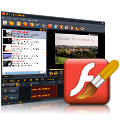
Giveaway of the day — FLV Editor Ultimate
FLV Editor Ultimate was available as a giveaway on April 16, 2009!

A useful FLV editor especially designed for editing FLVs from YouTube and other video-sharing sites. You can trim, cut, merge, replace audio, rip video and audio, or even transform MP3 into lossless FLV. You can edit files with timeline and use the player skin for the output SWF files. It enables you to integrate FLV downloading, editing, uploading online, and converting for portable devices into one with the SWF output function and cooperation with YouTube FLV Downloader and FLV to Video Converter Pro.
Show your talent on FLV editing and show it to the world!
Key Features
- Import MP3 and various FLV files encoded with H. 264, H.263, Flash 8, Flash 8 with alpha, etc.
- Save project file for future editing
- Useful editing functions enables to trim, cut, merge, replace audio, rip video and audio, etc.
- Short-cut keys and right-click menus help edit FLV more precisely
- Timeline editing and real-time preview save your time and labor
- Export lossless FLV, SWF, and HTML for sharing on website and blog
- Various Player skins, preloaders, and special effects options for SWF output
- Cooperates perfectly with YouTube FLV Downloader and FLV to Video Converter Pro
System Requirements:
Windows NT/ 2000/ XP/ Vista
Publisher:
Moyea SoftwareHomepage:
http://www.exp-flv.com/edit-flv/File Size:
11.0 MB
Price:
$49.95
Featured titles by Moyea Software
A plug-in program makes it possible to import FLV files to Adobe Premiere. It’s compatible with Adobe Premiere Pro CS3 / Pro 2.0 / Pro 1.5 / Pro 1.0 / Elements 4.0 / Elements 3.0. It supports almost all the FLV file types including Flash 8 Video, Flash 8 Alpha Video, H.263/ RAW, ADPC, MP3, Nellymoser, etc. Besides English version, other language versions of Adobe Premiere are also compatible, such as French, German, Italian, Japanese, and Spanish. You can edit FLV with Adobe quality now!
Flash Video MX Pro is for converting video to Flash, FLV encoded by Flash 8 with alpha, AVC/H.264, Flash 8, and Sorenson Spark video codecs. In addition to the simply video to Flash and FLV conversion, it offers dynamic video compression and audio settings, various gorgeous Flash Player skins, video effects and more functions like video trimming, cropping, audio replacement, batch conversion, watermarking and cue point adding, etc. Now make your website and blog outstanding with video contents!

FLV to Video Converter Pro 2 is to convert web videos known as Flash video (FLV) to popular videos for free video enjoying and sharing on your tech toys like iPod, iPhone, PSP, Apple TV, Zune, Xbox, Zen, DVD and 3G mobiles! It supports all types of FLV input including encoded with H.264, H.263, On2 VP6 and Nellymoser for conversion.
Comments on FLV Editor Ultimate
Please add a comment explaining the reason behind your vote.

iPhone app giveaways »




Android app giveaways »


![[365fun] Running Man Giveaway](https://android.giveawayoftheday.com/wp-content/plugins/gotd_googleplay_plugin/images/100/2026/06/com.whitewind.runningman_app_icon_1780400784.png)


Almost all the programs at this site are full programs they just dont have support or updates because they are free they are still the full programs. Download worked great. Great program
Save | Cancel
did not activate on vista 64 bit
Save | Cancel
The same:
1.Ran Setup, ran Activate, ran the Program, asks for me to order each and every time. Tells me that there’s a special version installed and there’s no free update available. Closing the dialog closes the software.
Save | Cancel
To #69,
Installing FLV Editor Ultimate will not overwrite FLV Editor Pro as they are different programs. Please see #83 about the comparison of the two programs.
To #85
The activation of FLV Editor Pro will not affect that of FLV Editor Ultimate.
Save | Cancel
Don't worry. It works well.
This is what i did:
- Download the file (zip) and unzip it.
- Install the program and at the end, UNCHECK the “launch now….”
- Copy the ‘Activate’ program to this directory “C:\Program Files\Moyea\FLV Editor Ultimate”
- Run the Activation
- Run the program
- Done !!!
Save | Cancel
So people who want to edit F4V can use its next version. The freeware FLV Editor lite or paid shareware FLV Editor Ultimate both support F4V in the next version.
Save | Cancel
# 76 Ben,
I got the news from Moyea support team that the next version of the FLV Editor ultimate will support F4V and this new version will be released after two or three days.
Save | Cancel
It is important that we provide our platform(s) (xp, vista, 32bit, etc.), post specific error messages, test the product and then submit feedback. My concern is that GAOTD will cease because many posts are useless to developers. I want to express my gratitude for the several useful products and information I have obtained from GAOTD... FLV EDITOR ULTIMATE ~ Tested on xp64 'stack error flv editor..' on shutdown, cleared up on reboot. On xp32 - no errors. Smooth installation on both platforms. It's limitations are specified in #27 Ashraf's link. However, it is useful for a beginner. An advanced user can move on to Avidemux (freeware).
Save | Cancel
Thank you GOTD and Moyea,
This is def. a neat sw unfortunately it don't support 'Fox' as nowadays people been relaying alot for this browser too (though is not too stable recently). Thank you. :)
Save | Cancel
I decided early today to pass on the GOTD offer of FLV Editor Ultimate. The whole FLY Editor Ultimate offer steeps of pure advertisement on the part of Moyea Software. I do not like an offer when it is just too much advertisement on advertisement on nagging you to buy the next step up. No thank you Moyea, I have too much of your software to buy any more. I am taking this opportunity to delete a couple of programs that I have never been able to use.
As announced earlier on GOTD, Reezaa MP3 Converter is supposed be offered again on Wednesday. Today is Wednesday and I have yet to see any announcement for the Reezaa MP3 Converter rerun. I will not get too upset on this because I have some MP3 converters already but I would have liked to give the software a try.
Save | Cancel
Uninstalled and tried the other way as suggested but same deal. Could this be because I have v3 of the previous giveaway flv editor pro installed. Will uninstall and give this a miss now. Thanks anyway. ps player wouldn't load either.
Save | Cancel
To #54
I google and find there is issue about FireFox with ThreatFire. However, I am not sure if there an update.
Save | Cancel
To #58
You may have a look at the comparison page of FLV Editor Ultimate and FLV Editor Pro to see if you need to install today's offer.
http://www.exp-flv.com/compare-pro-ultimate
Save | Cancel
$41 kevin
If you installed and activated FLV Editor Ultimate, you don't have to try the Lite version. The Ultimate version includes all the functions of the Lite version.
Save | Cancel
Well, I really wanted this, but it bombed out on me twice. I
am using Windows XP 6.0.
The 1st time, it froze up -- apparently while trying to
uninstall ActiveX.exe.
The 2nd time, it hung up here, as before:
EXECUTE: "C:\Windows\System32\Macromed\Flash\Uninstall_ActiveX.exe
(when I clicked to view what is happening, it showed):
Delete file: C:\WINDOWS\system32\Macromed\Flash\install.log
Output folder: C:\WINDOWS\system32\Macromed\Flash
Execute: "C:\WINDOWS\system32\Macromed\Flash\uninstall_activeX.exe"
It froze after only 5 bars had been completed, both times.
I am very unhappy about it, because when it "tried" to install the
new version, it first uninstalled the earlier version.
Now I have neither one. Sob.
Save | Cancel
O, Thanks, Johno,
I completely agree with you , I use the same way to active the special version and now works perfect: )
Cool interface.
Save | Cancel
Great!
I'm looking for a FLV joiner. Now this program can do more than what I expect.
The speed is great on the system of Vista Ulimate 32 bit.
Thumb up!
Save | Cancel
#24:
lol, you'd think. The first time I ever had a program need to be required to be run as administrator I went into my settings and made my setup run every program as administrator, doesn't harm anything.
Decent program, worked just fine for me. Not worth the asking price, so it's good you get it for free from this place.
Save | Cancel
installed and activated on windows XP 2003 server x64bit edition.
No Problems.
Thanx Moyea and as always... GAOTD, for the free stuff.
TC
Save | Cancel
Something no one is pointing out, is that this program doesn't support F4V which is what the "Moyea YouTube FLV Downloader" seems to think YouTube FLV videos are. (and is the program "Moyea FLV Editor Ultimate" links you to).
To sum it up, Moyea FLV Editor Ultimate is pointless if it can't do anything with youtube videos for most people.
I tried with a bunch of youtube videos, they all seem to be F4V even though they are .FLV on my computer, I could have saved the wasted time and just got one of the other Youtube downloaders off download.com that downloads AND can convert to AVI, so you can edit it in a real program that works.
Save | Cancel
Just a note to say that I had problems with activation... but when I ran activation as administrator, the activation finally worked and the software looks great!
Save | Cancel
Installs fine on XP 32-bit and Vista 64-bit. Cutting and pasting works great.
The problem with this program is that you can't mix video of different resolutions easily. If I want to join clips from a 320x240 standard clip and a widescreen 320x136 snippet from a movie preview, it formats the whole exported video using the dimension of the very first clip it sees, then stretches any subsequent clip to match the first clip. The software would be improved if it allowed for black bars and kept the dimensions of the original video.
The preview window also distorts the dimensions of all widescreen video previews, even though it may export it properly.
Save | Cancel
I have also got the problem of the registration not workin and all the programe does is ask you to buy it. I have tried the ways that people have mentioned including reinstalling and what not but it still wont work. Dissapointed as I was quite interested in getting the programe. :(
Save | Cancel
Installed and activated ok but I am getting this message every time I start the program: >>Access violation at address 005bd133 in module ‘FlashEditLite.exe’. Read of address 000000.<<
I installed the program as administrator on VISTA 32 bit and activated as administrator
Save | Cancel
Does this supersede the FLV Editor Pro I got here some time ago? I can not seem to find it on their web site to be able to compar the 2 progs.
Save | Cancel
Setup runs and installs. When I "activate", I get error message"failed to connect. Please try again later." This is running as administator and not. Re-installs continue the same message. Vista 32- bit.
Save | Cancel
this could be useful for making youtube video's =P but i dont know if it will work on my beast as its running vista 64bit ultimate and ubuntu linux.
Save | Cancel
After reading that some people had a registration problem I expected some difficulty, but mine installed and registered without a problem.
The program splits FLV's losslessly (at least no loss that I can detect), and fast too!
I haven't tried merging yet, because I rarely merge anything.
I was looking for an FLV splitter. #46 suggested windows movie maker, but I found that windows movie maker can not split the FLV's as I download them from youtube.
I'm mighty pleased with this program.I hope I won't lose it.
I disagree with #27 who wants more color. I think it looks beautiful.
Thanks GOTD
Save | Cancel
This program contains malware. It will gain access to your profile and bookmark files of your Firefox Browser during the install.
If you have ThreatFire, which is an excellent anti-virus and malware program, it will not only block this program but will put a lock on your profile on FireFox and it will not launch the browser!
Save | Cancel
Installed and activated fine on vista home premium but crashes when I try to run it. This is actually the lite program plus the free flv player and not a special version for GAOTD.
Save | Cancel
I finally got it to install and activate properly.
Unzip and extract to a Temporary folder on your desktop so you can find it easily.
Right click the Setup.exe and select Run as Administrator
Right click the Activate.exe and select Run as Administrator
Works fine
Haven't had a chance to try it out yet, but, so far, this is the the most aggravation I've had trying to install a giveaway!
Thanks for the freebee though :-)
Save | Cancel
#3 Ashraf Thanks for the tip. :-)
To anyone struggling to get this running on VISTA 32 bit ( possibly even on VISTA 64 bit ).
1) Unzip the download folder completely rather than trying to run from the downloaded ZIP file.
2) Install the program using SETUP
3) Right-clck and select "RUN AS ADMINISTRATOR" for the ACTIVATE program.
4) You should now be able to run the software!! Enjoy!!
These steps worked for me on VISTA ULTIMATE 32 bit edition
on my ACER C310 TravelMate tablet P.C. - laptop. :-) ;-)
Save | Cancel
Works fine for me on XP Pro.
1. Download zip.
2. Extract files.
3. Run Setup.exe
4. UNCHECK BOX TO START PROGRAM after install is complete.
5. Run Activate.exe
6. Run Program
7. Edit files
8. Have fun
9. No kidding
10. Really
Save | Cancel
What is the difference between this offer and the previous offer http://www.giveawayoftheday.com/moyea-flv-editor-pro
Both also from Moyea.
This offer: Moyea FLV Editor Ultimate
Previous offer: Moyea Editor Pro
Rather strange that the websites are totally different, but both claim to be Moyea publisher.
If I have installed Moyea Editor Pro, do I still need this?
???
Save | Cancel
Thanks for the tip Rich. That helped. Easy install. Cool interface. Thanks GOTD.
Save | Cancel
Special version is ok but to those who want life-long updates and customer service support, you can choose to order the full version by its discount order link. (save $30),
By the way, its free version with some limitations is available on http://www.exp-flv.com/flv-editor/,
Save | Cancel
I tried it and can use it now. Here is the detailed installation steps:
1)Download the file (zip) and unzip it.
2)Install the program and copy the ‘Activate’ program to this directory “C:\Program Files\Moyea\FLV Editor Ultimate”.
3)Run the Activation program as Administrator, just right click on the set-up icon and select run as Administrator.
4)Then click the shortcut icon of the program FLV Editor Ultimate to run it.
I am using windows vista home basic.
Save | Cancel
You wrote:
#31 Geekgal
You may go to Windows Task Manager by pressing Ctrl + Alt + Del, to see the programs running under the Processes tab. If FIREFOX.EXE is within the list, please try to end it and launch firefox again.
ANSWER:
I did. No firefox.exe was on the list. Even after a few reboots and then un-installing and installing again.
Save | Cancel
I agreed to #38 put activate in folder where softwares located in C:\Program Files (x86)\Moyea\FLV Editor Ultimate, Click on activate withn run as administrator. it works great without any problem
thanks #38
Save | Cancel
Update to my #45
Successfuly installed the program with Firefox.
It wouldn't install with IE.
Thank you GAOTD for the gift.
Save | Cancel
It's OK. I'm not sure it's the best software in the world. The timeline seems a bit messed up.
Save | Cancel
Add from #42
I went ahead and installed. Installed no problem Vista Home Premium., it uninstalled the lite version while installing. Rus fine. But like it's SWF converter cousin, it is very limited on output.
All you people having administrator problems in Vista, you need to set up your profile to include administrator priviledges and you should never have that problem again.
Format Factory for free is still a far better alernative.
Save | Cancel
I ran setup and then activated, but it still does not work. I ran both as Administrator and still does not work. I get the same message as #1 & #2.
Save | Cancel
To those who don't know how to run a program as administrator:
1. Go to the file after it has been unzipped (in WINDOWS Explorer, NOT Internet Explorer).
2. RIGHT CLICK on the icon.
3. Near the top of the list it will say "Run as Administrator" - right under OPEN.
Save | Cancel
#43 - If you are running Vista, all you have to do is right click on the set-up icon and select run as Administrator.
Save | Cancel
I have been using their SWF converer (paid version) for a long time. But I have been using the FLV lite free version since it was offered and IMO the free lite version is as good as this GAOTD, so download the free version.
But Ashraf is correct, for editing I use Windows Movie Maker, it works better, and if you want to pay for it, AVS video editor. The AVS video editor for slide shows has better transitions than Windows Movie Maker. Normally when I grab a FLV file off the web, I use the free Format Factory to convert it to WMV or AVI depending on what I am going to do with it. Then use Windows Movie Maker or my AVS video editor to edit.
Even though I will not download it, as I do not need another version of the same thing, I give it a thumbs up. It is still a handy tool.
But to grab flv and mp4, and other format videos off the web, I just use my Download Helper add on in Firefox.
Save | Cancel
Same as 42
This is the most frustrating thing about this program.
Save | Cancel
Anyone aware if triming FLV file with this is a RE-ENCODE or quick "chop"?
Save | Cancel
This may sound stupid, but what do I do to run as Administrator? I'm the only person or profile set up on this computer and I've tried all of the above-listed tips. So I must not be running as administrator. All I get is the "order or register" screen when I try to start the program. What am I doing wrong and how do I fix it? Thanks!
Save | Cancel
Installed, activated then opened. Won’t register every time asking “order or Register” Help Please
Save | Cancel