English
Every day we offer FREE licensed software you’d have to buy otherwise.
$49
EXPIRED
Giveaway of the day — Flex GIF Animator
Create and customize animations with 3D effects.
$49
EXPIRED
User rating:
328
265 comments
Flex GIF Animator was available as a giveaway on May 5, 2008!
Today Giveaway of the Day

Realize all your demands on Android backup and restore.
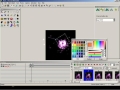
Create GIF, Flash, Quicktime movie and self-play congratulation animations with Real-time 3D effects. Optimize for target file size or compression ratio with before-and-after animated previews.
Support pixel painter and vector graphic draw. Support create objects tween animation. Add 60 stunning effects include particle system in real-time. It has a built-in Windows trick banner maker, screen capturer, morpher, and nature image matting tool.
System Requirements:
Windows NT/2000/XP/2003 Server/Vista
Publisher:
Web Graphics SoftwareHomepage:
http://www.webgraphicsoft.com/Flex-GIF-Animator/Flex-GIF-Animator.htmFile Size:
5.41 MB
Price:
$49
GIVEAWAY download basket

Developed by PhotoInstrument

Create, manage, copy and edit custom images.

Developed by Mirillis Ltd.

Developed by Andrew Zhezherun
Comments on Flex GIF Animator
Thank you for voting!
Please add a comment explaining the reason behind your vote.
Please add a comment explaining the reason behind your vote.

You can also add comment viaFacebook

iPhone app giveaways »

Phone Drive allows you to store, view and manage files on your iPhone or iPad.
$3.99 ➞ free today

This action roguelite platformer offers challenging new experiences every time you play.
$2.99 ➞ free today

$5.99 ➞ free today

$0.99 ➞ free today

$2.99 ➞ free today
Android app giveaways »
$2.49 ➞ free today

$43.99 ➞ free today

$2.99 ➞ free today

$0.99 ➞ free today

Blur Photo is the perfect censor photo app for blur background and picture blur.
$2.99 ➞ free today
I think the software works so far on Vista, at least for me, but I haven't used it too much, as I've been waiting for the registration code...still...
Save | Cancel
I downloaded and installed this per the instructions (activating it with the deal of the day icon) I started getting a nag screen saying I had to send an email with "the code". So I sent the code as per requested (on the same day). Thirty days later the software expired anyway. I sent the code AGAIN - asking for activation. I am not new to these free programs and really wanted to try this one out... and wasnt able to due to this "code" issue. FYI? No one ever wrote me back either time with anything to activate the product - in fact they didn't write back at all. Left a real bad taste with this possible customer. I am an educator, I WON'T be recommending this product to my students.
Save | Cancel
About time you all moved on. For goodness sake get over it. Lots more freebies apart from this one. Can't believe people are still griping about this.
Save | Cancel
no updates, no code, will no free software on this one
Save | Cancel
I cannot believe there has not been any updates on this program from the GAOTD.
Save | Cancel
This giveaway was a huge disappointment. I have waited for two weeks and that is long enough to have heard back from the developer. This software company apparently doesnt care if they provide any assistance for their $49.00 product, nor did they care if (anyone) had a decent trial. All of the graphics I made with it, had DEMO written in the background, which was fine if it should have been a demo.
I thought I was getting a real program! Today it is un-installed, and shall never return, to this hard drive.
Save | Cancel
Well, it’s now been 12 days, no code, no further response from Slava, looks like this developer doesn't want to talk, just harvest emails. Does this tell you that GOTD and all of us have been scammed?
Dave #261, you don’t really need to be paranoid about downloading from here, this is the only “problem” I have encountered. A developer failing to follow through on a promised offering doesn’t count as a “real” problem, not like it was a virus or anything.
Save | Cancel
It is now May 17th and no code has appeared. I asked for my code twice and recieved NOTHING!
I am so annoyed with this company, and I feel that we were all sold down the river by them. I have no problems with GAOTD.. you did try your best.
A rare and frustrating failure... Shame on the company involved.
T.
Save | Cancel
GAOTD better not pay these losers! :-(
I also wonder if Web Graphics Software is selling our email addresses?
Save | Cancel
This company did"t send any registration code. They are telling lies. Please vote negative response to this company.
Save | Cancel
I am also annoyed! I've sent two registration emails to WebGraphicSoft and am yet to recieve a reply! Whats going on? It seems like a great program but it wont allow me to save any thing unless I register it! Please sort this out GAOTD. Please.
Your loyal daily downloader,
skinnyeddy (Edward Stevens)
Save | Cancel
I've been hoping to hear an answer. I've been a bit paranoid to install other offerings on GAOTD. Please provide an update so we know what is going on.
Save | Cancel
15 days and the trial has expired. thats it WEB GRAPHIC SOFT STINKS.
The program is good but publishers who can't give us what they claim to give are really useless. I will never be intrested in webgraphicsoft products ever again. I said all these cus today is my sis birthday and today i really wanted to write my name on the mms. if this was not there. i should have sent her one now.
ANYWAY THANKS BUT NO THANKS
MIMRAH
Save | Cancel
I am curious if we will EVER get an answer about what this was all about...I haven't unloaded it yet...
I also did some pretty intense research to see if it installed any backdoors or other security concerns and so far nothing...
maybe it was just a sad story of something with potential....8(
Save | Cancel
I Think it's been a week now... I emailed my code to them using copy & paste instead of the copy button they provided so as to make sure it pasted the full code - and yet they have sent me no activation code yet. Am guessing it's time to give up hope of receiving one now?
Save | Cancel
I was going to try to wait for the code too.. but my virus program kept telling me I had a virus but I didn't know where it was coming from.. then my other program said it was coming from the flex animator file.. so... uninstalled =\
Save | Cancel
Any updates?? Still have not received my code yet. Any updates Slava???
Save | Cancel
still waiting for the key code. I'll give a couple more weeks.
Save | Cancel
Slava where is my code???????? Been waiting for 5 days now, also waiting for a responce from you as to what happened!!!!!!!
Larry
Save | Cancel
after emailing them and hearing nothing for days I have sent a second request without answer now also... it's very sad that something posted here as a free, giveaway of the day is not as it's stated.
this is very disappointing and will lure me to another gif animation program instead of spending money with a company that doesn't stand up to what it claims.
Save | Cancel
Well, 5 days without an activation code or GOTD being able to get an answer from them is enough for me!
Note to self, post on all message boards, warning to stay away from Web Graphics Software and webgraphicsoft.com/!!
Save | Cancel
I wrote and they NEVER sent me a serial number to activate. Oh well!
Save | Cancel
I hope we do finally get the Registration Code, the demo version is fun....
Please GAOTD give the publishers a nudge.
Save | Cancel
still waiting for key code
Save | Cancel
#245 No I will wait for Slava to hear a response back from the developer. Personally I am NOT going to uninstall it just yet...
Save | Cancel
still no code from them, also not sure if I would install now.
Save | Cancel
Has anyone done a careful review to see what, if any, risks may genuinely be present? is uninstalling enough?
Save | Cancel
Well Roger #237, It's been 72 hours (3 days) and no activation code!
Will you NOW accept the fact that we have been scammed by an unscrupulous software developer?
Slava, I don't doubt that you have been unable to contact these people, they don't want to have to deal with scrutiny! You guys do a tremendous job here, but it looks like you have been taken advantage of.
Save | Cancel
I downloaded this software. I was very careful about reading the read me file. I activated and sent the request for to the website to recive my activation. I received no response. I have tried this twice with no luck.
I will most likely try another software where I can not do a one time activation with GAOFD.
I know it is not GAOFD fault but has been a bad experience on my end.
Save | Cancel
Still haven't received the key but I will wait awwhile to delete it. If this is a fake there are a lot of us potentially in trouble.
Save | Cancel
Oh no they got my "sign up for junk email address" :-)
always use a junk account people, an no worries(except for that nasty trojan horse) ;-)
Save | Cancel
almost 48 hours but still no key. it feels like they only want to get our emails and sell it and send spam :( sorry for the horrible comment but it myt be true
Save | Cancel
We are trying to contact software developers to find out what happened and why you have not received your codes.
I`ll post more info once we talk to them.
Slava
Save | Cancel
Have not received my license yet. Please advise.
Save | Cancel
Another point, unless no one receives registration information in the next few days, it is wrong to assume that they devloper only wanted our email addresses in order to spam us.
Save | Cancel
Well my last comment was not added, but anyways.
Stop complaining people! It is taking a long time to receive the registration code, well guess what, some of the software I have purchased, I have had to wait a few days to be emailed the registration information. My point is that you don't always get registration information immediately, and since we are getting this for FREE, I personally don't mind waiting to receive the registration information.
The developer has been kind enough to give away the program for free, and all you can do is complain.
Save | Cancel
I downloaded the program yesterday and activated it sucessfully.
However, I was given a ID number to send to the manufactures website to get a registration code. I send two e-mails yesterday and never recieved a responce yet. I can only use the trial version until they send me the registration code. Does anyone have any idea how long it takes? Thanks.
Save | Cancel
Since leaving a critical message about the company hawking Flex GIF Animator, and "shaming" Giveaway of the Day for not doing better screening, I am now NOT receiving e-mail notices from Giveaway of the Day that I have received for a long time. Does this prove "attitude," or what!
Still, I have not received a response from the shoddy company hawking Flex GIF Animator, even though I sent them the required e-mail a number of times. This is NOT the way to do business!
Save | Cancel
he only good comment I have read! #229
"Why no response from GAOTD, either telling us when the codes will be available or a new system offered or at least that they are trying to contact the developer to work out some sort of arrangement, please?"
Comment by internetexplorer — May 6th, 2008 at 9:25 am
Did you find this comment useful? yes | no (+2)
Save | Cancel
I downloaded this program yesterday, ran and installed the way the read me said. At the end of all that I get a message to please email the company for my registration code. Regardless to say, I never did get my registration code. I have used this program before and I like it, Just not enough to pay 50 bucks for it when there are way better Gif Animator programs out there.
I would just like to see the developers actually follow through with sending the codes because this is not the first one I have not received, Or include the registration in the activation part of the download.
Save | Cancel
Sorry, but why not stop moaning and groaning about this thing? We've been duped, sent in e-mails for spamming. Let's move on and get on with our lives. Feeling really fed up with these guys? Then why not exert all your engergy for the next one hour sending them e-mail after e-mail just to cheese them off? Don't blame GAOTD. If you feel that strongly then don't bother visiting this site again! After this post I shalln't even be watching this section of GAOTD anymore.
Save | Cancel
I actually wanted to buy a copy for my unit in the office once I returned from this business trip. Now since I did not even receive the FREE unlock how could I trust them with my money? I am very disappointed. I am doing a project which I needed this type of animator.
Save | Cancel
Looked promising, but I never received any kind of unlock code in my email. Something's just not right here. So I'll probably end up deleting this today, it's pretty useless if you can't save what you've done in the program.
Save | Cancel
Why no response from GAOTD, either telling us when the codes will be available or a new system offered or at least that they are trying to contact the developer to work out some sort of arrangement, please?
Save | Cancel
Could download and install but wouldnt open.
Save | Cancel
still no reg code it has been 24hours. it this a scam?
Save | Cancel
Not only is it now 24 hours since I sent for the reg code, but still no comment from GOTD!!
Maybe someone from the project might like to answer our questions about this scam software developer?
It's not like you aren't seeing what we have written since ALL posts go through moderation!
Anyone?
Bueller?
Save | Cancel
Sent the email to try to register it yesterday, but haven't heard a peep back. Are they just collecting emails to spam us later?
Save | Cancel
Have requested a serial number and have not received anything. I am not going to use something that will expire.
Save | Cancel
It's now exactly 24h since I requested a registration code, and yet nothing has appeared. Judging from other people's comments I now believe a registration code will NOT be forthcoming. Time to uninstall (and blacklist this particular vendor).
One minor detail that nobody seems to have mentioned so far, I hope that the GAOTD team are NOT going to be paying this vendor for the SUPPOSED installations! That would really be adding (significant!) insult to injury!
John
Save | Cancel