English
Every day we offer FREE licensed software you’d have to buy otherwise.
$19.95
EXPIRED
Giveaway of the day — FastPaste
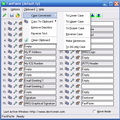
FastPaste is new utility for pasting commonly used text phrases, formatted text or even images into the applications.
$19.95
EXPIRED
User rating:
251
40 comments
FastPaste was available as a giveaway on July 30, 2011!
Today Giveaway of the Day
An all-in-one 4K video converter.
FastPaste is new utility for pasting commonly used text phrases, formatted text or even images into the applications. You just press a hotkey or click an icon, and the text clip you have set for that hotkey will be automatically pasted.
Example: Press "Ctrl + 1" to paste your full name or email address into any application.
System Requirements:
Windows 7/ Vista/ XP/ 2000
Publisher:
DextronetHomepage:
http://www.dextronet.com/fastpasteFile Size:
2.54 MB
Price:
$19.95
How would you improve FastPaste?
Featured titles by Dextronet
Organize all your tasks and notes in one place. Getting organized has never been easier (or more fun!). Discover why thousands around the world can't imagine their lives without Swift To-Do List.
GIVEAWAY download basket

Developed by Informer Technologies, Inc.

Developed by IObit

Developed by Garmin Ltd or its subsidiaries

Developed by Disc Soft Ltd.
Comments on FastPaste
Thank you for voting!
Please add a comment explaining the reason behind your vote.
Please add a comment explaining the reason behind your vote.

You can also add comment viaFacebook
iPhone app giveaways »

Phone Drive allows you to store, view and manage files on your iPhone or iPad.
$3.99 ➞ free today

This action roguelite platformer offers challenging new experiences every time you play.
$2.99 ➞ free today

$5.99 ➞ free today

$0.99 ➞ free today

$2.99 ➞ free today
Android app giveaways »
$2.49 ➞ free today

$43.99 ➞ free today

$2.99 ➞ free today

$0.99 ➞ free today

Blur Photo is the perfect censor photo app for blur background and picture blur.
$2.99 ➞ free today
Theoretically you could use this to save various comments and notes from each GOTD program you installed, in an easy to find, pre collated group. Could be worth a try. Thanks.
Save | Cancel
All of these types of utilities do both similar and different things. Lots of clipboard extenders have quick ways of pasting text and images, via hotkeys, numerals, tags, or search.
Ditto Clipboard Manager (open-source) was nice before Vista, but I don't think that it was ever updated to handle the newer clipboard support in Vista+.
Some utilities do text expansion, application launching, etc.:
ActiveWords
Most of these are complex and take some time to get used to and learn the features of.
Save | Cancel
This is a neat and clean utility that does EXACTLY what it was designed to do. Stores and pastes selected text to an active program. No bells, no smoke and mirrors, no unnecessary GUI, just a simple tool.
It takes the drudgery out of constantly retyping the same set of text lines over and over and over. Not too interesting unless the line of text is 100 characters long. Saves time and wasted key strokes.
Who NEEDS a fancy GUI, fonts, more than 30 slots at a time (I had 3,000 slots set up in 100 groups of 30)? Sure, it's simple but, hey folks, the thing works! A bit pricy, but then again, GOTD offers it free. Pity the guys that don't look at the site and pay full price!
Save | Cancel
Add this one to your review, appears Heavy Duty:
Clipboard Master
http://www.jumpingbytes.com/en/clipboard-master.html
Save | Cancel
I highly suggest trying the program called "speed typing" - You don't save things to a hotkey, you save them to a phrase or letter or group of keystrokes. The main advantage is that you can click on the icon in the tray and see phrases that you have saved. (In other words, you don't have to try to remember what you saved to which key. In addition, you can save huge amounts of html to a phrase so if you set up a lot of websites, you can do all the basic stuff by typing one little phrase and then go make small changes or additions. As an example.... this whole paragraph I just typed I could save to the phrase "speed" - Then whenever I wanted to type this paragraph again I could just type the word speed and follow it up with a period, or a comma or a space bar and the whole paragraph would type itself out. It's very cool - here's the one trick you need to know, after installing it you need to reboot for it to work.
Save | Cancel
Crystal Office's Clip Plus is a good clipboard manager, does todays offering add anything significant?
@(6)Jozsef- Not sure what "twip size" is, but the limitation of it sounds like a drawback.
@(9)ilovedessy- PhraseExpress? Tried it before, a while back, had conflicts, so uninstalled. If there's a portable version, might try it again.
@(11)Black Diamond- Bought a TLB licence. Is great software, but using my own system of shortcuts. With all the add-ons, it's on its way to being a mini-OS.
Save | Cancel
To find out how to make this a great App... research an old CP/M utility called Smartkey. Nothing else has even come close. The Australian author died almost 30 years ago and the source was made public domain. At the end, it was rewritten to run under MSDOS. What set that apart was that even with only 64k of RAM and a 5-1/4"floppy, the number of macros was only limited by the number of key combinations on the keyboard, and each macro could be in excess of 64k in size... one macro could call another so in the end the single macro size was almost limitless. On top of all this, recording a macro did not require any 'programming' or special commands.
I purchased and used SmartKey in my office... and probably saved well over 5,000 times its price in the secretarial poll.
Save | Cancel
Installed easily on my W7 x64 machine, although I needed to close it out of the sys tray before the activation code would take. According to the developers, one does NOT need to use CONTROL+ whatever; they said we are free to use any hotkeys we want.
Save | Cancel
FastPaste has encountered a problem and needs to close. We are sorry for the inconvenience.
EventType : BEX P1 : FastPaste.exe P2 : 2.6.0.3 P3 : 4933355a
P4 : unknown P5 : 0.0.0.0 P6 : 00000000 P7 : 00186770
P8 : c0000005 P9 : 00000008
Save | Cancel
The timing of this software is perfect for me. I lost my job earlier this week and now have been scrambling to fill out applications online. Having to fill in repetitive information at different websites eats up a lot of time.
I've installed this program without problems on Windows 7 64bit. I simply fill out the fields with content I'll be using often. The hotkeys work perfectly. I have two monitors, so I glance over at one monitor at FastPaste while I'm filling out a form in my main monitor and simply hit the hotkey and the information pastes into my form. That's a lot faster than having to copy and paste manually between two windows.
It appears that you can save many different projects in FastPaste. So you can load different types of information with hotkeys depending on what you are doing at a given time.
As an experiment, I've closed FastPaste in the task bar and the Hotkeys still work. That's because it's still running in the background and can be completely turned off by turning it off in the programs running in the background portion of the taskbar. You'll probably have to close it if you use other programs that use shortcut keys that have the same keyboard combinations as the hotkeys.
This program seems intuitive enough. Thumbs up from me.
Save | Cancel
A little confused here. Program states: You just press a hotkey or click an icon - So why do I have to do a control plus 1, or a control plus 2, etc? When I see the word "hotkey" my mind tells me it is only one key not two or more. Anyone know how to use this program using only one hotkey?
Save | Cancel
This is safe: Paste Copy.
http://www.virustotal.com/file-scan/reanalysis.html?id=db948d6be38f140265e7a877a566e2488e693d5f79ad095cb9d52198044f09bf-1312049305
Save | Cancel
Some food for thought. Always do a virus scan of any application before you install it.
For those using M8 Multi Clipboads, here's the scan result.
Not so good after all, right?
http://www.virustotal.com/file-scan/report.html?id=d2f418e7ed53b6aee8ca171c6cf21384ee5066ce71d6cf1dfe4e9ca3b09e186c-1312048232
Save | Cancel
After the FastPaste program was installed it interfered with my PlanMaker spreadsheet program so that I couldn't use the $ key to make a fixed cell ref.
I won't miss any feature of my spreadsheet - bye FastPaste !
BTW: Smarty Uninstaller had to use forced uninstall to get rid of the program
- Ben
Save | Cancel
Echoing a couple of the comments above, PhraseExpress is highly recommended. It is nicely intelligent freeware, with both hotkey and phrase replacement capabilities (assign a phrase to a word or letter combination, and PhraseExpress will replace the combination when you type it). It also does error-correction when you type, will count the number of characters in highlighted text, will change the case of text, contains a clipboard, has macro capability, and will list possible text to insert while you type, based on your past usage--it watches what you do and learns from it. Highly recommended--I haven't had to type my address block in years!
Save | Cancel
Just another product for consideration is Outertech's Clipboard Manager (also free). It offers not just clipboard management, but up to 20 "stickies", which are permanent text strings. The unique feature is that by pressing the CAPS Lock Key, the utility pops up so you can select your text. It does not, however, support images, as today's offering does.
http://www.outertech.com/en/clipboard-manager
Save | Cancel
There are so many free application like this one out there, that makes no sense to pay for something that performs inferior to many others.
Also, I used to make unlimited number of my own templates and phrases and pictures and graphics and shortcuts to directories and archives, by using any word processor as a master template short cuts. This way, I can write a small book in just few minutes without any typing.
Just open it and copy/paste anything from it into anything and no shortcuts keys to remember and be limited only or relying on your overloaded memory with short cuts keys maze. Just make your word-processor template file reduced in size and always on top and you have the best short cut software there is.
This may be good for someone who uses few shortcuts now and then and that is all.
Save | Cancel
Hey Guys, compare this to m8 multi clipboard. I've used it for years in XP thru W7 and M8 never failed once just impressed with every kind of Clipboard need. Their free copy isn't as powerful but still does the job. Customer service is top notch as well. Again, thanks to you contributors with your opinions as GOTD has become my first read of the day.
Save | Cancel
Jit bit, previously given away here, still my fav.
Sorry, but this just is not comparable to freeware OR commercial competitors.
Save | Cancel
While FastPaste was running on my XP-3 system, the Alt Gr button on my keyboard was out of function. E.g. I couldn't print @ ("at") in any program (not even in WordPad or in FastPaste itself). Uninstalling FastPaste solved the problem :)
Save | Cancel
Nice APP but you can do the same things for FREE using another little tool called "InstantType"
http://www.text-inserter.com/
And of course FIREFOX USERS can also use the addon iMacros for performing repetitive tasks.
Save | Cancel
I don't think it's correct to compare this program to other programs that allow one to save clipboard contents for later use. I like having the ability to save frequently-used text to hotkeys. I do not want the extra step of clicking on an icon and selecting a phrase as is the case with PhraseExpress. I have used a program called Suretype for years (which is no longer in development, unfortunately) that allows an infinite number of hotkey/phrase combinations, but I will certainly give FastPaste a try.
Save | Cancel
Liked it. It installed and works as advertised. I particularly liked the brief succinct tutorial when it first started. A common sense app.
Save | Cancel
I have installed it and the installation went well on Windows 7 64 bits. Good!!
As far as the functionality is concerned, it works. The interface seems a bit too complicated and it took me a while to find the keyboard shortcut but I succeeded in the end.
I will use it to insert short pieces of text into my writings and it seems to do this job well - even though it is slightly slower than a normal clipboard. Moreover, you can insert a formatted text and an image which can come handy.
I like this software - though I would never pay 20 pounds for it.
As I say it does what it claims to do which is good.
Zdenda
Save | Cancel
Given various suggestions and comments, those interested (and the developers) might like to check out M8 FreeClip (available from CNet, TuCows etc) which does a very nice job of allowing you to slot items from your accumulating clipboard history.
Save | Cancel
There's a brief, perhaps too scanty, overview of the program's use accessible via Help which answers some of the questions posed elsewhere.
Whilst TenClips is useful FastPast should be able to do rather more. Being able to set up 'projects' for different purposes letter writing/e-mail/proramming etc means that 30 slots per (infinite number?) of projects should enable you to customize the program to meet your needs.
Indeed, I was dreading the likelihood that those GOTD users who always punt for portable/cheaper/better GUId/font-filled/skinnable programs that do everything possible under the sun rather than remaining slim enough to excel at their their key purpose would be setting it up even now.....
Pasting in to applications works very well. I think the key area for improvement is probably in how you get stuff into project slots. Contect menu additions or a pop up that is accessible in any program e., making it easy to fill up new slots with selected items as I work without having to first copy them to the clipboard. Being able to copy images or text formatting like this - if feasible - would seem easier than the present arrangement.
An existing weak point (it seems) is that you hae to assign text strings of more than 100 characters ia the editor rather than pasting direct to the slot.
It would also be helpful if FastPaste worked with multislot clipboards or had this feature built in, so that you could run quickly through a file each object copy being automatically added to the next slot - after which you could assign these to hot-keys in the order you wanted.
Better than that might be to run through the whole of a document/web page (a la Down Them All) and then to choose from a list of all the identified sentences/paragraphs/format settings(?)/lines/ tables/boxes/buttons etc which you wanted to copy to a particular project. You could even specify beforehand all text blocks, all images etc. I guess sombody somewhere has already written an application that will scan all your documents in a folder disk and produced an output file of all sentences prew(sorry the ' ' key has stopped working)iously used multiple times that could then be allotted to slots.
Do these sound practicable or more likely to weigh down what is a neat little prog with excess baggage? A history of items copied to the clipboard(s) in the course of a day's work seems like a useful starting point though.
This looks like it will be useful in lots of ways to many different people and I'm grateful for it.
Save | Cancel
I don't get it. I read the description of the program above, but I'm not getting what they're trying to sell. For ME, it says it's a copy / paste program, but what about it is different and special than just using my mouse?
I am a bit dense sometimes, but honestly, I don't get it. Sell me better.
Save | Cancel
Great little programme. Works fine on Windows 7 and Office 2007. Not a fan of hot keys as far too much to remember and far too much chance of conflict so being able to just click on a button and having it all pasted in is great. Exactly what I was looking for. The only thing I could see missing was the opportunity of entering multiple lines as in an address but putting it in on one line and then sorting it on the page is no hardship.
Save | Cancel
A freeware alternative that is much better and has a lot more options is ClipX.
http://bluemars.org/clipx/
Save | Cancel
ArsClip can do that, and much much more. And it is totally free!
http://www.joejoesoft.com/cms/showpage.php?cid=97
Save | Cancel
For what it's worth, those still using the (awesome) TrueLaunch Bar offering here awhile back already have this function built-in.
Save | Cancel
Downloaded it and installed tried it out and promptly uninstalled. This is a totally pointless piece of software with not enough flexibility, to few options and outdated looking user interface, not for serious users. Im the bin it goes.
Save | Cancel
PhraseExpress is the BEST!
It does exactly the same job plus MUCH more!!!
- The program is free for personal use without feature limitations. !!!
- Compatible with 32-/64-Bit Windows XP/Vista/7
- Have portable Version!!!
http://www.phraseexpress.com/
Save | Cancel
#4: Tenclips does NOT do exactly the same thing! It holds 10 different things from the clipboad, and only 10, which are not key-assigned as like today's offer.
Save | Cancel
Note to my last post: I meant Clavier+
http://utilfr42.free.fr/util/Clavier.php?sLang=en
Save | Cancel
Hi, This program dosnot support setting 120 DPI. I have the message
" Your twip size is uncommon. This program is build for twip's size 15, your twips have got 12.
It's caused by 'large' font size which you have currently set-up. This program won't work on your system
properly until you switch font size to 'normal' (small). Do you really want to continue?
(We STRONGLY recommended to don't use this software with this uncompatible twip size) "
Thanks, uninstall !
Save | Cancel
Does it work on flash base websites? I use RoboForm to fill form but it doesn't work on flash base form.
Save | Cancel
tenclips does exactly the same job (minus the clipboard manager) and it's freeware.
Save | Cancel
I'm going to give this a go since it can be a real timesaver for me :)
Save | Cancel
£20 seems a bit excessive, regardless, interesting program different than usual. I'll give it a shot. Thanks.
Save | Cancel