Every day we offer FREE licensed software you’d have to buy otherwise.
Giveaway of the day — Easy Macro Recorder 3.85
Easy Macro Recorder 3.85 was available as a giveaway on December 7, 2010!
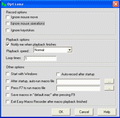
Easy Macro Recorder is a handy utility that makes your computers automatically do tasks for you. It records all operations of mouse and keystrokes and saves them as macros, then Easy Macro Recorder can play back the recorded macros to automate your work any number of times. It works on any Windows applications. Easy Macro Recorder is very easy to use, just three steps: record, save and playback. It doesn't require any programming experience.
Key features:
- Record all events of mouse and keystrokes of any Windows applications
- Repeat playing back macros for any number of times
- Allow you to do things that are tedious or time-consuming without actually doing them yourself
- Play back macros at schedule time
- Easy to use macro editor with several commands
- Easy to use and don't need any programming knowledge
System Requirements:
Windows 98/ SE/ ME/ NT/ 2000/ XP/ 2003/ Vista
Publisher:
GoldSolution SoftwareHomepage:
http://www.flashplayerpro.com/MacroRecorder/File Size:
2.42 MB
Price:
$ 29.95
Featured titles by GoldSolution Software
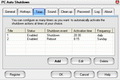
PC Auto Shutdown is a handy software that help you automatically shutdown, power off, reboot, hibernate, suspend or log off computers at schedule time you specifies. It can shut down computers at schedule time when no user is logged on or when computers are in suspended power conservation mode. It gives you different ways to schedule the shutdown event for your needs.
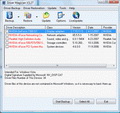
Driver Magician helps you back up, restore, update and uninstall device drivers of your computer. It can also detect unknown devices of your computer.
GIVEAWAY download basket




Comments on Easy Macro Recorder 3.85
Please add a comment explaining the reason behind your vote.

iPhone app giveaways »





Android app giveaways »





The macro program I use measures x-y positions from the current window, which is fine for getting to the File menu of that window. If it measures only x-y for the whole screen, then, yes, if the window is in a different position, there might be a problem.
AutoIT and AutoHotKey are probably more flexible, but aren't for novice users. But someone with a bit of programming experience might find them easier for certain tasks.
Save | Cancel
I tried this macro recorder hoping that it would be faster than me. Wrong. The application I was using went through the web to start. As soon as the web started the macro stopped, even though I recorded it. I tried it three times. It was more bother than it was worth.
Save | Cancel
Unbelievable how much misinformation is written here again, and I find it scary that one says something completely wrong, and every one else jumps on that and voila - thats how (deadly) rumours are created! People, when will you wake up from the sleepy followership of the mass consciousness and instead start to use your own intelligence?? It is bloodcurdling how much nonsense fills most of the comments.
@2 fandy - This is not a video/audio recorder or screencapterer. It is a macro recoder, this is not for media files but for automation of recurring tasks.
@ 11 Zeur - and everyone else jumping on this false statement without even having made your own judgement
This program does NOT require an internet connection. It only does, if you have (maybe unconsciously playing with it) created a macro script that you have included a command to open a URL - if you want a macro to open a URL of course it needs internet or how else can the browser open a URL. And it needs intenrnet for the one time activation after installation (which is actually the GAOT wrapper which needs internet). Otherwise Easy Macro Recorder never asks for internet connection.
@14 Corec - and everyone else jumping on this - this program is NOT a keylogger. It is NOT able to log your data and send them to the developer, this is total BS. It does not log keystrokes. It RECORDS your keystrokes (huge difference) if, and ONLY when and while you hit the record button because you want to record certain keystrokes in a macro in order to replay this macro later. You don't record your password, don't you?? You record for example any hotkeys you use for certain tasks etc. It stops recording the moment you enter the "stop" hotkey, it writes the records into the script, that you name and save yourself and you can open this script with notepad and look whats inside.
This BS about "internet and keylooger" etc, is like saying, a voice recorder is dangerous because it secretly listens to what you say all day and sends it via internet to someone else. But if you record your voice you do that by pressing the record button and on finishing you press the stop button, you have your record anywhere in your player and your recorder cannot "secretly" send anything, as it does not run if you don't record.
Its not a shame not to know what something is and does (like a macro recorder) but it's a shame, to judge about something you don't know what it even is, to create statements based on wrong assumptions and to blindly follow others who does.
So, had to vent as sometimes the misinformed comments really flood the banks here.
As for Easy Macro Recorder, I use it myself since about 2 years (oh and its not buggy btw, #27) and have it do a couple of automated tasks on every system startup. I love it, because its easy, fast, uncomplicated and its a decent little app which just closes itself after running the macro. Its reliable and has never had any bug all the time.
Sure, there are more complex apps for that, and there is AutoHotkey - which cannot be compared with Easy Macro Recorder at all. Creating macros with AutoHotkey is not easy and requires a longer learning curve, nothing for for people who don't have time or patience or don't want to deal with script languages. While Easy Macro Recorder does not only have the ability to record mouse and keys, but also offers a couple of ready made commands that you only need to double click, like opening programs, URLs, determine the window state of an opened program (for example have it start with minimized window) etc.
And it does also include the specification of the delay in millisends or seconds before/after or between several tasks.
For more complex tasks I too use WinAutomation.
But Easy Macro Recoder is a little tool for small every day jobs.
It does what it says and does it good.
Save | Cancel
Based on the comments left and what the program sounds like I did not install. I use AutoHotKey's AutoScriptWriter to automate my tasks. It allows me to record the windows position and not just a position on the screen. With a little bit of programming I can tailor it to meet my needs, though in many cases I don't have to change a thing. It's just nice to be able to if I want to. Though the AutoScriptWriter doesn't have the ability to make Hot Keys, with a few key strokes I can add a hotkey to the script after I record it. Autohotkeys is freeware. AutoScriptWriter comes with Autohotkeys. Though you may have to get the .zip file to get it since last time I got the installer had to hunt it down and found it in the .zip file. Initially released on 11-10-2003 so if there were any security issues one would think they would have been discovered by now.
Save | Cancel
@26 Bob10
I'm very sorry to hear of your bad experience, but I doubt the malware that got you was downloaded from a site like this one. The developers here have to identify themselves to GOTD before they can offer their stuff & receive compensation. Besides, GOTD checks all offers with malware checkers before offering them to us (as far as I know).
Also, when I tried the program, it didn't try to access the internet as some have reported earlier, according to my firewall.
If you suspect this program (or any program, for that matter) is surreptitiously recording your keystrokes, you should definitely check and run a keystroke detector software to be sure.
See...
http://www.ehow.com/how_4895006_detect-keystroke-logger.html
...for example.
---------------------------------
My test of this program showed it to be too buggy in operation to be very useful except for the simplest tasks. It might be somewhat helpful for an inexperienced computer user. Therefore, IMO, it's not worth $29.95 -- or even $00.00 to me.
Thanks, anyway, GoldSolution Software and GOTD.
Save | Cancel
Identity theft anyone, it is so easy someone to steal your banking ID and passwords when all that info is recorded and sent out to someone in China, you don't believe it, it happen to me last Spring with similar software. This is even worst, since require internet to be connected all the times and be stored into a hidden file, so you can not delete it at will or there may be a second hidden file that only the developer of this software knows how to get to it.
I will never ever install something like this ever.
Save | Cancel
@yannis #9
My earlier version as installed from GAOTD must have registered wrongly. I now get a message that the trial period has expired.
Most probably my own mistake :-( I must have thought that it registered automatically myself...
I'll install this version and take better care.
Greetz,
Patrick.
Save | Cancel
Sounds useful but the comments that it requires an internet connection to run makes me reluctant to try it.
Save | Cancel
How is it better than AutoHotKey?
Save | Cancel
Unfortunately, this does not appear to work with my Windows 7 (64 bit). Everything looks fine until I start to record a macro. Nothing happens and can't do a thing except stop recording. I hope I understand the operation correctly, but it seems broken. Sorry, I wanted this to work.
Save | Cancel
Hey, The program looks great, but I already have one thats free called "Mouse Recorder Pro". I would like to recommend it, because you can add a delay in between clicks, keystrokes, or movements.
~J
Save | Cancel
Downloaded Easy Macro Recorder way back when it was first offered and for quite a while never used it. Then I got started playing a game on Facebook and suddenly having it on the pc came in very handy.
I have been using it since then all the time and if it's a repetetive action, it's great. I can't get to run on 64-bit and Windows 7 (isn't listed either) so I'm using another program that, but I really like this one for it's simplicity and ease.
The only thing I wish they would fix is that sometimes after using it, it starts to show a little pop up window in the right corner and it won;t record in the game or browser anymore. Restarting the pc takes care of that, but that's a pain. I've written to them, no reply.
Save | Cancel
Excellent, does exactly what it says on the packet! Thanks GOTD!
Save | Cancel
I've had this before, & LOVE it! So glad to have it back again! Installed fine. It's very easy to work it, & really helped me out for the time I had it before. I do think it shouldn't be necessary that it go online, though, & I don't like that at all. If it does, then I wish they'd change that as soon as possible. I will be very wary of that! Why would it need to go online???
Save | Cancel
aRenegade is right. The comments, especially the first few, are fail. This isn't a screen recorder app.
Save | Cancel
A general question, are some GOTD members using the thumbs up and thumbs down to show if they like a software category or the program's uses, as opposed to the specific software itself? That would explain much in terms of some rating percentages over time.
Save | Cancel
No doubt if you do a lot repetitive work a macro recorder can let you catch up on your sleep and get some work done at the same time. Today’s GOTD has been offered several times, and I think that by itself shows a popularity, its stability, and a usefulness. I’ve had cause to use this program on several occasions for filling out forms and doing some backup operations at the end of a day. I never ran into any problems that caused me to do things all over again. Overall this is a set it, start it, and forget it type of program. I was glad I had to use. Now looking at today’s “Bad” list is, “Mouse movements/strokes are based off coordinates instead of program/screen recognition.” Say what?! This is pure gibberish. All programs use x/y (and sometimes z for 3D) coordinates for positional determination. Can you say GPS? Next in the “Bad” list is “Can’t record movements/strokes by the mouse scroll wheel. This is not only gibberish, it’s a falsehood. And finally on the “Bad” list is Users can’t assign hotkeys to run each individual macro.” More of the same gibberish and another falsehood. All there is to say about that “Bad” list is that as an exercise in nitpicking it gets a failing grade; at least in nitpicking there are semblances of truth...
Save | Cancel
Surely any good anti virus software will pick this up as a key logger and stop you using it?
Save | Cancel
In a prior post I requested 64-bit compatibility. My mistake - it has it. Thanks
Save | Cancel
Why does it try an install Pixo every time I run the program even though I cancel the install? Sorry. Program deleted.
Save | Cancel
Maybe it works perfect, but I don't see a reason why the software REQUIRES an internet connection to start. With logging/tracing the keybord facilities AND an internet connection I don't know if I may trust this tool. SO I delete it witout trying it.
Save | Cancel
Automating Windows with macro recording and playback is often dangerous, due to various issues such as resized windows, other application windows, message pop-ups, etc. Where possible, scripting is preferred. I like some commercial packages such as WinAutomation, which offers a very easy-to-use and quite readable user interface with guided scripting, intelligent macro processing, clean install, etc. When using macros, it's in the moderately safe range, allowing for window checks, image searching, etc. It's set up to do everything within the UI, but you can call it externally with the name of the macro job which you want to run. Automise is the safest and most powerful of the not-horribly-expensive automation tools, but the interface is complex, difficult to read, and the last time I checked, there were some problems with the install. You need the Professional version to do Windows GUI automation (a necessary feature in my opinion), which is somewhat pricey.
Save | Cancel
Guys, this software seems to be excellent. Though as a GiveAwayOfTheDay should register itself. But it doesn't. It keeps saying 15 days trial. And when trying to register it justs stays there, doing nothing.
Save | Cancel
I apologise I was a bit premature with my earlier criticism.
installed correctly after closing the older version, and DOES work in the Aston shell. :)
Save | Cancel
I already had v3.81 installed (from a previous giveaway), and the new one seemed incapable of installing itself with the other one already there. [Error Code 5]
Another observation - the macro recorder (or at least v3.81) doesn't properly work while the windows shell program Aston is running. I wonder if anyone else experiences this problem?
Save | Cancel
It would be nice if there was a wait time of a few seconds when you first record a macro as when you press the save button to start recording the macro you always start off were you pressed the save button.
It would also be nice if there was a way it could record the scroll wheel of the mouse.
I'm not sure why but i'm running windows 7 64 bit and when I go to record it freezes right after you press save, the only way I could get out of it was control alt delete and then it would say macro record process was interrupted.
Save | Cancel
If I am not mistaken there is similar tool that goes with autoIT (with extended SciTE), with feature to export macro to autoIT scripting language. Сertainly it's free.
Check out http://www.autoitscript.com/
Save | Cancel
Hm. I know I will be nearly banned for what I will say, but I am very sceptic to such an automated macro programs. What will do when we record the macro by catching our mouse's clicks and run it after resizing the program's window?
I know that such type of macro recording software was added even to plain Windows 3.11 and it worked well unless the program's window resized (due to user's action or program settings reset) or tool-bars changed. So it may be in many cases OK, but I would be slightly aware of using it to the responsible tasks....
BTW. I like free software like this (quite rare in GOTD), so I am downloading it anyway & I think I will vote 'up' ;-)
Save | Cancel
maybe it is ok but it can not record audio and keep synchronous with video and do not create many file video format. I personal use PCHand Screen Recorder can be a long time to record desktop activity and audio and create the video in avi, MP4, WMV, MPG, FLV, SWF file .
Save | Cancel
The Good
* Very easy to use.
* Has a macro editor allowing users to create or edit macros manually.
* Records mouse and keyboard strokes.
* Users can choose what speed they want the macros to playback in.
* Allows users can loop macros.
The Bad
* Users can't assign hotkeys to run each individual macro.
* Mouse movements/strokes are based off coordinates instead of program/screen recognition.
* Can't record movements/strokes by the mouse scroll wheel.
Free Alternatives
Do It Again
Comfort Keys Lite
For final verdict, recommendations, and full review please click here.
Save | Cancel