Every day we offer FREE licensed software you’d have to buy otherwise.
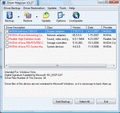
Giveaway of the day — Driver Magician 3.32
Driver Magician 3.32 was available as a giveaway on October 2, 2008!

Driver Magician offers a professional solution for device drivers backup, restoration and update in Windows operating system. It identifies all the hardware in the system, extracts their associated drivers from the hard disk and backs them up to a location of your choice. Then when you format and reinstall/upgrade your operating system, you can restore all the "saved" drivers just as if you had the original driver diskettes in your hands. After one system reboot, your PC will be loaded and running with the required hardware drivers.
Driver Magician has a built in database of the latest drivers with the ability to go to the Internet to receive the driver updates. It saves lots of time to find the correct drivers and mature drivers will obviously increase the performance of hardware. If there are unknown devices in your PC, Driver Magician helps you to detect them easily and quickly with its built in hardware identifier database.
Key features
- Back up device drivers of your computer in four modes.
- Restore device drivers from backup in one mouse click.
- Update device drivers of your PC to improve system performance and stability.
- Live Update device identifier database and driver update database.
- Detect unknown devices.
- Get detailed information of the hardware drivers.
- Clone all drivers to an auto-setup package (.EXE), so you can restore drivers without installing Driver Magician.
System Requirements:
Pentium 166MHz; Windows 98/ME/2000/XP/Server 2003/Vista/x64; 32 MB of available RAM (64 MB recommended)
Publisher:
GoldSolution SoftwareHomepage:
http://www.drivermagician.com/File Size:
3.71 MB
Price:
$29.95
Featured titles by GoldSolution Software
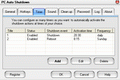
PC Auto Shutdown is a handy software that helps you automatically shutdown, power off, reboot, hibernate, suspend or log off computers at schedule time you specifies. It can shut down computers at schedule time when no user is logged on or when computers are in suspended power conservation mode. It gives you different ways to schedule the shutdown event to meet your needs.
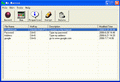
My Macros helps you automate all of the repetitive tasks you face each day on computers. It records all operation of mouse and keystrokes and saves them as macros. You can also create macros manually with macro editor. Then My Macros can play back the recorded macros to automate recorded tasks any number of times.
GIVEAWAY download basket




Comments on Driver Magician 3.32
Please add a comment explaining the reason behind your vote.

iPhone app giveaways »





Android app giveaways »





It seems that some people need to understand the mechanics of BACKING UP their computers. What does it actually mean to BACKUP your computer? Most of the complaints of this software seemed to be due to the ignorance of what to due with the files that were created by this software.
was not providing accurate information. He was quoting documentation that may have been accurate only in certain settings. As far as I can see, there is absolutely NO REASON to have to use the COMMAND LINE to use the automated recovery EXE. This FUD (Fear Uncertainty Doubt) was also inaccurate because the "NAME" and the "CODE" were both included in the EXE file!TRUE BACKUPS of your computer reside on some kind of media COMPLETELY SEPARATE from your computer! If you store your backups on your computer's hard drive and the drive gets toasted - you have no backup! If you store your backup on a second hard drive mounted inside your computer and the system gets fried by some kind of power surge - you have no backup!
Backups MUST exist outside of your computer. This is where TODAYS software comes in so handy! It will create a bundled package of your specific hardware's drivers that can be stored on external media with all of your other backup information. The self installing EXE is run from the external media using the Windows environment. You simply double click on the EXE that is created by this software and your system loads the needed drivers.
Whomever kept insisting that the HELP FILE said the only way to run the restore was to use the COMMAND LINE:
FUD like that might have kept some people from downloading a piece of software that is truly beneficial. The reality is that the self installing EXE is ONLY one method of using the software. There was also the ability to create a self extracting EXE of the drivers in a ZIP format. Or there was even the driver files themselves that were written to a folder.
ALL of these options would then be copied to the EXTERNAL backup medium which would then be available to use in case of a needed backup.
Save | Cancel
#71: No 'obviously' about your running activate.exe, because you say in your post that it hasn't got a registration number or name. OK, there's no number, but it IS CLEARLY REGISTERED to Giveawayoftheday (to repeat,as long as you've run activate.exe), so my point still stands; that as long as it's registered it's not going to show the message you found on trying to restore. That clearly looks like a message preloaded into an unregistered or trial version, which the GAOTD one ISN'T.
Save | Cancel
Installed and working great, well done GAOD. Gave up and got my money back on Driver Detective (DD) as they would not answer driver questions I asked through via DD or direct emails. Despite having a registered account with DriverMax every time I click an item in Updates and identification it takes me back to the Forum Registration Wizard.
clint
Save | Cancel
Awesome software.
Totally worth the $29.95 it costs!
Save | Cancel
#100
Save | Cancel
THANKS - solved ne of my problems I have been fighting with for weeks.
You are my hero!
Save | Cancel
I ran the Activate.exe file both before and after SetUp. After doing this I checked and the program said it was registered.
FYI, I installed the program on a USB external HDD/Flashdrive.
I am definitely not a tech guru... I just followed the directions and then tried to activate again when it didn't work the first time.
Save | Cancel
Odd--the program only found 4 drivers for my system, an obviously, radically incomplete list. DriverMax 4.5 (freeware) found 105.
Others have not reported this problem, so I may be a very unusual case, but if you run into this problem, try DriverMax. (Which does indeed still lack the exe option that today's GOTD includes, unfortunately.)
Thanks, GOTD--even if I can't use today's download, many others can. :)
Save | Cancel
To 70 and 75. "One would have to clone their hard drive in order to keep this registered copy of Driver Magician, thus defeating the purpose of having it in the first place, as a cloned hard drive has the files in it already."
If you had read my post earlier,if you are worried, the program can be installed on external harddrive. The Back up file are self extracting .exe and do not need the progam in any case
Save | Cancel
There are a lot of people, buying new PC's, which only come with Vista.
Some of those people would have preferred XP.
Downgrading to XP can be a tricky business, as there may not be appropriate drivers, in your XP cd (especially if it is a laptop).
I wonder whether this program would help make the downgrading possible ?
Save | Cancel
Wow, made backup .exe file in <1 minute on Home Prem SP1 high end 32 bit PC. Should help if need to do any critical restore. HD failures can be sneaky.
One thing is in Readme. Unlike some, you are supposed to run the tiny
activation file first before run Setup file.
Thanks guy. Program been around awhile so clean & simple.
Save | Cancel
it is a correct find that should be censored from the comments cause of the likely hood of software piracy such comment brings forth on the name of giveawayoftheday
Save | Cancel
This install told me that it was a trial version for 15 days. I was under the impression that GAOTD items were full working versions without constraints. It's ok, I just didn't expect the message.
Save | Cancel
Tried this on a win98 install as some old drivers can be a bugger to find these days.
activate.exe don't work on win98se without obtaining a ms dll first.
Creation of autoesetup.exe (as previously stated) requires entry of registration key whether or not the registered version was used to create the exe file.
tried it on 3rd party drivers for usb disk and mass storage,,failed miserably...
seems this pack actually fails to perform just where it might actually be needed.
As for current Os's(XP,Vista), most often it's best to keep drivers up to date not install old versions
but if you guys really want it the reg code is in plain text in the windows registry
Save | Cancel
Why do program developers make it so that only one account on a computer can use a program that is installed on the computer? If that account gets corrupted and you need to delete it and create a new one the program won't work. Or if my daughter wants to be the one to run the utility instead of me she has to sign onto my account to use the program. If the programs are sold for use on a single computer, everyone who uses that computer should be able to use the program. Sometimes installers offer you the option of single or all users. That's cool. But lots of programs don't even give that option. What's the use of multiple accounts if you all have to use the same account to use all the programs on the computer? Or do I just not know of some hidden setting in windows to make all installs multiuser on a single computer?
Save | Cancel
I had the same problem with it appearing to activate and register but still having a trial end date. So I uninstalled it and switched to a Vista Admin account. This time the activate & install process worked as advertised.
Save | Cancel
I accidentally clicked on the thumbs down, but I didn't mean to! The .exe file it creates is easily worth this download for most people. Love it!
Save | Cancel
I am having NO problems with this software (install fine, live update fine, create backup fine, create EXE fine). YES I did create an "Installable EXE" and ran it and DID NOT get #71, Ulrich Peters, error.
It seems that some people ARE having problems and others are NOT. I have had NO problems today - BUT THEN AGAIN, I had this previously installed AND PREVIOUSLY REGISTERED from a previous GAOTD.
Are the people having problems with todays download - first time installers of this software?
I have seen this before where the people who previously installed had no problems "UPDATING" and the "NEWLY" installing people could not get the registration to work. -
- just a thought as to why there are so many problems with this installation by people who ARE following the directions.
Save | Cancel
Thanks so much GOTD!
Save | Cancel
EDIT: Forgot to mention. In the registry, the posted trial date is there so the app knows when to shut down IF YOU ARE NOT REGISTERED. If you are registered, then you got nothing to worry about.
Save | Cancel
First things first.....
If you read the instructions, it said to run activate.exe FIRST, then install the program. Mine installed just fine, no trial period.
Second. After you register it and THEN create the EXE backup of your drivers, you dont need a name or password to restore. Know how to properly install these giveaways before you bash em or dont know how to operate em. I have used this app in the past and am very pleased with it.
Third. For those that have issues with it saying that your drivers are out of date (when you know they are not), run a full update on the app itself then try a re-scan. Also, keep in mind, that some of the drivers dont come directly from the manufacture site, which is why it my not report the latest version of drivers. This is the ONLY flaw I have ever come across with this app.
TY GotD for such a great app.
Save | Cancel
Re: end of trial date in registry
I have downloaded and used the previous giveaway of this software. My copy of the program is registered, but in my registry there is an entry for end trial time, and the date is 3-30-2007. There is also a first time date of 3-15-2007. That would make for a 15 day trial period. Well it is quite a bit later than 3-30-2007 and Driver Magician is still running just fine. So I guess the registry just keeps that info even after it's no longer needed.
If you click on Help, Register, it should say "Driver Magician has been registered." And the about box should show "Licensed To: GiveAwayOfTheDay" If so, I wouldn't worry about the dates in the registry, although having a look there isn't a bad idea. (Just don't change anything unless you know what you are doing.)
For those having trouble getting the program registered, in the past I've sometimes found that you need to run activate.exe more than once to get it to take. Don't know why that happens, but it does.
Hope this is helpful.
Lynn
Save | Cancel
Do I have to install it today, or do I just have to activate it? I ran Activate.exe, but I want to install the software on a different computer next week. Will it work?
I know that some apps from GoTD only have to be activated the same day, but then the installer can be used any time after that. I wonder if today's download is the same, or if it must be installed today. Does anyone here know?
Save | Cancel
Hello everyone, if you run the Activate.exe program included in the zip file you downloaded it will register Driver Magician and tyrn it into the full version.
The same applies to any giveaway which comes with Active.exe
Maybe on Vista you will need to run Active.exe as an administraor? I'm not sure about this since I have an administrator account with User Account Control disabled and I had no problems.
Save | Cancel
A great program. Was especially impressed with my graphics and sound card driver updates. Thanks GAOTD.
Save | Cancel
You can install it manually if you save it in selected folder. Save it in the folder, and open up device manager then scan each drivers one by one. It still save me a bunch of time comparing to use a CD drivers. Just my two cents.
Save | Cancel
This program absolutely does not work as furnished if you try to restore drivers that contain more than a single file. DriverMagic too often misses a complex driver. That is anything other than a driver made up of a single file.
The program does not restore drivers in the correct order of "first chipset drivers then video drivers, etc.".
Yes, you must purchase a registration key to restore a set of multiple drivers. You have been warned - but not by the program developers.
The error files that you see when you try to restore from a self extracting ".EXE" file are real. The ".EXE" file uncompresses as it should (this type of file compression has been around for years and is marketed by a number of vendors). The error messages are the result of trying to restore incomplete drivers in a "dump a bunch way". Go a head and ignore those error messages - you have no other choice unless you have come up with some "work around" methods a head of time.
If you purchase a registration key thinking it is better than not being able to restore your drivers any other way.....but the program developers said that if you had the key all would be well, re-think it all now.
Been there and done it all. Now with 25-minutes, two or three key presses, and Acronis True Image, I can do it all and the result is a computer that works.
What, the developers didn't tell you this? They didn't tell me either.
Bigun
Save | Cancel
#97: No, I obviously registered the program with Activate.exe before I built the driver-restoring-exe. Have you tried to do what I described? Simply build such a driver package, and try to restore it on another computer - you will see this prompt I posted.
The problem is that this auto-extracting driver package file, which you would use only AFTER a system crash to rebuild your computer setup, won't restore all the drivers you saved in it because in the moment of restauration Driver Magician will be UNREGISTRED. And you can't register it even if you save the original Activate.exe because it won't work correctly after today's giveaway is over. So what is the point in making backup of drivers when I can't restore them without paying for this software first?
Of course you can find the registration key in the registry and take note of it somewhere, but this is besides the point I wanted to make in my original post: If the publisher wanted us to have easy access to the registration key, it would have been given away in the readme.txt as in so many others cases before, but it was embedded in Activate.exe instead, so we "shouldn't know" about it. And this would force anybody needing to restore his/her drivers to purchase a license for this product first.
Save | Cancel
In post #82, I said "According to the registry info, this program has
a trial date that ends on 10-16-2008. I am not a guru,
but is this actually a correct find ??
Please comment on whats going on, and Thanks !"
========================================
Some have suggested reading the directions, using the activate.exe
and so on, so forth.. Let me make it clear, I did read the instructions and run the activate.exe,,, my point is "the registry information says that the end of trial is on 10-16-2008"... If you search the registry
for the entry for the program,, you will see it too I suppose...
Thanks, Mansion Trash
Save | Cancel
when I ran the Actviate.exe, I got "Fatal Error: the key is invalid.: :(
Save | Cancel
I made the backup to a disk subdir. I'm not interested in an exe file when I'm in a panic restoring my system. I want cold hard driver files ;).
I looked at the files in the subdir and they look like I could simply install or update any needed drivers directly from there -- or point windows HW manger to there when it finds that it doesn't have the driver.
Has anyone checked on that avenue of restore?
Save | Cancel
Thanks, very useful addition to my toolkit, especially the exe feature which is nicer than having to reinstall driver using INF file. Some drivers have setup programs, but not all.
This program is also useful for laptop users because many laptop manufacturers do not provide driver CDs for restoring drivers after a reinstall.
To #71: Look in "HKCU\Software\Driver Magician" for info.
Save | Cancel
Excellent!! Thanks.
Save | Cancel
Thanks for the warning, #71. I guess 'scamware' it is.
Save | Cancel
I've got a few serious questions - what happens if you find yourself in need of this program and a fresh install of the entire disk is needed? We would not (I presume) be able to activate a reinstall of the program and therefore not be able to update the backed up drivers?
Secondly, can this program be installed onto an external HDD / flash drive? This is kinda linked to my first point/question but if this is possible then that would be great, but otherwise not much use really..
Save | Cancel
Great software, I really like it. You can backup all your drivers, it can even update your drivers. However, it can't download unknown drivers. It can detect the unknown drivers' name, but it won't give you the link to download it. Furthermore, when you backup the drivers using .exe the drivers might not work correct. Best way to backup is to backup in selected folder and save it in thumb drive. This way it work the best. But overall, great software. Safe a bunch of time when reinstalling OS. Thanks GAOTD! You've just redeemed yourself from yesterday's giveaway.
Save | Cancel
Agree with #70.
I am suspecting this is perhaps useless to restore drivers after a system reboot. Even though files can be saved in autosetup package.exe file "to enable restoring of drivers without installing Driver Magician". You still however need to enter your registration name and reg code to run the exe file. Following is taken from the Help file: to restore drivers enter C:\DriverAutoSetup.exe /s /r /i "my reg name" "my reg code" .
The GOTD version does not have a reg code so you will not be able to restore without purchasing software.
I would be very happy to be proved wrong on this....
Save | Cancel
#71:
Looking at the screenshot that #71's published, I would take a good guess that his DM hasn't registered (ie didn't click activate first), which is why that message has been set to load in the .exe file created, to show when it's used (as #71 has done). I think that, because otherwise that DM dialogue would give the option of registration no. - NOT registration number from having just ordered it, I reckon it makes a distinction (although this sounds very confusing, sorry if so, but think about it). In other words, if you've got a registered copy that you're making your .exe file from it's going to work as it suggests (ie autorun .exe option). Thanks GAOTD!
Save | Cancel
This been here before? Looks famaliar. Says you don't get free updates.
Save | Cancel
I did download this software but it states that it will only remain active for 15 days unless I pay for it. That isn't free!
Save | Cancel
Why does the download say I have to buy this product, or erase it, in 15 days?
Save | Cancel
What would be really "Magic" is that this could be installed 1x on a USB stick & used to update & backup drivers on all my home computers.
Can this be done?
Save | Cancel
DON"T down load that auto shutdown that gave me virus asquared detected it but still froze my comp.
Save | Cancel
Oh yes! This is what I really need! Cheers! :)
Save | Cancel
AWESOME STUFF! Just good for a computer technician like me! I can always backup old drivers before reformatting my customer's computers! No more visiting the driver sites and waiting for the long downloads! Whee!
Save | Cancel
Well my copy is certainly registered and it shows in "about"
Nothing like returnil!
Save | Cancel
Thanks #70
Save | Cancel
# all!
#70 made a serious question.
What happens finally with the EXE file?
Is it working as it should?
Waiting for an answer...
Save | Cancel
Could this program be downloaded to and run from a usb flash drive?
Save | Cancel
umm... try reading the 'readme.txt' - you have to run the 'activate.exe' to register the program...
Save | Cancel