English
Every day we offer FREE licensed software you’d have to buy otherwise.
$29.95
EXPIRED
Giveaway of the day — DoubleSafety 4.5
DoubleSafety is an easy to use program for automatic data backup.
$29.95
EXPIRED
User rating:
230
48 comments
DoubleSafety 4.5 was available as a giveaway on June 10, 2010!
Today Giveaway of the Day
Protect private user data in Windows.
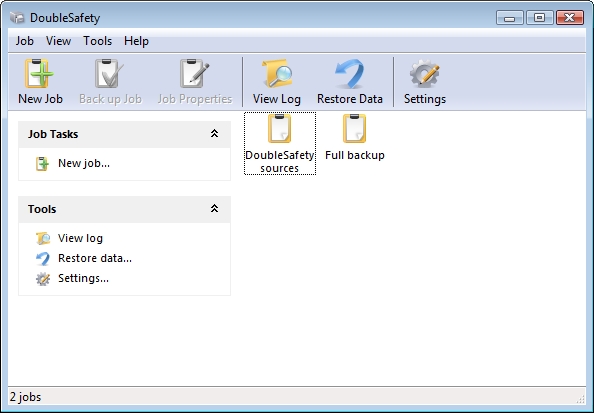
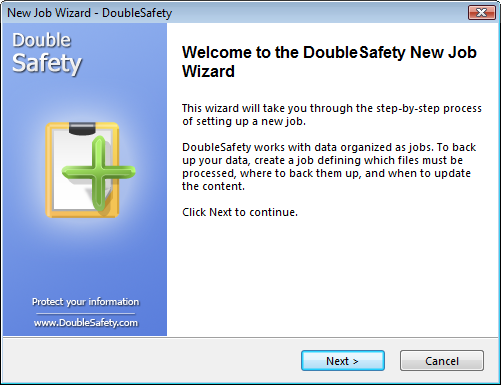
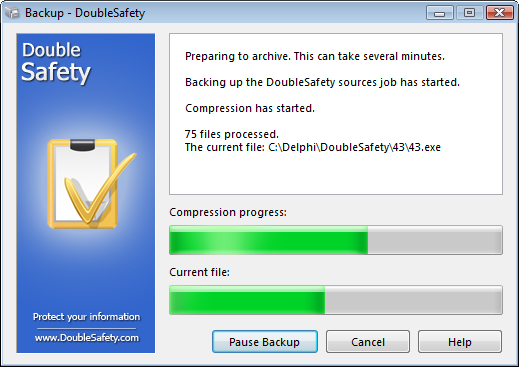
DoubleSafety is a program for automatic data backup. With an effortless user interface, you can store backups on your hard drive or use a local area network, send them to an FTP server or write to a CD/DVD or Blu-Ray/HD-DVD. You can also automatically encrypt data using the 256-bit AES algorithm.
Benefits of using DoubleSafety:
- Thought-out interface
- Powerful and flexibly customizable scheduler
- Encrypting with the AES standard
- Uploading backups to an FTP server
- Writing backups to CD/DVD and Blu-Ray/HD-DVD
- Version control
- Incremental and differential backup
- Open files backup
- Available in the following languages: English, Czech, Dutch, French, German, Italian, Polish, Portuguese, Russian
System Requirements:
Windows 98/ME/2000/XP/2003/Vista/7; approximately 4MB of free disk space
Publisher:
Power LabsHomepage:
http://www.doublesafety.com/File Size:
3.58 MB
Price:
$29.95
GIVEAWAY download basket

Developed by Informer Technologies, Inc.

Developed by IObit

Developed by OmicronLab

Developed by Garmin Ltd or its subsidiaries
Comments on DoubleSafety 4.5
Thank you for voting!
Please add a comment explaining the reason behind your vote.
Please add a comment explaining the reason behind your vote.
iPhone app giveaways »

$0.99 ➞ free today

$0.99 ➞ free today

$0.59 ➞ free today

VCL Checklist 100 uses your photo, map or image from Photos on your iPhone/iPad these can be of any size.
$0.99 ➞ free today

MedFlash is designed for medical students, healthcare professionals, and anyone passionate about medicine.
$0.99 ➞ free today
Android app giveaways »

Collect recipes from around the world and create the ultimate food truck!
$0.99 ➞ free today

A strategic combat game about a forgemaster who accidentally awakened a dragon.
$0.99 ➞ free today

$2.49 ➞ free today

$9.99 ➞ free today

$0.99 ➞ free today
I had the program downloaded & installed, but hadn't had time to try it yet. When I tried it tonight, it had a box for me to click on for an "update" and when I clicked on the box, it REPLACED my free GOTD version with a 30-day TRIAL version of the program. So I lost the license I supposedly got for free from GOTD. :(
Save | Cancel
#41 You don't have to register the program. If you click on Help, then click on About, you will see that it is registered to "Give Away of the Day".
I installed the program on my laptop Vista Ultimate 32 bit with no problems. I like the fact that you can backup system files, picture files, and files that other programs won't let you. You can also split the files to a small size before saving. I'm sure I'll find extra uses for this program than just your everyday HD backup.
Save | Cancel
#41 Registration:
I remembered the following of an earlier offer of that programm:
After the first back up of any folder (you can use a small one of your documents) you will find the programm registered.
Check on: help -> about: "registered of giveawayoftheday".
It worked on my laptop.
Hope I could help, greetings from Germany.
Save | Cancel
Install without any problem on WinXp. The scheduler do not register my choice. Not clear about " Save the forgotten Items"
Save | Cancel
Installed fine on Vista Home Basic and didn't need a reboot. It could not worked with gmail.com smtp settings. But most importantly it could not backup to an external hard drive. So I continue using Paragon Drive Copy which does a bang up job.
Save | Cancel
lol #38. you may be getting a lot of thumbs down.. but i don't think the folks here understand the power/technical aspects (though it's so very simple) of what you said. the xcopy command will do all of this and more.. one batch file created with a couple command lines.. set it in your directory.. click it.. VOILA! everything copied to your harddrive elsewhere. it's also the fastest way to copy.. and no bloated software to launch every time! i applaud your genius.. as i've done this for years myself. i have to question the so called "programmers" above looking to software like this as a solution. they should better.
Save | Cancel
I have been looking at different backup solutions recently because I cannot get Windows backup to run on a computer with 64-bit Windows 7. On my Windows XP machines I use a combination of different backup solutions (belt and braces approach), with Nero Backitup for daily backups of files and a couple of different programs for disk image backups. While this giveaway might not be a complete solution, maybe it could be used in combination with one of the many disk image backup programs in a "belt and braces" solution.
To #31: you have confused backing-up with archiving. They are two different things.
Save | Cancel
Great app, use it since v4.2. Now v4.5 with even more features.
Fine that the issue with the disturbing pop-up "end with error" is worked out.
If i may suggest an wish to the author: i miss a feature like
"Execute [ abc] command before the backup" and "Execute [ xyz] command after the backup".
I understand that i can run DoubleSafety with command-line commands
and so could use an batch to do all i suggest on my own... But... ;-)
-
And... PLEASE let me store the options.ini and jobs in the program folder!
PLEASE make it fully portable... i want to have my settings on different pc
and i don't like to think always about to go to AppData to copy the settings too.
On this way you may want to store register-key in the program folder too, instead of under HKCU?
Than i could just copy the whole DS install folder to the second pc.
Thank you.
Thanks for this nice program!
.
Save | Cancel
When I read here earlier that DS doesn't use a proprietary backup file format but regular ZIPs my interest grew and I decided to install it. It reminds me of SecondCopy I've used before. That has more features though (suggestion for a future Giveaway).
For me this is mostly useful for automatic backups of your own files in specific folders (My Documents, wherever your e-mails or photos are stored etc.) where new files are added/updated regularly. The only weak thing is that I'd like to be able to have it keep multiple backups and after let's say 5 copies delete the oldest one. When going through the wizard at the end it offers such an option but curiously enough it states that this can only be used for full disk (partition) backups. Why they would feel the need to impose such a limitation on folder-backups is beyond me.
Save | Cancel
This program identifies data to be backed up but makes NO claim that it can create a disk image. If a disk drive fails, all software programs must be reinstalled. Programs such as those obtained on this website cannot be installed because of they must be installed on the offer date.
I highly recommend a backup program that will create an image of your disk drive and restore it to another disk drive. The image backup will take more time to create but you will be disappointed with anything less.
Save | Cancel
@7 Being on Win7 - you really don't need an additional backup software. There is both a really, really good backup built-in to Win7, and you can also use Easy Transfer to different total snapshots of your hdd. ie - install of Win 7 alone, a second one of Win7 after you've installed and activated/registered all your programs - then any additional ones you want.
For any others, I personally would never use back-up s/ware obtained here on GOTD. You will have to buy a full functioning copy of the program if you lose it on your drive (crash - new hard drive installed, etc.) - assuming the company is both still in business and still supports the version of backups you have made.
Almost all the other software here ROCKS!!
Save | Cancel
Where the heck is the registration key? I tried downloading multiple times & nie reg. key.Its also not in the readme file etc.
Save | Cancel
This is a good package, but I agree with #4 and several others that GFI Backup, FBackup, Cobian Backup, Paragon and several other freeware backup programs provide at least the same functionality without cost or license issues.
I also agree that backup files up to the same HD is entirely sensible when the object is to have a "good" copy available in case you screw up the copy you are working on, such as of a complex spreadsheet or database. The object isn't to restore from a HD failure (for which you need a complete system backup) but to recover from a user error or power glitch.
Finally, developers should be using versioning software, of which there are several good freeware examples. This applies to software developers, authors, and artists.
Save | Cancel
Ya know what works better than this? A batch file using xcopy and Windows Scheduler. Pass...
Save | Cancel
I just wanted to say about backup software: I use syncback and I have been impressed every day since I first got it. Great syncing/backup capabilities, totally free, can even do syncing over ftp or over the network. Small program, no bloat, and very quick at what it does.
Save | Cancel
#8. When using "backup to hard drive", one uses a different HD from the one being backed up. Yes, some people have more than one hard drive.
Save | Cancel
I downloaded this the last time it was offered, and have been using it to make daily incremental backups after doing a full backup with the program built into Windows. I now have a new computer, and today's offer came just in time! :)
Save | Cancel
@17
I have just installed Noscript upon your advice and restarted Firefox.
You are correct and deserve a YES which I tried to give you.
It never happened - INSTEAD the whole screen blanked out.
I had to return to the email notification and re-click the link to come back.
You are WRONG and deserve a NO, but NoScript blocked that also.
NoScript has options, so many options TOO MANY OPTIONS
There are 6 Tabs of options with 56 box/circle options on the first 5.
The last TAB has a gazillion subsidiary TABS.
Life is too short for all this aggravation.
I only came to have a quick look at today's special offer.
I am not prepared to waste a few hours spread over several days/weeks consulting FAQs and Noscript User forums etc. to learn how to eliminate this Sticker aggravation but retain other functionality.
I will now see if "Submit Comment" is also blocked - after a "select All" and Copy to paste buffer ready for yet another browser meltdown.
Save | Cancel
Interesting discussion here. A backup needs to be on a different drive or media or it is not a backup. All now kind of redundant now Win 7 has included a usable backup program. For older systems I would recommend Fabs Auto Backup. Only problem is that you need to log on each user and do a backup for each. (if you have multi user)
Save | Cancel
To those reviewers suggesting that backing up to the same computer is "spectacularly stupid", "daft", etc., please try to understand the life of a software developer. We write, and we write, and we write, and then we re-write, and we tweak, and we re-write, and we modify, and we re-write (ad nauseum...) our multiple, interlaced programs all day long. Therefore, we appreciate a backup program like this that we can run first thing in the morning and at various other times of the day to save WORKING in-progress versions of our programming labours. Then if we start going in the wrong direction with our coding endeavours, we just grab the last good copy from our backups and compare/start over/swear/cut & paste/combine/etc.
If we put those backups on a disk or remote location, it becomes a pain in the peripheral to restore things.
Don't get me wrong... we do make off-site backups as well, but that's a whole different matter as to what gets backed up, how it gets backed up, and where that all gets stored.
Save | Cancel
I saw the program uses the standard ZIP compression format (or none) when backing up. It also offers the choice of using Volume Shadow Copy to backup files in use. A keeper for this reason alone.
Save | Cancel
Perfect!
I was looking for something like this (too lazy to program it myself)
it worked fine to install & register on Win7x64
Thanx!
Save | Cancel
@15
If you lose your harddrive, having to pay a fee to restore it would be worth it.
Save | Cancel
@ 10This is a backup program, dsigned to backup your data. It is not, nor does it claim to be, a disaster recovery app.
Save | Cancel
#6 and #16 - I see them too and they truly annoy me also (I use IE). I understand why they're there, just don't like 'em. Not going to try this backup. I've STILL not found one system I'm comfortable with. To the developer: try making one that allows the user to boot directly from the backup drive. That's the best way I know to prove the backup works. A good backup program should (IMHO):
Backup everything (system files, etc.) you need to start your system.
Have the ability to backup one-to-one (copy everything without compression or propriatary files).
Have the ability to do incrmental and differential backups.
Back up files while the machine is in use.
Save | Cancel
Tried this when it was offered on August 4, 2009 (version 4.4). Worked well, and would create a zip file of the information I was backing up. Quite easy to use, and offers (offered) password protection to the backup. Thus, to restore, you didn't need the software, just needed to unzip to where I wanted to restore.
My test was on the Firefox and Thunderbird data store folders (not small on my system, +/-1GB). The backup went well, the restore as well.
If this version works like the previous version, this would be a good, and simple, backup utility for someone not needing a backup application with tons a (useless) features. Simply create a backup 'profile' (what you want to backup, and to where, etc). Then start it when you need/want to backup.
The same *could* be done with simple freeware command line tools and a batch file, however, that would require a good understanding of batch writing and your folder structure.
Save | Cancel
#8 Guiseppe "you can store backups on your hard drive"
Not a spectacularly stupid thing at all. Often (mainly?) you want to recover data because it has been corrupted (person/program) or lost/deleted or inadvertently updated - saved to existing file by mistake ...to name but a few situations. Backups to the same hard drive will work. Backing up to the same local drive is quick and easy
Not having a backup in another place (DVD, Web, another HDD ...whatever) is less than sensible, for as you rightly say you lose that drive you lose everything - not all problems arise from hardware failure. Some use one copy for both, some dont.
Save | Cancel
8.you can store backups on your hard drive
Which would be a spectacularly stupid thing to do, although many people do just that. You don’t store the backup the same place as what you’re backing up. If your hard drive dies, your backup goes with it.
Comment by Guiseppe Madre
Guiseppe,
"your hard drive" can be your boot drive, or any other installed drive or partition, or any external drive, or even a NAS drive. It appears your comment is directed at the issue of keeping a backup on one's boot drive. :^)
Rich
Save | Cancel
This is a neat little program. As noted above, it installed and activated smoothly on XPsp2 is intuitive with a low learning curve. It has many features which I will find useful.
Important to note is that this is NOT system recovery software. It does not create an image of your hard drive, but will simply copy the files you specify conveniently and quickly to a destination of your choice. (I have not attempted to backup to an FTP server, but this may be useful for some people, if it works). It is therefore also necessary to have software such as Paragon or Acronis to create a system image in the event of total failure. Those programs will require some recovery procedure (e.g. startup CD, USB etc.).The disadvantage of those programs (apart from their size and cost!) is their slow speed, their lack of flexibility and the need for proprietary software to recover the image.
DoubleSafety is small, extremely fast and flexible and can be used for day-to-day work, keeping your work and (most) installed program files secure in between major system backups. There are many programs which do this (see above, plus Cobian Backup, Windows Backup), however this one does have some neat features and is very easy to use.
it produces .zip files which can be read by Windows, so no software is needed to recover your data. the compression level is variable and files which do not compress easily (.jpg,.pdf etc.) can be included in the archive but exempted from compression thereby improving speed and reducing overhead. Multiple types of backup can be created (full, incremental, differential etc., various sources/destinations /frequency/features) all kept separate and always editable. It can encrypt for security, can activate missed jobs and send notifications of failure/completion. Good little package.
Two more important things to note: 1. DoubleSafety can backup registry keys - however some registry keys cannot be restored directly to the registry while Windows is running. It will be useful for keys where user data is stored, such as program settings and keys. 2. Instead of using Windows scheduler, DoubleSafety uses it own scheduler, which means that it attempts to start with Windows and runs in the background. This may slow Windows startup time and also chews up some 18Mb of RAM. It may be a workaround to use Windows scheduler to start DoubleSafety regularly instead.
Hope this helps. I will work with it.
Save | Cancel
To me, core software (software you rely on in critical situations) like your backup software, must elicit the full confidence of the user. One look at the simplistic developer's web site with no technical information or detailed feature commentary only serves to deter me from exploring this further. As noted above there seems to be a serious lack of a stand-alone recovery media.
This may have some nice features built in but if they cannot include all the necessary basics, then I am afraid I cannot recommend it to myself, let alone others. Pass .......
Save | Cancel
I install the software and installation went fine; the activation too easy as always I manage to install it in 3 PCs, the software does what it says but I will like to see support to backup from outlook and others email clients.
For comment #14, this is why GAOTD let you try the software for free and if it's working for you to buy it later, how do you expect the software developer to make money if they make the software available for free all the time.
And for the others complaining about the software not making the backup bootable... well the simple answer is this is a data backup not an full system backup if you want full system backup go for companies like Acronis, Paragon, Restrospect and others
Save | Cancel
Even though this was downloaded from Give Away of the Day it is no were near Cobian Backup which is FREE all the time
Save | Cancel
#6- You need Firefox with Adblock Plus and NoScript installed as add-ons. Nice program today. Recommended.
Save | Cancel
To #6 What are you talking about? Never seen a pop up.
You need to sort out your browser before you move on to other things.
Some interesting comments. I'd normally put a program like this onto an external HD. Is that not possible with this offering?
If any backup or disc image is dependent upon the creating program not also needing restored, then it is useless.
Save | Cancel
cons ...
perfect for backup , but if you lose your harddrive, you have to pay for restoring cause gaod didn't permit download later
Save | Cancel
I don’t look at thumbs up or down – it is a useless indication. I would rather get the feedback comments the user has given on a specific program. and install problems.
The software installed fine and activated no probs, The interface is intuative and is easy to use. it does what it claims.
Save | Cancel
From the comments, I gather it creates a proprietary file format? I had Insofta Document Backup from a previous giveaway but lost it when I upgraded to Win 7. It created standard zip files. I would like to see that one come around again.
Save | Cancel
I am not sure I see the point of this software, as there are many backup apps available, some free of charge. Recent versions of Windows have them also.
Furthermore, there is no indication of
- how it works (HDD snapshots or individual files) and, more importantly,
- how restorations work (everything on HDD or individual files).
As was pointed out above, backing up to HHD on same computer -- even if on different partition -- is daft. Ideally the backup should be to a remote server, which can be done online these days.
Does the backup reflect what is on the HDD (with file content and name changes) or is it just a file-copying app?
Does it permit restoration of older versions of files?
Etc etc
There's "backup" and there's real backup.
Save | Cancel
All I get when I try to activate it is Fatal Error.
I have installed it without problems on 2 other personal computers.
Save | Cancel
In case of a hard drive failure the most efficient way to restore a backup is by having a 'rescue' type bootable medium (CD or USB-stick) which is capable of restoring the backups to the new HD. Without such a facility you'd have to go through the whole installation process of your OS on your new HD AND be able to re-install the backup software before you can restore your backups. With the GOTD version you won't be able to do that. If you're lucky you can use a trial version to restore your backup if it allows such full functionality. Otherwise you'll be forced to buy the software to restore your backup.
I haven't found any reference in the software's specs that it has an option to create such a 'rescue' medium which for instance the different Paragon apps that have backup functionality always do have.
A major shortcoming IMHO.
Save | Cancel
Install and activated successfully. The backup program is consider user friendly and stable, it's simple and easy to use too. It even can backup the Windows Registry, so overall is cool backup program.
Sadly, it lack of one function that I need, which is backing up small stuff into an email account.
Save | Cancel
you can store backups on your hard drive
Which would be a spectacularly stupid thing to do, although many people do just that. You don't store the backup the same place as what you're backing up. If your hard drive dies, your backup goes with it.
Save | Cancel
From their website:
DoubleSafety 4.5 released
Windows Registry backup feature is now supported by our software.
July 21, 2010
Back to the future!
Save | Cancel
INF 17-29-15 Connecting to the FTP server.
INF 17-29-19 Opening the destination folder on the FTP server.
INF 17-29-23 Backup upload to the FTP server has started.
ERR 17-29-24 Backup upload to the FTP server was aborted due to an error.
INF 17-29-24 Disconnecting from the FTP server.
ERR 17-29-24 Backing up the job was aborted due to an error.
#FAILED
would be more helpful if it said what the error was and how to prevent/avoid it in the future
Save | Cancel
PROS:
* Smooth download, installation, activation on Vista 32-bit OS.
* Simple, easy-to-navigate, easy-to-understand User Interface.
* Detailed, complete Help File (including support contact information) located within program.
* Features include: restore function, password protection, email notification, silent mode, view log, lower priority of backup process while minimized.
* Easy, efficient, smooth program operation (i.e., very low learning curve.)
CONS: - nothing significant to note at the moment.
Summary: - Program is easy to use & does as it says, so two-thumbs-up for today's giveaway. Thanks, GOTD & Power Labs.
Freeware Options:
GFI Backup
F Backup
Save | Cancel
Seems like a useful product. If someone steals your laptop/backup drive, DVD backups etc, they've got nothing!
Save | Cancel
The software here with GAOTD will not only count the US Thumbs, but it will add together all the thumnbs from the different language versions.
Its common in Germany just to call the GAOTD site and click on the thumbs down page, without even trying to download and test the prog or leaving a comment.
So - don't care about thumbs up or down - its a rather useless indication. I would more rely on the comments user has given on a specific program.
For todays Give-away - I for myself will not download it, because I have no use for it, therefore no thumbs up or dowb and no comment from me.
Save | Cancel
It's been available for five minutes here on the U.S. West Coast and there are already 7 thumb-ups and 8 thumb-downs. I have to presume that these voters are simply saying whether or not they will try it, rather than commenting on the quality of the program.
Save | Cancel