Every day we offer FREE licensed software you’d have to buy otherwise.
Giveaway of the day — Digital Photo Organizer
Digital Photo Organizer was available as a giveaway on December 8, 2009!

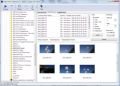
Your pictures will be perfectly sorted and ready for easy access at any time if you use Digital Photo Organizer. The user-friendly interface of the program ensures quick results and safe photo processing.
Digital Photo Organizer allowing you to:
- automatically sort photos;
- rename a group of photos in the batch mode using a template;
- give a unique name to every separate photo.
System Requirements:
Windows XP, Vista, Windows 7, 64bit
Publisher:
Alexander G StyopkinHomepage:
http://www.styopkin.com/digital_photo_organizer.htmlFile Size:
1.69 MB
Price:
$19.95
Featured titles by Alexander G Styopkin
Advanced Font Viewer is a comprehensive application, which is ideal for viewing, printing and managing your fonts. A full-featured font viewer quickly generates a high-quality display of your fonts.
Find & Remove All File Duplicates. How many file duplicates are there on your computer? You don't know, but you regularly come across copies of files, right? There are various reasons why duplicates appear, but no matter what these reasons are there is not much sense in storing them.
GIVEAWAY download basket


Comments on Digital Photo Organizer
Please add a comment explaining the reason behind your vote.
iPhone app giveaways »





Android app giveaways »




![[365fun] Running Man Giveaway](https://android.giveawayoftheday.com/wp-content/plugins/gotd_googleplay_plugin/images/100/2026/06/com.whitewind.runningman_app_icon_1780400784.png)
It will not register. I have run the activation program multiple times and it still is unregistered. I have Vista 32 bit os. I read the directions first and followed them but it doesn't work.
Save | Cancel
Will not work for windows 7 waste of time
Save | Cancel
I still use Microsoft Photo Editor from previous (pre Office 2003) disks for basic image editing. Shame Microsoft discontinued this in later versions of Office. Does all I need or ask of it. (Obviously use another program to work with layers etc!)
Incidentally, same file names ARE allowed for Word documents, they are tagged with time/ date to distinguish them. For printing I often import photo/ photos into Word (though not to store them - Word stores the original file size for images, not the reduced size versions.)
Suggest giving photos meaningful names, when copied into (named!) folders.
For batch resizing or batch labelling there are plenty of freeware programs.
Do strongly suggest backing up valuable photos onto another hard drive as well, AND copied on to optical media!
Save | Cancel
Seems like many programs will do this. I'm looking for one like I have in Iphoto on my mac that will identify faces. Suggestions?
Save | Cancel
Hmmmm............. I think I'll keep Picassa 3 after all :-)
Save | Cancel
Registration woes:
The registration probably won't work if the program is running. Make sure the program isn't hiding in your "tray". Reboot if necessary.
Clicking on the Activate program won't work in Windows 7 or Vista, even if you are an Administrator. The GOTD programmers still haven't figured out how to include the metadata that tells Windows 7 or Vista what privileges it needs, so Windows runs it with the fewest possible privileges (it removes your Administrator privileges so you don't install nasty stuff by mistake). In order to run it as Administrator, you need to RIGHT-CLICK on it and choose "Run as Administrator". If you aren't getting the nasty UAC prompt, you haven't done it right (or you have turned the prompts off, which isn't recommended).
Save | Cancel
I've read most of the comments and my conclusion is that Picasa will do the job easier, better and also for free!
Someone wrote: I've got 30.000 photo's to organize
You woke up a bit late!!!
When i load pictures from my camera to my pc ( with Picasa) i always create a folder with the date and sometimes a reminder.
"20091209 old home and school" is my folder for today. There more pictures about different things in that folder but those reminder help me to think back on today and where i toke todays pictures.
On a good day i might give a separate name to each picture or just to the pictures i'm using for other purposes.
In picasa i will enhanced,rename,alter or straighten the pictures and always save as: "save as.....".
that way a always have the originals and the modified version on disk.
So for todays program no thanks, but keep up the good work
Save | Cancel
Like # 19 above, I don't see how this program is useful, or what it does that Windows itself doesn't already do, and for free. #16... "thousands of photos in one folder"???????? You've got to be kidding! Why not Right-click to make your own folder right from the start?
Zoo Photos... Paste.
Brunch Photos... Paste.
Vacation Photos... Paste.
Go within the certain folder and highlight 50 photos, Right-click the first one, name it "Train Restaraunt at Pismo"... and watch hundreds of photos change names instantly, all numbered 1-500 if you want.
Highlight the next batch in the same folder even... Right-click on the first photo and name it "ATC's on Pismo Beach".... and all those change to:
ATC's on Pismo Beach (1)
ATC's on Pismo Beach (2)
ATC's on Pismo Beach (3)
...etc.
You know?????????????????? Is this for people who have trouble Right-clicking, pasting, naming, and creating folders? What happens if your computer goes down for some reason... what happens to all your photos controlled in a program? Are the photos in this program backupable (if that's a word)? Or does the program just deal with shortcuts, and your photos are just wherever they are in reality? THen when you move them, they will be out of order, thus all your work done for nothing? I am not understanding this one.
Save | Cancel
$20 dollars for a batch renaming program is rediculous. This program lacks any real usefulness at all. To batch rename multiple photos can be done within Windows Explorer. For example if I have 20 photots that all are from the same day/event, I could simply rename all of them by creating a directory/folder, name the folder example Christmas 2009. Place all photos from event into that folder. Open the folder, Ctrl+a to select all (Or click Edit>Select All), once the images are highlighted, right click on the top image and choose Rename, Give it a name like "Christmas 2009 (1)" (notice the space +"(1)"). IMHO this is a better way to batch rename photos, this software just gives the file a #+name+date+file extension which is simply too long of a name for an image.
Your photos should now be named: Christmas 2009 (1), Christmas 2009 (2), Christmas 2009 (3) etc. Free and now dowmload needed.
As far as "organizing" as well a sthe other features offered by this GiveAway... I agree that Fastone is a better alternative and is always free.
Save | Cancel
There are so many extremely competent freeware alternatives, one never needs to pay for a tool like this. Digital Photo Organizer has a long way to go before it is competitive.
I prefer XnView but there are many others.
Save | Cancel
Addendum to # 11:
Be aware that the renaming process overwrites the original file-names in the source folder. If you don't want to make such a final change, you have to back up first.
graylox
Save | Cancel
This software is great, it does what it claims and does it well, last time I checked none of the freeware options could AUTOMATE the sorting of files an folders, maybe it does not seem useful but when you have thousands of photos in one folder this software is VERY USEFUL! and UNIQUE in its ORGANIZING ability.
Save | Cancel
This is only an organizer/renamer. It deals with a directory at a time, and you cannot paste the directory into an edit field--something I find disgusting.
That said, the very fast preview and ability to drag and drop before renaming makes this a keeper. You can also select, by holding down the Control key, which photos to rename. I wish I had this two months ago, when I was designing a calendar and had to keep the photos straight.
Save | Cancel
To numbers 4,12 and 13:
It's unclear if you;re referring to
- IMPORTING pictures (from a camera or scanner),
- EDITING (red eyes, color adjustments, cropping, etc) or
- ORGANIZING (changing names or adding tags)
I believe that today's GAOTD, Digital Photo Organizer, is primarily directed at ORGANIZING.
It's unclear in your reviews how you comopare the ORGANIZING function in "Digital Photo Organizer" to other software offerings.
I am primarily interested in finding the best ORGANIZING program. Also, were there prior GAOTD offers?
Thanks to everyone for the contributions!! I have about 30,000 photos, including many dupes, in many folders and I'm going crazy!!
Save | Cancel
Have seen this one before; agree that Faststone Image is much better and also free; I still use ACDSee32 for my images and Photoshop for fixing/creating/modifying. Ashampoo makes a great PhotoCommander prg., and there are so many other intuitive, graphic-based programs that this one doesn't make the cut. But I visit here every day and really appreciate the opportunity to review, download nad test software programs I otherwise would not have the chance to do so.
Save | Cancel
For easy organisation of Photos from a camera, suggest you look at CAM2PC. It's free and will automatically download all pics from a camera (or card with a DCIM directory) and put them in a folder it creates with the current date in the folder name.
Save | Cancel
Digital Photo Organizer:
Download, installation, activation and first start of the programme were very fast without any hassle and even without right-click-administrator on Vista HP 32.
The GUI is clear, without unnecessary ornaments and intuitive.
But unfortunately, there is some need for improvements:
° You can't stop/interrupt the programme, only shut down with X or task-manager.
Single Renamer:
° Even for renaming of single photos, would a template be helpful.
Batch rename:
° The "Old Name" includes the extension (.jpg/.png), you can't delete it. When the old name shall be part of the new one, you'll have the extension twice in the new name. (Like: 005-OldName.jpg-2007-01-16.jpg)
° The thumbnails have a poor quality; especially those of resized JPGs with reduced JPG quality are heavily pixelated. Thumbs of .PNGs are much better.
° It seems that the programme is not able to read bigger(?) folders. e.g.: After loading for about 15 min I killed the process with task-manager; that was a folder of 1.45 GB, with 198 JPGs and 3 short AVIs.
Even smaller folders couldn't be read in an acceptable time or the programme froze.
Irfan View had no problem to show the thumbnails of even thicker folders very fast and in good quality.
° Well - the price is too high, especially when you look at lots of good freeware programmes.
Sorry Mr. Styopkin, I think you should improve this programme.
I like the straightforward design of your programmes, use and like your "Advanced Font Viewer" and the info about fonts on your site. Surely I will like an updated "Digital Photo Organizer" too.
Thanks for participating in the GOTD project.
graylox
Save | Cancel
Thanks but no thanks, GOTD and Mr. Styopkin. After a quick review of this program's features and interface, I'll stick with the excellent and always free FastStone Image Viewer and Picasa for viewing, organizing, naming, editing, resizing, and converting pictures.
Save | Cancel
I could not get it to activate on Vista Home Basic 32 bit. I clicked the Activate.exe and it connected to GAOTD and said it activated but when I opened the program it still says it is unregistered. :(
Save | Cancel
oh thank you so much GAOTD! I've been looking for something like this to sort and organize my digital pics.
Much thanks!
Save | Cancel
Installed fine but offers nothing than can be got elsewhere for free. I save all of my pictures into individual named folders in My Pictures so they are organised anyway. You can also batch rename photos in Windows very easily. If you need this type of programme then I suggest you use Picasa. It is free, very easy to use, has loads of features and it works. The only thing I would suggest with Picasa is to only let it scan your Desktop and My Pictures folder when given a choice or you will end up with millions of icons, bars, logo's etc. I should also point out that a couple of minutes with Picasa will transform any of the pictures that you take with your mobile phone that are just not quite as you want them. As for todays programme, at $19.95 it is massively overpriced and is still not worth considering for free as although there is nothing wrong with it there are far better programmes that do more for free everyday.
Save | Cancel
I'm using a totally free alternative i.e. Fast stone Image, and its much better
Save | Cancel
Well, I installed it not expecting anything useful, and I am not disappointed. The images that come from my digital camera have sequential numerical names that are quite meaningless. This software allows you to make even longer, sequential, numerical, meaningless names. Yes, fully sorted if you are a mathematician! For normal people, finding a specific photo by name will still be impossible.
ACDSee and clones will do a much better job.
As for "# give a unique name to every separate photo." Windows doesn't allow identical names anyway - you HAVE to use unique names or they wont be on your computer! Absolute foolishness!
This software does nothing for me - it's uninstalled.
Save | Cancel
Downloaded & installed fine on Vista Home Premium x64 bit OS.
You must run the "activate.exe" executable as Administrator for activation to take effect.
GUI is visually unattractive and unintuitive, but detailed Help File offers clear assistance.
Program offers several editing features, settings, and options, such as automatic resorting, batch renaming and single renaiming - but not as many functions as some freeware alternatives.
Not bad for a free giveaway, but I would not pay $19.95 for it.
Thanks for the program, GOTD and Mr. Styopkin.
Freeware Options:
Picasa - CNET User Rating 4/5
FxFoto - CNET User Rating 3.5/5
Save | Cancel
Downloaded & installed fine on Vista Home Premium x64 bit OS.
You must run the "activate.exe" executable as Administrator for activation to take effect.
GUI is visually unattractive and unintuitive, but detailed Help File offers clear assistance.
Program offers several editing features, settings, and options, such as automatic resorting, batch renaming and single renaiming - but not as many functions as some freeware alternatives.
Not bad for a free giveaway, but I would not pay $19.95 for it.
Thanks for the program, GOTD and Mr. Styopkin.
Freeware Options:
Picasa - CNET User Rating 4/5
FxFoto - CNET User Rating 3.5/5
Save | Cancel
Easy install, fast in use, not much bells and whistles. Very usable though! ;-) I'm going to keep this one a bit longer and see if I can't get rid of the chaos in my pix files.
Feels and looks like a simple tool.
But, to novice users and myself simple is often best :-)
Save | Cancel
Installed on Vista 64 with no problem, but can't activate the program! I run the activation program several times after the installation, but still I get the message, "Unregistered Copy of DPO - Please register."
Any idea how can I make the "Activation" to work?
Save | Cancel
Great program GOTD -
I definately 'get the picture'!
:)
Save | Cancel
The Good
* Straightforward and easy to use.
* Can batch sort image and video files.
* Has multiple different sorting rules for the user to select from.
* Users can use up to 3 sorting rules at once.
* Can batch rename image files.
* Has multiple different renaming macros for the user to select from.
* Users can mix and match the renaming macros as they please.
* Users get a preview of what the renamed files' names will look like.
The Bad
* Only properly sorts some image formats, like JPG; other image formats, like PNG, are just grouped into "Other".
* While sorting, does not give users the option to move the files instead of creating copies of the files.
* While sorting, sorts all non-image and non-video files and lumps them into an "Other" folder - no option to not sort non-image/video files.
* Only shows a preview of the first 35 files to be sorted - no option to show a preview of more than the first 35.
* Can't use single digits for the number macro for renaming images - must use 2 or more digits.
Free Alternatives
Rename Master <--- For renaming features
For final verdict, recommendations, and full review please click here.
Save | Cancel