Every day we offer FREE licensed software you’d have to buy otherwise.
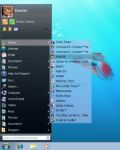
Giveaway of the day — Classic Start Menu
Classic Start Menu was available as a giveaway on June 27, 2010!

Are you missing the Classic Start Menu in Windows 7? If so, you are not alone. We have developed this Classic Start Menu for you, and now you can easily change the unusable menu of Windows 7 to the well known classic start menu with Aero skin. Actually, you can use other skins too, not just the Aero one. Yet, with Aero, you make the Classic Start Menu look like a real part of Windows 7.
Unique features:
- One-click launch helps you run programs faster.
- Use Classic Start menu as a starting point. You can add any folders to the menu, including special system folders, drives, or shortcuts, and get access to any point of your PC with few clicks from one single place.
- Power button timers. Now you don't need to wait for when a long process will be completed. All you need is to turn on the timer and Classic Start Menu will turn off or reboot PC for you.
- Aero Skin and others help you to change the look of the menu.
- Quick un-install feature allows you to uninstall any program with a right-click, even if the program doesn't come with an uninstall shortcut in menu.
You will realize the power of the new Classic Start Menu as soon as you try it out.
System Requirements:
up to Windows 7
Publisher:
OrdinarySoftHomepage:
http://www.classicstartmenu.com/index.htmlFile Size:
7.35 MB
Price:
$19.99
Featured titles by OrdinarySoft
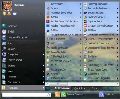
Start Menu 7 - the best software to replace the standard Windows Start Menu ever made. For your convenience, the interface has been developed with human psychology taken into account. Solve tasks in a simpler and quicker way.
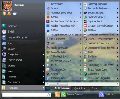
Freeware! Do you have hundreds of programs in your Start menu? Do you waste time looking for the program you need? Try Vista Start Menu to instantly find what you need among the large amounts of information. Vista Start Menu is effective for advanced users and easy to use for beginners. Start working with pleasure!

Tidy up your favorite bookmarks! Organize your favorite links as live thumbnails instead of trying to work through plain-text links. Open, delete, move, resize and update bookmarks in a single click. Conveniently use the same set of favorites and the same convenient user interface in all of your browsers - IE, Firefox!
GIVEAWAY download basket




Comments on Classic Start Menu
Please add a comment explaining the reason behind your vote.
iPhone app giveaways »





Android app giveaways »





I swear, sometimes things like this can really be more of a problem to install and set up than just learning the new start menu would be. I mean, first you have to download and install it, you have to use a specific skin with it in order to keep it from looking tacky, and then you'll have to do a lot of work to get it set up just the way you're used to from your old operating system. I've never had any problems transitioning from start menu to start menu, maybe because I don't often use them anyway. It's easier for me to just create a folder for shortcuts and attach any program I use often to that. Furthermore, I've noticed that my Windows 7 Start Menu will migrate programs that it notices I use often to it's quick launch area.
Donald from Skin Tags Removal
Save | Cancel
"Users need to adapt to technology"
Actually this means: Users need to adapt to Microsoft's way of doing things and Microsoft's way of thinking.
I'm forced to use Win7 (because of work)but I embrace freedom of choice.
Thank you.
Save | Cancel
@#10 - Rob
I agree completely! I could make a list of all the reasons I don't like the new Win7/Vista style start menu, but why the hell should I have to? I like the classic menu. I use ClassicShell, myself, but the same principle. I could just as easily argue that you should not change your desktop picture from the original one MS chose to give you as default, because you should just accept whatever crap they give you. The argument is just ridiculous. The Win7 menu is awkward, not productive, slows me down, is just ignorant the way it's laid out. Why should I have to click All Programs and then Back, as if they're two separate menus? That's just stupid! And then there's the fact that I don't have the ability to put folders in the first section of the menu, as I did when it was the classic menu, and as I can now with ClassicShell. I love the way my menu is set up. I did try Classic Start Menu too, but I prefer ClassicShell. There is just nothing closer to the real thing and as non-obtrusive. See? Nice and simple! I can make as many submenus as I please and put them wherever I please. You just can't do that with the Win7 menu. After years of setting up my menu my own way, it's rather crippling to have to do it any other way. Sure, I can if I have to, and I do every time I have to work on someone else's computer, but I don't like it. :P
Save | Cancel
I didn't want to go all the way back to the classic start menu, but looking at the page 'reminded' me of one of their other related aps "VistaStartMenu". I've used it before ('lost' it during a OS re-install). I had no problems with VistaStartMenu, and have just re-installed it.
The thing I like about VistaStartMenu is that it gets rid of the "dynamic" nature of the start menu, items in the menu stay put until you drag them elsewhere. That dynamic nature is the one thing I hate the most about the new Ribbon gooey (UI). Tabs and commands appear and disappear depending on the specific context. I know the hidden feature is there, but unless I know the "magic formula" to make it appear it is very frustrating trying to access them. You constantly have to think to look at right end of the tab list to make sure nothing new has "popped up". And then you have something like the Word "Outline" tab that shows up at the very left side of the ribbon, before the "Home" tab. No user interface consistency.
Save | Cancel
Ad. #1 and to all other People.
I am already using Windows Server 2003 EE and a long time before I have been using Windows 95. What I have remembered from the Win95 was the time needed for showing up the start menu - it was much less than one second, which was really fast. Moreover the start menu in Windows 95 have been showing very quickly even when the system was overloaded with running applications, so I was accustomed to this fast reaction.
The things have changed when I have installed Windows Vista on my computer. I have been shocked, when the Vista's start menu showed up after a few second from the time of pressing the Win key - for me it was like a whole night(!). When the system was overloaded then the thing was even worse - the time of showing up the menu was longer than 10 seconds. BTW: It wasn't hardware issue of slow computer, it was a OS' "feature".
So, after this short comparison we should see that a fast reaction of start menu is a feature that was taken us away.
On the other hand, the intelligent icon of commonly used application is useful only when we install a few programs like in the first example: program "X" from "A" company, which is installed as "A X" - not as "X" as we like... This is the time, when the search option is also useful.
Summing up: for some people the intelligent start menu from WinVista and from Win7 will be a must-have option, but for other it will be an unnecessary and unintelligent machine feature which shuffles with icons and that generates unbearable lags for the menu. Moreover, there are some things that I can do in Win95's start menu and I can't do in WinVista's start menu.
II am personally not using the Windows Vista nor the Windows 7 at the moment. If I were using it, I would install Classic Start Menu. In my opinion - if only this program is fast as noted - it is worth installing it for some people irritated with WinVista/7.
Moreover this program is useful in Windows 7 and also in Windows Vista, so the sentence "compatible up to Windows 7" is true and makes sense. Fancy button timer feature is also worth mentioning. I am giving him a green light - one point up.
SUMMING UP: (basing on program's features) THIS PROGRAM IS A VERY INTERESTING, BUT UNDER SPECIFIC CIRCUMSTANCES AND FOR SOME PEOPLE - FOR SURE THIS PROGRAM IS NOT FOR ALL, ESPECIALLY NOT FOR NEW COMPUTER USERS.
Greetings.
P.S. Sorry for my English, but it isn't my primary language.
Save | Cancel
I really have to vote with those who do not find Windows 7 Start to be confusing and difficult to use. I've been using Windows OS since before Win 95 and as far as Win 7 goes, for me it was one of the easiest to learn. What it really comes down to is personal preferences and individual perceptions of this OS. I'm not a fan boy of Microsoft; they certainly have made some pretty bad products, (eg. Window ME) but it is my opinion that they have created a very good OS in Win 7. Bottom line; if you don't like Windows 7 Start Menu then by all means get this product or a similar product. I'm going to pass on this offering but I'm happy for those who want and/or need it to navigate the Start menu.
Save | Cancel
I like to group my start menu in the same way as #19 so this may well be the program I'm looking for. However, I can't find an activate.exe in the download, or in an extensive search of my drives after installation. Neither can I find a way of checking whether it is registered - there's no info on the About page.
John D.
Save | Cancel
Re my post #16
Well, I've given both todays offering and the freebie posted by #6 a tryout.
My preference is for todays offering. I prefer it over the free one. It is light on resources, uninstalls very easily, and doesn't leave anything left in the registry after the uninstall.
I reinstalled it again after trying out the freebie and will continue to use it.
Save | Cancel
I look forward to the new OS and the changes they bring,good or bad,
but I never go back to the old OS.Why put junk on a new machine to make it look like an old one,I just don't get it.
Save | Cancel
Thanks GOTD and OrdinarySoft. This thus far appears to be a keeper!
I have been using Windows 7 Home Premium since it was released. I
find your Classic Start Menu very friendly and easy to use. I have
only had it installed for 30 minutes so, if by end day i find any
unpleasantness, i will repost.
As far as being a hog, not necessarily if you have a sizable hard
drive with plenty of ram!
Save | Cancel
Its good to see the Microsoft koolaid drinkers who think everything new MS puts out there is the greatest are alive and well.
For those of us who started with 95 this is helpful in getting past the learning curve MS threw out with Vista/Win7.
There are also cures for the 'ribbon' in office out there.
Save | Cancel
If you are one who uses a default win 7 install, and only play solitare, office, and browse the web with IE you won't care about this.
However, if you produce anything, your going to quickly find managing 10,000's of installed programs easier through a classic menu, where you can group your utilities, drag and drop the links in and out.
For example
I group like so..
-=[ 3D ]=-
-=[ Audio ]=-
-=[ Games ]=-
-=[ Graphics ]=-
-=[ MAGIX ]=-
-=[ Network ]=-
-=[ Office ]=-
-=[ Programming ]=-
-=[ Security ]=-
-=[ Streaming ]=-
-=[ Utils ]=-
-=[ Video ]=-
As you can guess there are many many links UNDER each group.
My Utils has Utils 1, Utils 2, Utils 3, Utils 4
My Video, 3D, and Audio applications are alphabetically sorted from A-L M-S T-Z Basically when the fill the menu from CLOSE to the top and bottom I start a new sub directory, or re-sort.
Everything is alphabetically sorted. Everything can be dragged and dropped for example I could take Kaspersky link from -=[ Utils ]=- and place it in -=[ Security ]=- instead. There's no question what is installed and what isn't.
Like I said, it's not for everybody, but I got to admit, between slashdot and other tech sites I am really really really tired of arguing with people about this dilemma. Just cause you like the new win 7 menu, doesn't mean it's productive. Really when I have to dig for an unknown application name, the stock win 7 menu's search and other features becomes completely useless to me, I'm actually faster starting the program directly via ztree, or command line. This is insane. Ergo these new classic menu replacement systems rock.
While I knew of this before, and also knew of the free alternative, I have to say, what kept me from buying it was it didn't seem to have any benefits over the open source version. (when I last looked it had more features) Mind you I am not knocking this software, just giving my opinion. I mean, the paid one has support, the open source one your basically on your own.
All I know from a tech's standpoint, is I hate working with the default win 7, I dread running secunia's PSI cause I know it's going to be time to manually track down why some flash dll wasn't deleted by the adobe installer again. Nearly everything in win 7 seems to be obscured by some new naming, or trick, or problem which I must burn precious time on to debug, and get to play nicely with the system. Slowing down my support for patching and updating such boxes. Okay bottom line, if I come across a box with default win 7 menus I will be slightly upset, if I come across a box with this software installed, I will be much happier, If I come across a box with nothing, and am given the option to install a solution, I have to honestly go with the open source, but obviously that COULD change..
So I give a thumbs up actually.
Save | Cancel
'unusable' - from the description.
How on Earth is the 7 start menu unusable? What is unusable about being able to search every file, folder and program straight from the start menu?
'to have simple menus, that show everything'
Unlike the XP start menu, the 7 one literally shows everything, that is, everything you would want to find on the start menu.
Some people are so resistant to change.
Save | Cancel
What surprises me the most is that it has a price tag of 19.99 which although isnt expensive in itself, seems a lot for what it does, especially when functional freeware is available.
The lack of documentation on the website does not give me confidence either.
The download size looks bigger than I would expect making me wonder if most of the program is required in preventing the old menu from running so instead of simplifying a process which isnt so difficult to begin with, actually just creating potential issues.
However thats why this site exists, to sample paid software for free to see if it warrants purchase .
Save | Cancel
@ #10 I'm in agreement with you on many things. However, I do like the Ribbon menu with Office 2007.
I've been using computer since before Win 3.X
Firstly I get really annoyed that ppl waste the comment section by saying they don't like it or that we should accept everything new. Newer isn't always better, however, having said that, new can (in many cases )also be better. If you don't like something and haven't tried it out then don't post! Stop wasting others time with your useless comments.
I've used the XP and Vista start menus. I never did like them so switched to classic. I don't mind the Win 7 start menu, it is better, but my preference is still for the Classic menu.
I'll be trying out todays offer and will also try the freebie that #6 posted to see which I prefer.
Save | Cancel
Since I'm running XP, I'm not going to download this, but if I had Win7 I would. (I will have a new computer in a couple of months so GOTD, I hope you will have this or another one like it.)
I agree with #10 and #11. It really irks me when they change programs so much that you can't just jump right in with menus and keystrokes you already know. Having used computers for 20+ years, you get kinda used to the old familiar ways. I bought MS Office 2007 but have yet to install it because, in having to use it at school, it annoys me that you can't change the menus and toolbars to be like previous versions (I like my toolbars and menus from Office 2000) so I was going to save 2007 for my next PC. I've heard there are programs like this one that will convert the MSO 2007 toolbars, so I guess I'll go look for them as my Word 2000 has crashed and won't repair, so it's probably inevitable for me to go ahead and install the upgrade.
Anyway, thanks GOTD.
Save | Cancel
Essentially, all this does is restore the way that the start menu worked in XP, EXCEPT that it leaves the very handy search box. Not bad, at all.
This function might SEEM the same as the myriad of other utilities from sourceforge and others (and this author) but it isn't.
It would seem that most of the comments here don't understand that. Granted, part of the problem is the name and the developer's (complete) FAIL at describing the product, but it would probably help things immensely if those CLAIMING familiarity with the product actually TRIED it before commenting.
Ya think?
Save | Cancel
I have noticed that with Vista and Win7, MS has chosen to keep the learning curve unnecessarily steep. What I mean is that for the sake of change, they have opted to move old stuff to new locations so that you have to start all over again. This is irritating to old timers who expect to use the new software right away and find that things have changed, to their chagrin.
On the other hand, if you are new to Windows, you would like it, since you do not have to "unlearn" any thing to start using it.
The bottom line is, if you are new to Windows, forget this Start Menu software. However,if you have cut your teeth on the earlier versions of Windows, such as XP, you would like the menu program.
Save | Cancel
I would appreciate it, if those that -
- Bought vista
- Love the Office Ribbon
- Love the Wimdows 7 Start Menu
would not try to preach to us, telling us that whatever MS foists upon us is to be embraced. And then tell us that we should all learn to adapt to them.
It is a legitimate desire by some of us, to have simple menus, that show everything, and are not a moving target (trying to find things).
I am not saying today's offering (thanks GOTD), meets that criteria.
I like many others will be reading user's comments, to help make my decision.
Save | Cancel
I have tried Start Menu 7 from the same company, but I must say that I have been very disappointed. It has many bugs, many things that doesn't work as intended, or doesn't work at all (especially in the options of the right-click popup menus). Anyway, if you organize your standard Start Menu in categories (with sub-folders), then the standard Win7 Start Menu is perfectly well suitable. I just don't like the fact that you cannot chose to have the All Programs pane opened by default instead of the Recently Used pane, and I would like to find a little free program that does just that. But anyway, there is no need for another app just to launch apps!
Save | Cancel
Why should I install a 7 Meg application that brings back a menu that is gone with the installation of a new OS!
So - everybody should buy my new Horesapple Dropper (It drops now and then a Horse Apple from the back of your Car) - it brings back the feeling of days gone by....
Guys - why did you go and install Win 7 when at the first moment you installed apps to bring back the feeling of XP - my advice - install XP, that way you don't have to adapt to anything new...
@ Derek - Comment #1 - I second that - you are totally right!
Save | Cancel
Well, eventhough i just start using window 7, i still think this program gives me a clue of how window 7 first looks like.
Save | Cancel
here is a free one, but better
http://classicshell.sourceforge.net/
Save | Cancel
I have the start menu 7 from these guys and it saves me quite a bit of frustration caused by the standard win7 start menu. I don't know about this classic start menu but judging from start menu 7, it probably works the same way with a look like the classic xp window. I recommend trying it as it's very light and makes no major changes to your registry. It doesn't really change your start menu. I simply causes the start menu 7 window to open when you hit the start button. To the user it looks like a change to the windows start menu, so it might scare some people into thinking that this is a change to the OS, but don't worry it's not, it's just a very powerful intuitive dashboard for your computer.
Save | Cancel
OrdinarySoft have a very basic website with no help or support whatsoever. The system requirements here say "up to Windows 7" but the program appears to be for Win 7. So why would anyone with XP, Vista, etc want this. There are no answers to be found on their website, only "Download Demo", "Contact" or "Buy", which is not exactly helpful.
If it works on other OS's tell us what enhancement it will make. Otherwise do not allude to a use it does not have.
Save | Cancel
Change is inevitable. Users need to adapt to technology and applications like this only hinder that transition. Once the user accept the change, they usually find it more efficient the older technology.
Save | Cancel
This is a great option available to those with Windows 7. The purpose of this program is to bring back classic program but to fit in with Windows 7 appearance. Although compatible with vista, it does not match the appearance of vista and is as 'tacky' looking as many other start menu alternatives.
Save | Cancel
No, thanks. No only I don't find the Win7 Start Menu confusing at all (What on Earth is there about it that can be considered confusing?), but I can launch my apps much faster thanks to the most used programs list and the feature to pin apps at the top.
And no, I don't need the feature to add folders directly to the first menu, since just typing the name of the program I want to launch in the Search Bar and hitting Enter is much faster (and much less awkward) than going through a sub-menu and finding it.
Save | Cancel