Every day we offer FREE licensed software you’d have to buy otherwise.
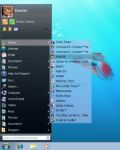
Giveaway of the day — Classic Start Menu Pro 3.8
Classic Start Menu Pro 3.8 was available as a giveaway on November 8, 2010!

Are you missing the Classic Start Menu in Windows 7? If so, you are not alone. We have developed this Classic Start Menu for you, and now you can easily change the unusable menu of Windows 7 to the well known classic start menu with Aero skin. Actually, you can use other skins too, not just the Aero one. Yet, with Aero, you make the Classic Start Menu look like a real part of Windows 7.
Unique features:
- One-click launch helps you run programs faster.
- Use Classic Start menu as a starting point. You can add any folders to the menu, including special system folders, drives, or shortcuts, and get access to any point of your PC with few clicks from one single place.
- Power button timers. Now you don't need to wait for when a long process will be completed. All you need is to turn on the timer and Classic Start Menu will turn off or reboot PC for you.
- Aero Skin and others help you to change the look of the menu.
- Quick un-install feature allows you to uninstall any program with a right-click, even if the program doesn't come with an uninstall shortcut in menu.
You will realize the power of the new Classic Start Menu as soon as you try it out.
Note that the most popular improvement idea will be rewarded with the lifetime license. Use Idea Informer widget to submit your feedback and do not forget to fill in your name and e-mail – otherwise the Developer will not be able to contact you in case you are the one to win!
System Requirements:
up to Windows 7
Publisher:
OrdinarySoftHomepage:
http://www.classicstartmenu.com/index.htmlFile Size:
6.65 MB
Price:
$19.99
Featured titles by OrdinarySoft

Start Menu 7 - the best software to replace the standard Windows Start Menu ever made. For your convenience, the interface has been developed with human psychology taken into account. Solve tasks in a simpler and quicker way.
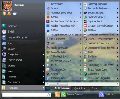
Freeware! Do you have hundreds of programs in your Start menu? Do you waste time looking for the program you need? Try Vista Start Menu to instantly find what you need among the large amounts of information. Vista Start Menu is effective for advanced users and easy to use for beginners. Start working with pleasure!

Tidy up your favorite bookmarks! Organize your favorite links as live thumbnails instead of trying to work through plain-text links. Open, delete, move, resize and update bookmarks in a single click. Conveniently use the same set of favorites and the same convenient user interface in all of your browsers - IE, Firefox!
Comments on Classic Start Menu Pro 3.8
Please add a comment explaining the reason behind your vote.
iPhone app giveaways »





Android app giveaways »





If you want to let your Classic Start Menu outstanding from others, I suggest you'd better list some features that others do not have. Anyway, this software had its potential.
Save | Cancel
thanks really needed this
Save | Cancel
How do you change the skin and other options?
Save | Cancel
Not really my thing (I actually *like* the Win7 Start Menu), but probably very good for anyone who does prefer a more classic style. My only gripe really is whether anyone would ever actually *pay* for something that does this in the first place.
Save | Cancel
Agree with #12 Aston2 is excellent and looks great - no problems experienced since installed from GOTD
Save | Cancel
I tried it but didn't want to use it, because my desktop is full of icons i can click. I simply don't need start menu!
Save | Cancel
One improvement I'd add is to have the control panel pop up the same way the programs do in a customizable window instead of going to the normal windows control panel in explorer.
Save | Cancel
Don't look at the thumbs down section. Many probably didn't even try it out or maybe didn't follow the instructions.
I use Start menu 7 which is part of this one being offered. It make it much faster for me to find my programs on my win 7 machine as it's all there on one screen. On my win xp netbook, it does more than that. The normal xp menu is too big for my screen but Start menu gives me accesss to all my programs because I can makethe menu smaller in size. Otherwise I'd have to do some rearranging to make it all fit. So for me it's far more than eye candy.It saves me tons of work.
Save | Cancel
Yeah, I still prefer Classic Shell. It's about the closest to the real classic menu.
Save | Cancel
#10: "I’ve been spoiled by Ubuntu and other Linuxes that have apps arranged in categories – Internet, Sound, Games, Graphics etc. So the Microsoft Windows menu is really annoying because I can never remember the names of apps I use infrequently, I just know what I want to do with them. I used CSM on Vista and it helped, but why is the resource usage so high?"
Purely FWIW, someone had or has to set up those categories in *nix, & for apps you install in Windows, that's your job -- sorry. :-) IMHO the hardest part about it in Vista is finding the right Start Menu folder using Windows Explorer, but once you do it's just a matter of creating folders & dragging shortcuts into them. Once you have the basic folder structure, if you have a Start Menu folder named Office or Tools or Graphics etc., it's super easy to just drag a new Start Menu shortcut into it using just the Start Menu itself.
RE: resource usage, yeah, Classic Start Menu Pro does use a little bit of CPU & RAM, pretty much constantly, whether you have it replacing the Windows Start Menu or not... IOW when it's running it's running all the time, rather than sleeping till you wake it. That's just one of the costs of using it, that small resource hit, & it's up to each user if it's worth it or not.
Save | Cancel
Just thought I might add that Revo found a whopping 342 registry entries during the uninstall process!!!
Save | Cancel
My impression is that Classic Start Menu Pro is more eye candy than function, though you could use it in addition to Windows' Start Menu, launching it with the tray icon rather than the Start Button, & have it customized to show just your image editing apps for example. Classic Start Menu Pro uses skins (3 are included), but doesn't have a skins editor & the xml file controlling the layout is commented in what appears to be Russian -- still, if you were inclined it shouldn't be hard to expand the .zip skin files & replace the mostly icon images &/or change the color values in the xml. This app *optionally* uses a *hook* to intercept mouse clicks on Windows' Start Button -- some AV software may not like that -- & you can turn this feature on/off either by right-clicking the tray icon & selecting "Customize Wizard" or by editing the registry (something to try if Classic Start Menu Pro won't run?). Using Regedit navigate to HKCU\ Software\ OrdinarySoft\ Classic Start Menu\ & set the value for IntegrateWithWindows -- a value of "1" turns the hook off]. The app also includes a couple of .bat files to register/unregister "VSM64bitProcessing.exe" -- I *suspect* that might cause some problems on some Windows installs, but since I couldn't get it to register I can't say for sure.
Using Classic Start Menu Pro is for the most part very straightforward -- you use that Customize Wizard to set it to start with Windows, replace Windows Start Menu, choose a search engine [e.g. Microsoft or Google desktop search], set hot keys, & turn single click start on/off. It bases its default configuration on Windows' Start Menu [i.e. what you've got setup already], so you're good to go right after installation -- you can further customize things via right-click context menus, though without a help file it's a bit of trial & error as you have to try clicking everywhere. You can re-size the menu itself by dragging, which also increases/decreases the font & icon size. To the right & below "Power Control..." there's a maybe not-too-visible button to shrink the menu so it only shows icons, no text. A quick uninstall feature is also added that's explained a bit here http://goo.gl/RXl2S .
As far as installation goes, 1 minor thing I don't like [particularly for those on dial-up] is that most of the download size is because of the included [4 MB +] "YandexPackSetup-ordinarysoft-20100729.exe" [it didn't install or ask to install for me with language set to English] [Yandex is a Russian Google competitor]. Otherwise the program's folder takes up ~6.5 MB with 61 files (36 of those are language .ini) & 2 folders. A folder added to User application data holds the .txt files that list all the shortcuts & their arrangements in the replacement start menu. RE: the registry, 2 keys are added for the Quick Uninstall feature, you get an uninstall key, & the software's key stores most of the app's settings. As noted, neither running regserv.bat or attempting to register VSM64bitProcessing.exe worked for me in XP Pro SP3 32 or 7 ult SP1 RC 64, so I don't know what changes it might make, when or where.
Save | Cancel
#12 I like Aston also! I hope GOTD runs it again because I have a new computer.
Save | Cancel
Comment on #14. I downloaded Start Menu 7 Pro onto my Vista setup and it is registered and running well as Pro! Maybe I'm one of the few people who bother to read the readmetxt before I install. Not all software offered installs the same way. Keep up the great offers GOTD!
Save | Cancel
When installing a program such as this that changes the way Windows interfaces with the user, the chances of a successful installation is greatly increased if anti-virus programs are disabled before installing. Otherwise, you may find that the anti-virus program detected a false-positive system change and prohibited part of the installation. The installation setup file should also be "run as administrator" to avoid access permission problems.
After installation, restart your anti-virus program and run a system scan.
Always create a System Restore point before installing any software.
If you really have doubts about the security of a program, DO NOT INSTALL!
Save | Cancel
Well, I gave it a try; an exercise in futility I must say, is it just me or does this program have absolutely no real "extras" or "power".
Uninstalling.
Thanks GAOD, for being here every day.
Save | Cancel
Is this giveaway the Pro version? The Start Menu edition the other day said it was, but it wasn't.
We should all check.
Save | Cancel
Want a better START MENU??
Why not use the freeware VISTA START MENU for that?
Vista Start Menu is the convenient alternative to the plain Start menu you find in Windows XP and Windows Vista. The program uses your cognitive abilities (visual memory, reflexes,etc.); however, while it is easily understandable for beginners, it is also highly efficient for experienced users.
Platforms:
Windows 2000
Windows 2003
Windows XP
Windows Vista
Windows 7
http://www.vistastartmenu.com/index.html
Vista Start Menu has been in development as an attractive and efficient alternative to the Start Menu in Windows XP and Windows7.
I have always found that the Start Menu in previous versions of Windows to be hard to use. With Windows 7, they have made it more attractive but more CUMBERSOME!
Now there is a FREE alternative!
Dennis Nazarenko,
Developer of Vista Start Menu
Enjoy!!
Save | Cancel
Works like advertised, but I still like another giveaway better;
Aston Menu http://www.aston2menu.com/
My suggestion would be, If you do not like Windows7/Vista start menu, download Classic Start Menu Pro as a definite improvement right now, and hope for another Aston Menu Giveaway in the future.
Save | Cancel
I already have Start Menu 7. What is the difference between Classic Start Menu PRO and Start Menu 7 - is one better than the other?
Save | Cancel
I've been spoiled by Ubuntu and other Linuxes that have apps arranged in categories - Internet, Sound, Games, Graphics etc. So the Microsoft Windows menu is really annoying because I can never remember the names of apps I use infrequently, I just know what I want to do with them. I used CSM on Vista and it helped, but why is the resource usage so high?
Save | Cancel
Unlike many here, I don\'t vote thumbs down for giveaway product simply because it\'s not something I want. I down want this because I don\'t use Windows 7.
I think it would be a good idea to place a poll here to see what percentage of us use which Operating System. That way you know how many people an OS exclusive product like this one is useful for.
Save | Cancel
I like this software but how to change the skin.Hard to see the text with the colour gray and black.
Save | Cancel
Here is a better one, and its completly free.
http://classicshell.sourceforge.net/gallery.html
last time this giveaway was on, there was a bright comment to my post about this free one (It dosen't work in winxp he sayed, yea but why do you install it in xp?, where its bild in)
this shell does it all, and even better and will allways be free
Karsten.
Save | Cancel
You can create start menu folder groups in Win 7 anyway, it's just in a different place.
C:\ProgramData\Microsoft\Windows\Start Menu
Nice app but 'tis only icing.
Save | Cancel
It looks great. I have WinXP start menu and this one is much better. Easy to read and very clear; it also gives more room for programs. I suggest others to try it. I am very happy with the results. Thanks GOTD for a great addition to your programs.
Save | Cancel
Excellent Software except for one shortcoming. The genuine 'classic' start menu in Windows 98, Me, 2000, and XP allowed the user to add new folders in the main directory....which then allowed the user to group the shortcut icons of similiar applications together. For me, that was the greatest advantage of the genuine classic menu...and thus Classic Start Menu Pro's great shortcoming. Other than that issue, it is a wonderful app for those who miss the old Windows start menu (as I do).
Save | Cancel
On top of the other problems, the unistall locked up and I had to reboot -- then use ccleaner, etc. Running a Malwarebytes scan just in case.
Save | Cancel
FAIL. First, Returnil System Safe (which I got here at GOTD) flags Classic Start Menu as Malware - a few times. Second, after installation when I click on programs it opens Windows Explorer to the Programs directory. The same is true on most menu items. Finally, a system error popped up: "Access violation...".
UNINSTALLED
Save | Cancel