English
Every day we offer FREE licensed software you’d have to buy otherwise.
$29.95
EXPIRED
Giveaway of the day — Chameleon Startup Manager
Chameleon Startup Manager can control programs that run at Windows startup, which makes Windows start faster and operate with increased stability.
$29.95
EXPIRED
User rating:
139
62 comments
Chameleon Startup Manager was available as a giveaway on October 23, 2009!
Today Giveaway of the Day

Download Deezer music, playlists, albums, podcasts to MP3, FLAC, WAV!
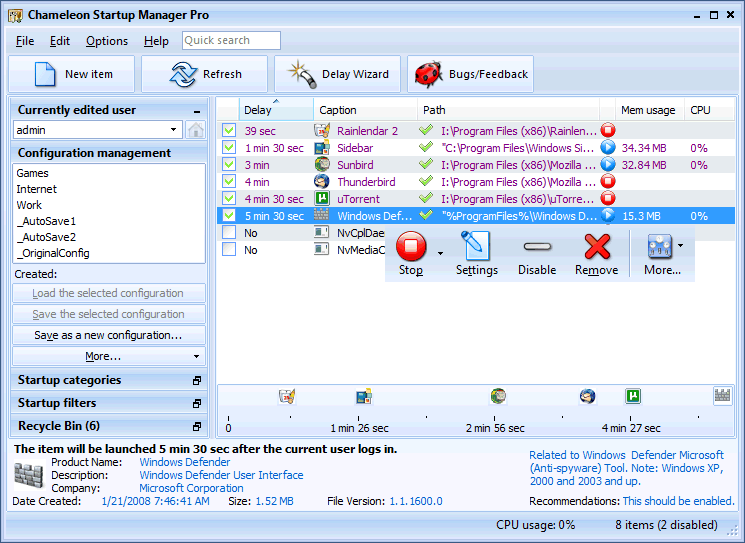
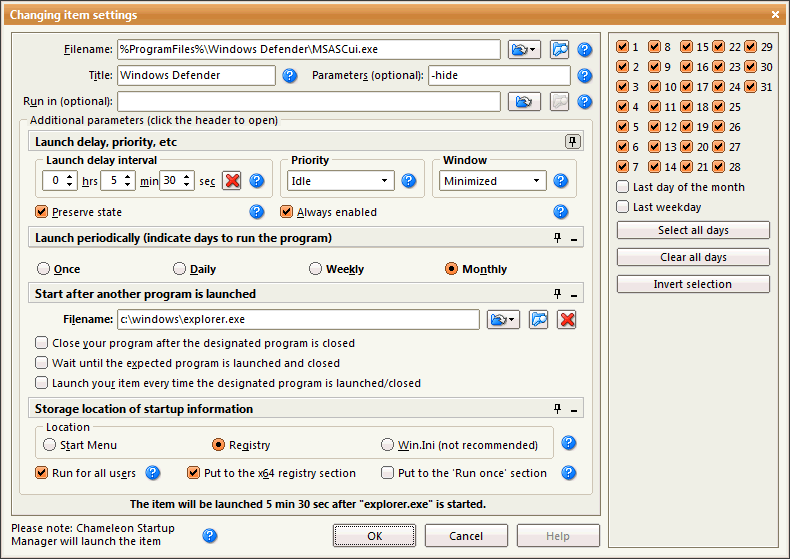
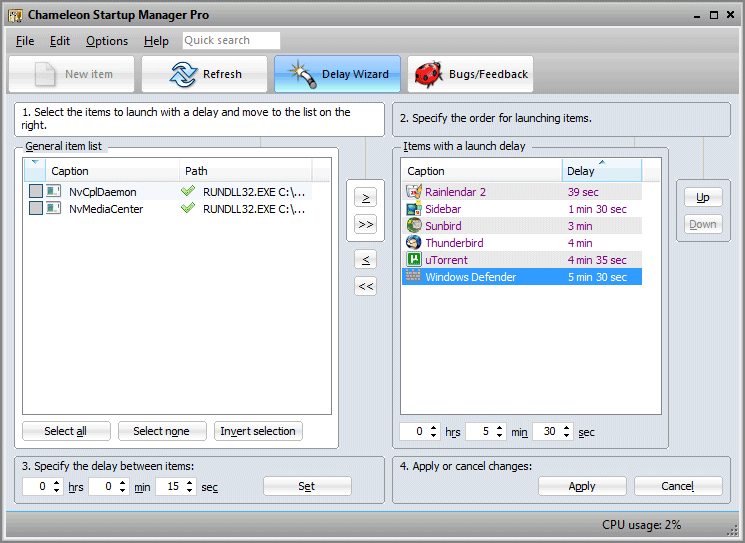
Chameleon Startup Manager can control programs that run at Windows startup, which makes Windows start faster and operate with increased stability.
Programs can be run according to various functions including startup order change, startup delay, priority, consecutive program launch, day selection and much more.
Configurations can be created and selected at Windows startup or applied 'on-the-fly' without restarting Windows. Chameleon Startup Manager provides real-time monitoring of programs added to the startup list.
System Requirements:
Windows 2000/XP/2003/Vista/7/x64 Edition
Publisher:
Neosoft ToolsHomepage:
http://www.chameleon-managers.com/windows-startup-manager/File Size:
5.18 MB
Price:
$29.95
GIVEAWAY download basket

Developed by Informer Technologies, Inc.

View, manage, encrypt, pack, and unpack archive files.

Heal up your system and speed up your PC with the help of 25.

Developed by IObit
Comments on Chameleon Startup Manager
Thank you for voting!
Please add a comment explaining the reason behind your vote.
Please add a comment explaining the reason behind your vote.

iPhone app giveaways »

$39.99 ➞ free today

Photos Search app takes image searching to a whole new level by allowing you to search for text within photos.
$0.99 ➞ free today

The app allows you to quickly read files in various formats - documents, receipts, photos, business cards and notes.
$1.99 ➞ free today

This puzzle game has a goal, this is to clear a set of specified, flashing blocks off the screen.
$0.99 ➞ free today

$0.99 ➞ free today
Android app giveaways »

$0.99 ➞ free today

$1.49 ➞ free today
![[365fun] Running Man Giveaway](https://android.giveawayoftheday.com/wp-content/plugins/gotd_googleplay_plugin/images/100/2026/06/com.whitewind.runningman_app_icon_1780400784.png)
$1.10 ➞ free today

This is a unique circle icon pack with Squid's tentacles inspired design on the bottom.
$1.49 ➞ free today

Backroom is a place under the world, there will be no clipping place that will make you fall into the backroom.
$0.49 ➞ free today
Startup monitor does a wonderful job on everything.
Save | Cancel
#36, Dear John, you sound a little harsh on people may actually have problem and did read the instruction, I wouldn't classify "maybe you should not even be in front of a computer" as humble opinion.
i.e. there's no "uncheck [Run program] option when setup finished, before run activation.exe"
#63, Dear John again, glad that you did read others' comment
one thing about the program, after I arranged all the delay timing and order on the right pane in the Wizard, the [refresh] canceled everything!
useful to delay those Adobe/HP/Java update residents.
Save | Cancel
To John (#36), I've been coming here for years, and I've RARELY had a problem. I DO read the readme file and do what it says. Unfortunately, this one won't register for me (tried 5 times). Thanks anyway GAOTD!
Save | Cancel
Wow, I ran the "startup wizard", which delays startup progrmas, and canned some unimportant programs! Now, my computer starts up at least 10 seconds faster than before. No big deal in itself, but the whole system seems faster. Also, it explains in detail what each individual startup file does, what it is, and whether it is needful. This program is very good! I give it a 9 ot of 10. Would have rated it higher, but the interface is a little cluttered. Would be good if it had more tabs or something.
Save | Cancel
I am very happy to use start up managers. I have used WinPatrol since it was released and it is very good for many purposes.
Almost all tune up utilities include some module to control the start up programs as well as the msconfig.
My question is, which program takes over and is decisive, boss of bosses?
Will it be Camelon, msconfig, WinPatrol, TuneUp etc.?
How does Windows XP know? Or, will it be a difficult mess of the whole, as everything is bound to happen in connection with the start up?
Save | Cancel
#18: "This programme cannot detect startup entries made by rootkits and other new generation viruses..."
AFAIK no one says or said Chameleon Startup Mgr. was A/V software. It's designed to help you manage the software you *Want* installed. You run A/V apps to *hopefully* make sure that's all you have to worry about. ;-)
* * *
#33: "Sometimes it makes a difference after Setup is run that you shut down the program, run Activate and then open the prog again and do the registration steps."
Activate.exe as usual adds keys/values to the registry -- it needs to be allowed to do this -- sometimes security software, settings, or Windows may prevent this [Rare, but I have seen A/V software add restrictions to whole sections of the registry]. A past GOTD from Wondershare did overwrite those same keys, but Cameleon Startup Mgr. does not. In 7 64 I ran Activate.exe, installed the app, & let it start as soon as install finished -- no problems noted.
'Bout the only suggestions for those having repeated problems is to monitor the registry while running Activate.exe & make sure the license keys/values are indeed written. Google & there are several tools available, including a method using Microsoft's WinDiff. Can check to see if permissions are set in your registry to allow keys/values to be written, make sure you're running activate.exe as admin, make sure your A/V software isn't preventing changing the registry, & maybe as a last resort, check into setting up / logging into Windows as the so-called Super Admin.
* * *
#43: "Should I uninstall AnVir Task Manager before I install this one?"
The potential problems of using more than one app to control auto-starting software, are 1) confusion, & 2) making sure one doesn't cancel out the other. You could get confused over what you set where, when, & if for example you need to have Chameleon Startup Mgr. start with Windows, you need to make sure whatever other app(s) you have allow it to do so.
* * *
#45 "Can I use this program to add an entry to the startup during boot? e.g. run a program before anyone even logs onto the machine ?"
Adding an entry to the registry's run key(s) under HKLM will take care of every user, as will adding a shortcut to the start menu startup folder for all users. Getting it to load before anyone can log in however is more of a problem... AFAIK that's usually handled by scripting -- Google on scripting for your version of Windows.
Save | Cancel
@27. Andy said, "- anyone ever heard of “Autoruns” from Sysinternal?
Andy,
Try this: autoruns, or this: sysinternals
Save | Cancel
Chameleon Startup Mgr is a cool app that adds 2 program folders -- 1 wherever you tell it to put the program folder, & the other in Program Files [x86]\Common Files. It doesn't put anything in the other Windows' folders, or auto-start with Windows unless you tell it to, & checking with Autoruns etc, it doesn't add any Windows Services... SO far so good, though reviewing changes to the registry, installation *might* effect other software, changing keys put there & used by other apps. IOW maybe hang onto that restore point or backup for a little while to be sure all your software works the way it should.
You can use Chameleon Startup Mgr to add/remove items the usual, auto-start places: the Registry Run keys &/or the Start Menu Startup folder. You can auto-start Startup Mgr itself, & have it start programs for you after a delay, &/or when more resources are available. You can use it to autostart certain apps only on certain days, or present you with a menu to choose a startup configuration -- you can save different configurations, i.e. 1 for gaming etc. You can also move items from the run key in one section of the registry to another. All in all it's very versatile. Chameleon Startup Mgr will monitor apps set to run with Windows, & block some from ever auto-starting if you prefer [I had problems once with the Real media player ALWAYS inserting itself into the registry's run key, no matter how many times it was deleted -- it still may, but I don't use it any longer]. If it matters to you, it is a 32 bit app, that also runs pro64.exe [installed under Common Files] in 64 bit Windows.
Most everything has some sort of downside, though Chameleon Startup Mgr's is really pretty minor. If you have it set to control one or more apps, you have to make sure those get put back uninstalling, &/or if sometime in the future Startup Mgr. breaks.
Whether or not you'll benefit from adding Chameleon Startup Mgr. to your system depends on your personal preferences, & what you've got installed... If after installing software you don't mind checking for added auto-start apps yourself, there's no reason to monitor that sort of thing. And if everything starts up like it should, there's no need to use this Startup Mgr. to cause a delay -- it's thankfully rare, but sometimes the different software you have starting with Windows can conflict with each other, &/or they can cause problems if the startup order isn't carefully choreographed [Systems Internals has an article where this timing caused Microsoft & one developer big problems that were quite difficult to track down]
Save | Cancel
This app seems like a gem. The only question I have is whether there is a way to detect and manage running what my Device Manager calls "Processes."
Not a computer person, by there is a huge difference between the number of apps(programs)shown in Device Manager and the number of "Processes" running.
Please correct me if I'm missing something, but at first blush it appears as though CMS only provides controls for Program startups.
Save | Cancel
Here's the link
http://www.r2.com.au/software.php?page=2&show=startdelay
Save | Cancel
I have been using Startup Delayer for years now and am having great success with this program. It is compatible on all of the following Windows 98/ME/2000/XP/XP64/Vista.
On of course, IT"S FREE!
Save | Cancel
don't need it i use msconfig and Windows Defender
Save | Cancel
Like #17 and #43, I'd like to know how this software compares/co-exists with AnVir, which many of us installed just a few days ago.
And if the experts think that Chameleon is superior (of course, I'd like to hear why), then should AnVir be UNINSTALLED or TURNED OFF (AnVir --> Tools --> Shut down --> Turn Off)?
Thanks,
Save | Cancel
Well it worked on my third try, Thanks to the info and instructions posted on here by other good people. I kept getting an error message on activation. I uninstalled and totally started over with a new download. Worked like a charm.
Thank You To All
cuggie
Save | Cancel
Here's another free alt.
http://www.r2.com.au/
I'm also wondering,
after install and registration, I went to the "help" tab, just to see what the about said. I see it says "licensed for home use", usually this means the program is free except for business use. I also see a "buy now" icon button, when clicking on it it brings up a box to buy with credit card, and has a place to paste a Registration number.
You would think if the program IS registered it would say so, or at least show a number in the blank area.
Save | Cancel
A nice feature so far not mentioned is the ability to run any program in your arsenal on running any application.
For example - If you machine always enters the Go-Slow routine whenever you play a certain game, you can run the program that sorts the problem automatically after the application is started.
How about running an App that restarts the machine after someone (Wife/Husband) messes with your 'puter without your knowledge, by using a program that you have booby trapped? It'll take them an age to work a way around that.
Huh. Got them!!
Save | Cancel
#43 I am. AnVir does a lot of things that this doesn't.
#45 Yes! Try reading previous posts or prog description.
Good steady program. Very clear. Change colour scheme if need be. Many MANY options that are not at first apparant.
Need to spend a lot of time on this one.
Recommend that EVERYONE downloads it as you will ALL find something of great worth - I promise you. Just look for them.
Nicely thought out so a BIG TY to developer and Gaotd.
Save | Cancel
For all of you that feel it necessary to criticize other people, re-read the intro. The one that says this forum is for discussion of the software. To bitch, go to another forum. Now who looks like they can't read?
@37, your process worked for me, thanks very much.
I instantly liked this SW as it was able to get rid of a program that no other SW could (not a stand-alone prog? Most definitely is capable). It also serves as a test bed of possible configurations. And disabling a program to prevent a new or suspect program is very easy too.
I don't need this type of program often, but it is nice to have it in the toolbox. I find this to be a real keeper.
Save | Cancel
WINPATROL is FREE and does much more. I have used it for 10 years. If you are a techie you might want to pay the ONE TIME fee of $30 but most people will not need the pro version.
WINPATROL can be reviewed by googling it. It has a huge following and avid users. Check it out, you will be impressed as I was.
Save | Cancel
Can I use this program to add an entry to the startup during boot? e.g. run a program before anyone even logs onto the machine ?
Save | Cancel
My suggestion to the developer.
I'm not sure that the average user would have use for this as a standalone application. If it were part of a utility suite you'd be offering more versatility - different things for different types of user. As it is it might be too specialised (suggestion link does not seem to be working for me so I'm posting here). Regards - Damian
Save | Cancel
Should I uninstall AnVir Task Manager before I install this one?
Save | Cancel
@34 - John (and others who think I don't read the readme that is included with all offerings from this site.... You're wrong.;).
I read and follow the instructions in the documentation for every file that is offered on GAOTD (which is why - if you read back through the archives - I have never had issues installing SW from here.
With today's offering, I ran setup,exe, unchecked the box for run after install, then ran activate.exe.
Result: Pop up appears after a few minutes use (after switching user accounts from within the program).
Tried on another box and followed the same procedure as above, with the same results.
@35 - Will Ambrose The program tells me it is registered for home use when viewing Help->About.
Save | Cancel
Installed and registered fine,just one problem, after installed, Anvir Task Manager popped up saying:
Status: Definitely not required - typically viruses, spyware, adware and 'resource hogs'.
Description: Browser hijacker, redirecting to NCM Search.
Anvir Task Manager also gave Chameleon Startup a 56% security risk.
Is this something I should worry about, or would this be a false positive.
Would appreciate feed back
Save | Cancel
@27, Actually no, I'd missed that one... My bad...
Anyway, Chameleon Startup is an extremely feature rich programme but should you miss it here's a couple freeware alternatives (both 100% freeware):
Startup Delayer - Startup Delayer Screenshots
Startup Delay (extremely basic but works). Startup Delay Screenshots
What happens if you use Chameleon Startup to stop itself from starting up? LOL
Thanks GOTD and Neosoft Tools - Regards, Damian
Save | Cancel
@26 & 35: 35, your solution worked for me. Thanks. [Win XP, sp2, AMD Dual, 3 Gb ram, etc.].
Save | Cancel
@26:I did so, and the activate program still did nothing. My installed version still say its an unregistered version. If it indeed expires in 30 days, I don't want it.
Save | Cancel
Sometimes it makes a difference after Setup is run that you shut down
the program, run Activate and then open the prog again and do the registration steps. This has gotten me past the trial screen many times.
p.s. Just installed Chameleon Startup and there is a trick to it. After installation routine has finished there is a run now box with green tick mark that you must remove before clicking Finish. Then activate the prog and if you check "about" on first start of prog you should be registered.
Save | Cancel
Had no problems installing and running program. It offers a lot of options for those who want to spend time tweaking their startup, but it is too complicated for less knowledgeable users IMO. I can't see very many users needing it bad enough to spend $30 for it.
Thanks Neosoft Tools and GAOTD for offering it as it does seem to be a good software considering I haven't had a lot of time to thoroughly check it out.
Save | Cancel
Having same problem as others - 90 day trial only. Followed instructions:
Installation
Unzip the package you`ve downloaded and run Setup.exe to install the software, then run the activation program Activate.exe which is included in the package.
Tried uninstall and re-install - activation first then setup first.
No good (Vista 64 bit) - never had this happen b4
Save | Cancel
Sometimes it makes a difference after Setup is run that you shut down
the program, run Activate and then open the prog again and do the registration steps. This has gotten me past the trial screen many times.
Save | Cancel
I use this free program: http://www.r2.com.au/news.php?page=6&id=49
much better.
Save | Cancel
#20, #24, #30 - in order for the activation and registration to successfully take effect, you must run the "activate.exe" executable file before you open/access the program for the first time.
Try uninstalling and re-installing it again, then when the installation process is complete, uncheck the "launch program" box option, run "activate.exe", then open/access the program.
It should work this time. It did for me. Hope this helps.
Save | Cancel
I, apparently, am also not registered. I've uninstalled, reinstalled and still show that it's not been purchased. I've done activate before and after installation. Any other suggestions? Thanks!
Save | Cancel
I bought this program a couple months ago (they asked me how much I wanted to pay for it, I told them and they accepted my offer).
There is also a free version lacking a few features, but still a big step up from msconfig (really, guys, come on; know what you're talking about claiming msconfig is comparable)
I have had no problems with this under Win7 or WinXP. It does what it was made to do and stays quiet doing it.
I too would like to have the option to have a more noticeable alert when something's added to startup, but other than that, a great program.
The only problem with a disk image is that if you have to restore it, you will lose access to this program unless it was part of that image.
Save | Cancel
- anyone ever heard of "Autoruns" from Sysinternal?
Save | Cancel
@20 Harvey Poch
@24 Line1
Please, try to uninstall the program.
Activate the program again and install the program
Save | Cancel
Did follow all the instructions but on the top of the program there is warning: The trial period will finish in 30 days.
Did I miss something??
Save | Cancel
@20 Harvey Poch - Even after registering I keep (occasionally) getting a pop up asking for a registration code (which I don't have).
Screenshot at http://img198.imageshack.us/img198/3408/registerj.jpg
As you say, this shouldn't happen!
Save | Cancel
The following is Happy Person's review. Happy is having trouble getting the post to go through here on the giveaway site and put this on the forums. Me being an admin on the forum, I thought I'd give a shot at trying to get his review through.
PROS:
* Successful download, installation, activation on Vista Home Premium x64 SP2 OS.
* Prompts user to create system restore point prior to installation.
* Simple, clear, easy-to-understand, easy-to-navigate GUI.
* Smooth, easy, intuitive program operation.
* Supports 15 languages for installation setup.
* Supports 5 languages for on-the-fly use after installation (including English, Italian, Russian, Czech, Portuguese-Brazilian.)
* Accurately lists all startup programs in right-side menu screen.
* Lists various startup program attributes, such as file name, size, date created, and many many more features, in right-side menu screen.
* Left-side menu screen lists startup program by: current user, and all users.
* Left-side menu screen lists startup programs' registry entries by: current user, and all users.
* Left-side screen lists the win.ini executable function with: run, load options.
* Left-side screen lists configuration management programs with title of configuration file to allow: load, save, save as new, apply configuration on the fly
* allows user to apply startup filters.
* Left-side screen displays recycle bin feature to: restore, remove, empty.
* lower bottom of main screen allows user to: find more detailed description of selected/highlighted startup program, via internet.
* Program provides a "Delay Wizard" for startup program settings.
* Program GUI is skinnable
* Program provides a large selection/option of editing and configuration features - too many to list here.
CONS: - nothing significant to note at the moment.
SUMMARY: - Program is easy to install and use. It contains many useful features, and is rated a 4/5 by CNET users. Thumbs up from (and a definite keeper for) me. Thanks, GOTD and Neosoft.
100% Freeware Options include:
Startup Manager
Startup Manager for Registry Entries
David Nash's Startup Manager
Save | Cancel
@ #5 and #2 -
WinUtilities, for one, has yet to EVER cause a problem for me with regards to my registry or any other issue. I think you guys are follwoing way too much hype about what works and what doesn't.
The only people who don't need to be using programs like this are the ones who don't know how to fix a computer issue in the first place. In quite a few cases a simple system restore to before your computer was acting stupid will work. In other cases, anyone with any common since has a drive image.
Save | Cancel
You musta had a pretty useless reg cleaner for it to harm your P.C. as they only remove useless entries anyway: Many cleaners ( Registry Easy ) + Your Uninstaller which does a reg cleanup too -now include Startup managers so this apart from a few bells `n` whistles would appear redundant- always make a GOOD backup to return to if things go wrong, if you do they won`t if you don`t-they will! Computers? Try another version that sounds like it went corrupt
Save | Cancel
For the second straight download (I don't download everything), I received a trial version, and not a fully registered one - even after running the activate.exe. This should NOT happen.
Save | Cancel
There is one option that I like particularly, disabled by default: you can launch the delayed items as soon as the CPU usage falls beneath a certain percentage. This is a feature I have been waiting for a long time, as this is the best way to be sure that your hardware is not too busy and that it can launch a new startup program rapidly.
However, I would have preferred a similar option for the DISC usage, as it's because the disc has too seek constantly that starting all startup programs at the same time is so slow. The CPU usage doesn't matter much, especially with modern multi-core PCs. I hope the developers will add that option in v4.
Also, the documentation is not very clear about the CPU usage option. If it launches ALL remaining delayed items at the same time, the option is not useful. But if it launches only the next item, then watch the CPU usage again until all items have been launched, that it's a very useful option, that should be enabled by default imo.
Anyway, it's probably the most feature rich startup manager I have tried so far.
To reply to many comments above, it is true that disabling a startup program without knowing exactly what it is supposed to do can be dangerous in some rare cases, and even lead to system instability. But leaving useless startup items run in the background without a good reason is certainly the worst thing that can happen! The boot time is dramatically increased by those useless apps, many resources are used for no good reason, and the system stability can also be affected. Furthermore, many viruses install themselves in the startup process, so it is a good thing to monitor what is added, and why. You are free to leave them anyway. My PC runs faster and very well with 80% of the startup items disabled!
Note also that this program DOES NOT monitor and show ALL items that can be launched automatically, without the user consent. To have a complete view of the programs, services, devices, codecs, BHO, etc... that can be launched automatically, use Sysinternal's AutoRuns, available on the Microsoft site. (MSConfig doesn't list them all neither!)
Save | Cancel
This programme cannot detect startup entries made by rootkits and other new generation viruses, which launch themselves from other locations in the Registry. I have myself made several programmes which does not use the conventional registry locations to launch itself, and Chameleon Startup Manager was unable to detect those entries/ programmes. Delaying or priortising the Startup may be a good feature, but unless the Chameleon Startup Manager detects the hidden startup programmes, how can this feature be used.
A much better option is the SPYBOT- SEARCH & DESTROY programme, which can detect more startup locations and moreover, it is free and feature packed (Though it does'nt have the delay wizard)
Save | Cancel
Before installing one more program on my computer, can anyone tell me why this is better than Anvir, which I installed a short while ago from GAOTD and which seems to do the same thing?
Save | Cancel
@#3: Do you know this? "Better is the enemy of good."
Save | Cancel
The price is a bit high for this program, but it's very useful! A lot more helpful than when editing manually in msconfig. Looking good!
Thanks GAOTD
Save | Cancel
The first thing that impressed me was that it actually asked to set a restore point before installing. Looking promising already...
The next thing that impressed me was being able to disable some annoying startup programs such as the software for my phone which I don't need to run very often, certainly not at each boot up.
The symbols and icons are a little confusing and the interface is WAY too cluttered. Have these people never heard of white space before?!?
I was somewhat disappointed by the absence of an undo function after I accidentally removed something and my initial excitement eventually turned into frustration that these software engineers need to think about the interface more - good features are simply not enough if people (such as other computer systems engineers) have trouble figuring out how to use it...
Save | Cancel
@ Spitt-5: you must be living on an other planet. Msconfig can enable or disble but not delay. You don't have different profiles, there is no lookup possibillity, you cannot change priorities etc.
Today's GAotD is really feature packed. Though there are many alternatives like Autoruns I like this one a lot. Thanks GAotD & Neosoft.
Save | Cancel