Every day we offer FREE licensed software you’d have to buy otherwise.
Giveaway of the day — BulkZip File Compressor 7.5.4
BulkZip File Compressor 7.5.4 was available as a giveaway on February 25, 2016!

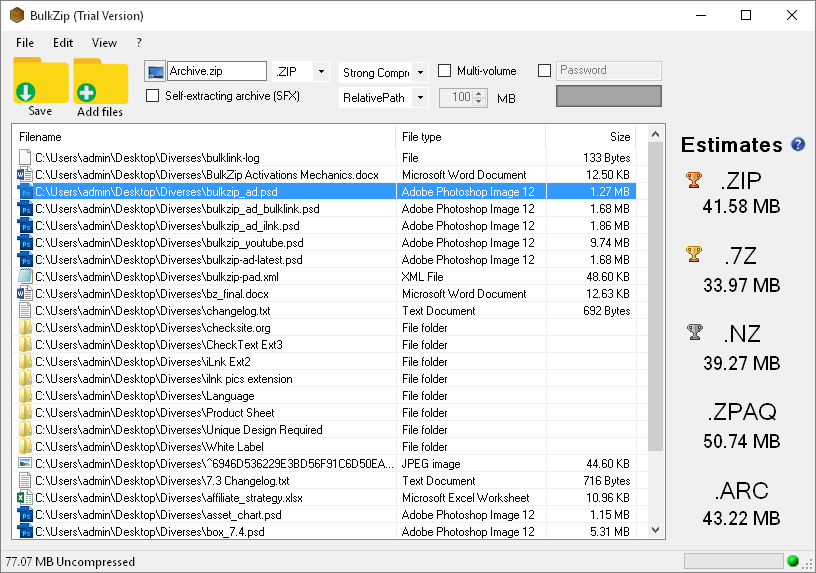
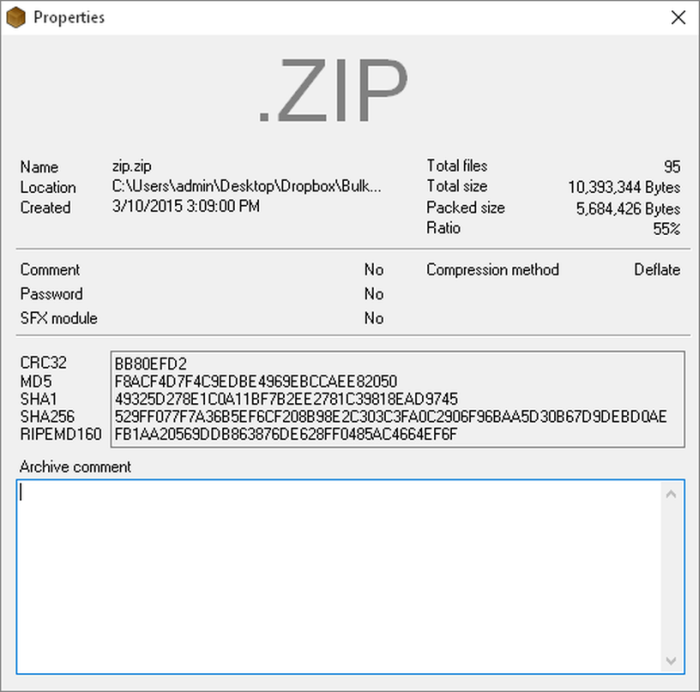

BulkZip is a file compression/file archiving software, which provides you with strong and secure data compression. The software can decompress RAR, ZIP and other files downloaded from the internet, as well as create new archives. With a modern and easy-to-use interface, it provides support for common compressed and encoded formats (40+ file types).
BulkZip ships with full Microsoft Windows integration and is localized in 10 languages. It features high performance compression, ranking first in multiple benchmarks regarding strength and speed.
Features:
- Strong and secure file compression;
- Bulk, 7z, Arc, Nz, Pja, Tar, Zip, Zpaq compression;
- Extraction: 7z, Ace, Bulk, Apk, Arc, Arj, Bz2, Ear, Cab, Cb7, Cba, Cbr, Cbt, Cbz, Chm, Cramfs, Dmg, Gz, Img, Ipa, Iso, Jar, Lha, Lzh, Lzma, Nz, Pja, Rar, Rar5, Tar, Tbz, Tgz, Txz, Uha, Uue, War, Wim, Xz, Z, Zip, Zipx, Zpaq;
- Encryption: AES-128, AES-256;
- Creates Multivolume Archives (.z00, z01, z02...etc.);
- Creates Self-Extracting Archives (SFX).
Please note: both private and commercial usage are allowed!
System Requirements:
Windows XP/ Vista/ 7/ 8/ 10; HDD: 30 MB; CPU: 1Ghz; RAM: 128 MB
Publisher:
NorthstoneHomepage:
http://www.bulkzip.com/en/File Size:
11.7 MB
Price:
$20.00
GIVEAWAY download basket




Comments on BulkZip File Compressor 7.5.4
Please add a comment explaining the reason behind your vote.
iPhone app giveaways »


Android app giveaways »





Why Pay for an alternative to 7Zip?
Save | Cancel
Or Bandizip which is also free. I've been using Bandizip in preference to 7zip for a number of years, mainly because of a neat little "Preview archive" feature whereby it displays a list of a zip archive's contents when you right-click on the archive in Explorer.
Save | Cancel
I use 7-Zip, but will give this one a try. I like simple interface, similar to 7-Zip and even simpler archive creation (less options to choose, which is a plus for casual users). I like that they added a simple guide to thier help file about each archive type and what it is best suited for (what type of data). There is even a little historical info about each archive format. Program also suggests best archive type to use based on selected files and rough estimate on final archive size. Before I just used .7z for personal use and .zip for sending files, but now I might consider other formats for personal use based on data type. I didn't do actual speed and compression testings, but will give it a try based on initial impressions. Promotional license is lifetime with updates and valid for commercial use also (says so in readme.txt that came with download). So you can at least secure your license in time.
Save | Cancel
Didn't expect "install behavior" (reboot to finish) , that's always a bad sign for me.
Sure enough, battling firewall and process rules.
Here's the deal. Sure I can get it to behave. BUT...
Since about 1996 when I ran a bbs, I Have COLLECTED Archivers. they all live in my path c:\z ALL OF EM. 7z, zip, rar, ace, arj, ani, msi, xul, jar, *.* whatever unpacker or SMALL util, it is, it gets installed to c:\z and that's in the environment path. THEN I Have ztree who also live in that path. (it's a habbit I had since DOS + Xtree Gold, turns out in the windows 7 days there's a plethora of good reasons to have things outside of Program Files (x86)) There's not many archives who can't be opened but I still do run into them occasionally.
I don't like the redundant questions over and over associations -- with paths this isn't an issue. Put this in the SETTINGS is my constructive comment for this program.
With other archive software, I can UNZIP and we are installed, in the path and ready for commands
The interface I must have not got all the firewall settings right since it never fully loaded the graphics. (Using PrivateFirewall 7 here) I could let it just go everywhere into registry, web and updates, but all the others I don't allow it.
I had a black band on the top, in fairness, the nausea when it said we needed to reboot after going through all my associations OVER AND OVER made me not test further (could removed all restrictions on the program.) I am going to chock this "personal fail" up to me being to harsh on certain program behavior. Others may tolerate programs that act like this, and so I shall not say anything BAD. not a peep, as this program would be quite useful for other people, just not me and my style.
removed successfully.
Stay frosty ;o)
Save | Cancel
A solution with out a problem? A slow solution at that. 7-zip is free, and full 64-bit, and does what needs to be done. Helpful too that 7-zip handles java and *.exe files.
Needs something else. Turn to WinRAR.
This compressor does noting new, or nothing better that existing tools. Why?
Save | Cancel
Sorry guys, got things a bit mixed up. Should have said that files were compressed to ZIP not RAR and I've discovered that in order to get BulkZip to start the compression process that you have to physically select the files (Edit > Select All). WinRar had a slightly higher compression ratio but not by very much and (feeling stupid because of my last comment) BulkZip IS FASTER. Sorry for the confusion, wasn't paying attention to what I was doing/saying. Going to the vet to see if he can cure my foot in mouth.
Save | Cancel
Ok, decided to give this a try and have to say I'm far from impressed with the results. I chose test this against Winrar and here are my results:
1529 JPG files, file size 1.46 GB, normal compression to .rar
System info - Win 8.1 8 core AMD CPU, 64Gb RAM
Winrar took just 4min 21 secs
BulkZip (now running for nearly 10 mins) is still processing the files. I opened Task manager and curiously is showed no CPU usage, 58.9 memory usage and 0 disk and network usage meaning that it simply isn't working.
Also tried on smaller Word document and exactly the same happened. Uninstalling and reinstalling didn't resolve the issue ... Uninstalled, binned and sticking with WinRar.
Save | Cancel
Quote from the maker's site ( http://www.bulkzip.com/en/ ):
" BulkZip is free to download and free for unrestricted use for private users, yet business and organizational users are subject to a 21-day trial. "
Save | Cancel
Advantage(s) over e.g. 7-Zip???
Save | Cancel
mike
"But then I don't distribute a lot of files, so creating self-extracting [SFX] files isn't useful"
7Zip can make SFX.
Save | Cancel
mike
I like your reviews.
" I've set 7-Zip to use 2 out of 8 threads"
How did you do that ?
Save | Cancel
Rob Down Under
I think you responded to the wrong message (from your quoted text).
Save | Cancel
It needs .NET Framework 4.0 and it will download it if necessary.
Save | Cancel
Claims a restart is required after installation and registration.
Opens up to a very minimal interface; claims it can compress multimedia video and so decided to test on MP4 file.
Its estimates of compression were way better than the actual result, 1% reduction.
Obtained similar results with IZarc even at extreme compression setting of today's programe.
PDF compression showed similar results.
When saving no prompt was offered as to the name of the archive nor where to store it and in my experience it called everything Archive and stored in the same directory as the original file.
Compression of a number of files, multimedia, PDF and image again created with the name Archive. When this was opened in another compression program all these files reported the same file size, this has never happened before with any other compressed archive.
The lack of control of the output files name and area of storage is offputting in my opinion and the fact that another two compression programs reported incorrect file size caused some concern.
To compete against freeware programs it needs more functions to make it worth buying.
Save | Cancel
XP-Man
You can control the output folder and the file name, if you look on the tool bar you will see this is showing as Archive.zip click on it to change output folder and archive name. You can also select what type of archive you want (zip, rar, 7zip etc) as well as the compression level. Good idea to do a proper test before posting off-putting and inaccurate comments.
Save | Cancel
Lenny
Thanks for the advice, I presume in future we'll be seeing your expertise in attempting to give a quick idea of programs in the future.
Save | Cancel
XP-Man
You said that you used media file for testing. As I said in my main comment they took an effort to explain each archive type and what it is best suited for. I remember seeing one specialized for media files (PJA). Never heard of it before, but might be worth a shot.
Save | Cancel
Bruno
Thanks tried that compression on an MP4 file; started at 497 MB and finished at 490 MB.
It took 11 min to complete the task but frankly, makes me wonder if it is worth it as a small change in the MP4 compression levels would be much more effective without too much loss in quality.
Save | Cancel
XP-Man
No problem. Just saying that before I tried this program today I never even considered to use any other archive type other than .7z or .zip . That little introduction to archives in their help file was helpful in that regard. It isn't too techy or extensive, so I actually read it. :P
I guess you can't shrink media files by too much, since their native codecs are probably optimized to make as small files as possible. I'm not an expert on this but I guess so.
Save | Cancel
W10, 64-bit. I did a very quick and simple test - compressing a 7.2 Mb text file. Using the "extreme" ZIP compression setting, BulkZip got it down to 2.85 Mb. Then with 7z, which compressed it to 1.92 Mb. There was no noticeable speed difference. In other words, BulkZip seems no better than it was last time it was offered on GOTD.
Save | Cancel
mike
I'm sure there are people to whom BulkZip's extra versatility is worth twenty bucks, Mike, but the "normal user" doesn't care much about that sort of thing. And file compression itself is going the way of the payphone ....
Save | Cancel
It's so nice and refreshing to see:
"Please note: both private and commercial usage are allowed!"
A true rarity. Thank-you BulkZip.
Teacher Michael
Save | Cancel
Michael
I STAND CORRECTED. Opps, caps lock.
Save | Cancel