Every day we offer FREE licensed software you’d have to buy otherwise.
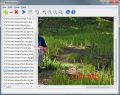
Giveaway of the day — BatchInpaint
BatchInpaint was available as a giveaway on November 24, 2011!

BatchInpaint is a batch version of a popular software Inpaint. Now you can remove watermarks, date stamps and other unwanted objects in a batch mode.
How to use BatchInpaint:
- Add the images
- Simply move and resize the rect to select the unwanted area
- Run the process
System Requirements:
Windows 1Ghz and higher; 2000 MHz processor; 256 MB RAM
Publisher:
TeoreXHomepage:
http://www.theinpaint.com/batch-inpaintFile Size:
3.77 MB
Price:
$19.99
Featured titles by TeoreX
Inpaint reconstructs the selected image area from the pixels near the area boundary. Remove undesirable objects from still images, such as logos, watermarks, power lines, people, text or any other undesired artifacts. There's no need to manually go through messing around with your old clone tool any more! Now you can use Inpaint to easily remove all those unexpected objects that end up spoiling an otherwise really great photograph.

iResizer scale an image without changing important visual content such as people, buildings, animals, etc. iResizer lets you shrinking or enlarging images to improve a composition, fit a layout, or change the orientation.

FolderIco allows to customize the icon of every Windows folder in one click! Don't you know how to change standard yellow folder to a colourful and bright? With FolderIco, give some color to Windows folders. With just a one click, colorize your folders, and discover a new intuitive way to classify your files. A quick look is now enough to identify the folder you are looking for!

WebInPaint is a web application that allows user to remove objects from photos online.However, if you can’t afford the likes of Photoshop or Snagit, then Webinpaint is something you should try. It can help you quickly remove things that are undesirable in an image.
RadioZilla allows you to listen and download radio station content in one click for FREE!
GIVEAWAY download basket




Comments on BatchInpaint
Please add a comment explaining the reason behind your vote.
iPhone app giveaways »





Android app giveaways »





I guess it's OK to post a comment calling a programme a piece of crap, but criticising it for making it easy for someone to steal photos isn't allowed.
Two different programmes recently have done that and my criticism of them were not allowed. If you don't like being criticised for allowing software that enables theft to be distributed here, then don't select it for the giveaway. If the criticism makes you uncomfortable, then instead of deleting it and pretending it never happened, do the right thing and stop aiding and abetting theft.
It's not just these two programmes to remove watermarks from photos, you've also distributed programmes that remove copy protection from DVDs. If the theft of your website's code would piss you off, then you know why the theft of photos, movies, music, etc is wrong, too.
If someone took your car and used it without your permission, you'd scream to the cops, even if they brought it back and topped up the tank. Intellectual property is just as much property as your car or house or gaming system is and if the theft of those things from you wouldn't be OK to you, the same applies to the theft of intellectual property.
And you should really have a look at what can happen to you under the Digital Millennium Copyright Act. They don't just slap wrists, they can kick ass with it. "We just provide a link" won't cut it, either. You know full well what the software does and you willingly chose to make it available through your site.
At least have the balls to accept criticism for doing that instead of pretending nothing was said.
Save | Cancel
Don't bother with this one !!
It left traces of the watermark behind on my version of using a simple photo taken with a date stamp, (my own work).
This was a very poor attempt the setting was 100% quality setting so I shudder to think what it would have been at a lower setting !
It also left behind a black thin line across the photo. It was a good job it was only a test or otherwise being a legal man I would have been looking to them for compensation.
I think the makers need some form of quality control and test this programe before releasing it.
VERY VERY POOR, AND THIS PROGRAME NEEDS RE DOING BEFORE RELEASING IT.
Save | Cancel
#6 Corno
Simply put, take some different colored paints. Put equal amounts next to each other. Now, take your brush and mix em up like crazy! It's very fun yes, but, not helpful. I've tried this program on photos with small and and large watermarks. I've actually even tried doing small portions at a time of watermarks. No luck. And by "fast" I meant for individual photos. I couldn't get it to remove one watermark. As I said it simply just mixes everything together.
Yes, by nature a watermark is hard to remove. This doesn't to it. I'm sure the dev has made other good programs. Just not this one.
Save | Cancel
Thanks TeoRex + GOTD.
Tested it with a set of photos.
It quickly and easily removed horizontal text labels in white font written on the top and bottom black border surrounding the batch of photos.
It can be fooled a bit by text labels written on the black border at the vertical sides of the photo. Some of the black border was removed as well.
Missing part of black border was easily filled in with other freeware photo editor.
It may not function as well if the watermark is placed over important part of the photo with complicated background, say a human face (i.e. not plain background). But if a photographer did that, then he is defacing his own photo with the watermark.
We recognise and appreciate the creative efforts of photographers - and the dangers some face to get the photos, e.g. war photographers.
Don't worry. No one is stealing anything with this. The software just gives us the fun of trying out a tool.
Who says one can steal just by removing the watermark? You can still sue even if someone removed your watermark but the pictorial content is an exact replica and obviously filched from your original photo.
Save | Cancel
how do you select the unwanted area ?
Save | Cancel
It may or may not work. I was turned off by the poor grammar and "text speak" in the description. I figure that any company or programmer that cannot or cannot be bothered get simple English grammar and syntax right is going to be equally careless and superficial and/or shoddy with their software coding. Grammatical errors in English text can (usually) be deciphered and understood. Grammatical and/or syntactical errors in software simply lead to crashes or bugs. So, if the advertising syntax and grammar suck or the ad uses texting terms and shortcuts like "rect" instead of "rectangle" I'm not about to trust my computer to that company's code.
Save | Cancel
W7 x64
version 1.0
Activate.exe verifies correct GAOTD date & presets the registry key into the Windows Registry
Setup.exe is the BatchInPaint installation program
registers automatically (by running Activate.exe)
only 1 single file to the program, BatchInpaint.exe, 7 MB
program window is resizable, but NOT the split between the file list & the picture window.
very odd IMO.
further there should be a means to hide the file list entirely.
my original thought was that this would work like Inpaint, with Inpaints features, but in a batch mode, & if that held true, then this could be looked at as an upgrade to Inpaint, in that it would have Inpaint features & allow batching.
but that is not the case. it does not have all the features as Inpaint & does not work in the same way. does not have undo/redo & the selection tools are different.
appears this is made to remove the same object (say a watermark) from multiple pictures at once. like if you know the date/time are stamped into a picture at a fixed location, you select that location & inpaint should proceed to remove the date/time for all of the selected files. & presumably the pictures would all need to have the same dimensions for this to work effectively.
no undo/redo
no preview
only selection tool is a resizeable rectangle
once started, the pictures are modified in mass, automatically saving each as it progresses
no indication which particular file is being worked on
no real indication that any file is being worked on, only a dialog that says "Processing..."
oh, OK actually there is, "some" feedback, just taking a while for it to register anything meaningful (like x% completed)
so if you have a set of files, all watermarked alike, dimensioned the same, then presumably this could remove the watermark on each picture.
i don't have such a set, only picked random images, & removed "something" from each, so can't really say how effective this would be with real data?
actually i do, heh.
if you do not register the program, it runs in Trial mode, & trial mode watermarks its output.
ah, that didn't work. the "watermark" is simply an 'X' that runs from corner to corner so not something repeatable that you would be able to remove.
pictures are obviously disturbed, but depending on what you're looking to accomplish, the results could be acceptable?
given the comments the other day on Photo Stamp Remover, i'm sure there will be many complaining how this can be used to "steal" ...
Save | Cancel
Great program, work fine for mass-removal of watermarks or any unwanted marks on the same position in all of the pictures.
Input bitmap-files are saved as bitmap (.bmp) - that's essential for further processing.
@ Michael #11: It's Version 1.0
@ ender342 #8: My good ol' InPaint 2.3 is still working as a full version :)
Thanks GotD and Maxim Gapchenko
Save | Cancel
This giveaway was a total bust for me: I installed BatchInpaint in Administrator Mode. I unchecked the run box before clicking finish installation), ran the activation program (again in Administrator Mode - it said activated successfully); then ran the program. The program opened, showed version 1.0 in the *About* subMenu. There was NO paint brush or line tool as demonstrated in the tutorial -- only the adjustable square box -- it did NOT clear the area of unwanted text. My computer is a aptop running Win 7 (x64) home edition. -- Without those 2 tools, the program seems worthless. I uninstalled it.
Save | Cancel
Can someone who has installed it please say what version of Inpaint Batch this giveaway is.
It would be really helpful if GOTD would always say what the version of software they are giving away is. Sometimes it is an older version rather than the current version and I'd like to know that before installing it.
Also, checking the website the price of Inpaint and Inpaint Batch is currently the same - I wonder why that is - From the title you would think that the features of both are the same with the batch version just being able to process more than one image at a time. If that is the case why wouldn't it cost more or is it that the batch version is not so feature rich? I am asking because of the comment above by "ender342" that says he like the original Inpaint but has not got good results with the batch version. So are the feature sets different or is this Batch version not the current version?
Thanks
Michael
Thanks
Save | Cancel
#ender342 - If it was so good, and you need it then, buy it, InPaint is regularly discounted at BitsDuJour i bought a copy there and am happy with the purchase.
Save | Cancel
#8 - If you are that happy with the original Inpaint then why don't you try purchasing it now that your previous giveaway has flaked out?
Save | Cancel
The original Inpaint was an excellent tool for removing blemishes or unwanted items from a photo. You could just draw a line around the item and the program filled it in with material drawn from its immediate surroundings. I used it for months but then it converted itself into a trial version that wouldn't save the edits. So I jumped at the chance to load this version. I didn't care about batches; one edit at a time was all I wanted. But this version doesn't seem to do anything like that. (Maybe it removes watermarks and dates but I don't need that.) Oh, and mine crashed almost immediately.
Could we get a giveaway of the good old un"improved" Inpaint soon? Please?
Save | Cancel
#3 Arvind - This one will process a large number of images at once (rather than you having to edit each one individually) with the same parameters (ie: if a bunch of photos have a watermark all in the same place, you would set it to remove it in the first photo and it would process the rest of the set in the same way). It's for editing a large number of images that have a similar attribute that you want to change in all of them in the same way, basically.
Save | Cancel
#1 Jay "It simply mixes everything together" What a puzzling statement. Would you mind to be more explicite?
Watermarks are always difficult to remove, that is what they are made for.
Note that every batch processing, by its very nature, is bound to treat the individual picture more crudely than a customized treatment would do.
Save | Cancel
inpaint was good but it took a long time to process. this batch thing has helped me save time for removing dates from my scanned photos, as i just leave it running. be careful not to edit too much at a time as the program can crash like this.
btw whats with the strange system requirements, 1ghz then 2000Mhz?
Save | Cancel
List more Apple/Mac enabled software please!
Save | Cancel
What is the difference between the Inpaint offered previously & this one?
Save | Cancel
very, very limited possibilities in comparison to PhotoStamp released by GOTD some days before. And it is veeery slow. I will uninstall this and stick with PhotoStamp instead.
But thanks GOTD for this gift!
Save | Cancel
Yes, it removes watermarks. No, the image isn't usable afterwards.
The program installed easily on my Win7 32bit OS. It has very limited capabilities. Meaning the options simply let you decide where and how to save a file (duplicate in same folder, overwrite, and select folder.) I have tried removing watermarks with other methods and while this program is quite fast, it doesn't seem to actually remove large or small watermarks. It simply mixes everything together.
Happy Thanksgiving America!
Save | Cancel