Every day we offer FREE licensed software you’d have to buy otherwise.
Giveaway of the day — Audio Recorder 1.5
Audio Recorder 1.5 was available as a giveaway on February 3, 2011!

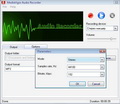
MX Audio Recorder is an application for recording all kinds of sounds with your computer. MP3 Recorder allows recording sounds off the microphone, line-in, streaming audio from the Internet, music being played, for instance, in Windows Media Player or WinAmp, Skype conversations, sound themes from computer games, etc. The recorded audio file can be automatically converted to MP3, WMA, OGG, or WAV. On top of that, Sound Recorder comes with an internal audio editor, which you can use to slightly fresh up your recording.
System Requirements:
Windows 95/ 98/ 2000/ Me/ XP/ Vista/ 7
Publisher:
MediaVigor SoftwareHomepage:
http://www.mediavigor.com/audio-recorder.htmFile Size:
3.58 MB
Price:
$19.95
Featured titles by MediaVigor Software
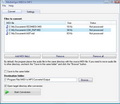
MediaVigor MIDI to MP3 Converter is a award-winning utility that allows you to convert MIDI to MP3, WAV, WMA and OGG formats. With help of Sound Fonts the program converts .MID files or Karaoke files much quicker than similar tools.
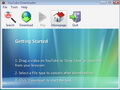
YouTube Downloader is an application for downloading videos published on YouTube.com. YouTube Downloader automatically converts the videos to any of the popular formats – AVI, MPEG4, MKV, MOV, WMA, or 3GP.
Comments on Audio Recorder 1.5
Please add a comment explaining the reason behind your vote.

iPhone app giveaways »




Android app giveaways »





I like the way this program does the EXACT SAME THING as the Windows XP audio recorder, only less.
Save | Cancel
To m c d (currently comment no. 41 - the comments appears to randomly change order):
I'm never offended by people who are genuinely trying to help.
I have just double-checked, and can assure you that according to the website, Audio Editor is NOT free. Check for yourself http://www.mediavigor.com/audio-editor.htm or trust the copy of the advert from their website here:
Audio Editor
MediaVigor Audio Editor is a dominant yet easy-to-use audio edition software that will allow anyone to simply record, edit and mix audio files, apply sound effects, convert sound to a variety of formats. Within seconds you will be able to open a file and edit it. If you take time to explore the other features you will find many great tools designed with the certified sound engineer in mind. MP3, WMA, WAV, OGG, and many more formats are all supported for express sound editing, recording and conversion.
Fast and simple to use
Full featured Mp3 editing software support
Sound editing functions include cut, copy, paste, delete, silence, and more.
Apply special effects, such as fade, equalizer, doppler, mechanize, echo, reverse, flanger, and more
Compatible with Windows 95/98/2000/Me/XP/Vista
Flexibility for power users
Free lifetime updates
Full money-back guarantee
... so, whether it offends you or not, I believe YOU ARE MISTAKEN.
Save | Cancel
The software seems to depend on your audio card. I have several options to record from and they all work. I like the fact that it records directly from midi and converts it to mp3. My audio card uses wave files so they sound great. Thanks
Save | Cancel
@ 18, Garfey B.:
That's what I thought it would do, just automatically pick up the sound playing, but it didn't. I tried music through WMP, didn't work. I tried music through youtube, didn't work. I tried several other programs (VLC, Winamp +++) but it didn't work.
Save | Cancel
The software install fine but there are no options to record sound from a mp3 or youtube video. It only records sound from the microphone. Waste of my time
Save | Cancel
I am having same problem as #11 is
Can`t initialize device error code: 0 !!!
Save | Cancel
for mike: your comments are very much appreciated, but it would be even better if you could please write a sort of summary/conclusion/rate at the end of your reviews, thanks
Save | Cancel
iSound is great. I agree. It adjusts input level automatically. If you want manual control of input level, I recommend Polderbits Sound Recorder.
Save | Cancel
The best sound recorder I've found is called i-sound - PERIOD! It will record any sound you here coming from your speakers, even on limited sound card-equipped computers. It records any sound from the internet. Not just sound from mic inputs and line in.
Save | Cancel
Well that's it for me, it worked twice, now I just keep getting access violation or missing DRM rights. Thanks anyway!
Save | Cancel
Huh I'm so surprised after reading the comments, that it works so well. I am running Vista 32, I clicked genre, then click each station and they play, record, and play back. Nothing wrong to me for just wanting to record a song. Good I guess
Save | Cancel
- Xeny
Try searching Unreal Superheros, it is commonly used in keygens and I have heard it from several keygens before. Maybe this will help your search.
Save | Cancel
Installed OK on Vista Home Basic - the program began to start up and failed with a message box saying "Can`t initialize device error code: 0" ---- I have used this program on another computer using XP for a couple of years and like it for simple recording tasks, but so far, not working for me on Vista.
Save | Cancel
to number 40,
i don't mean to offend but i believe Y O U are mistaken about the audio editor
if you go to their w/site and click on "products", they list (8) products, 4 for purchase and 4 for FREE, 1 of which is "audio editor".
Save | Cancel
A comment on Liroma's comment (no. 34):
I don't mean to offend, but I believe you are mistaken about the Audio Editor being free. If you read the clause underneath the download links, which I have pasted into my comment (no. 15), it tells you that all of their products are provided for a 10-day trial period only, so it appears to be only a demo for which you will have to pay if you wish to keep using it afterwards.
Save | Cancel
My Toshiba laptop does not have a "Stereo Mix" device type so many of the free recorders cannot record Internet radio. This one cannot either. I removed it.
Save | Cancel
I scan the remarks daily. I am always interested in reading what Ashraf, FUBAR, and Mike have to say about the daily giveaway. They almost always have good information to convey. Thanks to them.
Save | Cancel
Well, I am pretty a newbie and I have never used an audio recorder before, so I tried for the first time this one.
I don't know about other people's expectations, but I was thrilled to discover a very easy-to-use program, with exactly the features a newbie needs in order to record something playing on his/her computer
I didn't need any manual in order to perform the basic operations like record, play or choose the output folder or format. There is actually a manual in the Help section, but it doesn't explain the options one has for performing a recording, so I guess I shall let the default settings on.
What most impressed me was the quality of the sound. It's great! And the user-friendliness also is a good point for this program. And many thanks to #12's suggestion - I've discovered now a great site for listening to music: GOEAR.COM!
But I also found some problems with this program:
1. the most annoying was not being able to minimize the window, so it stood stuck to my Desktop, couldn't get rid of it but by closing the program.
2. then, my antivirus Kaspersky Internet Security warns me every time I start the program about a trojan-like behaviour. I don't understand this very well, so I quote here the best answer I have found on the internet regarding this aspect. IF, PLEASE, ANYONE FROM THE COMPANY COULD GIVE US AN EXPLANATION FOR THIS! I am feeling threatened now and I don't know if I should uninstall immediately or go on with it.
3. another issue would be the missing part from this package: indeed, the editor is not a part of the recorder, but it can be freely downloaded from their site. I didn't try it however, as I still don't know what to think of the developers. Are they trustworthy or not? Where does this company come from. There wasn't any location mentioned on their site, which also points to a disturbing lack of information.
That would be all. I shall be waiting for a reply from the developers' team, in order to finally decide if this is a keeper or not for me.
Thanks again GAOTD. You are doing a great job here for all of us, but we have been missing lately Ashraf's comments. Ashraf, are you on a vacation again or have you abandoned us, the ones that depend on your advice? Please, do come back!
Save | Cancel
OMG, No thanks sheesh i get:
"Couldn't START Recording..." ; "ERROR CODE 14"
NO SPARE TIME TO INVESTIGATE NOR DO I CARE TO, WINDOWS SOUND RECORDER WILL BE JUST FINE AND IS ERROR FREE PFFT CYAzZz...<~(____)~
zZz
Save | Cancel
TIP:
Make certain Your microphone is enabled and set or else this program will error box popup and won't even load my friendzZz! Enjoy.
Save | Cancel
I don't get it, Windows comes with a pretty much basic sound recorder, just goto windows folder and load it. This software does little to nothing it cannot already do, but maybe a sweeter interface...? anyway sometimes nice to have alternatives for sure. If you just want basic record and save option then everyone running Windows already has this, thanks anyway.
"Remember faith believes that all things can "BE" It's sure of what it hopes for and certain of what it cannot "SEE"
Enjoy!...~<(___)~CheerzZz in 2011 Folks.
~~~~~~ ~~~~~~~~~~~~~~~~~~~~~~~
Save | Cancel
After downloading this software and using it. It is nothing more then recording. Doing multi track recording can be done but it is far to much trouble for the sound. As always I'll keep using Audacity. I also used Kristal. But found it far to much trouble recording multi tracks and over dubbing when as a free alternative Audacity makes it so much simpler. Kristal does has it good points. But since I use a multi track head to record through I do not need the effects that Kristal offers. As a free alternative I would suggest Audacity to anyone thats new to using a computer to record with. This will let you get your feet wet, and after learning what you want you can then explore other alternatives.
The software given here today is a good software to record sound off the internet or even to use as a memo recorder. But to use as a multi track, try something different.
Save | Cancel
An alternative, though not free ($17.95 for the standard version) is highcriteria.com Total Recorder. Will record anything coming thru your sound card into just about any type of audio file. It has a scheduler and an autostop feature, among many other bells and whistles. There is also a Pro version that does even more. I have been using this app for about 10 years now, when it was only $11.95, but the good thing so far, is you get any upgrades for free, I started out with v3 now up to v8 something, and they will email you a new key for the upgraded version for free, if the key changes.
Save | Cancel
Like #1- HELP gives no help apart from telling me to to go to their website where I will get a “wealth of information about the Audio Recorder product” ..lolololo
Save | Cancel
I have downloaded Audacity and found the use cumbersome and somewhat complicated. Afterward, I could not get it to work properly, and as of yet it does not operate to record on my Vista Home system. Audio Recorder is less complicated, but have had great success with this download in past. After recording, go to the program and move recordings to the file you desire them to reside in, if different. Simple, clean, works for me. Thanks, GOTD.
Save | Cancel
Exactly what I was waiting for from GOTD. I had downloaded an earlier copy over a year ago on another computer, but had to wait until this version to get the ability to record streaming audio once again from the Internet (something I was never able to get Audacity to do.) Just choose "Stereo Mix" as the input device and you can record anything that you hear from the Internet.
Save | Cancel
To #2 Chris Roy Jackson
I like Kristal Audio Engine for multi-track recording.
Far superior to Audacity in my opinion.
http://www.kreatives.org/kristal/
Save | Cancel
I don't care much for today's offering. A much nicer and totally free option is the Donar MP3 recorder: http://www.donarzone.com/donar-mp3-recorder-3/
Donar provides for recording any sound on your computer, from mic, sound card, streaming Internet audio, etc., etc. Try it. Works great.
Save | Cancel
Looks pretty basic. Quite a few similar applications floating around. I normally just open Audacity for anything like this.
Save | Cancel
I registered this product but the ID3 tags comment still says: "Created with unlicensed version of MediaVigor Audio Recorder". I know I can change this, but...
Save | Cancel
Will this program capture tagged data (song name, artist, etc.) when recording from an online internet radio station?
Save | Cancel
Can I record from you tube using this software???
Save | Cancel
Never used Audacity... I always used TotalRecorder
Sorry, but this software seems a little too overly simplified for my tastes.
Save | Cancel
17.@ #2 Chris Roy Jackson
All Pro recordings consists of these four steps:
1.Recording 2. Editing 3.Mixing 4. Mastering
This software is for #1. For number 2,3 and 4 steps you may use Audacity or keep looking for specialized software for each stage of your production.
Save | Cancel
.
#3, Duncan, wrote:
"I can’t for the life of me figure out how to record from other inputs (i.e. onboard sound). So that’s a draw back for me."
It's very simple, actually. Just start the music (or whatever) playing, and then press the Record button. When you're finished, press the Stop button. You don't need any fancy connections -- it records whatever music is playing thru your PC.
I'm surprised that so many are having trouble with this. I didn't understand it, either, but after a few minutes of playing with the controls, I found it to be rather intuitive. And it does a very high quality job of recording.
.
Save | Cancel
@ #2 Chris Roy Jackson
Audacity is a great free multi track recorder. It will over dub or record side by side tracks and then you can mix all your tracks once your done. It also can record anything you hear through your computer speakers or the mic and line in jack. Using Audacity you will have to down load extras stuff for importing or exporting in mp3 or wave. But thats also free through Audacity. It is called Lame. You can find everything you need to know about Audacity at http://audacity.sourceforge.net/
Save | Cancel
Great Program, just what I needed. But would like it if they could change the program so I can minimize to tray
Save | Cancel
I just checked out the vendor's website, and although they proclaim the software to be free, once you go to the download page, there is a clause underneath the download links which I'm now going to paste:
All our products is provided with 10-day trial period. During this time you will be able to try all its features and decide if you really like our software and want to purchase it. You can order software by filling the Plimus online purchase form. You can also buy using PayPal, FAX Order, Postal Mail, Phone or Purchase Order.
All our software products is compatible with Microsoft Windows 9x/Me/NT/2000/XP/2003/Vista/Seven.
... so be aware that these downloads appear to only be demos.
I also find the actual Audio Recorder 1.5 program to be really basic, and I would not buy it. There are many way more advanced free audio recorders around, and this will probably end up as just clutter in your program list.
Save | Cancel
Has anybody who has downloaded this software - who is using Vista - checked if it can record an audio stream coming from another source ie. streaming audio over the internet or background music playing from mp3 that you can do a voice over using the microphone for making instruction audios / videos that are more professional.
My laptop has no line-in jack so I always get stumped on this one. Each time I download software none of them seem to work in this area.
A search on the internet has not turned up a solution to deal with this Vista cripple-ware feature.
I don't want to download yet another good tool that cannot solve this problem to have to uninstall it 5 minutes later.
Any suggestions?
Save | Cancel
Thank you. I needed this very simple app to record any sound from my PC to mp3/wav. No need for manual if you only want to record and save the file. I was looking for the editor in the program but didn't find any also. The vendor's website however has a separate audio editing program which is free. Anyway, this giveaway version lacks the internal audio editor.
Save | Cancel
This did not work for me straight away (on XP), but after changing the ouput folder & source & doing a few tests it worked (and the previous test files suddenly appeared !!!). The "Stereo Mix" allows recording from websites such as GOEAR.COM (foreign but easy to understand). This software does allow simple playing of recordings but does not compete with Audacity for audio editing.
Save | Cancel
Can`t initialize device error code: 0 !!!
Save | Cancel
Will this software record music from a keygen? I've had this in my computer for over a year, and I can't bring myself to delete it as the music is so beautiful to me, I've heard it nowhere else, and though I've tried to find a program that would record it, I haven't. Got close once, but that's all. Thanks for any answers.
Save | Cancel
I wish I had had as good an experience as Scoobidoo #4. The thing looks wonderfully simple. The contents in the Help menu read '0'. You think, hey, what could go wrong anyway? Well what can go wrong is that none of it works. I tried to record some audio that I often record with Audacity, but nothing happened at all, and there was no way to make the choice for, say, MP3 output. When it did seem it had produced something, there was zilch sound. Until they sort out a help file or give us support, I can't be bothered. Audacity is good. Who needs this rubbish?
Save | Cancel
This program does exactly same thing as Audacity. I have been using Audacity for years and is better than this program. You can get portable Audacity for free and not install another program and pay $19.95 for it.
Save | Cancel
Installs and runs with no problems on Windows 7 64bit (and Vista 32 bit and Xp pro SP3 via VMware virtual machines).
As another reveiwers have said I could not find no help file/manual; and this is something that i rarely look at on software also. And again this software is the exception.
I am not the world pro but I am not no pc newbie either and I just could not figure half of this software out/get it to work.
And as mentioned also I also could not find no 'editor'.
Personaly I found this a very basic piece of software, and I certainly would pay the asking price of $19.95 (or about £14gbp in my case).
So, on that note: Thank you for the offer today but its not for me.
Save | Cancel
you can mix multiple tracks in audacity (free download). dunno about direct recording.
Save | Cancel
This software is certainly not so powerful than Audacity, but easier. After installation and registration, I tried to record with the microphone (default option) and this software recorded a native mp3. Then I recorded without any difficulty a web radio. The quality of the sound is good : I recommend it if you want a simple and easy recorder.
Save | Cancel
Downloaded and installed without a hitch. Make sure to read the readme file as it contains the serial for activating the program.
It starts up fast on my not so new Windows 7 laptop. Tried a sample recording through the microphone, worked great. Has three codecs you can use to save: MP3, OGG and ACM Wave.
I don't usually have to read the instructions on how to use a program, as I tend to figure out things fast enough on my own, but this program will be the exception. I can't for the life of me figure out how to record from other inputs (i.e. onboard sound). So that's a draw back for me.
It also claims to have a simple editor built into the program, but I can't find it.
But other then that, looks like a straight forward recorder. At least for the microphone part anyways. I guess it'd be great for those of you who do podcasts, for me I think I'll go ahead and delete the application as I have other recorders that do what this does and more.
Save | Cancel
I am CONSIDERING downloading this...
Could the developer or anyone else tell me How many Tracks this Application will record (Stereo, 3 Tracks, 6 Tracks, whatever)?
What I want to do is record first on one or two tracks, then go back and record additional Tracks that will playback with the original Track(s).
If this App will NOT do this, I would GREATLY Appreciate anyones' suggestions as to any other Applications that would (FREE of Otherwise).
Thanks-in-Advance,
Save | Cancel