English
Every day we offer FREE licensed software you’d have to buy otherwise.
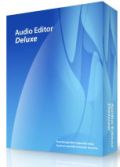
$40
EXPIRED
Giveaway of the day — Audio Editor Deluxe
Professional audio editing tools in an easy-to use program!
$40
EXPIRED
User rating:
789
104 comments
Audio Editor Deluxe was available as a giveaway on April 18, 2009!
Today Giveaway of the Day

Securely erase files/folders from HDD, SSD, or external drives.
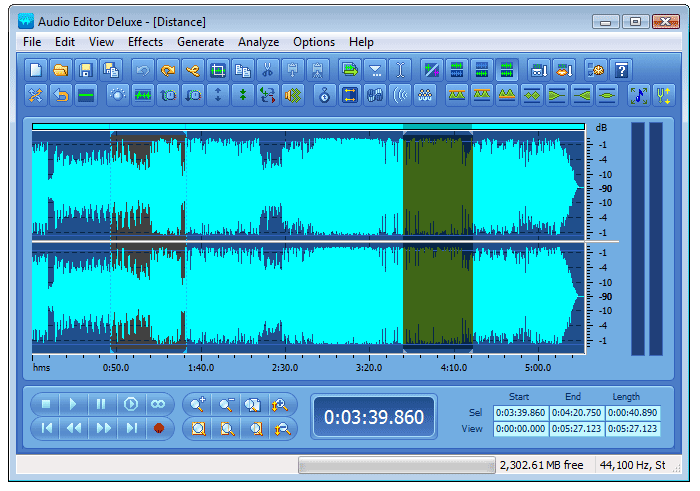
Professional audio editing tools in an easy-to use program! Record from any source and edit the sound with drag & drop, cut & paste, fade in & out. Add effects to your sound, mix tracks together. Record streaming audio, convert LPs and tapes to CD/MP3, rip and burn CDs.
System Requirements:
Intel Pentium 4 1.0 GHz or Pentium M 1.0 GHz processor (Pentium dual core processor 2.8 or above or above recommended*); 256 MB RAM (512 MB recommended*); Microsoft Windows 2000/XP/ Vista; PCI sound card or on-board audio; 100 MB of hard disk space; CD-RW for audio cd burning
Publisher:
AudioEditorDeluxe IncHomepage:
http://www.audioeditor.biz/File Size:
7.11 MB
Price:
$40
GIVEAWAY download basket

Developed by MPCSTAR

Transform media files for playback on various devices.

Developed by VSO Software

View the feedback from multiple IP cameras.
Comments on Audio Editor Deluxe
Thank you for voting!
Please add a comment explaining the reason behind your vote.
Please add a comment explaining the reason behind your vote.

iPhone app giveaways »

Over 500,000+ beautiful and cool wallpapers, live photos at your fingertips!
$2.99 ➞ free today
QuickScan transforms your device into an offline mobile scanner and text extraction tool.
$9.99 ➞ free today

Effortlessly craft your ideal passport, ID, or visa photo with the seamless integration of AI-powered customixation.
$2.99 ➞ free today

TripleShot records from three iPhone cameras at the same time, giving you portrait, landscape.
$0.99 ➞ free today

Conduct any type of Inspection, Audit and Safety Checklists quickly and efficiently with OnSite Checklist Tool.
$9.99 ➞ free today
Android app giveaways »

$0.99 ➞ free today

Prepare for an exciting word puzzle adventure with Word Slice: 1 Hint 5 Words!
$2.49 ➞ free today

Collect recipes from around the world and create the ultimate food truck!
$0.99 ➞ free today

$2.49 ➞ free today

A strategic combat game about a forgemaster who accidentally awakened a dragon.
$0.99 ➞ free today
For those who missed it, there's a good and free alternative available.
Its called "Audacity":
http://www.pcfreunde.de/download/d748/audacity/43638-rWnzpJ7QY6/
There is a beta version available too:
http://www.pcfreunde.de/download/d15972/audacity-beta/43638-FxE0F9Rwwu/
This is one of the best sound editing softwares, that is available for free.
Chears, and keep on going! =D
Save | Cancel
Same as audacity.
Save | Cancel
I had a terrible time installing this program. I had to run install 3 times,, then error messages, conflict with another running program, I had to hit ignore over and over with each install until it "installed" and i'm not sure its installed, I"m scared to use it.
Save | Cancel
I have to say, that for 40 dollars, this software is a rip-off. It gives you less than what a 5 dollar software (the old Nero Wave Editor from Nero 6) can give you. Even for free, it's a rip off.
It's better than Audacity but not by that much. Audacity, for me, is a waste of time - it needs a lot of development before it can see real use for professionals.
If you have the money, I'd say get Sony SoundForge or Adobe Audition (formerly CoolEdit Pro). If you want free, get Audacity. Don't support rip-offs like this.
Save | Cancel
I mainly use Creative Wave Studio - it's powerful, professional, easy to use and best of all free. What CWS can't do, audacity can.
For those that want to try out Audio Editor Deluxe, here's the list of features from the website:
Overview
Audio Editor Deluxe is a visual multifunctional audio files editor for Windows. It allows you to perform various operations with audio data such as displaying a waveform image of an audio file, filtering, applying various audio effects, format conversion and more. Supports all major audio formats. Provide more than 20 sound effects and 6 filters. Support mp3 VBR codec and Windows Media 9 format. Support ID3 tag and CDDB.
Details
* Editing - Open, create and save audio files. Play an audio file or any part of it. Visually edit an audio file (Cut, Copy, Delete, Paste, Paste From File, Mix, Mix From File and Insert or Delete noise or silence in an audio file)
* Display - Display a waveform window of an audio file and apply zooming
* Recording - Record new audio file from a microphone or another input device
* Digital effects - Apply different effects (Amplify, Delay, Equalizer, Fade, Flanger, Invert, Normalize, Reverse, Multi Tap Delay, Silence, Stretch, Vibrato, Echo, Chorus)
* Audio filters - Apply different filters to the selected part of an audio file (Ban Pass Filter, High Pass Filter, High Shelf Filter, Low Pass Filter, Low Shelf Filter, Notch Filter)
* Support all major audio formats - Audio Editor Deluxe supports a wide range of audio formats, such as MPEG (MP3, MP2), WAV, Windows Media Audio, Ogg Vorbis, Audio Tracks and Dialogic VOX. It is easy to convert an audio file from one format to another.
* ID3 tag & Media information - Insert and change information about an audio file (Album, Artist, Channels, Comments, Copyright, Genre, Title, Year)
* Ease of use - Audio Editor Deluxe provides a customizable interface, allowing you to build projects the way you want. It also supports standard Windows keyboard commands and mouse shortcuts
* Markers - Use markers in your audio file to quickly select between different selections!
* Selection tool - Select a part of your audio file precisely with the selection tools of Audio Editor Deluxe
NEW!
Audio Editor Deluxe supports the following file formats so that you can edit audio files
* Waveform audio (PCM wave)
* MPEG Audio (various layers) to include MP2 and MP3
* Windows Media Audio
* Audio CD Tracks
* OGG Vorbis Audio
* VOX Dialogic ADPCM
* RAW Audio
Personally, I don't see anything unique about this product that other free programs can't do. I'm not going to download it or vote because if those are the best features it's got to offer, I see no point.
Save | Cancel
I wish I had read no 8 Johno's comment before giving up on this giveaway. I missed out on it for nothing as I couldn't get around the server error.
Save | Cancel
I find it hard to believe that some here hve evaluated this software fully and decide that other more familiar programs are superior. In my book the jury is still out for me. I will need seveal days to fully evaluate with critical listening to make a recommendation. So far I like what I see, with one caveat. The zoom function only will allow play within the audio in frane. I would like to see a floating zoom for remastering purposes.
Save | Cancel
Thanks GAOTD.Audio Editor Deluxe is good as a basic audio tool,but not the best.In the features it is shown that "Record streaming audio, convert LPs and tapes to CD/MP3, rip and burn CDs."Provision is there for recording,but,I don't see any option to "convert LPs and tapes to CD/MP3, rip and burn CDs;" anywhere in the UI nor in the 'Help'.
Save | Cancel
I miss the original CoolEdit, and I really hate using Audacity's bass-ackwards selection tool, so I was quite happy with today's giveaway when I was able to drag a selection and edit it with no problem. Not so happy when I tried to save it as a new mp3 file...
The save functions for both mp3 and mp2 are listed as evaluation versions. The help file specifies Advanced Mp3 Options under General Settings, but there aren't any in this giveaway, so when does this evaluation expire, and why isn't this limitation noted in the giveaway description? I don't mind a somewhat crippled evaluation version of a product, that's what shareware typically entails, but a giveaway is supposed to be a fully functioning program unless otherwise noted - or so I thought 'til today.
I am also not happy with the way Audio Editor was installed - codecs and libraries were registered in Windows system rather than in its own directory, and that's usually enough reason to uninstall - I just hope this software didn't screw up any codecs already in place..
Save | Cancel
9.4.18
? Should the previous version Audio Editor ver 1.1.0.18 be removed before installing this delux ver 9.5.1 ?
Wxp pro sp2
Save | Cancel
Doesn't save as a 24 bit wav file???????? GOOD BYE Audio Editor Deluxe!
Save | Cancel
No problems downloading or registering here. I didn't get anything regarding counting down or "no device" problems. I'm running it on a PC with 32 bit Vista Ultimate.
I was able to record streamline music with no problems.
For those with the input device problems make sure you have the correct driver for your sound card.
For registration problems make sure you let the program open after it has loaded. It will then ask you for the registration info in the text file. You put it in & then you shouldn't get that countdown problem.
Lots of times if you have the registration name & code then you can reload these programs if your hard drive crashes. I've done that with several GOTD programs.
Looks good so far, but I haven't had a chance to really play with it.
Thanks GOTD & Audio Editor!
Save | Cancel
Graphically more friendly multitrack player recorder and able to play with loops or mix audio for movies :
TrackAxPC (freeware) :
http://www.trakax.com/software/pc/
And for audio play and record, with midi command (music keyboard or PC keyboard 'Soundfonts compatibles). Free too :
Z-Maestro
http://www.z-sys.org/products/zmaestro/default.aspx
So, happy ? What's up Doc ?
Save | Cancel
Based on all the comments, I've decided not to install this audio editor. My primary usage would be to capture, save and/or edit streaming audio from the Internet. Since several posts have said that this app will not do this despite the instructions and menus, that's it for me. I'll wait until GOTD comes out again with Audio Recorder, a simple audio capture of streaming audio that worked fine on my other computer, but couldn't transfer the registration codes to this computer.
Save | Cancel
#78 Options -> Windows Recording Mixer & select. Thanks Mike this sent me in the right direction.
I'm new at all this. I want to record streaming audio. I had only had the microphone in the Recording Control. Click on "Option" then "Properties". Change the "Mixer device for your speakers (Realtex AC97 Audio) Select "Stereo Mix" Make sure that the "Select" box at the bottom of Stereo Mix has a tic in it. Choose your radio station then record, it works.
I also notice that if you have more than one user on your computer the other user has to activate the program. Mind was registered but my wife was unregistered. Make sure that you go to registration under help and that you register each user on your computer. Have fun.
Save | Cancel
This is kind of like Audicity but does seem easier to use...for free, it's great, but I don't think I would pay $40 for it when I could use Audacity instead...
Save | Cancel
You can't edit ID3 tags....like the genre of an mp3 can't be changed....or can it? anyone?
Save | Cancel
I did find registration info, but when I try to do instructions in post #8 I get kicked to site page to purchase software? What am I doing wrong?
Save | Cancel
#70 Vostromo: Yes, excellent free software from a superb Australian company.
This one here doesn't seem to have provision for plug-ins for specialized compressors and effect such as vocoder, harmonizer, etc.
Save | Cancel
@3 Dear Audacity Fanboy - if you have "nothing more to say" THEN PLEASE DON'T. We all KNOW Audacity is out there...WHAT IS YOUR POINT?
Save | Cancel
Installed on Vista home Premium 64. Did NOT register correctly. Got the same results previously mentioned about 10 trials left. To me that means it did not register correctly.
Tried to record and no sound as it recorded.
Default save is MP3, which is a compressed format. Should save in an uncompressed format by default.
No 'Noise' removal.
Can not select recording device. That is a big negative.
When I select 'Windows Recording Mixer ...' nothing happened.
I am leaving it on my computer, maybe will find a use for it, but Audacity is going to remain my primary audio tool.
Save | Cancel
@12 - If you crash, that's all she wrote. Some of the Giveaways I've noticed you CAN re-install if you got it installed in time the first time around, but you can't count on it. I always save the .zip file just in case. They usually come back around though. Here's the thing...make a drive image of your hard drive for backup and you won't ever have to worry about that again. Once in a while they offer software that will do that as well, but there are tons of imaging softwares available free or cheap. All you need is a USB hard drive to store the image on.
-Roj
Save | Cancel
@84 yes it is 9.5.1 (the trial version) I just downloaded it to see, it says 931 but downloads 951.
I uninstalled the program cause I use GoldWave 5. Maybe goldwave will allow a download of their new version coming out soon on this site.
Save | Cancel
I just recorded a song off YouTube by going to "Options" and selecting "Windows Recording Mixer" and then selecting "Stereo Mix". Then you click on the little red button (records new sound) in the bottom left of Audio Editor and when the song stops just click the "stops playback" button just above and to the left of the record button.
Save | Cancel
Adobe bought CoolEdit from Syntrillian. Or did Adobe buy out Syntrillian (like it did Macromedia)?
Save | Cancel
#78
Options -> Windows Recording Mixer & select.
Nothing happends after selecting Windows Recording Mixer...
Is this because my Vista laptop uses RealTek?
I was hoping to record from the internet and other sources but there is no option to select any other input.
Save | Cancel
#22, #28: The trial version downloaded directly from the vendor website is 9.3.1, while GAOTD version is 9.5.1. So downloading from vendor and registering with GAOTD data might not be the same.
Save | Cancel
#16 Chris: CoolEdit is still available but has been known as Adobe Audition many years now.
This program here isn't free, so it's supposed to have greater functionality and more capabilities than Audacity. It should stand comparison with SoundForge, Cubase, Wavelab, Nuendo, Ableton Live, Logic Audio, Acid Pro, Power Tracks, Sonar, Adobe Audition or Soundbooth, Final Cut Pro, etc.
Save | Cancel
Installed on Vista flawlessly, works great.
In future installations would love to see a Programmable Recording Timer and Scheduler for future internet broadcasts.
Save | Cancel
Re: #59; I followed the instructions in #8 and it DID install after a couple of rounds of 'ignore'. Seems to have taken the program registration well is there is no indication of it being just a trial.
Harvey
Save | Cancel
Would not install for me under 32 bit Vista Ultimate. It kept telling me that the Microsoft Register Server had stopped working. Doing a reboot did not help.
Harvey
Save | Cancel
This is McFunsoft Audio Editor under a different name. Not bad, but it doesn't handle AAC or lossless formats.
Save | Cancel
to #42, Tk, Boy that was a mouthfull of data - I think I'm going to have to get up and get a cup of coffee to be able to digest all that technical data. Good thing is that you are providing some insight for both developers and those of us, liek you, that have a particualr collection of LPs and would like to be able to digitize it, while keeping its clarity.
Perhaps a not-so-distant future giveaway.
Save | Cancel
Todays offering is indeed very good and useful, but if you're into music recording you should also download Kristal (http://www.kreatives.org/kristal/), a free audio sequencer ( it doesn't support midi, so if you're a midi musician you'll have to look elsewhere or, worst case, learn to play).
Together these two programs will give you an excellent home recording studio!
Save | Cancel
GR8 basic little prog!
Yes, #16 remeniscent of CoolEdit.
I ain't bitching but it would be nice if we could "preview" the FX before applying or modifying them.
I think Audacity allows VST plugins.[Like Soundforge # 55]
Thnx GAOTD.
PS. What does "MP3 evaluation" mean in "save"? We're going to have to buy an MP3 license later?
Save | Cancel
To me, it just seems 10 times easier to use than Audacity.
Save | Cancel
Installed successfully on XP Pro SP3.
The 10 trials still remain after injecting the Registration Key.
Save | Cancel
I use the outstanding free version of Wavepad from NCH Swiftsound -- http://www.nch.com.au/wavepad/ -- which does enough for me with ease. I admit the installer loads a bunch of unwanted trial versions of related apps, but they are harmless and can be uninstalled/deleted at any time. The only feature the free version lacks is batch processing, but in exchange for the very precise realtime editing it offers -- fades, filters, effects, conversion, etc -- I've really enjoyed working with it.
Save | Cancel
As usual, the onboard Realtech(?) sound chip on my Abit AN52 board is having issues. Nearly all audio recorders cannot use it properly. Without digging to find the chip model, if anyones has similar issues, don't be surprised. It's not the software.
Settings and drivers are all correct. Oops. Oh well. Maybe there's a more recent driver update I haven't seen yet, time to go look again I guess. :oD
Save | Cancel
Well after looking at it some I find it isn't like GoldWave, I Like my GW is better.
Not to down this program, it is free, but its not all that complete. One thing I see is you can only open 1 audio file at a time, so if you want to cut/paste/mix, your having to copy a piece, close the file, open the audio file you want to paste/mix to and go through this stage each time you want to change. In GW you can open several audio files at a time and inter change with each. Besides being able to change the color of the background.
I'm using it on Vista Home P also, but I may remove it now that I seen what its able to do.
Save | Cancel
I'm having the same problem as others. I can't select an input device for recording streaming audio online. Help anyone??
Save | Cancel
I have Vista Ultimate and it registered fine and didn't have to use 'run as admin..'. The help file for recording is misleading, there is no option for input but... I went to the Control panel->Sound and changed my default from "What you Hear"(my sound card) to Microphone and viola!! It worked!! Also for the Fade in, Fade out and Fade custom, go to Effects->Amplitude (this is where you will find the Fade options. Yes, it is similar to Audacity and it takes getting use to especially if you have been using another program and are use to it. It's a keeper for me. Thanks again GAOTD!!!
Save | Cancel
Absolutely bizarre that it doesn't include any way (Options simply doesn't have it)to record streaming or from stereo mix, despite the Help pages saying it does (written by someone who's never tried it out, obviously). So, as far as I'm concerned, if it doesn't record, it doesn't stay on my computer. I saw all the good comments & therefore thought I'd try it, but it's a waste of time for me. Audacity still is the greatest!
Save | Cancel
This software installs Windows Media 9 Series software, so if you do not like Microsoft media player, do not install it. The only thing I do not like about this is that they do not give you a choice as to whether or not you want to install this. That's a BIG NO-NO for me.
Save | Cancel
Sounds goog, but don't bother.
Does not work on flac files.
When uninstalling, it left a lot of so called "shared" dll files on computer.
Save | Cancel
#45 - I have found no recording time limit when I recorded using this software. Although on my system it does stop showing you visually on screen that it is recording after a couple of minutes (no waves are visible) if I leave it on normal zoom. However the timer a the bottom right shows that it is still recording. XP users get a Windows Recording Mixer in the options section in order to select the desired device, thus the positive feedbacks.
Save | Cancel
This app is missing flac support. Otherwise it seems like a nice program from what I have tried thus far.
Save | Cancel
I agree with Rider (#52). Audacity works much better at adding tracks and overlaying them. Audio Editor was pretty annoying trying to add tracks at the end of another track. Copy and Paste is all I could figure out. Yucky. Pain in the arss.
Save | Cancel
To record, the instructions say:
Open Audio Editor Deluxe.
Choose "Options" > "Input Device" On the main menu. Click device the Wave device.
There is no option for "Input Device." Anywhere.
Save | Cancel
OK, how do you use this? I'm trying to record a sound from the line in to my sound card. The instructions say the below but the options dropdown does not show a "Device Control".
How to record sound from Microphone, DVD / VCD / CD Player, MP3 Player, RealPlayer, Windows Media Player, Web Page, Internet Conversation, Internet News, Internet Radio Station and the others?
Step 1. Select the Record Source;
Select 'Microphone' in the Record Source (Options -> Device Control -> Input Device) to record from Microphone. Select 'Stereo Mix' in the Record Source to record any sound from your sound card.
Save | Cancel