English
Every day we offer FREE licensed software you’d have to buy otherwise.

$24.95
EXPIRED
Giveaway of the day — Astroburn Pro
Handy tool for burning and mastering CD, DVD, Blu-ray and HD DVD media.
$24.95
EXPIRED
User rating:
520
88 comments
Astroburn Pro was available as a giveaway on June 25, 2010!
Today Giveaway of the Day
Plain text editor with multiple features!
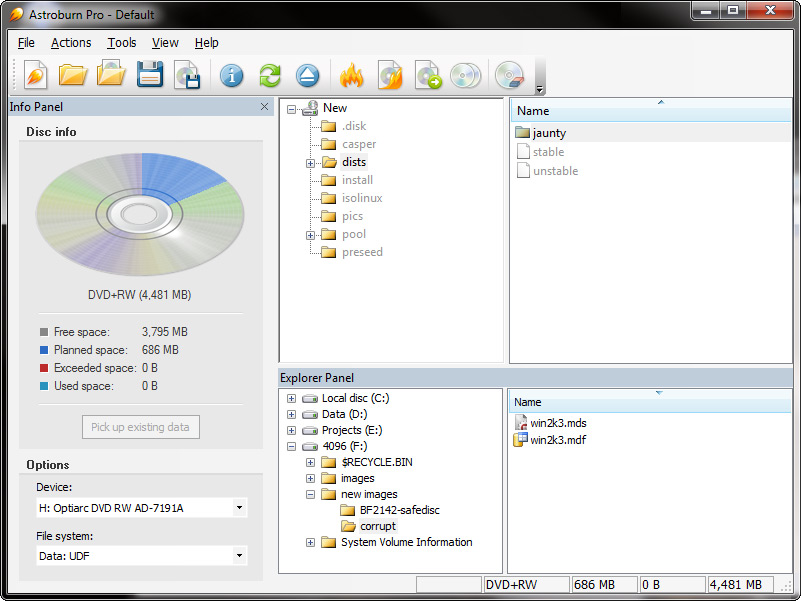
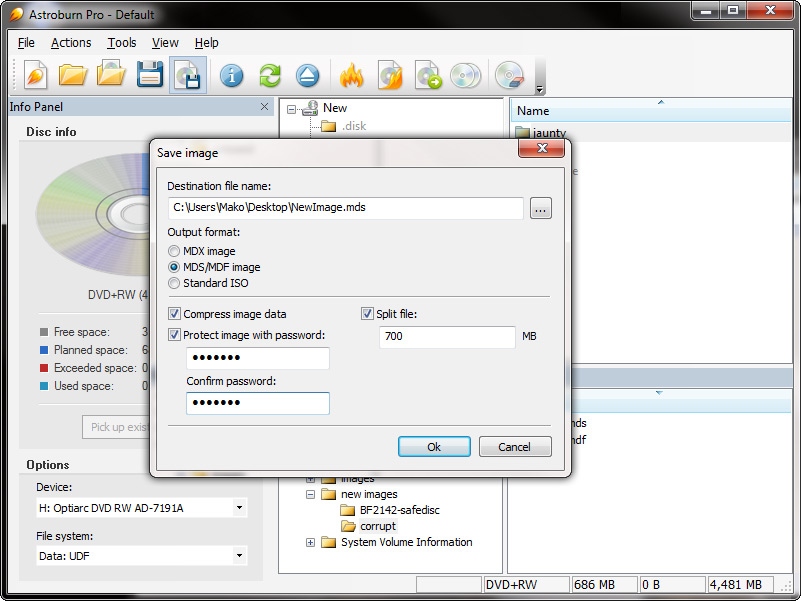

Handy tool for burning and mastering CD, DVD and Blu-ray media. Perform burning, copying, erasing operations with all types of optical storage media.
Easily grab original discs to create image files and save them on your hard drive or compile disc images with data or audio projects. Create CDs and DVDs with just a few mouse clicks. It’s easy to learn and to use.
System Requirements:
Windows 7/ Vista/ XP/ 2000 SP4
Publisher:
Disc Soft LtdHomepage:
http://astroburn.com/File Size:
4.91 MB
Price:
$24.95
GIVEAWAY download basket

Developed by Informer Technologies, Inc.

Developed by IObit

Developed by OmicronLab

Developed by Garmin Ltd or its subsidiaries
Comments on Astroburn Pro
Thank you for voting!
Please add a comment explaining the reason behind your vote.
Please add a comment explaining the reason behind your vote.

iPhone app giveaways »

$9.99 ➞ free today

$0.99 ➞ free today

The app complies with IUPAC's latest standardization and is used in more than 148 countries worldwide.
$9.99 ➞ free today

$9.99 ➞ free today

Drop The Chicken is a fun filled, addictive and challenging puzzle game.
$1.99 ➞ free today
Android app giveaways »

Premium VPN with fastest VPN Server, Secure VPN Connection & Protect Privacy of the users.
$49.99 ➞ free today

A strategic combat game about a forgemaster who accidentally awakened a dragon.
$0.99 ➞ free today

Collect recipes from around the world and create the ultimate food truck!
$0.99 ➞ free today

$0.99 ➞ free today

Stunning detail of levels, in-depth gameplay, finely tuned balance of all levels and turrets.
$2.99 ➞ free today
82.For those that might be interest in the cyberlink dvd suite 7 for free that mike on #76 mentioned about.. here is a link with info on how to obtaion it.. as another possible option over this astroburn
http://dottech.org/freebies/16575
Comment by mike — June 25th, 2010 at 5:20 pm
Almost 1GB to install
Save | Cancel
Iistalled on Vista Ultimate 32x without a problem so far, followed #58 instructions.
Roxio that came with my computer worked well, but died can't find certificate!
Will use AstroPro for now and Nero on my XP SP3 system.
Thanks GOTD
Save | Cancel
got it installed & regged on winXP SP3, aside from the ISO capabilities I'm not sure if it's worth keeping. I'll need to explore that.
I'm using CDBurnerXP at the moment, and it does just fine for what I use it for (data DVD's- I very rarely burn Video DVD's since I use the front room computer for feeding movies and music to the TV/stereo) and am used to it.
I stopped even looking at Nero after version 6- the bloat is insane- and so is the mash-everything-in approach. Voice over IP in a DVD burner? huh?
When I want to burn discs I use a burning program, when I do something else- I use a different program. and they total a lot smaller.
I really dislike any program that phones home microsoft style- tried to point that little 'feature' out on Daemon Tools, but had a critical IP blocked, so my comments vanished into the bit bucket.
Uninstalled it anyway, it didn't work for me...
as far as ripping a dvd intact to a hard drive I still use Smartripper 2.41, with VLC to unlock the vobfiles, or DVDFab HD Decrypter if a tough one shows up. usually I use VLC 1.05 to play the ripped copy, it does seem to handle menus ok.
Save | Cancel
Seems to be a trend of Windows 7 64x users with no issues running this program.
I have Windows 7 32x, and it crashes immediately after installation and upon launch thereafter. Don't waste your time.
Considering the MAJOR issues with the Daemon Tools Pro giveaway, this trash makes perfect sense.
Save | Cancel
I just downloaded and installed it on a Windows 2000 Pro system and it opened perfectly with no issues.
I have not tired to install this one on my Windows XP Pro machine yet but will get to that in a little bit.. So far out of all the GAOTD that I have downloaded, none have had a problem.
Save | Cancel
Win XP Home SP3 - installed & burning without any problem. Thanks GOTD.
Save | Cancel
Installed fine on Windows 7 Home Premium 64 bit. Nice program. This PC uses AMD dual-core processor, 4 gb ram - perhaps on some of the others having trouble it could be related to the chipset?
Save | Cancel
Small points!
Any software of this type needs a reboot to work because of the Windows drivers used.
64 bit software is very expensive to develop and if you can afford a 64 bit Windows OS, you have to be prepared to pay for software specially developed for 64 bit systems!
Please don't expect lower budget companies to provide 64 bit operation!
If you download it and the file won't unzip, very simply, something has gone wrong downloading it. Delete the file, and download it again!
Save | Cancel
Installed in Windows 7 , 32 bit no problems with installing. But when trying to use the program it will load but when ever a selection is made it hangs the computer, won't even select a drive without hanging. Windows task manager can't even close the program when it hangs.
Save | Cancel
For those that might be interest in the cyberlink dvd suite 7 for free that mike on #76 mentioned about.. here is a link with info on how to obtaion it.. as another possible option over this astroburn
http://dottech.org/freebies/16575
Save | Cancel
#68
Mike, thank you so much for your clarification re: BluRay. I didn't realize I could put 2hrs of video using bluray. I learned something new. Thank you so much!
Vajra
Save | Cancel
This came just in time as I`m most disappointed with Nero 9.00. What you notice about this compared to Ashampoo & Cyberlink is that the proggy is Small!! Most Burning suites are Mega Huge this is about Browser size & works on Data CD`s perfectly. The Burn setup options seems to be auto-selected (I.E Juliette for CD`s & UDF for DVD`s ) and the ability to burn boot discs is a definate plus. You may never need it, but it`s there!and it`s not so hidden away that you give up (Nero please note!)Had a bit of trouble getting the key, but not as much as fighting thru these horrible stickers! I generally stay clear of "unknown " developers. But this one is O.K and is a money-saver on my new Vista machine . The problem with Nero 6.00 is it requires an old version of wnaspi.dll and the 9.00 which is supposed to be an improvement is ghastly!!I run Home Basic SP2 by the way - this get`s a thumbs up from moir
Save | Cancel
I installed this Astropro program as instructed on a XP SP3 machine and it gets a pop-up message that says the "The program has developed a problem and has to close. Uninstalled and re-installed several times. comes up the same way.
Save | Cancel
Installed fine on Vista ultimate 64 bit. Made a few registry changes during installation which may have caused some problems for others.
First thing I noticed, the authors have concluded that all users know everything about different disc images, how to compile the images and how to create a standard dvd that will run in a dvd player. The project panel is not labeled, although the info and explorer panels are explicitly labeled.
The help is hopelessly minimal, only having minimal (at best) information.
This is more like StarBurn in that it's great for creating backup and file dvds, but if you need more that that, look elsewhere.
Save | Cancel
#64: "... I have a bunch ... of DVDs, ... need the menus intact, that I want to transfer to a hard drive so I can easily take them with me and watch on my computer. ..."
Check the Slysoft & DVDFab sites/software... As far as playback, either use a player like PowerDVD or many people use Windows Media Center in Vista or 7 for exactly what you're talking about -- the greenbutton site might help for Media Center DVD info. If you need/want a DVD player & more, a site in the EU is giving away 10k copies of a Cyberlink suite [it's advertised on all the deal sites], that contains the last version (not the latest) of many of their apps, but it's a HUGE download [~1GB], & many of the included apps are just so-so IMHO. Still, it's a free version of PowerDVD, & while I haven't checked it out, the download site advertises the suite has Blu Ray support.
Save | Cancel
Installed and worked fine on Windows XP Professional 5.1.2600. The disc I did as a test burned perfectly at 16x and plays back fine. Very simple to install and use!
Save | Cancel
For me, the download and registration was flawless and no problems. Actually the download/registration was the best that I have experienced. Program is installed on Windows XP Pro, Quad Core. Have already tested a burn of files I would really hate to loose. I then copied that disc to another to test copying a disc. Both went well. The surprise was that my CD/DVD burner usually is burning at 4X and with this program it burned at 16X. Something I'll have to ask the OEM about. Plan on doing more testing. I do have the LG Nero Burning/Power suite and will be keeping it but, also I plan on keeping this program as well. It performed well so far and is quick. Nice clean appearance. Nice product. Good Job.
Save | Cancel
Installed fine on Windows 7 Home Premium x64. There was also no problem registering it. Everything was taken care of on the install.
Thanks GAOTD
Save | Cancel
Installs fine on Windows 7 32 bit (x86 architecture)
Save | Cancel
hi,
using XP SP3 and Unzip, Izarc and 7zip tools for unzipping, they all told me the setup.exe file is corrupted inside the ZIP. How can I obtain only the setup.exe ?
Save | Cancel
#18 – DVD player videos require additional files beyond the often used video formats. DVD Flick is a program that can make DVD files for you, it converts most video formats (Including .AVI since that is what you are trying to burn) to DVD .VOB files and burns them to a disk. You can also create DVD menus. Here is the link to the website. http://www.dvdflick.net/
Also if anyone is having trouble with Astroburn you can try Infrarecorder, it is a free alternative that has a nice amount of features to. Here is the website link http://infrarecorder.org/
Save | Cancel
Installed and works fine for me on XP Home SP3. I've used the free version before. You can't compare this to Nero, NTI or Roxio. It's a basic burner, not a media ripper/converter/burner/labeler all-in-one. The only features that I would use in the Pro version are the CD Text support and the build/save iso images. It supposedly supports burning to Blu-ray media, but I don't have a blu-ray burner. Others have mentioned a few other free apps that do the same thing. If you just need a basic app for burning and creating iso's, this will do it. Thanks GAOTD.
Save | Cancel
#18: "... I thought I could put an avi and make it into a dvd. ... dvd player does not recognize it."
The short answer is 1) figure out what kind of video you have now [avi is just a container & you need to know what's inside]. 2) search for your DVD player or read the docs that came with it to find out what it will play [many DVD players also play DivX/Xvid]. 3) search for software &/or methods to make what you have now work in your player, either as DivX/Xvid (IF it plays those), or as a DVD. At that point you should be able to use Astroburn Pro to burn the DivX/Xvid or DVD files you created to a blank disc.
* * *
#43: "I have some questions:
1. What does this prog do that NERO cannot?..."
Depends on your version of Nero &/or add-ons you've bought... you might not be able to burn BD [Blu Ray] for example.
"2. Will this prog enable my DVD burner to burn blue ray movies or I still require a BluRay burner?"
Yes & No :-) Blu Ray is a *format*, & it's also a type of disc. Blu Ray discs themselves are expensive & require an expensive drive to read, & a more expensive drive to write. Blu Ray as a format works just fine on DVDs, which you can burn in the DVD writer you have now. You can fit up to 2 hours of HD video on a single sided DVD [longer on a dual layer disc] that should work in your Blu Ray player. [Note: while Blu Ray on DVD is official spec, not every Blu Ray player will play them -- most will, but check before making any big investments. You'll also need a software Blu Ray player if you want to watch Blu Ray format video on your PC/laptop.] Look for BD5 &/or BD9 at videohelp.com.
* * *
#50: "Nero is the most bloated piece of ..er…rubbish in the cd/dvd burning world. And I BOUGHT Nero 8."
When it comes to burning discs, it's an imperfect world... Nero & Roxio are bloated as they've grown to include everything but the kitchen sink [in a very crowded market that's how they've chosen to compete], and they do work well for burning. I think it's worth noting that Nero's Essential versions do leave much of that bloat behind. Then again, what you & I call bloat, is what many users want -- both Roxio & Nero have been around a long time now, which they wouldn't be without lots of happy customers.
* * *
#54: "Does this program enable you to make backup copies of DVD movies – I have small kids who always seem to scratch or get food smudged on the DVD."
Most DVDs have DRM -- Every burning app I've ever seen will copy them otherwise. Search on apps like AnyDVD & DVDFab to deal with that. Using DVDShrink can also help in your situation, Tom, by letting you just back up the movie -- assuming the kids don't care about all the extras, leaving those go can mean using a much cheaper single sided DVD blank. [if you let them use the *good* player, I'd really watch out for them using discs with food on them -- the drive mechanism is the cheapest, most prone to fail part of the player, & the lens mechanism can get dirty or gummed up easily]
Save | Cancel
I installen on Win7x64 and it works just great. A nice burner. I'll use it long enough to see if I like it better than Nero. Thanks Gotd.
Save | Cancel
It's running well on Windows7 x86
Save | Cancel
I seem want to do the opposite of what most on here want -- I have a bunch (like, really a lot) of DVDs, mostly TV series, so they are episodic and need the menus intact, that I want to transfer to a hard drive so I can easily take them with me and watch on my computer. Will this software do this? I know if will burn a disc image, but can I use that image to watch the disc on the computer or do I need to do something else? I appreciate any info anyone has on this -- as I said, most of what I see, here and elsewhere, focuses on burning computer files to DVD, not the other way around.
Save | Cancel
Installed, activated and launched successfully on first attempt under Win7 Pro x64.
Regarding earlier comments by others on not being able to erase disc: That will only work for you if you have a CD-RW/DVD-RW/DVD+RW (RW means ReWriteable).
Save | Cancel
Tried the software...
Couldn't find something on it that ImgBurn cannot do. The interface is fairly simple to use for the layman.
Until it can find something to beat the competition (which happens to be free not just for today), then it isn't particularly useful (:
Save | Cancel
Astroburn will be the third program that has crashed my computer and while I'm grateful for the programs that have installed correctly so far, I'm getting a little leery about what may happen in the future.
Are these programs tested in any way before they're offered here? Up until now I've been able to recover with no serious problems but who knows what may happen the next time.
Save | Cancel
Installed without issue on Windows 7 Ultimate 64bit. Runs great! Sidenote: This operating system is fully updated, so to those that had issues with it crashing when opening update your OS.
Save | Cancel
For a moment there I was tempted to simply write: "Astroburn Pro burns discs, *But I Digress*". ;-) Maybe I was expecting too much, but I was underwhelmed... I didn't see anything that Astroburn Pro does better than the competition, & using it made me do extra work -- the on-line only help files don't tell you everything you need to know, settings are in unusual places, & labels could be better, so I spent too much time just trying to figure things out, & never saw anything that made me feel the time spent was worth it.
My problems started when I accidentally tore off the "Info Panel" -- being able to rearrange &/or "tear off" panels is neat, but spending time figuring out how to put them back isn't [other apps I've used always had something in the menu to put things back]. You set the disc burning speed in the "Disc Info" pop-up window -- Normally you'd set this in the Burn dialogs, & being labeled "Info", it's not clear that the write speed ISN'T what your drive &/or blank disc is capable of, but where you set the burning speed. To name or title your disc you right click "New" next to the drive icon -- other burning apps I've used also have a separate dialog. Under "Options" [part of the Info Panel] there's a drop-down box for "File System" -- you're left assuming [or hoping] Astroburn Pro chose the right one, for example the right UDF version for your video DVD or BD [Blu Ray]. I never did see anything about Buffer Underrun Protection, determining &/or setting max burn speed, or making a bootable disc. I think most if not all of those issues could be avoided with a good help file or manual, &/or by using more descriptive labels &/or tool-tips.
I didn't have any problems installing or running Astroburn Pro in XP Pro SP3 32, & the only process I noticed it using even slightly out of the ordinary was MSVCP80.dll, a Microsoft C++ runtime that had previously been installed to a folder in Windows \ WinSxS. The same file is installed to the program's folder. Could reported problems be caused by Astroburn Pro using an older version of this file that the user had already, instead of the newer version in the program folder?... I don't know.
Astroburn Pro itself isn't bloated or intrusive like many burning apps, taking up ~11MB in 47 files, 1 folder -- besides shortcuts 2 folders are added under Docs & Settings [under All Users \ Application Data & [UserName] \ Application Data. Of the recorded 262 registry entries added, 7 are for uninstall, & the rest are in the HKCU & HKLM \Software\DiskSoftware keys. [I mentioned other burning apps being intrusive -- Roxio Creator 2010 added 88,614 entries to the registry!!!] During install the GOTD version of Astroburn Pro has the key or serial number already filled in, & phones home to automatically activate using a "System ID"... I don't know if like other software that tracks your system ID, changing hardware [e.g. adding/replacing a component like a hard drive] breaks activation/registration, but it might be something to keep in mind.
Alternatives...
Out of the apps I use & the several I've tried, the free [& portable] ImgBurn is the most technically sophisticated, & the only app I [& many others] trust to burn dual layer video DVDs. It also handles BD well, but it's not the most user friendly burning program out there. For general burning I like Nero 9 Essentials 2 [version 9 of Nero but the 2nd, more complete version of Essentials] -- OEM discs/licenses are often on sale for $2 - $10. IMHO the full versions of Nero are far too bloated, but then I think the Nero 9 Essentials are a bit bloated & only use it in win7 -- I use version 6 in XP. Nero Essentials is super quick & easy to use, with all the functions you need for basic CDs & DVDs. And I have/use the full Roxio Suite, normally just for some of the more difficult tasks like making a bootable SP3 install disc for XP Pro. [Online coupons are easy to find, so when it's on sale & you use the MIR it can be worth it] OTOH at least 1/2 of the bundled Roxio apps range poor to bad, it can be harder to use, & the way you have to use their Copy app to burn a DVD folder strikes me as lame. I'd love to simplify my life & just use one burning app, but unfortunately today's GOTD leaves me still looking.
Save | Cancel
people what is the problem? i just down loaded this program and registration was already done when i ran the program.VERY simple.if you dont under stand how to use your computer system don't put down the soft ware that GOTD gives you. its free! i've NEVER had a problem loading programs and registering products. just down load zip file, extract, run set up, allow access by your fire wall and install. that simple.
Save | Cancel
I tried to download the items listed today, yesterday and the day before. Everytime I got to the setup dialog box, I clicked on the button and got the message that the download failed. It seems weird to me that I can download things from other sites but not from Giveaway of the Day. What gives? I would appreciate an answer from someone.
Save | Cancel
Installed and runs perfect on my win xp laptop. Thanks GOTD
Save | Cancel
I think a lot of the functionality is also present with IMGBURN freeware.
Save | Cancel
Does this program enable you to make backup copies of DVD movies - I have small kids who always seem to scratch or get food smudged on the DVD. Thanks
Save | Cancel
Installed fine on Windows 7 x64. I had Astroburn Lite before and loved it. This paired with Daemon Tools Pro is awesome! Thanks so much GAOTD!
Save | Cancel
Installed on XP_PRO_SP3 without a problem, registered automatically, looks nice. Am using NERO 6 now, will try this next time I need to burn or copy. Thanks very much!
Save | Cancel
#49 Absolutely right. Why repeated "validating" ? Ive noticed several giveaways revert VERY quickly to trial version, without warning. So this is the reason ?
Save | Cancel
#45 - Nero is the most bloated piece of ..er...rubbish in the cd/dvd burning world. And I BOUGHT Nero 8.
Save | Cancel
check out to "EULA": "The SOFTWARE PRODUCT will try to validate the license from time to time (active Internet connection is required during validation). After several unsuccessful attempts to validate the license, the software may be found to be not properly licensed; the SOFTWARE PRODUCT functionality may be affected."
I don't like it! validating once should do it.
I'm blocking internet access for all the software from GOTD after first activation.
Save | Cancel
Installed fine and ran on win 7 64 bit (amd cpu). No crash but haven't tried anything other than running and trying some menu dialogs.
Save | Cancel
Yeah, burned one on my Win 7 x64bit no problem whatsoever.
So God alone knows what some people are doing wrong, and blaming this software.
Save | Cancel
I have tried several (7 or 8) times to download and open the file. File download size is about 54k and then I get a message that the file is invalid. Guess its a no-go for me
Save | Cancel
totally waste of time............:((nero iz by far the most used,loved burner in the world!)
Save | Cancel
Clean, fast and simple - Nice Giveaway
Win 7 64bit
Burned a 3.5 GB 16x DVD-R , data files, in 5 minutes, perfectly
Save | Cancel
I have some questions:
1. What does this prog do that NERO cannot? I am a regular GAOTD user and would like not to install programs which duplicate the work of already installed programs.
2. Will this prog enable my DVD burner to burn blue ray movies or I still require a BluRay burner?
Save | Cancel
Installed and self-registered on Win7-64 on a dual core Amd emachine. Help file is online. Now I need a good free program to download the multipage help file to my HD. Any suggestions?
Tom
Save | Cancel
Installed fine and registered fine on my win7 64bit ultimate.
I will be keeping this one
Save | Cancel
For those having problems starting Astroburn.
Per their support forums Astroburn can crash if MagicDisc is installed.
I have XP Pro SP3 32 bit and Astroburn installed fine but crashed on launch complaining about a buffer overrun in Engine.dll (using WinDbg to check out the crash dump).
After uninstalling MagicDisc, Astroburn now launches without a problem.
Save | Cancel