English
Every day we offer FREE licensed software you’d have to buy otherwise.
$39.95
EXPIRED
Giveaway of the day — AnVir Task Manager 6.1.0
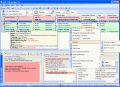
AnVir Task Manager controls everything running on computer, removes Trojans, increases performance and tweaks Windows.
$39.95
EXPIRED
User rating:
349
107 comments
AnVir Task Manager 6.1.0 was available as a giveaway on October 14, 2009!
Today Giveaway of the Day

A movie editing software you should explore!
AnVir Task Manager controls everything running on computer, removes Trojans, increases performance and tweaks Windows.
AnVir Task Manager provides convenience by offering all of its features in a single interface. It saves money because users won't have to buy multiple packages to perform a family of related tasks.
Monitor your system and replace Windows Task Manager:
- Information about processes, startup programs, services, internet connections, drivers
- Integrated database with Descriptions for 70 000+ startup programs, Internet Explorer toolbars and services
- Icons in the tray that indicate CPU, disk, network, memory and battery
Get rid of viruses, Trojans and spyware that your antivirus missed:
- Security risk rating for each active process and startup program
- Get notification when any program tries to add itself to startup
Enhance and tune up XP or Vista:
- Tweaker that gives access to hundreds of XP / Vista settings
- Click on the title of any application to minimize window to system tray
- List of recently used folders in Open / Save dialogs
- Drive's free space as a colored horizontal bar in Windows 'My Computer'
Speed up your PC and Windows startup:
- "Delayed Startup" lets you set up any startup program to run few minutes later after Windows startup
- Run startup programs minimized to system tray, or as a floating icon
- Balance CPU usage
System Requirements:
Windows XP, Vista, 7 (x32, x64)
Publisher:
AnVir SoftwareHomepage:
http://www.anvir.com/File Size:
3.95 MB
Price:
$39.95
Featured titles by AnVir Software
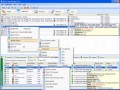
All the features of AnVir Task Manager with the additional benefits of advanced information about the processes: threads, open files, handles. Block processes. Save changed priority of processes.
GIVEAWAY download basket

Developed by Informer Technologies, Inc.

Developed by IObit

Developed by OmicronLab

Developed by Garmin Ltd or its subsidiaries
Comments on AnVir Task Manager 6.1.0
Thank you for voting!
Please add a comment explaining the reason behind your vote.
Please add a comment explaining the reason behind your vote.

iPhone app giveaways »

$5.99 ➞ free today

"See Music" is a complete sight reading training method for musicians, music students and teachers.
$0.00 ➞ free today

AI-powered restoration studio that turns blurry, pixelated, or old media into breathtaking 4K masterpieces.
$4.99 ➞ free today

$0.99 ➞ free today

$7.99 ➞ free today
Android app giveaways »

ead your mighty heroes and defend the frontiers of your realm from the darkness!
$0.99 ➞ free today

$1.99 ➞ free today

Last Survivor: Zombie Survival a thrilling zombie apocalypse adventure game.
$0.99 ➞ free today

$2.99 ➞ free today

Survival Island 2 is an offline adventure palworld survival simulator game.
$0.99 ➞ free today
Hi,
Downloaded and installed fine XP Pro 32bit sp3.
I'm using AnVir 6.2 and I wouldn't be without it. Two of the most useful features for me are..
1.When you open Explorer it labels unused drives with a 'no entry' sign. That's handy when you have multiple USB ports and only one mamory stick plugged in.
2.It monitors anything which tries to sneak into your start up. I really like this feature as if you are not sure about something you have the option to quarantine or delete that item. If like me you want a program to start when you want it to start and not by default during PC start up then this is a very handy feature.
It also gives you very detailed information on your network connections, processes and services.
All the best,
Andy
Save | Cancel
The first time I see somebody posting twice the same day: # 12 and # 38. Is it absentmindedness or just seeking attention?
Ashraf as usual does an excellent job and I'm indebted to him but Fubar's is as sharp and implacable as a steel dagger. Many thanks!
Uniblue has kept for quite a few years a policy of sneaky bandits, stay away from their products for your own sake. Bait and switch is an old and unfair method of marketing.
Question: nobody mentioned it yet, is there any conflict between AnVir and WinUtilities 7.0 we also received as a wonderful gift here at GAOTD?
Save | Cancel
Also to deanimator:
The other way to get rid of those icons in the Windows title bars is to open AnVir Task Manager, go to Tools... Options... select "Windows Enhancements" and uncheck "Show additional icons in titles of windows."
Save | Cancel
I love AnVir, but had one serious problem with it. It rendered Lotus Notes 6.5 unusable on my PC. I eventually found that going to Tools > Options > Windows Enhancements, and turning off "Show additional icons in the titles of windows" resolved the problem.
Save | Cancel
Anvir task manager is a very good, although I always like DTaskManager as my default (very stable). AnVir has fine features.
The Uniblue connection is a disaster, of course those had to be unchecked. Sad to see. Some of those products are the worst type of dangerous shlockware and I will be reluctant to work with AnVir in the future knowing that they have a $ deal with Uniblue.
The Toolbar unchecking at least was very obvious, with even a pic of the toolbar.
Shalom,
Steven Avery
Save | Cancel
Well installed and works fine.
Didnt like that it by default change system restore to discard restore points older than 1 day.
Save | Cancel
#70, John, I use the commercial product Blue Project SysTracer Pro (a home license is available). An earlier version was a previous giveaway (I purchased a license for the Pro version).
#75, J-Man, and others reporting problems with some applications, go to Tools, Options, Windows Usability, Windows Enhancement, System Menu and Dialogs, and clear "Show additional icons in the titles of windows".
As #72, mike, noted, their forum indicates that some (presumably old) systems experience problems with sound and video files due to S.M.A.R.T monitoring. Use Tools, Options, Program Settings, Tray Icons and Menu, Tray Icons, and clear the (display) Disk icon (or at least Disk temperature in the Combined Icon if you're using that). Or right-click AnVir's tray icon(s), select Tray Icons, and do the same thing.
#77, Irha, as I posted in comment #19, there are differences between AnVir and Process Explorer. I also noted that AnVir used to add a handy "Open AnVir" or similar entry to the system menu of applications, which would open AnVir to the window's process, but that feature has unfortunately been dropped. AnVir will display the process tree. Select the Processes tab, then select (on the main menu, not the buttons) View, Process Tree. For terminating processes, Kill Process Tree is also available. AnVir deals with locked files by letting you identify the process which is locking them, and kill the process if necessary (freeing a handle of a running process is a bad idea, but of course, a forced termination of the process is also bad). Process Explorer has lots of features which AnVir doesn't, and AnVir has lots of features which Process Explorer doesn't. People forget that Windows Task Manager (at least on Vista) has a few features which neither AnVir nor Process Explorer have. Autoruns is generally the best option for dealing with startup items, however, AnVir has startup-related features which Autoruns doesn't, and AnVir monitors startup items.
#85, Lu Hulu, delayed startup items handled by one utility will not show up as delayed startup items in another. That's because delayed startup is a feature of the utility, not Windows.
#99, leemreay, I've upgraded AnVir previously, so I didn't trace 6.1 (as I stated, I have the Security Suite and upgraded several days before this giveaway), but as I noted in comment #33, it's possible that AnVir may be applying their crappy "Tweaks" (disabling Windows error reporting is one, and is a terrible idea). I'll be mad if they did that, but since I didn't trace 6.1, I can't say for sure. Some other giveaways damage settings, but I trace those.
#101, JerryMeandering, sorting Startup items by Delayed Startup still works, but it lists disabled items first. I guess I really don't understand your issue, terminating AnVir before your delayed items start will stop them from starting.
For people complaining about colors (per-tab), View, Text Colors lets you change what's colored. Panels can be resized, closed, etc. Also, Tools, Options, Program Settings, Advanced, Appearance lets you change things.
For people complaining about system slowdown over time with AnVir 6.1, I noted that in comment #19. Some earlier versions of AnVir had that problem, but later versions fixed it, so they should be able to fix that. As I stated, you can simply close and restart AnVir. I find the problem is exacerbated by browsing, the same as the earlier versions with this problem.
Save | Cancel
I have to say of all the programs that I've obtained from this marvelous site this looks to be the most useful and unique. (Paragon's right up there, too.)
For once a program that does much, much more
than it claims ! And almost flawlessly! It does have a small problem adding up RAM usage - the totals are right, the breakdwns are wrong.
Great giveaway!
Save | Cancel
9.10.15
In Wxp pro sp2
AnVir (ver 6.1.0.0) forced adding 3 extra dodads to the top right of browsers IE8 and Firefox (the dodads can collapse the browser to a little tab on desktop or collapse the browser down to the far right section of the taskbar at the bottom of display, not sure yet what the stickpin dodad does yet)
Program also molested how my partitions show used/free space in My Computer.
Program also forced into lower right section of taskbar: cpu ussage, diskload, memory ussage and and LocalAreaConnection monitor... i already had those functions from other programs! now i am stuck with two sets doing the same thing?
How does one remove the molestation AnVir did to the browsers? Nothing in the browser's view/toolbars seems to indicate where one can remove these 3 unwanted extra icons this program adds to the top right of all browsers; the bloody 3 extra icons are even stuck in the top of windows task manager now.
Save | Cancel
Have been using this since last time it was given away on GOTD with no problems... decided to update to latest and greatest, and it seems to be somewhat of a hog now ... my machine is noticeably slower running this new version. FML - might have to uninstall... can I get the old version back?
Save | Cancel
One of my all time favorite MUST have system utilities for all IT people. Worth paying for. A long time ago, GOTD had the Pro Version of this program. For some moronic reason, I installed the standard version when a version update came out, and I lost the Pro. Grab it & keep if it ever shows up again.
One negative point to this version over my last (5.4.1), I always sort the Startup programs list by clicking on the Delayed Startup column with the Running State column next to it. This allows me to exit Anvir to stop the delayed programs from starting when I want to. This version only sorts by Enabled Status for some reason when trying to sort by Delayed Startup. ** Note to Developers, Please fix!
A complaint to GOTD. When did you start installing the Software Informer without asking? I already have 2 other programs which do the exact same thing. Please put it back to an unchecked option in the install process.
Also, the registration for Rating giveaways seems to not be working. Tried with 2 different Gmail addresses. No confirmation & password does not work.
JerryMeandering
Save | Cancel
I do not have much time to read all comments before this, maybe there is or there is not a mention of it being portable. If there is nobody before that said it, then be reminded that this application can be made portable, by following the directions in the file Portable located in the Program/Antvir folder. Be sure the do this while this is still a giveawayoftheday, because when you first start on the portable application, you will be asked to register.
Save | Cancel
This program has a lot of good features, but installation sucks - it disables programs and settings in winXP without asking or notifying user. You can easily spend a few hours tweaking your system back to where you have it set with your own custom settings after installing this program. It seems to automatically decide to change many custom settings back to original Win settings. That's a drag. Running the program is ok, but it seems to want to have full control of your system. Lots of freebies out there that do the same things as well or better WITHOUT screwing your settings or programs.
Save | Cancel
TO: deanimator
"{In addition…there is one tiny but really annoying feature which has installed itself at the very top right corner of all my windows…I HATE that…how do I get rid of it?}"
In response to your question about the icons in your title bar.
Place your mouse on any one of the three icons and right click and "Uncheck" Icons in Title.
Those little annoying things just disappear.
Hope this helps.
Save | Cancel
Norton Internet Security 2010 is kicking the setup.exe file into Quarantine because its SONAR module is saying the program is too new and less than 100 NIS users have installed it. Guess it errs on the side of security.
Save | Cancel
Some people ask in email about discount for AnVir Security Suite.
Discount works for all our products: AnVir Security Suite, AnVir Task Manager Pro. Also you can buy AnVir Task Manager if you would like to get versions updates.
Please use coupon code HT9Z1
Direct links to order pages:
AnVir Security Suite
https://secure.avangate.com/order/cart.php?PRODS=2301560,2301557&QTY=1,1&COUPON=HT9Z1
AnVir Task Manager Pro
https://secure.avangate.com/order/cart.php?PRODS=2301545,2301540&QTY=1,1&COUPON=HT9Z1
AnVir Task Manager
https://secure.avangate.com/order/cart.php?PRODS=2301355,2301342&QTY=1,1&COUPON=HT9Z1
Save | Cancel
Extended Task Manager by Extensoft Free plus other utilities.
http://www.extensoft.com/
Works for me.
Does not replace XP taskmgr.exe
Save | Cancel
I had a couple of problems like others with programs that would start and then close immediately after installing this program. I uninstalled it and the problems disappeared. Reinstalled and problems came back. It too a while to run it down but apparently many of the problems listed above can be resolved by going to Tools/Options/WindowsEnhancements and turning off the "Show additional icons in the titles of windows".
All problems disappeared.
Put it onto a couple of other computers with different software, one had the problems and one did not. Turned off that switch and no problems after that. Explorer froze (had to hard reboot), turned off that option and no further problems.
So, I decided to install it on my laptop and no such luck. When I downloaded and installed it went okay but this evening it says the key has expired. Tried it on my second laptop and same thing. So while there should be six hours left, it has expired. Too bad. Would have been nice there too now that I have resolved all the problems I had with it. Great program with that switch off and getting rid of all those icons in the tray. Will turn the ones on I need if I have a problem.
Save | Cancel
i downloaded the portable version which is pro and free and has no toolbar or other rubbish to deal with so why does gotd one have a cost
it does what it says it does thumbs up for portable one
thumbs down for this bloated one
Save | Cancel
This post will be censored as have all my other critical reviews. This is 'anvir' not avira. Do some checking...this will do for a start. http://www.browserdefender.com/file/1184912/site/anvir.com/
Save | Cancel
I just installed it, took a quick look at various screens, then selected "Run Registry Scan", which is under both menubar items 'startup' and 'tools.'
Surprisingly it brought up a web page for Uniblue Registry Booster:
Uniblue Registry Booster
The page makes a generic claim that “There is a 94% chance that your computer has registry problems.” I clicked to download and install it, and it came up with 459 registry errors. For example, a free Microsoft Studio Express install had many entrys pointing to non-existent paths.
I clicked "Fix Errors" and immediately a screen demanded I buy the product (no price listed) and that they are a Microsoft Gold Certified Partner.
I'm very disappointed. Other comments had said this was an all in one utility.
Save | Cancel
All in all, on a scale of 1 to 10 where 10 is excellent [ not perfect, there ain't no such thing :>) ] I'll give this free version of their software about an 11.
I am very, very impressed. The software combines many disparate functions and a wealth of information into an attractive, well thought-out interface. In my first run-through, the only thing (very minor) that I would like to see added are mouse-over pop ups showing the functions of the new icons in the upper right hand corner of the title bar.
Since there are so many functions, I'm sure that I will have to use it for a few days before I can absorb the range of its abilities. So I might find a few more things (minor, I'm certain) that I would like to see added or changed.
Thank you, GAOTD and the great prgrammers at Anvir Software.
Save | Cancel
This program is nice! The only thing that I've found so far that could use some work is the languages: With some languages other than english, at least a good 30% of the menus etc will still have the english names.
Save | Cancel
AnVir Task Manager 5.4.1 changed my life when it reached GAOTD last year. Definitely worth an install. For the control freaks, technicians, antivirus users, and tweakers among us, ATM can do a lot and make life much simpler.
Save | Cancel
This software caused my Magic The Gathering: Duels of the Planeswalkers to stop working. It wouldn't be that big of a deal except that is my favorite and most played game. It will not allow any cards to be in reserve, and will not allow any to be kept if removed from the deck; they just disappear. This is only in Shandalar. Also, it changed my explorers w/o permission.
Save | Cancel
I have the exact same problem as J-Man. But if you close Antivir down then run MediaMonkey and thereafter restart Antivir Mediamonkey doesn't crash. But an annoying problem it is.
Regards,
Rasmus Bertelsen
Save | Cancel
Installed Anvir TM and comparing with WindPatrol.
I noticed that Anvir TM did not register the 2 delayed Startup programs, which I had configured in WindPatrol. These two Delayed Startup programs were not highlighted in Anvir TM's Delayed Startup tab at all. It shows "No Entry".
The two delayed programs are totally missed out by Anvir TM. Nowhere found but the programs are definitely started and running in my system.
Save | Cancel
As others have noted, the UI is quite cluttered and haphazard. I don't like the four icons in the ever-more-crowded tray, which remain even when the program is terminated. This could be a showstopper. It isn't immediately obvious what benefits this program provides over some of the SysInternals freeware, but in fairness I haven't lived with it long enough to be familiar.
It gave the highest suspicion level (40%) on one system to a process associated with Keriver image backup, the excellent GOTD entry from a couple weeks ago.
Art
Save | Cancel
Installed on 2 XP and 1 Vista - no problems, so far. I got the previous version from GotD last year, and really enjoyed it - it worked great! Then about 4 or 5 months ago, my McAfee decided it was a virus and quarantined the executable. It did the same thing on all 3 of my computers, and on 3 friends computers that I had installed it for them. I couldn't find any way to whitelist it, so McAfee would leave it alone - every time I put it back, the next startup McAfee would remove it. So I just did without it. I'm glad to have it back - hope it keeps working!!!! Thanks, GotD and AnVir.com!!!!!
Save | Cancel
+1 for *apparently* slowed my system down a lot (I needed a restart, biggest slowdown seemed to be plain old Windows Explorer). I didn't install any toolbars, didn't have optimizations on. This was the installation from Ashraf's site. It took about four hours of running my normal apps for lagging to become observable. Oh well.
Save | Cancel
Email update. Email works, icon got changed to transparent window that was at top of screen.
Save | Cancel
I cannot install this software. When i click, setup.exe, it says "failed to connect" Can anyone help me? thanks
Save | Cancel
Upgraded my 5.4 freebie I got from here. Software has some useful items when I'm too lazy to edit the registry by hand. Windows Explorer sitting idle with the download folder in view (to run the setup application) crashed during the latter part of installation. (probably when adding those darn icons in the upper right of the title bar of)
Had the old version set to not load at startup. This version installed in same folder and didn't have to enter the registration info which are good things, but it changed my setting to load at startup and added those icons in the program title bar for whatever which is bad.
I think I've used the old version three or four times since I got it and this version probably won't see any more use. As long as it isn't running in the background using resources, it's ok to hang around using minimal drive space. (4.05MB for the program folder)
Save | Cancel
Marinus (#63): Thank you for your reply, and I apologize for appearing rude. However, my comment about color blindness was made in all sincerity and not meant to offend -- perhaps a color-blind person would be unable to read some elements of the interface. I agree that AnVir could be considered ugly, but I have not found it illegible as you claimed in your first post. Illegibility is a felony, but ugliness is just a misdemeanor.
As for the tool bars, I have installed today's giveaway on three computers today (XP and Vista 32-bit). On all three, I cleared the Yahoo tool bar and Dealio tool bar check boxes during the installation process, and voila! no tool bars. If you don't clear the check box, you accept the tool bar, and thereby its terms and conditions -- and then you can uninstall it later.
I do hope this is helpful to you and to other GOTD readers.
--jplutchok
Save | Cancel
I use process explorer extensively (I replace the default task manager with that) so very curious what this has to offer. It is basically a better task manager and a few tools such as startup manager, service control event log together in a single view. While it has some extra features over all these tools together presented more nicely, the features that lack over process explorer are:
- there is no "Find Window's Process" feature. Process explorer allows you to drag a little icon over the window and show its corresponding process.
- there is no tree hierarchy of all processes. There is an option to find the parent, but it is not the same. Process explorer also allows you to kill a parent process and all its children.
- while process explorer's kill process is unconditional, anvir's kill is more like a request to exit. If the process doesn't exit, you do get the standard windows dialog to terminate it. Both have their advantages and disadvantages.
- I didn't find a way to close handles to files in anvir. This is an extremely useful feature in process explorer when programs erroneously hang on to documents even after closing them down and prevent deleting or moving.
There are probably other things that lack, but there are definitely features that are lacking in process explorer, so they should complement each other nicely.
The "Autoruns" tool from sysinternals also seems like is more comprehensive than the "Startup" feature offered by this tool.
Save | Cancel
#58: "...I’ve installed this program twice before and I’m sorely tempted to download it again today. What prevents me is that it noticeably slows my system...
FWIW, Anvir Task Mgr. just like Windows own Task Mgr. is useful when/if you need it, but IMHO you don't need either running constantly. Run it to accomplish whatever, then shut it down.
Again FWIW, when you run things like temp monitors, things can slow down, regardless the software you use to monitor this stuff. You might be able to lessen the effects by turning some of the hardware monitoring off, if you think Anvir Task Mgr. would still be useful for you. And/or, If all you want to do is monitor temps for example, try an app that does only that, like the free HWMonitor.exe.
* * *
#63: "No you can’t, choose not to install Yahoo toolbar."
FWIW, unchecked toolbar etc during install & nothing was added/changed ie8 or F/Fox 3.5.3
Save | Cancel
Not good. It really do affects sound and video. It shuts down mediamonkey immediately when starting the program. Can't find the tweaking section to let mediamonkey starts normally. Had to close anvir in order to use mediamonkey. Don't know if any other programs are also affected. Had to unchecked the "load anvir task manager on startup" on tools/option/program settings/general. Disappointed.
Save | Cancel
Email hosed. Downloaded and installed program, no problem with registration. However, it seems to have hosed my outlook express email. Anyone else having problems? WinXp Pro, IE 8. Click on envelope icon, nothing happens. Email worked before download. Open to suggestions. Thanks in advance.
Save | Cancel
HOW TO UPGRADE FROM FREE VER. ON GAOTD TO AVIR PRO AND GET DISCOUNT?
You indicate that one can upgrade to the PRO version today for 30% off. How does one do that? Should I first install the free version here? and then upgrade? Is there a code or special site I need to go to? Thank you.
Save | Cancel
#23: "...noticed a problem with both sound and video playback after installing this."
From their forums Read: [http://www.anvir.com/forum/viewtopic.php?f=4&t=71] . Hopefully will solve the problem.
* * *
#36: "Slowed my system to a hault. Seemed to be taking up all of my resouces. Had to hard reset to shut it down. Couldn’t work in Explorer, caused it to slow and crash."
Anvir Task Mgr. itself shouldn't be interfering with anything, since it's so lightweight as far as its Windows footprint goes, but something *might* be conflicting with something else you've got running or it's being blocked by some anti-malware program. Anvir's forum has this that might help: [http://www.anvir.com/forum/viewtopic.php?f=4&t=71]. Otherwise my concern (i.e. if it was my PC) would be what was already running, what kinds of resources do already running apps/processes consume, & are they all working properly (no mal-ware etc). IOW If you have to do without Anvir Task Mgr. that's a shame, but you might want to check if the app failing to run is actually alerting you to another problem you didn't know you had.
"Added serval icons to the system tray"
As posted by others, this is fully controllable from inside the app.
* * *
#39: Info = copy/paste from text file in the program's folder. No big deal, but new users should note that the AnvirRunServ.exe listed under Modules comes with the Pro version -- not today's GOTD. IOW don't get this for that, or worry if you can't find that feature.
* * *
#52: "Kaspersky 2010 flagged this as a virus... yesterday Kaspersky didn’t complain... it has happily allowed GAOTD offerings in the past...."
FWIW perhaps check the download, making sure it came from GOTD, &/or check the download of the same version from the Anvir site today? I get the following MD5 sums [Google if you don't know what those are]:
6a2905e036d8e71e5cdf1c99cb141561 *AnVirTaskManager.zip
19516ba1fe1bb3bb2110514d52d4f0aa *taskman.exe
Otherwise couldn't hurt to check your system for any mal-ware that might be effecting things. *Might* be just 1 of those things where Kaspersky is wrong, which is what I suspect, but since you're the one taking the risk, I won't assume that's the case. ;-)
Save | Cancel
Is it really necessary to flood the tray with a bunch of Icons , I don't think so.
Save | Cancel
works well with vista 32 for me. Not sure yet if it is slowing down my system. thanks to Ashraf, Fubar, and Happy Person for always posting useful information. Thanks to GAOTD for this.
Save | Cancel
Zone Alarm pro (downloaded/installed yesterday) also
flags this as malicious.
Save | Cancel
Today's GTOD, Anvir Task Mgr., is an update from a previous Giveaway almost a year ago -- it installs over the previous version seamlessly, though I'd suggest if it's running, set it to NOT start with Windows, then re-boot before installing the updated version. Running it as a portable app from a USB stick I couldn't remove the stick until a re-boot -- if indeed after the app's shut down, portions stick around in running processes, it could potentially effect the update install. Otherwise I didn't even have to enter the GOTD key.
You can get a good overview of what Anvir Task Mgr. does here: [http://www.anvir.com/task-manager-windows-startup.htm]. And you can download documentation here: [http://www.anvir.com/documentation.htm]. The app itself takes up just over 4 MB with 12 files in the program folder. The default install adds a folder under Documents and Settings\[User]\Local Settings\Application Data\ . Registry entries are mostly install/uninstall data & the program keys under HKCU\Software -- if you set the app to use an .ini file [following directions in anvir_en.txt found in the program's folder], you can optionally restore the registry to it's state before install, & Anvir Task Mgr will have zero impact (with the exception of housekeeping stuff like registry caches) [if you do that don't forget to delete the Anvir folder under ...\Application Data].
Anvir Task Mgr itself can be very useful, so I definitely recommend the update or install, but I don't see any need to run it constantly, or even very often. [As with Startup Defender yesterday, there's a certain amount of irony in running an app just so you can cut down on running apps.] It can monitor & control Startup apps (those that auto-start with Windows), but those don't get added unless you add software -- I'm a firm believer in checking/monitoring the impact of any app prior, during, & just after install, so either check manually, or use software like Anvir Task Mgr immediately afterward, & shut it down.
You can also monitor processes etc, but unless you're having a problem, or checking out new software, *Why*? That goes for an awful lot of the info Anvir Task Mgr. gives you -- unless you're having a problem or tweaking your setup, why slow things down? [FWIW I'm not talking the resources the app takes, but the slowdown you can see when really pushing your PC because of the extra processes involved in monitoring... a few fps encoding video with a very good encoder for example.] It can also be useful to ask yourself: "What if"? If you get some maybe flaky readings monitoring your PC, what are you going to do about it? No offense, but if you don't know, why bother monitoring this stuff in the 1st place?
While there isn't anything bad I can think of to say about Anvir Task Mgr., I do want to mention that their so-called Tweaker is pretty weak -- if you're really interested in that sort of thing there are all sorts of sites listing individual tips/tricks/tweaks you can perform yourself, &/or there's several apps that do nothing else... TweakNow just released a new version of their free Powerpack that boasts over 100 Windows settings [tweaknow.com]. I like the free FreshUI which is powerful, but beware -- it can totally trash your system so DO A Backup 1st [updated 10/12/09 freshdevices.com].
Save | Cancel
That email should be: heathcliff at xs4all dot nl
Save | Cancel
Very nice tool. Have tried versions 5.4, 5.5, 5.6 and now 6.1. All versions have the same bug that makes it unusable for me. I am a software developper and for some legacy projects I still use Micrsoft Visual Basic 6 with SP6. Whenever I have Anvir Taskmanager installed VB6 crashes randomly all the time. I have tried it on Windows 7 and on Windows Vista. This is a real pitty, because other than that I really like this tool. Crashes only occur with this tool. Other tools like Sysinternals Process Explorer have no effect on VB6. I hope this will be fixed some time. If one of the developpers needs a crash-dump or something, the let me know on: heatcliff xs4all nl
Save | Cancel
To jplutchok:
No you can't, choose not to install Yahoo toolbar. As its install screen proclaims: "acceptance of Yahoo toolbar constitutes approval of terms". They add: "but you can easily uninstall it later."
As to your customizing of icons in taskbar, and standard vs. pro versions comments- i stand corrected.
No, i am not partially or wholly color-blind. If its colors don't bother you, congratulations! But there's no need to be offensive.
I stand by my summary: it's an ugly obtrusive program, but if some of its many! features appeal to you, it's probably worth it.
Politely yours,
Marinus
Save | Cancel
This program certainly has a lot of features; I agree with #54 that the interface is rather chaotic and unappealing, not my cup of tea. Ergo, the presentation can be a little confusing, even after eliminating features and colors one by one it still doesn't present well, IMHO.
All that aside, I do appreciate the detailed information provided after you extract it from the rest of the 'stuff' going on.
Fubar, thank you for the always informative and unbiased reviews, good to see you again as well, White Rabbit.
Thank you for an always interesting software start to the day, GAOD!
Save | Cancel
Anvir Tak Mgr is a useful tool that I suggest you set up (your main install or a copy) as a portable app, following the directions in a text file [anvir_en.txt] you'll find in the program's folder. Store a copy of that folder somewhere off your hard drive, & you won't have to worry about losing the app after a Windows' (re)install.
Save | Cancel
#53
-No need to uninstall. Updates automatic [ see Help> Registration]
- Great Documentation Vid on their site!
Save | Cancel