Every day we offer FREE licensed software you’d have to buy otherwise.
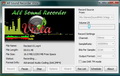
Giveaway of the day — All Sound Recorder Vista
All Sound Recorder Vista was available as a giveaway on April 21, 2011!

All Sound Recorder Vista is Digital HD Audio Recorder for Windows 7, XP, Vista. It has HD quality recording capability and enables to record any sound from computer's sound card, like voice, mp3, wav, etc.
All Sound Recorder Vista has simple and intuitive interface with a big number of features. For advanced users All Sound Recorder Vista has Digital signal processing (DSP) function which can help user to get high quality effect.
Key features:
- Full Support Mutli Channel Recording on loopback device;
- Add Loopback Recording (Windows Vista and 7 only);
- Auto Check best freq for record (Windows Vista and 7 only);
- DAR mode TM technology;
- Digital signal processing (compressor, AGC, low, high, band pass, notch filters) is supported when recording;
- Real time encoding data when recording, no temporary file created;
- And much more...
System Requirements:
Windows 95/ 98/ NT/ ME/ 2000/ XP/ Vista/ 7
Publisher:
mp3do.comHomepage:
http://www.mp3do.com/soundrecorder.htmlFile Size:
3.83 MB
Price:
$ 37.95
Featured titles by mp3do.com
Advanced MP3 Converter converts audio formats such as MP3, WMA, WAV, OGG, APE, MPC, CUE, AAC, MP4, M4A, TTA, AC3, FLAC OptimFROG, Speex, WavPack, ALAC.
idoo File Encryption is the best file encryption software program that can quickly and safely lock and hide files, folders and drives, and it can use 256-bit AES encryption (Encryption Standard Adopted by the US Government) to protect your files located on HDD drive or any portable media such as USB drives.
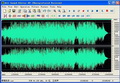
All Sound Editor is a visual music & audio files editing software. It can edit mp3, wav, wma & ogg which allow to perform various operations with audio data such as displaying a wave form image of an audio file, filtering, applying various audio effects, examining the frequency components and other details about your audio with the help of Frequency Analysis, Statistics, Spectral View features, format conversion etc.
GIVEAWAY download basket




Comments on All Sound Recorder Vista
Please add a comment explaining the reason behind your vote.

iPhone app giveaways »





Android app giveaways »




@ stache # 90
Just checked (Apr 26th)... Will try ONCE MORE tomorrow and if your reply is not there I will conclude that you are no longer interested.
Save | Cancel
@ stache # 90
Sorry pal, I am not familiar with Vista (I only know that Vista users have several headaches on multiple fronts so you might be unable to use a resource editor on your OS... It might have to do with UAC. Are you running Resource Hacker under Admin credentials?).
If you post here your email address I can send you the modified .exe file... I'll be checking here again in a couple of days to see your reply.
Save | Cancel
#87 Running Vista. I installed the Resource Hacker clicked on 24 and 1.
right click on 2052.
All I see is the following, No Delete resource.
Save resources
Save [cursor] resources
Save | Cancel
#87:MARK.... Awesome assistance , worked like a champ !!!
thanks for this tip, & in the words of some kids these days: 'you da man'
Save | Cancel
had the same problem as others,not being able to see the full
interface,then remembered i had "feewhee".ran feewhee,clicked on
the asvr bar and scrolled my middle mouse button to expand.simples.
Save | Cancel
Good news for all those who could not view the entire program interface (computer set to a higher resolution = cropped control buttons/GUI).
This is the solution (follow it carefully and you'll be done in less than 3 minutes... It might sound more difficult than it really is):
1) If you don't have it already, download this freeware (Resource Hacker 3.5.2.84 Beta... Even if it is a beta it is VERY stable don't worry) http://www.softpedia.com/get/Programming/File-Editors/Resource-Hacker.shtml
2) Once you have launched Resource Hacker (make sure that All Sound Recorder Vista is not running) drag and drop the "asrv.exe" file (note its size in KB somewhere) onto Resource Hacker GUI
3) On the left side of the (Resource Hacker) panel you will see all the resources. Look for "24" (it is the last one at the bottom) and expand it (by a single-click on the "+")
4) Inside you will see "1". Expand that too.
5) Inside you will see "2052". Right-click on "2052" (make sure that only "2052" is selected) and click "Delete resource" (confirm with "YES" at the prompt).
6) Now (in Resource Hacker's toolbar) click on "File" and then on "Save"
7) Close Resource Hacker and go to All Sound Recorder Vista installation directory where (if you followed correctly this procedure) you should see the modified "asrv.exe" file (this is the correct one that you should use, it should be 1 KB smaller than the "asrv_original.exe" file, which is the original file's backup.)
8) Check if all works fine (in my case it does, otherwise I would have not posted the solution here) and delete the "asrv_original.exe" file.
NOTE (to some of you who did not know Resource Hacker): Use Resource Hacker with caution -you really need to know what you are doing- or you might cripple applications and render them inoperable... In any case Resource Hacker will always keep the "_original.exe" as a backup when you save your final executable after the (eventual) modification(s).
Hope you found this useful.
Mark
PS: Many thanks to Mike (post # 61) for having pointed me in the right direction to solve my problem (not the one described above).
Save | Cancel
I wasn't expecting much but this is a really nice application, especially for Vista and higher users. There are some problems with the Help file. As noted in the description at the top of the page and by #64,65, TK, this uses the Loopback functionality of Vista and higher. #56, mike, you missed that major feature. On Vista and higher, there's no need to select your Stereo Mix or equivalent, All Sound Recorder will indicate whether the current playback device is a loopback device, so you generally don't need to change your playback device. Lots of nice features, spectrum analyzer and dual-channel amplitude indication, seekable player (via mouseclick).
Save | Cancel
Great! This is what I looking for. Just installed and worked well. Thank a lot
Save | Cancel
You can register with own name. Excelent software, thanks you GAOTD & mp3do. Thank Yous. Installed an runs flawlesly Windows 7 64 bit.
Save | Cancel
Nice. Works well. Simple but effective, solid collection of options and features. Good one, GOTD and MP3DO.
Thanks!
Save | Cancel
Downloaded just fine on Win7 Ultimate 64 bit computers as other mentioned # 27, #65, #67 has mentioned thas poorly framed interface as only displays partial (1/3) of the skin size.
You u cannot view the entire program interface if you have personalized your computer to a higher resolution in my case 1600 x 1200 and higher. !!! The control buttons are cropped, what prevents from proper setting and using it.
So program became totally useless ... !
Uninstalled!
To bad!
Save | Cancel
After my failed installation of this software, and removal, I now discover that I now have no Audio device installed. I had sound earlier today, but not now.
This is becoming a pain.
Save | Cancel
Seems to install OK, then when you try to start the program you get an error saying "cannot start default recording device" followed by the fatal error, "Exception EAccessViolation at address 004073E0 in module 'asrv.exe'. Read of address 69502CE8."
Seems like a promising software be fails on my Widows Vista 32 bit with all current updates so I will uninstall.
Save | Cancel
Nice. Works well. Simple but effective, solid collection of options and features. Good one, GOTD and MP3DO.
Thanks!
Save | Cancel
It appears that an army of commentators have descended here today and are writing a ton of cloned comments. GOTD should require registration and proof of individual installation of the application before allowing anyone to vote or post comments here.
I've noticed that the regular commentators are absent today. I guess that either their comments are blocked, or they are staying away from an obvious fraud on the part of today's "vendor."
:X
Save | Cancel
The program records excellent sound. How do you change the file name on the recording. So far, all I get is Rectest 1, RecTest 2 etc. How can you change the name to something like Bentley Tape One.
Save | Cancel
I have a desktop PC running Vista 32/64 OS. I downloaded the ASRV and installed it with no problems. But I don't find the steromix option in the sound recording tab. Only high definition microphone and in-line. there are no other disabled devices. It appears that ASRV will not work on my system.
Save | Cancel
Is there a way to get it to display properly when using 120dpi?
Save | Cancel
#16 above
I have the same problem.... "error: task scheduler not running”
Whats up with that?
Ive tried uninstalling and reinstalling with no luck!!!
Save | Cancel
Bad News - Good News. Bad first: This little Beauty won't work on my old clapped-out Lappy with WinXP SP2, darn:( Started making positive moves, but came up with an error, tried to start Task Scheduler Service, as that seemed to be a prob, but the Service was "not recognized", so didn't start. That happened twice in a row, but - 3rd time lucky and Good News: - asked me to register (my own name and code)and is running:)) Just shows you. Don't give up at the first hurdle..!! So many People do. And for those who feel "inferior" to others having top-notch latest sophisticated Models (I don't and don't envy folks anything, perhaps clever brains:) - Most, and I mean Most Programs DO work fine on shabbiest machines! I cannot even start Windows (BSOD), so worked out how to run "the show" on 8 Services,(no updates, but running SpyBot regularly - have to:), standby button, and having only 5GB of free mem on C: - All my GAOTDs go to FreeAgent big usb Drive (I have a folder for downloads and sub-folder for GAOTD Programs) -- Everything runs fine from THERE! Not C:Programs. Does it mean it's all Portable?? Looks to me it might be. Does it go to Win Registry? God knows, I couldn't care less. Hope All Sound Recorder serves me as fine as my Corels, Adobes a.s.o. If graphics and clever Games can without crashing - Sounds will too, when I have a bash:) Evening All. Thanks GAOTD for today's great giveaway.
Save | Cancel
Downloaded just fine on both Win7 64 bit computers (desktop and Laptop)
I believe someone else has mentioned that you cannot view the entire program interface if you have personalized your computer to a larger view size. As a senior I need the 125% mode to clearly see all of the print. You must first change view to 100% to see the entire interface and most important the control buttons. I think the developers need to think about fixing this as it will limit the amount of folks who might regularly use it.
Save | Cancel
I try to download it & it says its a zip file and doesnt recognize the program. trys to open as a music file in media player. what can i do, i want this program. i have windows 7
Save | Cancel
YAAYYYY!! This is a neat little sound recorder with all the typical controls in a neat little gui AND it has a scheduler! Installed clean & runs well on my Intel/ASUS Win7 64bit system. $38 might be a bit steep for retail but not too far off, and as a free download here today it's an outstanding value. Thank you mp3do and GOTD!
Save | Cancel
My first try did not come out very well. I think it was due to the default settings. The app can be set for much better quality than the default settings.
Also I had to turn my volume control down or the sound would be distorted from the levels being too high. After lowering my volume under the computer's control panel, I don't get the distortion.
It does not seem to save your settings.
Save | Cancel
i dont have Record,Pause,Stop,Options,Wizard Buttons.
waht am i doing wrong?
Save | Cancel
Downloaded program but when I click on 'Setup.Exe' I get a box stating 'This process cannot access the file because it is being used by another process'. Then I get a 'successfully activated' notice with a registration key but the program never loads on my computer and I don't see anyway of doing so at this point. I also went to the program's homepage listed at the top of the listing and downloaded the program using the 'Free download' button there and it installed on my computer but would not accept the registration code provided by GOTD so it obviously is not what is being offered FREE today. Any ideas what I am doing wrong?
Running: Vista Home Premium SP2 64bit.
Save | Cancel
GOTD you really scored with this one. For those of us who were wondering what happened to "stereo mix" in Windoz7, these guys put a link right up front in the upper right hand corner--"not find stereo mix?". The resulting help pop takes you by the hand to enable and make it default. Saved me 30 bucks on a new sound card.
Sorry this post is so far down the page. This is big news. Thanks
Save | Cancel
Alright, here is where I have a problem with this: It records DIRECTLY to file?...no no no...I want to be able to clean up the recording (remove mistakes, start multiple times if I have to ...etc etc).
Record directly to file, then erase said file due to errors...or erase multiple files due to false starts....and after recording (finally) 2 or 3 songs, defrag the drive because I just made a whole lot of files and had to delete them again....what?
Uh-yea-no....I would have kept trying this if the problem with audacity not allowing stereo mix on some cards was not duplicated with this program....thanks though.
Sorry GAOTD, thanks for the program offering, but I really don`t need another program writing files to My drive without My interim control.
Save | Cancel
Installed properly on a Dell Win 7 laptop, but not on a Toshiba Win 7 laptop. The lower portion of the window was not shown, so none of the buttons were available. I removed it and retried in XP compatibility mode and had the same issue. Works well on the other laptop.
Save | Cancel
Installed & registered easy on Vista. Played with it awhile, if it had sound meter level indicators would be nice. Seems a bit too basic for me - uninstalled.
I looked around for better ones and trying out *Audacity* and *ExpStudio*
http://www.expstudio.com/audio-editor-free.html
which are ALWAYS FREE! They look more worthwhile and can even EDIT.
Save | Cancel
Tried it out. I do books on tape, for my own enjoyment works well, like the pause when recording if it goes silent, saves me from having to edit later when I read though the book. Also great if you're having multiple people do the readings, you can switch the headset mic and not have a huge gap in the recording or have to stop and start. Haven't tried recording from the internet or anything but all in all its a pretty good product for what I use it for.
Save | Cancel
I got this error "This application has failed to start because msvcr70.dll was not found. Reinstalling this application may fix this problem."
Save | Cancel
Can it record a VoIP conversation?
Save | Cancel
When I record from YouTube the output mp3 is nothing but high pitched feedback and the song is buried behind the squealing. How do I fix this, I have Stereo Mix enabled as my Default Device and the program didn’t seem to want to work when I Disabled my built in microphones on my laptop. It’s a Win 7 Pro 64 Bit system.
Thanks for the help in advance if any one has any suggestions.
Save | Cancel
works very well on my win7 64 to record streaming audio media from the web in various formats. Because it records from what is going to my usb speakers, I am able to hear the music being recorded perfectly. Thank you.
Save | Cancel
It won't start under XP.... Even after reinstallation...
Save | Cancel
First, this program automatically detected and configured my Realtek sound chip so I just had to hit "Record" to start recording. I can't tell you how many so-called sound recorders are unable to do this properly. For that alone this program deserves praise.
I did notice an odd problem using DAR mode. This allows you to either pause, stop, or stop the current recording track and start a new track once it detects silence. My issue is with the latter. While it seems to work well (tested it on classical pieces with lots of silent parts) I noticed it would record a track of space in between. As an example:
1. Track #1
2. Couple seconds of silence
3. Track #2
4. Couple seconds of silence
5. Track #3
If the author could fix this issue, it would be an excellent all-around sound recorder. Even with this issue it's better than most.
Save | Cancel
I have downloaded 6 recording programs in the last 10 days trying to capture quality sound from streaming radio but all I got was a toy-like sound from my laptop speakers. I didn't know what was wrong but the HELP link:"Not find Stereo Mix" solved my problem AND this little gem has none of the gazillion complicated "features" of the other options. Simple; clean; efficient! I love it!
Oh, and to #34, Franca Lingua: This isn't Buckingham Palace. It's an international sharing site. Comment on the software or shut your gob!
Save | Cancel
Of course I forgot to tell you that you can do that using a FREE sound recording such as AUDACITY....
http://audacity.sourceforge.net/
But honestly at present I don't know what's better among the two ones...
What do you make of it, dudes?
Save | Cancel
First of all, I simply do not know anything about audio other than if you have a CD, DVD, tape you stick it in and hit the play button. :) But, I downloaded this just to see what it was. I am so glad I did. Download, registration went without a hitch. The Editor I also downloaded. If it helps any, at the time of registration (on the registration dialog box) there is a button at the top for the Editor click it first then go on to register. I downloaded a melody from the internet and forgot to use the Wizard :( and it was at Normal. Not to fear, it came out beautiful. So simple in appearance; good help instructions. No problem with language. Look forward to trying my hand at the Editor and think it will help me learn something in audio. Tried other programs and just plain got frustrated. This one seems to take the edge off learning. Thanks alot GAOTD and mp3do for the opportunity to learn. This a keeper. Have a great day everyone.
Save | Cancel
Great TOOL!!
On their HELP FILE they say that this GEM can even record Music to MP3,WMA,OGG,etc files directly from a CASSETTE TAPE, PORTABLE PLAYER and/or from an LP, by connecting the "Line Out" jack of your AUDIO DEVICE to the "Line In" jack of your SOUND CARD.
Did anyone try to do that??
Save | Cancel
Would someone please explain what "loopback recording" is and how to implement it in this program.
Thanks
Save | Cancel
Fail for me. Installs fine on WinXP SP3, but sees only 2 of 4 hardware sound sources on the system, and only offers one recording source option: Record from Microphone. Audacity sees all of the sources, and can record Stereo Mix from my Realtek sound hardware.
Save | Cancel
I've used "Total Recorder" for 15 years. I don't think this one will surpass it so I'll stick with what I have. Thanks anyway. http://www.totalrecorder.com/
Save | Cancel
#39 and Others - Here is the link for the free “Sound Editor”.
NOTE: Many download links on the mp3do-com site are missing the ".com" extension on the www.idoodownload part of the links
http://www.idoodownload.com/mp3do/all-sound-editor-xp.exe
"CD Ripper Free" and "Free MP3 Converter" are gievaways, and have user names and registration codes listed on their download pages (Click on "Giveaway" to see the codes...)
Save | Cancel
I cannot find a reference to their software at Majorgeeks.False representation on their webpage does not impress me.
Save | Cancel
I've got a firewire audio interface that uses ASIO drivers and it's not able to record anything. I'll mess with it more later as this is one of the more useful programs offered here recently, but I am a bit disappointed. My interface shows up in the wizard, but the only option in the dropdown menus for source is speaker. I was hoping to be able to use the line input, but it doesn't seem to work even after running the wizard.
Save | Cancel
Great! This is what I looking for. Just installed and worked well. Thank a lot
Save | Cancel
Although it was commented in previous posts, no reply has been provided for the broken link to the free "Sound Editor". I tried to download it directly from the developer's web site but no luck again!
Save | Cancel
I have always been sceptical of reviews that begin "I was just looking for..[insert current GAOTD]...."
However!
Yeah I know.
I had decided to record my small daughters fairy stories to CD for the future and had planned on doing a Google for a suitable prog.
Ok, to it.
If we are talking name changes to include O/S, it also works flawlessly on Win 2003 Server, en, I know it is an XP in disguise but many offered here won't.
So thank you for that.
Works flawlessly, about says it all.
@#15 Harold DeWayne
not sure what you mean, it works off a mic for me, just change your setting to line mic.... or was that a typo?
So a def keeper for me, thanks GAOTD and the MP3do team, saved me having to search, download and evaluate what search threw up.
Save | Cancel