Every day we offer FREE licensed software you’d have to buy otherwise.
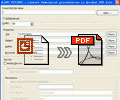
Giveaway of the day — A-PDF PPT2PDF
A-PDF PPT2PDF was available as a giveaway on March 15, 2007!

A-PDF PPT2PDF is a software utility program that converts PowerPoint files into .pdf files which are compatible with Adobe Acrobat Reader Version 5 and above. Features of the software include the ability to change the visual quality (compression) of the output pdf file, change the output file properties, and add password protection to the output file. In addition, pdf document permissions can be set to allow users various degrees of control of the document.
Features
- Standalone program. Does NOT require Adobe Acrobat or Reader
- Support bookmark
- Ability to change the visual quality (compression) of the output pdf file
- Change the output file properties with macro
- Add password protection to the output file
- PDF document permissions can be set to allow users various degrees of control of the document
- Settings can be saved to use as defaults, producing multiple pdf documents quickly
System Requirements:
Windows 98/ME/NT4/2000/XP, MS Powerpoint 97 or above
Publisher:
A-PDF.comHomepage:
http://www.a-pdf.com/ppt2pdf/File Size:
1.29 MB
Price:
$27
Featured titles by A-PDF.com
A-PDF Merger is a simple, lightning-fast desktop utility program that lets you combine two or more image files or Acrobat PDF files into a single PDF document. A-PDF Merger's convenient features include supporting 'drag and drop' for adding files to your documents, or even adding all files from a directory/folder with one click, as well as time-saving by allowing you to create an 'import' list for frequently used sets of documents to which you want to add specific additional PDFs or images.
A-PDF Split is a very simple, lightning-quick desktop utility program that lets you split any Acrobat pdf file into smaller pdf files. It provides complete flexibility and user control in terms of how files are split and how the split output files are uniquely named. A-PDF Split provides numerous alternatives for how your large files are split – not just by pages, but also by bookmarks to various levels.
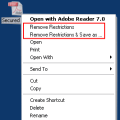
Do you have a PDF (Adobe Acrobat) file which cannot be printed, copied, or edited? Then your PDF file has had password security and other restrictions added. With A-PDF Restrictions Remover, you can remove the password and restrictions in a few seconds. This program supports both user/open and owner passwords, and does NOT need Adobe Acrobat software. A-PDF Restrictions Remover is extremely easy to use. Just right click the PDF file in Windows Explorer, and in the context-sensitive menu that pops up, select either the "Remove Restrictions" or "Remove Restrictions & Save as..." option.
GIVEAWAY download basket




Comments on A-PDF PPT2PDF
Please add a comment explaining the reason behind your vote.

iPhone app giveaways »





Android app giveaways »





Big problem I have with the program is: it loses the hyperlinks. My e-books have table of contents with links to chapters. Those are lost, so I'm still publishing my books in MS Reader.
Save | Cancel
Meh. there's plenty of free PDF converters out there that do more than just PPT documents, in fact anything. This program would probably be better off not existing at all rather than perform such a narrow task.
GOTD is starting to blow rather badly...
Save | Cancel
Love the comments, amazing to read and always do before deciding if something which looks promising will actually make it to my hard drive. Want to thank Bladed Thoth for the reviews. Read everything before deciding but that review usually clinches my decision. Actually so do the newbie comments, gives me an idea if something will work for folks not terribly computer savy.
Am giving this one a try. Seems like a decent middle ground, not too sure I would pay that much for the program however, especially with reading problems of text. Seems to me it should be a bit more reasonable considering all the freebies out there. If you price it too high folks will just bypass it and get one of the freebies and you end up with disappointing sales.
Either lower the price or jazz it up to work with other types of files and fix the blurry text problem. Give it a 4 on a 1-10 scale.
Save | Cancel
2-sheds,
The closest you have been to NASA is when you pick you NASAL buggers. What are you, 14? Ok, I'll stop feeding the troll now, but I just couldn't stop myself. I also would like those people that give ratings from 1 to 10 to stop doing so.
We already have the thumbs system to tell us what the overall rating is. I particularly do not care what your personal rating is, but of course, it is a free country, or so they say.
I have been using PDFCreator for a while and I like it. I print receipts from on-line purchases to PDF's which saves me from keeping a bunch of papers around.
I create Power Point presentations for a friend's company. With this tool I am able to make them PDF files and send them to him for approval via email in a much smaller file. Great offer. Thank you.
-psuloparra
PS: I have noticed that now GAOTD is in beta 2. I guess I would like to know what the final finished service is going to be like.
-Mario
Save | Cancel
Am I missing something about this give away stuff?
There's not been anything here that's worth near what it's worth if bought outright!
How about useful software????, this stuff goes away when it's offered for free, and you can't get it back after the time allowed so, if it's useful let's shout about it, not just comment "I'm first, thanks gaotd", give me a break!!!
I know my e-mail is getting havested too, because of this site, what a shame that we're all so gullible!
Offer juvinile software....your target audience here demands it!
Save | Cancel
To #44: Souka - As mentioned in my review, the PPT file is not my file specifically, but one I've been using to test PPT-manipulating applications. And as for being generous; It did its job, and besides the text quality, did it pretty well, at least in my opinion and the time I used the application. Personally, I have no need for it.
It is funny though; I am usually called harsh on my reviews.
Save | Cancel
@ BillW50 Thank you very much for the FastStone Capture freeware tip! I was just on the point of buying Magical Snap from Ashampoo. I never heard of Faststone before, checked it out and I really think it's better than Asampoo's program, even when not taking the cost into consideration ;) Great!
Save | Cancel
It cracks me up, some of the comments that are posted. I mean, you can tell the honest real people with real comments about the software offered and I appreciate them.
But when I constantly come across the same sort of comments, it get kind of old. If you notice the comments, if there is a negative trend, suddenly there is a comment like:
"OMG! THIS IS WHAT I HAVE BEEN LOOKING FOR!!"
Seems there is always somebody who not only has a over the top praise, but has to do it with capital letters.
Some more comments like:
"It was like Santa came to my house!"
Now this is not the first time I have seen the old "OMG!" and "Santa" reference here, but I notice one poster put the two together:
"OMG! EXACTLY WHAT I WAS LOOKING FOR! GOTD is like Santa"
Looks like they put together all the pieces, capital letters, the "OMG" and the "Santa" thing.
My point is that if it looks like the giveaway of the day is getting bashed, you can bet there is going to suddenly appear a over the top comment. If you check other download sites, you never see those kind of comments unless they are being put there by the software publishers themselves to bolster their product.
I mean, comments like "Thank God for this software", is the kind of thing you find on rogue software websites that are trying to sell you products that have spyware in them, or just don't work.
I find the majority of the comments (such as the one offered here) to be useful. Thank you to all the people who left honest comments (good and bad).
I don't know if GAOTD or the developers of the software are inserting those fake, over the top comments, but I wish you would stop.
We are not stupid and certainly will not make our decision to download this software based on a "OMG! This is the best thing since sliced bread!" comment.
I appreciate this website and the software it offers. Let's just keep it real.
Save | Cancel
Other programs do the same. Programmer should clean up fuzzy text on conversions if he wants $27 other days.
Hey 2Sheds (60) you used to be a nasty little troll. Now a funny little troll. Big improvement.
Save | Cancel
I think what BladedThoth wrote in his review pretty much sums it up.
I have an old full version of Adobe on the system, which installs a printer driver, so printing from any document to pdf is not a problem for me. However, I ran a test on a ppt with some 2.4MB which consist of pretty high grade photos from National Geographic. The Flash converts them to a nice quality flash file of about the same size. The Adobe printer prints them in great quality to a 7.7 MB file, but this app does the job in less than 1 MB and yes, it does have the problems with the text, but the photos are still good when you scale them down.
So, if I want to e-mail somebody a rather hefty ppt, printing them to pdf with this app is a great option to have. So, thanks GOTD, I won't use it everyday, but I am glad I have it.
Save | Cancel
Or what about the Paperless Printer
http://www.rarefind.com/paperlessprinter/downloads.html
Not only can it convert anything you print into pdf but also to HTML, DOC, Excel, JPEG or BMP. So why anyone would pay 27 USD for A-PDF PPT2PDF is beyond me.
There's lots of good freeware / open source solutions around for businesses and even more for non-business usage.
#29 There are several possibilities to convert a pdf to jpeg, the program I mention will even make a jpeg per pdf page if you so want.
Have a nice one everyone. Looking forward to tomorrow's give away.
Save | Cancel
I'm sure there must be a reason why someone would want to convert a power point file to a pdf but I can't think of one right off for myself. Microsoft has a FREE power point viewer available from their downloads section. Someone mentioned Open Office but I use Open Office spreadsheets routinely every day (since not everyone using them has Excel we decided to go with a good free program everyone could access regardless of OS) and they don't convert well to pdf. Not sure how ppt files would convert. All I know is that once Open Office converts spreadsheets to pdf they are exponentially unrealistic size wise. I'm sure I must be doing something wrong and there must be something I am missing when doing the conversions but I've found they convert better to html than pdf.
Thanks for all of the great software opportunities. I've found a couple keepers that I would never have considered if it weren't for GAOTD.
shadoe
Save | Cancel
I think what BladedThoth wrote in his review pretty much sums it up. I have an old version of Adobe on the system, which installs a printer driver, so printing from any document to pdf is not a problem for me. However, I ran a test on a ppt with some 2.4MB which consist of pretty high grade photos from National Geographic. The Flash converts them to a nice quality flash file of about the same size. The Adobe printer prints them in great quality to a 7.7 MB file, but this app does the job in less than 1 MB and yes, it does have the problems with the text, but the photos are still good when you scale them down.
So, if I want to e-mail somebody a rather hefty ppt, printing them to pdf with this app is a great option to have. So, thanks GOTD, I won't use it everyday, but I am glad I have it.
Save | Cancel
I checked out most of the other freeware that have been commented about above. I liked PDF Redirect the best. It has better image quality than PrimoPDF. Also, the www.media-convert.com is a good site if you don't want to download software, just upload a doc, convert, then download the pdf document. I think this site may be limited, though, as to the doc types that can be converted. The PDF Redirect will even convert your e-mails to pdf.
Thanks again, everyone.
Save | Cancel
Please bring back Aston and Altdesk again. I had no problem installing and running this very nice software. I had also downloaded the shell swapper to the same folder and everything worked just fine.I really like the way my laptop now looks.In fact, I now enjoy my windows XP just as well as my Mandriva Linux, which includes 14 other desktop Linux shells.. I have mentioned Aston to so many friends of mine that they would like to try it as a free download from your site.
I will also take this opportunity to thank the Giveawayoftheday admin who makes it possible for us to download, many nice and useful programs from your site. I enjoy reading all the comments and responses as well. Thank you. reece Vancouver Canada
Save | Cancel
OMG! EXACTLY WHAT I WAS LOOKING FOR! GOTD is like Santa (only every day of the year, lol).
When you work in the aerospace technology field like myself. You have alot of ideas that you have to get across to others (others that don't have PowerPoint). But everyone has a pdf reader. Now, I can leave NASA with a pps and not have to worry about my engineer buddy who needs a pdf.
Because of your giveaway today, I've just developed a new procedure where I convert from pps --> pdf --> doc. I call it the "2-shed's document trifecta converting procedure for the thought enlightened". I'm sharing with you all now for the very first time. 'Course you do need other converter giveaways that have been given away here at the site. So this secret is only good for the diehard fans of gotd. BTW guys and gals, You're welcome! My pleasure to share with you all!
I turned another friend of mine on to this site. He said "The program runs great and you don't have to be a rocket scientist to use it". I said, "Yes, but even us rocket scientists will use it", lol, rotfl, lmao, *slaps knee. My wife says I should be a comedian. I told her I was on the road for a few years; but you have to go where the money is eventually. Hence the reason I'm working on the space shuttle instead of standing on stage telling funny man jokes.
So on a scale of 1-10, I give it a 282.6 on the kelvin scale... lol (I crack me up).
Thx gotd and developers. Another great addition to your giveaways.
You guys rock! WOOT! Yea, baby.. Yea!
Save | Cancel
Really weird that this would be the giveaway for today. I just spent some time looking for a way to convert publisher, not ppt into pdf. I found this program: http://www.download.com/PrimoPDF/3000-10743_4-10575974.html?tag=lst-0-1 . It's a completely free PDF converter that works just like Adobe PDF Writer.
Save | Cancel
#7, You are right. i have PDF 995 also. it converts ANYTHING to PDF. Plus, doesn't OpenOffice.org do this also? I guess i'll try this out. I'll give it 4 points out of 10.
Save | Cancel
Thanks for the program - but Adobe Acrobat Professional will let you convert your grandmother into .pdf if you want, and even if you don't want to go that way, there are neat Firefox extensions which will let you print anything to .pdf and - even better - with the foxit extension, you can do away with acrobat altogether and view and deal with .pdfs much quicker. Does not do every last thing the Professional edition does, but most things.
Save | Cancel
Use PDFCreator. Free, Open Source, converts *everything*, not just PPT, to PDF! Sometimes I wonder why such software PPT2PDF can still be sold!
Save | Cancel
the resolution is not fine
any idea why ?????
Save | Cancel
Nice software....
i got more like these at this site
http://www.fidunderground.co.nr
Save | Cancel
Great, works fine, I have winzip 9 and had no problem.
Anybody got a winzip 11 FREE?
Save | Cancel
This program is a bust! They say it leaves a watermark in the corner until you buy the program, however it is this obnoxious tag in the corner. Totally renders this application useless until purchased.
Save | Cancel
Thanks a lot GOTD, another nice Freebies, just one point : I read the comments before downloading, and I see 3 kind of comments : the normal 'thank U', the more (also normal) experient user with good info about, and than the blasé type 'humm there a lot of better freebies out there'... well why do this last type of pple gives us such a useless comments
#47 think rather U download sys
Save | Cancel
thanks, even though i do not know why i would need this. keep up the great work!
still waiting for a program to host your website on your own computer ;)
Save | Cancel
Not sure why this is better than the pdf995 freeware i use...? mine works on all files all of the time. thanks tho - i love this site!
Save | Cancel
To #32. you're apparently not a very accomplished reader are you?
How is "asking a question" whining? lol
I ddon't think GOTD is looking for "yes men" I think they're looking for a "user demographic" please take the time to read someone's ENTIRE comment before calling them a whiner
mmmmmmmK Einstein?
Save | Cancel
its Very good ...but no clarity after conversion .....if it gets improved then this software will be a hit.................
Save | Cancel
#35's review....waayyy to generous, and don't forget spell check on yer PPT next time...
#22 question: PDF to PPT? I don't know any specifically, but if you had the licensed version of Acrobat, you at the very least could copy/paste the content of a PDF to PowerPoint, then save it.
And as other people have stated, CutePDF, PDF995, and other FREE utilities can do the same.... I know CutePDF and PDF995 do NOT suffer the image quality problems that this app does....
My $.02 and a thumbs-downn on this app
Save | Cancel
The thing I love about this site is, if you decide you don't want this particular giveaway, there are always plenty of recommendations in the comments for similar products.
Thanks GOTD and everyone!
Save | Cancel
Great work guys... Keep up the good work. Don't listen to the bad comments... Now adays some people think everything should be free...
ITS NOT A RIGHT... It's a previlage
Also #4 a great one for word docs is PrimoPDF and its free. It acts as a printer. You install... the PrimoPDF driver will show up as a printer on your system. Act as thought you print to the printer and it will create the output file with lots of great options...
Save | Cancel
# 20: thanks for the comment...you have answered my question. I too do not have PowerPoint installed and was wondering if this would be able to allow me to view some powerpoint files that I have, but apparently you actually need powerpoint for this program to work
# 27: thanks for the link...I'll check it out and see if I can finally view these files
All in all, looks like a great program, for those that can use it. Keep up the great work GAOTD!
Save | Cancel
Thanx a lot..might use it someday.. ;)
Save | Cancel
No use for this. Thanks anyway.
Save | Cancel
Ok, I haven't seen anyone state the obvious. You can download a FREE plugin from Microsoft to let PowerPoint do this already... and it's at a very good quality. Screensavers, audio, whatever, I like GotD when it gives away something that isn't already in the software it "alters." I hope they keep up the good work, but must say that pimping a program that not only has free alternatives (like most do) but has a free plugin from the company that makes it to do what it does, is a waste of my time. I'll check back tomorrow. 'Till then, go download the plugin from Microsoft, it works for PP, Word, OneNote, Excel, etc.
Save | Cancel
This is definitely useful. PowerPoint does not have a ppt to pdf converter included as some above seem to believe; well not with the Microsoft office 2003 version any way. You have to buy third party pdf software such as "click to convert" which costs over $90. So this application, which can be regarded as freeware for today at least is just as good, and maybe better than the many freeware alternatives mentioned above. I thank all of you who have posted links and names of alternatives though, because I like to compare and evaluate as many as possible to ensure I get the best software, (only in my opinion of course)
Most of the freeware alternatives I've checked out so far have not compared favorably with the commercial software offered here though, however that doesn't mean there aren’t any, as I’m sure their are. I don't get the time or don’t have the inclination to check every piece of software, only those that I really find useful.
Thank you very much A-PDF.com and the GAotD team for offering this okay piece of software for free today.
Save | Cancel
who would pay for a PDF converter that only works with PDF's? i use freeware CutePDF, that works for every app?
#20, #27's advice is the best way to view powerpoints. Actually M$ has free viewers for all it's proprietary formats.
Save | Cancel
Hello all! My 15-Minute Review is up! Check it out!
http://www.bladedthoth.com/news/2007/03/15/15mr-a-pdf-ppt2pdf-v1-0-1/
Save | Cancel
Hmm... Might come in handy.. I'll take it.. Thx..
Save | Cancel
You mean take a PDF and make one long JPEG? If so, freeware FastStone Capture will do this.
Save | Cancel
To Vilulf(#25): Since you can't update these giveaways for free, why ask for software (antivirus, etc.) that needs to be updated almost daily? Stop whining and get with the program. TODAY'S program! There's plenty of free spyware apps out there.
Thanks GOTD and A-PDF! Most of us appreciate the work that you folks do!
Save | Cancel
No thanks GOTD! I use PDF995 and it can convert from any software into pdf..
Save | Cancel
Not today .... but I feel something good coming in the next few days
Cheers GOTD
Save | Cancel
Seems to be good software, thanks GOTD :-) but i need pretty much the opposite!
is anyone able to recommend freeware which will convert pdf to jpeg?
Save | Cancel
hmm...doesn't ppt do this for U?
Just save as a pdf document, that's all to it...
Save | Cancel
#20: You can get a free PowerPoint viewer from Microsoft at http://www.microsoft.com/downloads/details.aspx?familyid=428D5727-43AB-4F24-90B7-A94784AF71A4&displaylang=en
Save | Cancel
not a useful one, no thanks
Save | Cancel
Just wondering if GOTD has a line on any utility software like spyware scanners, antivirus' , etc. I'm by no means complaining, just curious.
Save | Cancel
Thank you . Gaotd
Save | Cancel