Every day we offer FREE licensed software you’d have to buy otherwise.
Giveaway of the day — Total Image Converter
Total Image Converter was available as a giveaway on November 27, 2006!

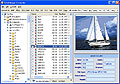
Total Image Converter allows you to take an image and create a new one with a different size or format, or perform the task for huge batches of graphic files with one click. It is invaluable for web designers and other IT professionals. Total Image Converter supports almost all image formats. It's all-in-one solution for those who do not want to waste time and effort searching for 10 different converters to deal with different formats. If you have hundreds of images to be converted, you can use its batch file convert option. Just check the files that you want to process or just press Select All button to save your time. Get any amount of image files converted or resized in one click!
There are 3 ways of handling. First, there is well-thought user interface. Second, Total Image Converter seamlessly integrates into Windows. That means that you may select the file in your desktop and make right-button mouse click. You will see ConvertTo item in the standart Windows popup menu. And there is also Command line support. Run Total Image Converter from the command line within other programs.
Total Image Converter has built-in viewer. You may easily view your images inside the program before or after the conversion. You can either work with detailed list of files (name, size, type, modify, attributes) or with their thumbnails. With Total Image Converter you can also resize, watermark, crop, rotate or mirror images and change the color resolution (include convert to black and white color) of your graphics. Besides, you may adjust White Balance and make gamma correction. All this done when converting your image with Total Image Converter!
System Requirements:
MS Windows NT/2000/XP
Publisher:
CoolUtils.comHomepage:
http://www.coolutils.com/TotalImageConverterFile Size:
5.04 MB
Price:
$19.90
Featured titles by CoolUtils.com
The best file manager 2005 by PC Magazine/RE. Enjoy highly configurable and convenient file management environment!

Converts between MP3, WMA, WAV, OGG, MP4, APE and more 30 formats. Built-in audio player and CD ripper. Powerful but Simple.

Elegant solution to print your directory tree. Templates for lists of photos, songs, movies, info reports and many others.

A professional file renamer. You won't imagine renaming template that Visual Renamer can not perform!
GIVEAWAY download basket


Comments on Total Image Converter
Please add a comment explaining the reason behind your vote.
iPhone app giveaways »





Android app giveaways »





I like that!s
Save | Cancel
Da best!
It is really quick and simple. Thanks to developers!
Save | Cancel
GOODS SOFT
Save | Cancel
Nice tool, quite powerfull.
Save | Cancel
thank you
Save | Cancel
I agree with the above comments... not bad for free but I would not pay for it. I'd also like to have the ability to slant or angle the text in the watermark as opposed to just putting it on one or the other of the corners.
Save | Cancel
Good little program. It's perfect for free with no ads/spy. Very easy to use
Save | Cancel
[...] Oggi vi proponiamo un software molto utile, si chiama Total Image Converter e permette un controllo e gestione totale di tutte le estensioni esistenti per le immagini. Un potente convertitore con funzione di ridimensionamento. [...]
Save | Cancel
It works perfectly. I agree, there are enough free alternatives. But this one is very easy in use.
Save | Cancel
Good program for free, although wouldn't pay for it, considering the other free alternatives, such as Infranview.
Save | Cancel