English
Every day we offer FREE licensed software you’d have to buy otherwise.

$ 99.95
EXPIRED
Giveaway of the day — MultiSet 7.8.8
MultiSet has been created to free you from routine work such as program installations.
$ 99.95
EXPIRED
User rating:
621
47 comments
MultiSet 7.8.8 was available as a giveaway on April 25, 2011!
Today Giveaway of the Day
Apeaksoft WhatsApp Transfer is professional data transfer software.
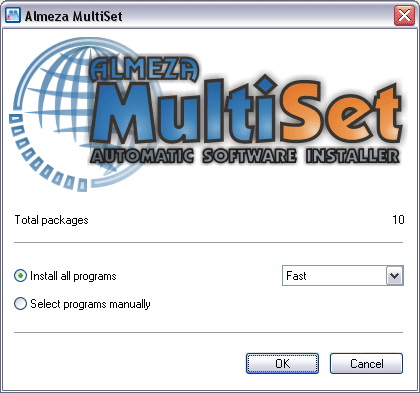
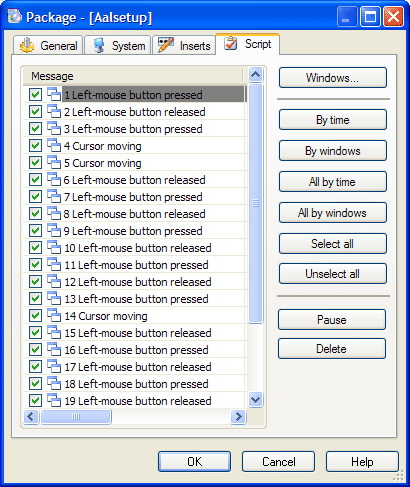
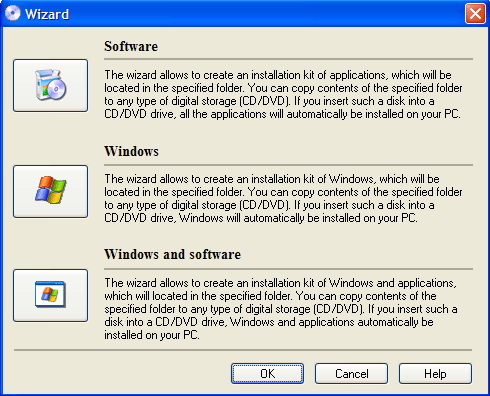
MultiSet has been created to free you from routine work such as program installations. Almeza MultiSet will automatically install all the applications you require, either onto your original computer or onto a new one. It's an ideal solution for rebuilding your systems quickly!
Key features:
- Create a bootable USB Flash Drive;
- Automatic Windows installation;
- Automatic installation of any software;
- Creating a bootable disk for simultaneous unattended Windows and software installation;
- Automatically restoring software settings and tuning Windows;
- Remote automatic installation.
System Requirements:
Windows 2000/ XP/ Vista/ Server/ 7
Publisher:
Almeza CompanyHomepage:
http://www.almeza.com/File Size:
7.36 MB
Price:
$ 99.95
How would you improve MultiSet 7.8.8?
42
vote
Comments on MultiSet 7.8.8
Thank you for voting!
Please add a comment explaining the reason behind your vote.
Please add a comment explaining the reason behind your vote.

You can also add comment viaFacebook
iPhone app giveaways »

$1.99 ➞ free today

$3.99 ➞ free today

$1.99 ➞ free today

Get this special numpad keyboard to enter numbers with ease in any app on your iPhone or iPad.
$0.49 ➞ free today

PDF2JPG is the ultimate solution for converting PDF documents into high-quality JPG images quickly and easily.
$0.99 ➞ free today
Android app giveaways »

The global bass booster and the equalizer enhances the sound quality of your Android device.
$1.99 ➞ free today

Want to get experience and emotion from driving a real city train in the metro simulator?
$0.99 ➞ free today

An alien ship has taken possession of multiple cities on planet earth, deploying countless robots.
$2.99 ➞ free today

If your device has low sound, use Volume Booster and Sound Amplifier to make your device super loud.
$1.99 ➞ free today
$1.99 ➞ free today
Bill I'll try to answer your question, if I understand it correctly. I've spent the day on the forum trying to get a grasp on this app. The C:\DESTR_WIN, is a folder you create to copy the contents of your original Windows OS install disc.
You do this so that Multiset can access it when it either makes a Windows installation iso, which includes not only the os, but any apps that you load into the package following the Express Guide in the F1 help doc/file. Once you have installed all the apps to be included and tested them, you either click the disc icon or the USB Flash Drive icon, which will create the ultimate iso file that can be burnt to disc. The result will be an unintended installation of your os and all the apps you included.
I hope I've got that right. I'm a bit sleep-deprived at the moment.
Now I'll take a minute to give some praise to Almeza and GOTD. I really like this program,cause to me, it's another form of backup. If things get unrepairable with your installation, all you have to do, is run the ultimate Windows and Software install disc you created. It's bad enough that you've lost your working pc, but with Multiset at least you don't have to go thru the drudgery of reinstalling your os, and be there to click when you're needed, or downloading and/or finding your app install disc all the apps you had installed. You simply insert your Multiset install disc, set it and forget it until it's done. It'd also be best to set up a reliable backup system so that any additions you make to your pc after creating the Ultimate disc, you'll only need to restore the backups after the install disc finishes and you're right back where you were before disaster struck!
I'm done.
skilz853
Save | Cancel
Multiset asks for Windows distribution package e.g. C:\DISTR_WIN'
There is no such a package on pre-installed OEM.
Recovery OEM disk only points to recovery files, which recovers system by first formatting disk- removing all installed programs.
Multiset does not recognize recovery files, as distribution package.
The distribution package is to find only on Windows installation disk.
I don´t understand how to use it, when 99% new computers comes with pre-installed OEM?
Users which created an installation kit for Windows with application on OEM machines- please answer where You found the distribution package?
Save | Cancel
Thankyou for this piece of Software, i really this, i really wanted a software that could make an automated installation of XP, all this time i got my hand only on freeware, which was still good/ but this was something i wanted for a while.
GREAT JOB GUYS, AFTER SUCH A LOOOOOOOOOOOONG TIME.
Save | Cancel
After several tries to get my USB with the PE builder of this program, it did not boot properly. I restarted in my Vista Home Premium OS and i found the USB drive "shared" when this was not set to be shared by the user (me), so i needed to stop the sharing manually... there was 1 user connected.
Save | Cancel
This is an awesome and very useful TOOL, even though nLite and vLite (for Vista) can both be a great FREE ALTERNATIVE to this GAOTD.
The best feature of this program is that you can create several DVDs, that automatically install a customized Windows XP (Vista or Windows 7) copy with service packs and updated drivers, along with your favourite software (MS Office, Nero, FireFox, Google Chrome tec...), without any knowledge of scripts writing.
Cool, isn't it?
And I believe that with this TOOL you can even reinstall licensed programs (included GAOTD), you had previously saved in your HD, after a reformat of your system following a sudden PC crash.
What do you make of it dudes??
2 THUMBS UP from me!!
Save | Cancel
Suggestion: Get a native English writer to clean up your website. Headings like "How to install many programs on many computers not leaving your working" make no sense!
Save | Cancel
#25 first, OEM pre-installed computers do have a key. There should be a certificate of authenticity sticker on your computer somewhere, with a key on it. If you can't find that, you can always use a keyfinder like magical jellybean. As for the disc... Say you use your recovery option, and it re-installs, we'll say vista, with service pack 1. Your best be would be to find an oem disc of windows vista with service pack 1. Sometimes a service pack 2 disc will work. Make sure that if you have a 32-bit version, you use a 32-bit version during the re-install, and choose the right edition. You could try and get a replacement media-only disc, they tend to be about $30, but can be hard to find. Most OEM PCs have the ability to burn system restore discs, though I don't know if multiset could use those.
It is possible to download the discs, but I won't go into that.
OEMs like HP and Dell sell replacements too, but who knows if they would work with a program like multiset or nlite or whatever.
Save | Cancel
Quote... "MultiSet wont work with Windows OEM -preinstalled on computers.
It asks för distribution package from Windows install disk, and a key, which are not present on OEM machines.
Someone know how resolve this?
Comment by Bill — April 25th, 2011 at 11:14 am"
-----------------------------------------------------------
You should contact the OEM dealer you bought it from to get what you need. One thing OEM's are REQUIRED to do, is place the sticker from the OEM opsys package on your computer (usually in the back); it will contain the Activation Key you need. Also, they like to make a FAT partition to hold the full installation files that they use if you bring it in for restoration, or such. Just point Multistage to that partition.
When users buy preloaded systems, they should insist on getting the medium as it's THEIR disk, not the OEM's! It can also help down the road, if you need to reinstall and have to speak with someone at MS... You also get some piece of mind that key is not as likely to be installed on multiple machines, which can really make problems for you, if MS sees it's been activated multiple times with the same key. Although, if you keep receipts and all paperwork, they have very good customer service; they'd probable send you a replacement disk (for a small fee, of course).
Good luck!
Save | Cancel
#31 and #32:
NO it will not erase C: it only makes an image of it.
Now about this image being used on a completely new computer: "It is NORMALLY true" that you can not put it on a new system....UNLESS YOU DO AS STATED. I have acronis workstation and universal restore. I have the newest version, and the previous version...
IT WILL image to a new system, you will load drivers last, for the new motherboard and hardware.
Hey I'm just trying to help, but don't take my word for it...GO to acronis and read up. Then you will have it straight from the horses mouth.
Save | Cancel
Almeza MultiSet is a smaller, mostly portable app for recording & editing macros, then packaging them together with the software those macros run, usually setup files or folders. Those packages can be burned to disc, put on a USB device etc as needed, & you can make them bootable in case you want to install something like Windows. The chief advantage is unattended installs -- you don't have to sit there babysitting, waiting for the eventual prompt(s) for user input. The main disadvantage is unless you're doing the same thing more than a couple of times, it may not be worth it -- there's little point in recording a macro of a software installation that you're only going to do once [you're not going to uninstall it just to run the same installation using MultiSet ].
Installation gives you the program's folder, with 84 files, 10 folders, ~13.5 MB, plus Start Menu & optional Desktop shortcuts. I recorded 149 new registry entries in the XP Mode VM, but many of those were for things like Windows Scripting -- you get an uninstall key, a ASProtect entry [HKCU\Software\], & 4 Shell related keys... I've run past versions of MultiSet from USB sticks, using the portableapps.com format *only* when I didn't want any new registry entries made to the host Windows -- if/when that doesn't matter it's seemed to run fine as-is, adding the few keys it needs when run.
Overall I've always thought MultiSet nice software, but of limited use when it came to home users -- no one here uses their PC the same way, so the installed software's different from one system to the next. Likewise at home, unattended setup very often just isn't that big a deal -- get bored & you can just go do something else, taking care of any user prompts a few minutes or half an hour later [it's not going anywhere]. A lot of that changed IMHO with win7, & particularly with SP1, which was a pretty big drag to install. This is my own personal story, in case it gives anyone else an idea or 3... Since not everyone's moved to 7 yet I thought it worth adding SP1 to the setup disc/ISO, & since I was working with it already, it was a simple matter to have the ISO handle multiple win7 versions, & since I was testing those 2 things in a VM [Portable VirtualBox], it was trivial to create a disk image backup before the target [virtual] disk re-booted & the new win7 install started configuring itself. That where I'm at right now, & it works pretty decent when I've used it. Then I remembered MultiSet visiting GOTD today. Right now I have to use one of my boot CDs/USB sticks to run Paragon Backup to restore that disc image to the target hard drive/partition, then use EasyBCD to set it up to boot. That's not a big deal or hassle, & it is much faster than the normal win7 install, but I should be able to use MultiSet to create a bootable DVD &/or USB stick that combines everything -- that simplification should let me hand off a DVD to family members rather than running it all myself, & may be of even more use if you don't have WinPE type bootable discs/USB hardware already.
Save | Cancel
MULTISET states it will perform "automatic installation of any software". So if I want to re-install some GAoTD software that I installed years ago does that mean I need the Setup.exe file and the password (or is it smart enough to copy Registry settings, folders, etc...) ?!?
Save | Cancel
@ 20 & 27
Thanks mike & mike studyform for the replies..both appreciated!
Also, my apologies for the obvious typos..not sure what happened there..but no offence intended to anyone or the guys at MulitSet for that matter.
Thanks again..
PeterC
Save | Cancel
I'll be using this to batch run software installation programs. Antivirus, antispyware, utilities, etc.
Installing the OS using this program wouldn't be practical for me.
Save | Cancel
#26: "I have no Windows 7 CD/DVD. Windows came pre-installed."
It may be there on a hidden partition, or the manufacturer may supply you with a disc on request, or you can download the ISO, which isn't too hard to find on-line, including at microsoft.com. Note that while there are different versions of 7, Google/Bing to find directions on a fairly well known way to make a win7 install ISO universal -- IOW if you find/download the ultimate ISO but have an HP license, you can *fix* it so you have a win7 version menu during setup, & then just select HP. While you're at it consider adding SP1 to the ISO if it doesn't have it already -- it can save you hours.
Save | Cancel
#28
windows 7 has a built in utility to make an image of your system that you can restore from.
Save | Cancel
#22: "After creating USB boot-able drive and copying the operating system on it (win 7 pro), I tried to re-installed it on a new freshly formatted drive and it said: WRONG KEYS ENTERED, CAN NOT CONTINUE."
If it helps, instructions for "Creating a bootable USB Flash Drive" are here: http://goo.gl/nVewA -- note that it says to copy the CD/DVD & then select "Windows installation kit". The page for "Creating a bootable USB Flash Drive with Windows PE" http://goo.gl/vsA30 says "Copy your original CD/DVD with Windows PE". Both say "Do not select folder with work Windows (C:\Windows)." What happens is the needed boot files are copied to the boot sector of the device/drive, & the minimal version of Windows used for WinPE for example is added.
What this means or does is you can now boot from that USB device, assuming the hardware supports booting from USB -- note that some PCs/laptops don't, & some may require a USB device formatted using FAT 16 or 32. Once you boot from that USB device, you can run other software like MultiSet or Windows install etc. Note that if you copy Windows' files/folders to another drive it will not boot or run -- you need to use backup/restore or cloning software that works with a disk image of your original drive. You can however make the win7 files/folders you copied over boot [& hopefully run] using EasyBCD to add the needed boot code/loader.
Save | Cancel
Does anyone know what the difference is between this version and the previous GAOTD Multiset "Professional" version 7.8.1? There does not seem to be a "Professional" version on the Almeza site any longer. Thanks.
Save | Cancel
#5
You could buy acronis, but who wants to spend money? clonezilla is free. Clonezilla can make a bootable restore DVD, as long as your hard drive doesn't have too much crap on it (a dual layer disc is 8.5 GB, but clonezilla can generally compress about 20 GB down to 8.5. Back up your documents and pictures, etc, separately). If you have a blu-ray burner, you should be able to use that. There is a guide here:
http://www.ehow.com/how_5779033_create-clonezilla-recovery-dvd.html
If you can't fit your backup on to a DVD, you can always back up to an image file on a portable hard drive or some other form of storage.
#24 says you could restore your backup to a completely new computer. This is usually not true. If you install windows on one set of hardware, and then suddenly change everything, windows will likely give you a blue screen of death on startup. Even if it doesn't, windows will be de-activated and you may run into problems there. I have imaged countless systems with clonezilla (used to work for a computer refurbisher) and we had one image for each model or family of machine. Not to mention that loading an old windows install on to new hardware is illegal.
And if you have Windows 7, disc imaging is built-in to the OS so you don't even need clonezilla.
Acronis is easier to use, but clonzilla is free and has plenty of tech support and tutorials, so it's up to you.
Save | Cancel
A question to #24-rod:
Will acronis workstation erase, the original system on drive C, while copying it, to destination drive D?
Save | Cancel
mike studyform #20
The answer to the question is no; the reason being that this way you only copy the system visible to you, there is a lot more needs to be copied of the system area that is hidden.
Thanks Gonzo #8 after reading the review you gave a link to, I’ll pass on this.
As hard drives are so cheap now my preferred method of backup is to use the free MaxBlast and make a direct copy off my drive via USB. If things go wrong then I just exchange the drives.
Save | Cancel
#11: "I have an XP machine with Microsoft Office 2000 installed, I recently replaced it with a windows 7 machine but I cannot find my Microsoft Office 2000 CD’s. Can I use this software to move Microsoft Office 2000 from the old XP machine to the new windows 7 machine?"
If you don't have them go to nirsoft.net & get an app to record your keys from your XP install. Then get the CDs you need on-line as ISO files or from Microsoft [possibly as an update including the latest service pack(s)]. The MS Ofc install in a nutshell is too complicated, Ofc itself is too embedded in Windows to do without running the setup CDs/DVDs. Once you have them OTOH you could use MultiSet, but I don't think for a single PC there would be an advantage.
Save | Cancel
I wish I would have had this a couple days ago when my computer crashed and I had to reinstall Windows 7 and all my programs :/
Save | Cancel
#12: "Here is what it says in F1 help… “Close all the run applications before using MultiSet. The antivirus software and firewall must be disabled when the program is running.”"
When you record changes, which is part of what MultiSet does, you don't want anything extra happening. You don't want part of a recorded install effected by AV software, don't want it to record you clicking a notice from your firewall app to let it connect etc. And you want to record installs on as clean a system as possible -- if a setup routine adds extra stuff that's not already installed, like VB or C++ runtimes, you normally want that stuff to happen during recording.
Sometimes you need to worry about that stuff, other times not so much -- it really depends on the app you're installing, so you can take Almeza's warning with a grain of salt. OTOH if you want to make sure, record installs that don't require specific driver setups using a clean VM.
FWIW MultiSet *is* designed more for biz than individual users, where it's much more likely that someone can have/use a completely bare PC/laptop for this sort of thing. That doesn't mean it's useless to the average home user -- just maybe have to be a bit creative, asking yourself when automatically running any app would be an advantage. In some cases alternative macro apps might do better, & sometimes, like when you want/need to put it all on a USB device you can boot from, MultiSet may come out on top.
* * *
#13: "It’s a shame this doesn’t make a backup of your system as is..without the need to install everything “after” you install MultiSet, as I think that is what most of us would much rather have..a program that just backs up or copies everything “in situ”, so you just pop in a dick or USB and away you go, in the even of a crash, format or just on the move."
That's where you'd use something like one of Paragon's or Acronis' apps... be faster too because you're copying raw data rather than files/folders. OTOH there's no reason I can see that you couldn't make a MultiSet package that runs your backup software to restore such a disk image. As the Paragon apps on GOTD don't include the WinPE bootable rescue disc, & MultiSet will create one [ http://goo.gl/vsA30 ], perhaps that's not a bad option or project to consider?
* * *
#14: "If my hard drive crashes and I want to reinstall..."
1st off the best thing to do in that case is to restore a disk image backup, putting everything back the way it was. If you did for whatever reason want to re-install everything, you could use a package that you already created with MultiSet that would boot from your PC/laptop, then carry out whatever installations you included in that package. [Assuming there was nothing on the target hard drive you would need some sort of bootable disc or USB device because there's nothing on the drive yet to run]
* * *
#18: "... Does it only restore programs... will it create a backup or clone..."
You set up MultiSet to run other programs in order, & you set it up to supply user input when or as required so you don't have to sit there. It does not create disk images or clones etc., but there's little or no reason it can't run an app to for example restore a backup or clone image.
"Is this just a 30 day trial or does it register for a longer time?"
GOTD standard policy, as at the top of this page & in the readme.txt file says: "1) No free technical support 2) No free upgrades to future versions 3) Strictly non-commercial usage" Those are generally the only limitations, & on the few occasions where it has been limited, e.g. when there's a subscription involved like with AV software, GOTD has always made sure we got whatever the regular subscription period was, in those cases I remember it was a full year.
* * *
#19: "... vLite and nLite are superior software to MultiSet in my opinion."
Like WIAK I think, those apps & rt_7_lite etc. are supplemental to MultiSet. I've slipstreamed win7 install discs with SP1 for example using rt_7_lite, but they still needs installing. And those discs don't include any apps etc. that might as well be installed at the same time rather than later.
"... However if you are willing to create (and keep) an image backup of your Windows after you install it..."
Backups are most always easier than re-installing everything, but I think what MultiSet is aimed at is new installations when/where cloning a single hard drive is impractical, e.g. when there's simply too few identical systems. Also, FWIW the actual time it takes may not be as important to many people & IT dept.s as it is to you or me -- if it takes hours, so-be-it, as long as it doesn't tie up an IT employee babysitting the process. ;-)
Save | Cancel
Installed fine on Windows 7 (32-bit). Tried to use it to make bootable USB, but the program doesn't recognize my Verbatim 2 GB USB drive or my 8 GB SanDisk Cruiser.
Oh well...the concept seemed good. Anyway, I have no Windows 7 CD/DVD. Windows came pre-installed.
Save | Cancel
MultiSet wont work with Windows OEM -preinstalled on computers.
It asks för distribution package from Windows install disk, and a key, which are not present on OEM machines.
Someone know how resolve this?
Save | Cancel
#5 about your question. If I were you I would image your C: drive and then copy that image to one or two spare hard drives (like D: and E:)
One hard drive (D:) could be in your box, and E: could be in a portable case..
For software I would go with acronis workstation with universal restore. This would allow you to not only restore your computer if you lose your hard drive, but would allow you to restore your system to a completely new computer.
Just buy the program from acronis, download the cd file too, burn the cd file to a cd. Boot with the cd, (choose via bios/ot F8 key as system is booting). Choose complete workstation option, choose disk C: as disk you are copying. Choose destination D:...That's it your done.
Save | Cancel
#8: "This is actually yet another macro recording app, though geared toward software installation...."
And FWIW pretty advanced for its intended purpose, making it easier to add whatever software combos unattended, including Windows on a range of hardware. The unattended part is the main benefit, so you could for example set up or update several PCs/laptops at the same time. That said, while it talks about adding Windows Updates/Svc Packs, adding them to the installation package before you use MultiSet makes it IMHO much faster, e.g. adding win7 SP1 takes a long time, so creating a win7 install ISO/disc with SP1 beforehand makes sense. Google/Bing & you can find a few methods & apps for including updates, driver packs etc. in the original installation CD/DVD/network share... you can still use MultiSet to make the full setup package, but since it needs to do less it's easier to setup in MultiSet & faster to execute.
Someone(s) will probably mention Windows Automated Installation Kit... Win7 setup uses a .wim file that's an image of the installed files. Microsoft has tools to create, work with, & update these images, plus there are several 3rd party apps/methods. The way I see it WAIK & MultiSet supplement each other rather than forcing a choice of one or the other.
"As far as I know it won’t let you create a package from an app that’s already installed and it also won’t create an image of your current Windows installation (you may want to look for a disk imaging or partition backup tool for that)."
MultiSet pretty much just runs apps, so you would have to use whatever app's setup routine, or put something together that added that app yourself -- for simpler app installs an example might be to make a WinRAR or zip self-executing archive of the program's folder(s) & as a last step have it execute a very short/simple script to merge needed registry entries [the MultiSet site talks about WinRAR self executing (extracting) files]. In many cases it would be easier since running many apps for the 1st time creates needed user files/folders & registry entries.
Otherwise AFAIK the only app to move a program from one PC to another is sold by Laplink. Paragon does have software to move a complete Windows install, together with installed software to another PC/laptop, & it will turn drivers off in the registry so the result will boot -- otherwise Windows usually won't start, though you *may* get away with running it in Safe Mode & deleting drivers manually. Using Paragon's Driver Injection you can also add driver packages that aren't included in Windows. I don't see any reason why you couldn't combine that with MultiSet to get Windows & whatever software on the target machine's drive so it will boot, then add/run whatever setup routines you wanted/needed [e.g. a graphics driver install] for a specific or all PCs/laptops. Much (maybe most) of the time it takes to install Windows is caused by the setup routine checking/formatting the partition & copying files -- you can do a fresh install of win7 in 10 minutes or less if you skip those steps [this is rumored to be how win8 will install], so you could potentially save enough time to make the idea worth exploring.
* * *
In case it helps... win7 *may* make activation easier for some folks -- you don't have to enter a key during install when it asks for one, & if you don't you have an initial 30 days to run it as a trial... if you're not set up like corp IT with a bunch of numbers &/or want to skip that step setting something up with MultiSet, you do have plenty of time to deal with it later. If you research on-line I think you'll find that activation in 7 can be a bit hit or miss anyway, so putting it off until you can call if/as needed may make good sense anyway.
* * *
Purely FWIW, I've got Paragon Backup disk images I've made of win7 SP1 installs before the 1st re-boot, before win7 starts configuring itself for the specific hardware -- a basic win7 install takes however long it takes to restore that roughly 4 GB archive, which is a function of drive/USB device speed. One caveat is that I have to run EasyBCD, the way I've set it up to work for both primary OS & multi-boot installations. I'll be looking at MultiSet to take that a step or 3 further -- with WinPE supported by MultiSet I shouldn't need a separate disc or USB device to boot from, shouldn't have to manually run Paragon Backup to restore the archive, then manually start EasyBCD etc... Cool if it all works out. :-)
Virtual Machines can be great to play with this sort of thing BTW... I use Portable VirtualBox [so I can keep a copy of whatever VMs on external drives & use with WinPE-type setups], but Windows Virtual PC & vmware work as well. To boot to something like WinPE, attach the ISO & set the boot order so that's 1st. To install or test install, just attache an empty virtual disk. Do note that if you use vmware you'll need the Workstation [not free] or Server [free] versions rather than the free player. And if you opt to go with Windows Virtual PC it relies heavily on Remote Desktop -- not every version of Windows supports remote desktop, e.g. Vista HP, where you'll find it'll work fine as a VM, but you can't get anything in or out -- you don't have the ability to transfer files in/out.
Save | Cancel
I just finished the trial run of MultiSet and these are the results:
* After creating USB boot-able drive and copying the operating system on it (win 7 pro), I tried to re-installed it on a new freshly formatted drive and it said: WRONG KEYS ENTERED, CAN NOT CONTINUE.
* I re-did the above process again and came to the same point, where it said: CAN NOT OVERWRITE PREVIOUSLY INSTALLED OPERATING SYSTEM
* I tried this time on a re-writable disc and it did not copy some hidden operating system files from the original win 7 pro disc and came to the same point of disappointment.
I spend almost 2 hours and can not do what it claim can do.
Just uninstalled it. Some of you may have better luck than I.
Save | Cancel
Not being remotely technical, I think this might have some use for most people, BUT, and I'd appreciate the help of those of you who know.......
Is it possible to merely save everything on my computer onto a external drive, stick, or CD(s), and in the event of a crash just load the lot onto a new computer (or hard drive)?
If so, does this program help in this respect?
Also
#13.
Watch out for electric shocks mate. Or at least get someone else to help. :)
Save | Cancel
"I don't know what people are talking about when they recommend MultiSet. The best way to describe MultiSet is a 'good idea implemented horribly'. If you want to put up with the "macro-recording" method of this software that is your choice - I hope it serves you well. However, my advice is to skip on MultiSet. vLite and nLite are superior software to MultiSet in my opinion. True vLite and nLite cannot automate applications (on your Windows install CD or otherwise), but they can add drivers and automate Windows installation in a better, much easier and less cumbersome fashion than MultiSet. They also allow you to remove certain components of Windows, such as Internet Explorer, from your Windows installation...something MultiSet cannot do. For creation of an automated Windows CD, my recommendation is vLite/nLite. However if you are willing to create (and keep) an image backup of your Windows after you install it, I recommened using the Macrium method mentioned above because it is superior to vLite/nLite and MultiSet both in terms of easiness to reinstall Windows - just create one backup (which may or may not, depending on how you did your backup, include installed drivers or software) and restore it whenever you need to "reinstall" Windows; restoration is always automated."
Save | Cancel
Comments here a bit confusing and contradict each other. Has anyone actually tried to restore a computer with it. Does it only restore programs only after it was installed or will it create a backup or clone of the system you have? Someone mentioned it needs serial #s,
but their website says it will automatically install the OS Windows without asking questions about username and product key. Is this just a 30 day trial or does it register for a longer time?
Save | Cancel
To Gonzo: Tks, to a couple of non techs like me, this type of comments are really helpful as a guide to know what the giveaway really does, a lot of times I simply do not understand what the giveaway of the day does.
Save | Cancel
Seems quite interesting from the looks, although coming off awfully similar to AutoIT or AutoHotKey. Sounds good nonetheless, but nothing that can't be accomplished between some VBS scripts and/or AutoIT.
Save | Cancel
I have Windows 7 and it asked me to make an image backup and a disc and I have my backups on a separate hard drive. When I went to install, thinking this might be useful for the other abilities, my system warned me not to install, that I have software like this. So I guess I'll have to pass. If someone else knows that this will not hurt my system please let me know. I'd love to take advantage of this free software today if it wouldn't hurt my system.
Save | Cancel
If my hard drive crashes and I want to reinstall do I require this program to be installed on the hard drive first before it will reinstall the other software. That would mean I'd have to purchase the software at the time to reinstall the software to my hard drive.
Save | Cancel
It's a shame this doesn't make a backup of your system as is..without the need to install everything "after" you install MultiSet, as I think that is what most of us would much rather have..a program that just backs up or copies everything "in situ", so you just pop in a dick or USB and away you go, in the even of a crash, format or just on the move.
Still, it looks like a good bit of kit for doing what it does, but it's not really what I need or am looking for right now.
Thanks anyway, GOTD for bring us this offer.
PeterC
Save | Cancel
Here is what it says in F1 help...
"Close all the run applications before using MultiSet. The antivirus software and firewall must be disabled when the program is running."
That will NEVER happen with this guy.
Melwarebyts blocks me from reaching their site and forum.
Save | Cancel
Sure looks good to me.Seems quite handy & saves you a lot of time..
I just wonder why Joe states,that's not so much a base system to work from..??
Would be nice if you could & would ellaborate on that.
Thanks everybody :wink:
Save | Cancel
It sounds like it produces "slipstream" installation media. I don't have a lot of use for that at home but I'll give it a try. If I again find myself in a situation where I'm installing a lot of computers, this might prove to be a handy tool. If you need a base system to work from... not so much.
Save | Cancel
I was recently looking at this app with some interest and found an interesting and enlightening review at dottech:
http://dottech.org/miscellaneous/2898
This is actually yet another macro recording app, though geared toward software installation.
In other words, it allows you to record the steps you follow when installing an app (yes, you have to actually install it after installing and running MuliSet) and then it creates a package which you can use in the future to automate the process.
It also allows the creation of a Windows installation CD with many packages in order to install everything from scratch with almost no user intervention.
As far as I know it won't let you create a package from an app that's already installed and it also won't create an image of your current Windows installation (you may want to look for a disk imaging or partition backup tool for that).
I haven't tried it yet, although it does seem like an interesting concept (in a way...).
Save | Cancel
Mark (comment no.3), I haven't tried it yet so can't confirm, but if you read the home page it certainly seems to say that it DOES capture configuration and customization.
Save | Cancel
Installed fine on Vista though examples seem to veer toward XP! I want to collect my widows updates into one installable DVD without PE or AIK & if it can do these claimed things everything else is a bonus I notice included are boot.iso`s for Xp & Vista/7 presumably to facilitate numerous reboots during what would be a fairly lengthy install with around 40 windows updates/hotfixes to-date!
Save | Cancel
For the non-tech people, will this burn a disk with windows and all the programs I have downloaded from this site, and make a bootable disk that can just give me an exact copy of my system and programs if my hard drive crashes? I have many programs from this site that I will lose if my hard drive ever quits. If it does it would be a wonderful back up.
Save | Cancel
This one, seems worthless to clone a system, with Windows preinstalled on one PC, to another computer.
It asks for some Windows dsitribution package, and a serial number, which I suppose are absent on computers with preinstaled Windows
Save | Cancel
If it includes the ability to capture POST-install configuration and customization, then it might be worth considering. Otherwise it's leaving a considerable chunk of tedious manual clicking and typing. Many people cannot and do not use applications in their default initial state. Ignoring that is actually ignoring the far more time-consuming and frustrating part of the process of re-creating a work environment and workflow.
Save | Cancel
A good tool, not tried this version, but a previous version worked well in a business environment to install an XP system with pre-loaded apps. Saved a lot of time when rebuilding systems for different departments - imaging would have been easier, but too messy with so many various pieces of hardware around - so this was a good work-around.
Save | Cancel
The app itself is kind of disk burning software, but with many advanced capabilities - it can create bootable USB and DVD, with pre-configured Windows and pre-installed software at your choice. I like it a lot, thanks GOTD!
Installed on XP, install is smooth and easy - even no need to care about activation, it's pre-activated.
Save | Cancel