English
Every day we offer FREE licensed software you’d have to buy otherwise.
$69.99
EXPIRED
Giveaway of the day — iCare Format Recovery Pro 6.1.4
An effective Windows data recovery solution
$69.99
EXPIRED
User rating:
51
23 comments
iCare Format Recovery Pro 6.1.4 was available as a giveaway on May 28, 2018!
Today Giveaway of the Day

Painting with light!
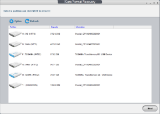
iCare Format Recovery is an effective Windows data recovery solution that can easily recover formatted hard drive, usb flash, memory card after quick or full formatting. It requires no tech skills. As an easy-to-use & 100% Safe recovery tool - it goes deeper than any other data recovery software, which guarantees the efficiency of the process.
System Requirements:
Windows 10/ 8.1/ 8/ 7/ Vista/ XP/ Server 2000/ Server 2003/ Server 2008/ Server 2012/ Server 2016; CPU: 1GHz (32 bit or 64 bit); 256 MB RAM (1024MB Recommended); 100 MB and above free space
Publisher:
iCare RecoveryHomepage:
https://www.icare-recovery.com/format-recovery/File Size:
4.08 MB
Price:
$69.99
GIVEAWAY download basket

Developed by Informer Technologies, Inc.

Heal up your system and speed up your PC with the help of 25.

Developed by IObit

Developed by OmicronLab
Comments on iCare Format Recovery Pro 6.1.4
Thank you for voting!
Please add a comment explaining the reason behind your vote.
Please add a comment explaining the reason behind your vote.

You can also add comment viaFacebook
iPhone app giveaways »

Classical Tank battle game. Old style plus new element. Defense your base, and destroy all enemy tanks.
$4.99 ➞ free today

$2.00 ➞ free today

$1.99 ➞ free today
$4.99 ➞ free today

$4.99 ➞ free today
Android app giveaways »

$2.99 ➞ free today

Prepare for an exciting word puzzle adventure with Word Slice: 1 Hint 5 Words!
$1.49 ➞ free today

Whether you're a fan of io games, survival games, or just looking for a fun new game to play, this one is for you!
$0.99 ➞ free today

$6.99 ➞ free today

$1.49 ➞ free today
No trace of blue register key. The pull down menu at top right hand side does not reveal it either. I have iCare DataRecovery 7.9 installed and inunstalled previous icareFormatRecovery before installation. Strangely when I click on the help menu it gives me the help file for icareDataRecovery NOT icareFormat Reccovery. Also IGB recovery limit has been mentioned but there is nothing about that on the GOTD offer page that I could see. Just hoping that it has picked up the old registation key during installation!
Save | Cancel
I have a 32-bit Win 7 partition on my laptop HDD which was totally BRICKED when Microsoft "helpfully" caused the 64-bit Win10 partition to "update", 18 months ago.
When I saw this, I had been hoping that at last I might have SOMETHING that will get it all back. However, when I started running the programme (it still has 45 mins to go) I soon saw that it only gets back things like documents, graphics and multimedia files. I see no mention of EXE or DLL files....
So I guess it probably won't be any help -- after all, I can get access to my .doc files and jpg's simply by changing the partition when I open the relevant programme.
This is not to say it is no good -- just that it is unlikely to help a "bricked" computer or partition.... which is a pity.
If it DOES help, no doubt I will come back to report on it....
Save | Cancel
Tranmontane, -- Well, I can see it does find some potentially useful files, so it may well be useful. Trouble is, I can't be sure WHICH files to recover, and I also can't be sure that they won't over-write something that it still needs to "recover" the OS on that partition.
I guess I need to back up that partition FIRST, even trying to make an IMAGE of it, before attempting any further work.
But it does look "useful" -- yes.... So I would say, it's worth a go. And that partition (about 350Gb) took less than two hours to scan, if anyone is interested.
Save | Cancel
Wonderful & easy program to install & register , cannot say that about some other programs I have had .
thank you.
Save | Cancel
Hassle-free installation and registration. Thanks to the developers for this offering.
Save | Cancel
I installed the program and plugged in my external hard drive which had
somehow become formatted with the loss of all files. Instead of recovering
lost files, icare said the drive needed to be formatted.
Save | Cancel
Tested thoroughly today in a real-world situation of data loss due to inadvertent formatting. The software exceeded expectations. Well done, iCare.
Save | Cancel
I rarely need to use a recovery app, but my luck ran out a week or so ago, & I [unfortunately] got a chance to run the iCare software through its paces. First I tried their Format Recovery Pro, then their Data Recovery Pro, which I think is the more full or comprehensive of the 2. Unlike a half dozen other recovery apps I got as giveaways, the iCare software had remained registered or activated, and it seemed happy to run in the background doing a deep scan, not taking up much resources. It also saved its progress, which is cool, & it gave the option of displaying the files it found as raw, in addition to the list of named files. It did not show whether a found file could likely be recovered successfully, or not -- a couple of recovered files were too damaged to be used, but some others were OK.
Then I ran the free Recuva, finding that it didn't like to run in the background [the deep scan progress was much slower], that it used a fair amount or RAM, that scan results could not be saved, & that the results were pretty much on par with iCare Data Recovery Pro. I tried Puran File Recovery -- another GOTD -- and it crashed 1/3 of the way through a deep scan.
Next I ran EaseUS Data Recovery Wizard -- an older version I got from GOTD -- and it was the champ compared to the others. It ran OK in the background, didn't consume too many resources, and found more files, including the half dozen Photoshop PSD files I was after that the others could not find. The ability to search the found files, with the results displayed as a list, proved crucial -- while Data Recovery Wizard attempted to list all the found files in their proper folders, that part was very inaccurate, and if I hadn't been able to search the results, I would never have found what I was after. While the files I recovered with Data Recovery Wizard were OK & worked, they were saved with that same inaccurate folder tree, which was a small bit of a PITA, since many of the folder trees were quite deep.
And that's where I stopped -- while all the scans, with the exception of Recuva, were done in the background, while I was doing other stuff, each of the individual scans took about 4 hours [it was a 2 TB drive], and by the time I was done with the EaseUS app, I was too tired of it [& bored] to try any more recovery apps. There was nothing lost that I couldn't fairly easily recreate, so it was a matter of could I recover a file, spending less time that I would recreating it, e.g. I had a couple of VMs that I hadn't backed up yet after recent updates, so could I recover them in less time that it would take to perform the same updates on the existing backup copies.
That all said, I personally feel that it's worth it to grab apps like iCare Format Recovery Pro when they're given away because, well, stuff happens. I don't think it makes sense to spend more time, effort, & cost [e.g.. storage] protecting [backing up] your stuff than you'd spend replacing it. In my recent example, recovering some files saved me maybe a couple of hours if I include the time spent starting the recovery apps, & going through their results. Don't store *your* stuff on the same drive partition as Windows, & if you follow that advice, running recovery apps is pretty painless [with the exception of Recuva].
Save | Cancel
mike, thanks a lot mate, this is well tested way. In work I have issue to restore outlook .PST file from colleague, that erase it by mistake /clean all mydocuments and stupid default place for outlook/.
Can't remember now, which software finally found several versions of the same email, because I use a lot. PST files in Shadow-Copy were broken and unrepairable. 3.2GB was the file. Will edit this for future read. I also install this software as backup to test. :)
Save | Cancel
As this user comment thread seems to be more about missing blue keys than anything else, I thought I'd add an actual user review here by way of a change . . .
(1) Downloaded, installed, registered in under 2 minutes. No email address harvesting. No nasties. Kudos to the developer: all GOTD promotions should be as clean, quick and fuss-free as this one;
(2) Ran a straightforward test by duplicating the kind of disaster that can befall the unwary: I copied the contents of my Fuji X-T10's current 16Mb SD card to my Windows 7 desktop PC (68 jpegs in total), removed the card, and then placed it in my Panasonic FZ2000. I then formatted the card, this after the usual Panasonic warning that such an action would erase all data.
(3) With the formatting completed, I popped the card into a USB reader and plugged it into the desktop. Windows reported that the 16Mb card -- now appearing on screen as Drive F -- was empty: no data, no images. Everything. . . gone.
(4) I set iCare Format Recovery Pro to work with a quick inspection of my setup's various drives, including the new F: Generic Storage Device, and then an analysis of that drive. It took 16 minutes 43 seconds for it to complete, an elapsed time that ought to be borne in mind by any prospective user: by my reckoning, that's slightly over 1 minute per 1 Mb.
(5) The software reported 986 total files found / 870 files identified. (No, I don't know what the difference might be: there were certainly not 100 DAT and TIDs in the actual output.)
(6) The software's detailed analysis split the results into four folders. The first, Directory 1, comprised AVCHDTN / BDMV entries containing a few kbs of DAT info and nothing else. The second folder, Directory 2, comprised a similar handful of DAT file material. The third folder, PRIVATE, contained more AVCHD references in the form of DAT and TID files, though again, of merely half a dozen kb or so each. The fourth folder, Raw Files, proved to be misleadingly named, because on opening it contained not only a GZIP Compression File subfolder but a JPEG Graphics File subfolder. This last was further disaggregated into three subfolders: 1-300, 301-600, 601-870.
(7) Retrieval of the 870 image files from those three subfolders to a newly created folder on my desktop demonstrated that, as is to be expected from the functioning of this kind of salvage software, various different sizes of the same image recurred. It was also apparent that the older the image -- the 'found' files dated from October 2 2016 to May 24 2018 (three days ago) -- the greater the problem of content loss, that is: the appearance of "banding" across the top, bottom or sides of an image, from which pixel information has been irrecoverable. However:
(8) Every one of the most recent images stored on the formatted card were retrieved as 100% originals with no loss of quality, exif data, or anything else. The actual usable total retrieved in this test -- that is, images either 100% complete or with only relatively slight top and bottom frame loss (landscape) or left/right frame loss (portrait) -- was not those 68 seemingly gone forever but 202.
Though that total might not seem a lot from the software's reported recovery of 870 it is, in fact, a substantial harvest from an SD card that has been used extensively and formatted more than once in the past two years.
Verdict: this was a test to see if iCare Format Recovery Pro could bring back 68 jpegs ostensibly lost due to the formatting in a Panasonic camera of an SD card used in a Fuji camera.
The actual result was the recovery of 870 image files -- though not 870 different images: as noted, this type of software yields multiple sizes of the same shot -- taken over a period of almost 2 years, of which 202 are either 100% at best, or 80% at worst, the same as they were Out Of Camera (OCC).
On which basis then, and even allowing for the fact that no two camera manufacturers deploy the same formatting techniques -- Nikon's, for example, may well be more aggressive than Panasonic's -- there's still every reason to think that iCare Format Recovery Pro will make a decent job of trying to salvage that which an unfortunate camera user might've thought was beyond salvaging.
Thanks, then, GOTD, and thanks, iCare.
Save | Cancel
Any chance for some comments re this s/w? Ya
y or nay?
Save | Cancel
webeye,
Don't know if my comments on it will be approved & posted or not, so here's the short version... iCare stayed registered -- several other recovery giveaways did not. iCare runs happily in the background -- Recuva for example would not. iCare found roughly the same files that Recuva did, but EaseUS Data Recovery Wizard [an older version from GOTD] beat them both by a fairly wide margin.
Save | Cancel
Same here. I can't find the blue key.
Save | Cancel
Larryh, Did you already have an older version installed? I did and I do not have a "big blue key" either. I reckon the old registration code has carried over to the new version.
Save | Cancel
Jerry,
If you want you can search in Regedit for "PS_iCareProCdr" [w/out quotes] & look at the "info" key. Back that up [export & save it], & then delete it, and your old registration should be gone -- you can always double click the .reg file you saved to put it back.
Save | Cancel
Jerry, I downloaded from icare website the pro version, installed it and there I see the big blue key. You can see "pro" on the screen. Of course it would not accept the reg key provided here at GOTD. I figure the link given here is for the free version not the pro since registration is not required. Just my guess.
Save | Cancel
Jerry, oops...my mistake. It was the icare 'Data Recovery Pro' that I installed. The icare Format Recovery Free Trial has a limit of 1 gb to restore. This offer from GOTD restored 80 gigabytes of video for me. So even if I can't input the reg key, it's performing like the pro version. To GOTD and icare... thanks a lot for this nice program.
Save | Cancel
Very easy to install, no jumping through hoops to register. I will at my first opportunity try this software (I usually have a friend drop by with this problem weekly) and I will respond with accuracy & ease of use. Thank you for your offering today.
Save | Cancel