English
Every day we offer FREE licensed software you’d have to buy otherwise.
$99.95
EXPIRED
Giveaway of the day — Almeza Multiset 8.7.8
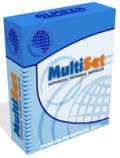
Almeza MultiSet will automatically install all the applications you require, either onto your original computer or onto a new one.
$99.95
EXPIRED
User rating:
275
34 comments
Almeza Multiset 8.7.8 was available as a giveaway on April 14, 2015!
Today Giveaway of the Day

An AI-powered object remover for videos and images.
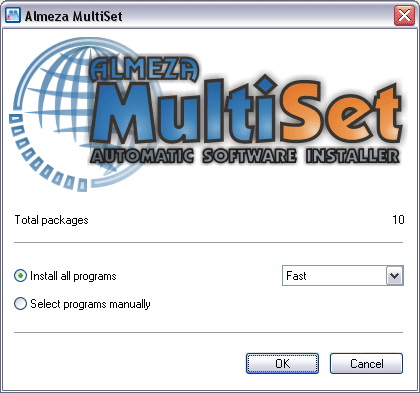
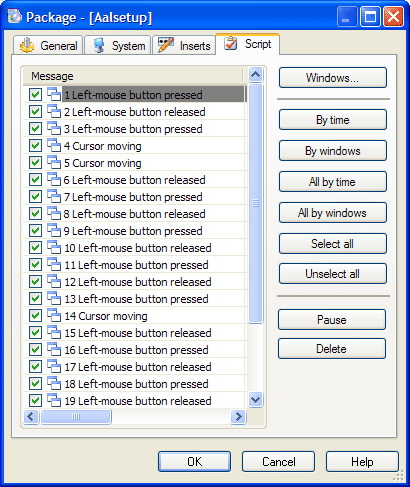
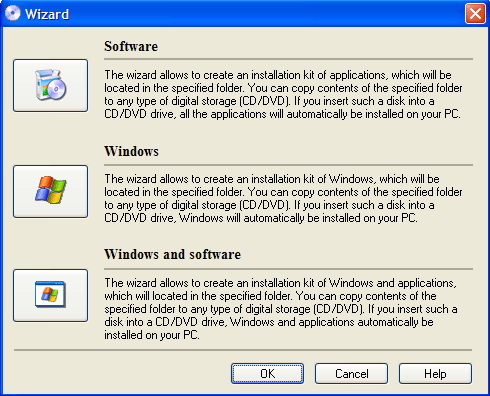
Almeza MultiSet helps to install programs automatically and has a simple, convenient interface. It can take a lot of time for a user to install the necessary programs after the operating system installation. And at the same time a user needs to change discs in CD-ROM and DVD-ROM drives, enter registration data and make chores which takes a lot of time. The Almeza MultiSet program will install all the necessary programs automatically. And at that you will not have to write a single line of code!
Key Features:
- essential administrator assistant;
- fully-automatical;
- intuitively understandable interface;
- installation speed selection;
- multilingual;
- sound accompaniment of events;
- automatical insertion of registration data;
- time and power real economy.
Please note: the commercial usage of the program is allowed
System Requirements:
Windows 2000/ XP/ Vista/ Server/ 7
Publisher:
Almeza CompanyHomepage:
http://www.almeza.com/File Size:
15 MB
Price:
$99.95
How would you improve Almeza Multiset 8.7.8?
1
vote
GIVEAWAY download basket

Developed by Informer Technologies, Inc.

View, manage, encrypt, pack, and unpack archive files.

Heal up your system and speed up your PC with the help of 25.

Developed by IObit
Comments on Almeza Multiset 8.7.8
Thank you for voting!
Please add a comment explaining the reason behind your vote.
Please add a comment explaining the reason behind your vote.

You can also add comment viaFacebook
iPhone app giveaways »

$0.99 ➞ free today

$2.99 ➞ free today

$0.99 ➞ free today

$1.99 ➞ free today

$1.99 ➞ free today
Android app giveaways »

Whether you're a fan of io games, survival games, or just looking for a fun new game to play, this one is for you!
$0.99 ➞ free today

A collection of icons based on the well-known candy bar.
$0.99 ➞ free today

$5.99 ➞ free today

$0.99 ➞ free today

A nice-looking and beautiful battery charging animation app.
$1.49 ➞ free today
I downloaded and installed this program, thinking I would create a windows image on a flash. unfortunately, it is unable to recognize the usb device. Tried with two devices so not sure what is the issue.
Save | Cancel
I see zero advantage for a single user of this application. Sure it can record and log keystrokes and mouse activity during installation. What good is that for an user that already has everything installed? How could this be any advantage over having a proper system and data backup or cloning an system onto another drive? I see nothing advantageous. Key stoke recorders do become useful within a browser however and for this Imacros a Firefox addon utility is great for that and free.
Save | Cancel
I had this software before and used it only once, the reason was that most of today's software require live downloads, updates, e-mails accounts, licenses, keys and some of the software I have requires a call to the software developer to get a re-installation key because the date of installation changes the key.
To make the things even worst, just imagine a new hardware was added like: MB, video, audio, network and so on and after you spend countless hours feeding disks and USB drives the end result is no boot or crash after crash to trouble shoot every error or blue screen freeze.
It took me 3 times more time to again re-install everything manually to correct the errors.
Save | Cancel
Still baffled how a home-user would benefit. What I'd like to see is software that would re-install Windows and still retain all our old Giveawayoftheday software!
Save | Cancel
"What I’d like to see is software that would re-install Windows and still retain all our old Giveawayoftheday software!"
Most importantly I think that would often violate the license terms, & certainly runs counter to the intent of developers that expect, or at least hope that users will buy products they find useful.
If you migrate an existing Windows install, complete with software, what you have to watch for is DRM that keeps track of the hardware you're using, similar to the way Windows requires activation if it detects a certain amount of hardware changes. Not so much with GOTD offers, but some more expensive software may lock you out entirely, so you can't even remove, install, & re-register.
If you reinstall Windows then reinstall software, that normally works, but you should still check with the companies that sell that software to make sure you don't have to do something special -- they may have recorded info on your old hardware, & will only activate their software on that old hardware otherwise. With software you've gotten from GOTD, more often than not that's not possible because you don't have a setup file you can run. Developers also often use date windows, where a copy of an app that's offered free but for a limited time will not activate once that time's past.
Save | Cancel
https://www.runtime.org/driveimage-xml.htm
Choose full system image. Or do you not know about system imaging? Windows has a built-in program, but this one is far better.
Save | Cancel
Mike,
I was never aware if an image restore was done on a PC to different hardware that installed software might have issues. Have you actually experienced this?
Dan
Save | Cancel
Please advice --
when one upgrades to a new computer
when moving the hard disk from an old computer to a new computer
does this software updates the softwares to the new motherboard ?
Thank you for your replay
Save | Cancel
No... Actually the best way to do that is don't. ;)
Windows accumulates garbage -- remnants of updates, software you've added & later removed, maybe [heaven forbid] mal-ware [the object of mal-ware is most often to make someone $, so often great care is taken to make sure the infection is as invisible as possible]. If you run Windows Disk Cleanup, using the System files option, you'll often get a slightest glimpse of how much junk just Windows Update leaves lying around. Microsoft suggests several times in several places to re-install Windows every so often to take care of that sort of thing.
That said, the problem when you try to use a Windows install on different hardware is that the drivers Windows uses to talk to the hardware doesn't match your new hardware. If you're talking about something like the audio chipset on the motherboard that's often not critical, but if Windows tries to talk to an AMD CPU & chipset instead of the Intel hardware you've just bought, it's just not gonna happen.
What you can do is try running a Windows Repair Install, or try special Migration software from companies like Paragon, that removes existing driver entries from the registry, or try removing/uninstalling devices in Device Mgr. before you unattach the drive from the old hardware. Sometimes it works like a charm, & sometimes it'll take days to get everything working right -- longer than it would take to install everything fresh.
Save | Cancel
Mike, thank you so much for your excellent replies to questions related to this software. I have some questions that go beyond this GOTD and don't want to bother people here. Can you recommend a forum where I can place the questions?
Save | Cancel
Cool application....Thanks you GAOTD guys
Save | Cancel
From the description, it sounds like this software will automatically change the CD/DVDs if you are installing from multiple discs. Of course, there isn't any software out there that can do this. So, at least, someone has to watch the installations and change the discs as needed. Definitely not a set-it-and-forget-it program.
Save | Cancel
If you were going to put together a Multiset package you'd gather all your needed installation files & have them in one place beforehand. Then you'd make everything, the setup & Multiset files available to another PC/laptop, whether stored on removable media, via a network share etc.
Save | Cancel
If I need to re-install windows I usually use the option of using a back up image from before whatever incident caused me to need the re-install. This preserves all my software anyway. If I was going to undertake a new full install (such as on a new computer or, possibly when I upgrade to windows 10, then installing licensed or free software is not really a problem as I am retired and have time to do it. The problem arises with software from sites like this where often the one day license does not allow for transferring to a new PC but I am not really sure that this program would solve that problem. Also where I have decided to keep using an earlier version of software rather than a paid upgrade and the old version is no longer available - for this reason I keep all licensed software installs and their relevant keys on a different drive to the system. I forsee that this software is unlikely to be problem free in which case it is probably no time saver over re-installing the software you need. Think I will pass on this one
Save | Cancel
This is not intended for the normal home user who has 1 or 2 or 3 computers.
It is basically a mouse+keyboard macro recorder. It robotises the action as if a human was installing the software.
This is intended for computer retail business owners or IT installation specialists who have to install the various software (over the time period of a few years) into HUNDREDS OR THOUSANDS of computers.
Even so, this almeza multiset may not function correctly all of the time. Unless all the computer hardware are identical which is unlikely. Different hardware detected by the software may cause different responses or pop up windows.
Save | Cancel
Purely FWIW, IMHO it's actually worse, more of a drudge if/when you've got 2 or more PCs/laptops you maintain at home, with optionally maybe a bunch of VMs thrown in. You've got stuff to do, & stuff you'd rather be doing that sitting at someone's PC/laptop watching progress bars that always seem to stall. ;)
If you're at work it's your job, & it's not [usually] like you can go raid the fridge & binge watch whatever series.
I'm not going to say it's the best way or anything, but I could see many a person in that boat at least trying Multiset to see if it helped them out.
Save | Cancel
How can they think any one shall be willing to pay 449 for this program, even 99 are to way to much coz it will be 990 kr for me and why shall I pay near 1000 kr for this program as not can handle a wrong stroke, without it stoppes working, and wich real computer lover jells over the installations prosses, just a lazy user have need of this program, as long they not do any wrong stroke. And then I not understand what they mean with that I must remove the original installation before I use the automatic installation, and I not get why I shall install the program and then remove it, to get this program to work, to me it seems to be much to do, to be normal, coz what I want is that I had be able to use this program to my programs I allready have installed so I could move them to another disk, but this program just feels the program you installs efter you have install it?
Save | Cancel
@PCMan
This program is good for people who have a bunch of identical workstations to administer. If you are dealing with lots of different hardware, then this software might not be what you need.
Save | Cancel
https://ninite.com/
I'm a big fan of ninite. It allows me to install the latest version of designated software without the overhead of CDs etc. A great free site. It also has apps for Linux
Save | Cancel
It would be nice if someone could enlighten me as to why this is more advantageous than making a clone of a system which is then copied onto other new machines.
This is more or less what we did when I was programming and it appears to have many less pitfalls than this seemingly complex method as pointed out by #2 Chris Locke.
Going to delay installing this program until I have a better understanding, hopefully I'll learn something new today.
Save | Cancel
Thanks krypteller but before I would be willing to pay such a high price I would certainly give Comodo Program Managers ability to create an install builder a try.
Many years ago InstallRite 2.5 C would have been my choice, not tried it recently as it does not handle the huge number of registry changes that NT makes. I think that that could be fixed by using Regshot instead but keeping the files found by Installrite.
Both the above are free.
Today's download seems to be an macro recorder that specialises in installations of Windows systems or applications.
From my work experience-the best macro program is available in my opinion is Macro Scheduler with an incredibly number of powerful commands that are made so easy to use by its design, however not cheap either. Would give that a go as a trial before purchasing today's download as its versatility makes me believe it could be more effective.
Save | Cancel
You've hit on its Achilles Heel XP-Man. Installing software takes time & hardware resources -- time unpacking setup files, expanding those files while copying them into place, then writing however many registry entries, shortcuts etc. Then you might have to set whatever permissions & or configuration settings.
In an IT Dept. they test whatever software [or should anyway] before it's deployed -- same as updates. They also tend to buy hardware in bulk, though over time they may have several herds so-to-speak, one from each buy. If you test one PC with all the needed software & configuration in place, it makes sense to clone its hard drive to use in every identical PC once everything's set. One way to do it is to simply clone however many drives, then send someone out to swap them in -- another is to propagate it over their network. It also simplifies maintenance -- no need to figure out what someone did to mess up a PC when you can just replace everything on the hard drive.
Since win7 that sort of thing's become easier. The 1st step in setting up Windows is to unpack & copy the files you'll need to the HDD, then the system reboots & Windows adds the drivers & settings that match the hardware. With 7,8,8.1, & 10, you can shorten the install time by just putting those files/folders in place, by copying or better yet, restoring a backup image. BUT, then you have individual driver installs [Windows only comes with minimal versions of the drivers, partly because of manufacturer's (C) concerns], Windows updates, & any added software.
Where Microsoft made it easier from 7 onward is those files/folders are stored in a .wim file, & you can make your own. When the IT Dept. has a PC that's fully up to date, configured & tested, rather than cloning the drive they can put everything into a .wim. And they can include added driver setup files so it will work on a PC that isn't identical, & the .wim can include software.
You can do the same thing yourself. Some folks are frequently called on to fix or setup PCs/Laptops for friends & family, & it's become popular to create a .wim file with Windows plus all the current updates plus maybe an app or three.
That's Not to say Multiset doesn't, won't have its uses, but rather that in a good many cases it's not the simplest, easiest way to go.
Save | Cancel
I dislike any program that asks me to disable UAC (found that out thanks to Karl's screenshot). If software can't do what it needs to do with UAC enabled, it's of no good to me.
Save | Cancel
You've got good eyes!
I was writing a much more detailed comment, until I detected problems with Win 8. So I deleted most of what I have written before.
Here was the screenshot:
http://i.imgur.com/03mZdlg.png
Greetings from Germany
Save | Cancel
Who has UAC running? I´m not...
Save | Cancel
@ Karl
I found it here: http://i.imgur.com/k6mYhD2.png on the right hand side. I didn't download the software to test it because of the UAC issue and I have no use for it.
@ Robert
Having UAC disabled allows any application full admin rights to your PC without requiring any user confirmation. Take a look at this: http://www.7tutorials.com/uac-why-you-should-never-turn-it-off
Save | Cancel
When a program just alters the UAC without any notification, it's wrong.
It will run with admin-rights without any permission.
Therefore I dislike Chrome.
Chrome installs itself on a user with no admin rights without any notification.
Save | Cancel
UAC has never been enabled on any Windows machine I've had since UAC was incorporated and I have no need for it and my systems are always OCD spotless.
Save | Cancel
Now I am cleaning a Win7: 5045 malware files.
And just now a new AVG found 10 items to repair.
And this Windows has UAC disabled.
Save | Cancel
This program comes up regularly and each time causes confusion on what it actually does - automatic installing, program imaging or something else.
At its basic level, it is a keystroke / mouse recording software, allowing you to install an application to record the keystrokes/mouse movements so that they can be replayed on another machine automatically. The program 'watches' out for various dialog boxes to make the necessary decisions, etc.
This would work flawlessly if all software installed flawlessly. Unfortunately, in past experience, one slight change can cause a cascading sequence of events, for example, installing Office, it'll ask you if you want to sign up for Windows Updates. Another time, this can take a minute or so, in which time, it might ask you another question. This software can't 'read' the question, but knows its a dialog box, so tries to push "Yes" (as its pre-programmed to) but suddenly, everything is now out of sequence, with it now trying to open a new mail item (as the mouse is in a different position) clicking random buttons ... just like my Mum uses her laptop.
This is like watching a 5 year old install an application. You still have to supervise it (nothing worse to coming back to a machine after an hour to see a "Are you sure?" dialog still on the screen, with the program saying "Successfully installed".) so you may as well do it properly yourself. Install the applications, image the machine, then sysprep it - image good enough for any PC every again.*
* Until a program / Windows needs updating ... which is approx a week!
Save | Cancel
It should be able to read dialog boxes just fine. For years, I used a utility called, "Push The Freakin' Button" that was excellent macro recording software and you could make conditional responses with it.
I've heard of MultiSet years ago but have never seen it used; I'll definitely give this a shot.
As far as the UAC comment below: much software requires admin rights to run normally; security in Windows is an afterthought.
Save | Cancel
Installed without problems on a Win 8.1.3 Pro 64 bit system. The installer only expands the files to a working directory. The software i preregistered.
http://i.imgur.com/Zdbxlzl.png
A tool, which can be usefull for system managers, distributing software or updates for unintended install.
A (Russian) company without name and address. We had a version Almeza Multiset 8.4.6 on December 26, 2012. Here are the old reviews:
http://www.giveawayoftheday.com/almeza-multiset-846/
They lowered the price from $495.95 to $99.95.
It seems, that this software does not support Win 8, it is not mentioned as supported system.
http://i.imgur.com/k6mYhD2.png
No uninstall, maybe I can use it later. For unattended Windows installations:
"Want to create a Windows installation disk or USB Flash Drive that will automatically install the OS Windows without asking questions about username, product key, time and locale settings? "
Save | Cancel
This software looks interesting...but from $495.95 to $99.95, i don't think it should be called (lowering) the price my friend..it's more like (a Drop!) in the price. I'm going to downloaded it for that curious reason too why? and check out its promised abilities.
Save | Cancel
If one doesn't understand how to use sysprep and xml files, this MIGHT be usable but be careful that your not preping deployment of software you only have one lic for.
Save | Cancel