Every day we offer FREE licensed software you’d have to buy otherwise.

Giveaway of the day — AceThinker Mirror 1.4.8.5 (Win&Mac)
AceThinker Mirror 1.4.8.5 (Win&Mac) was available as a giveaway on June 12, 2020!

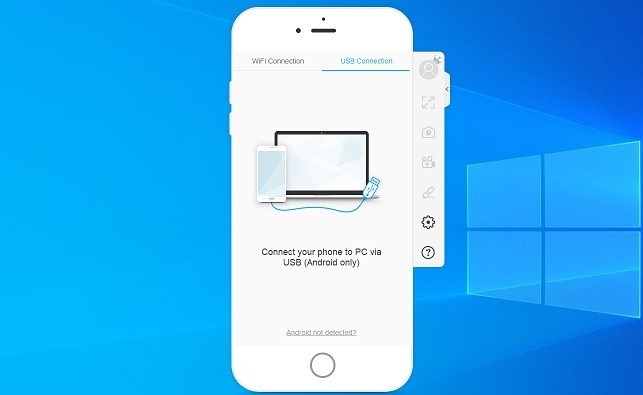
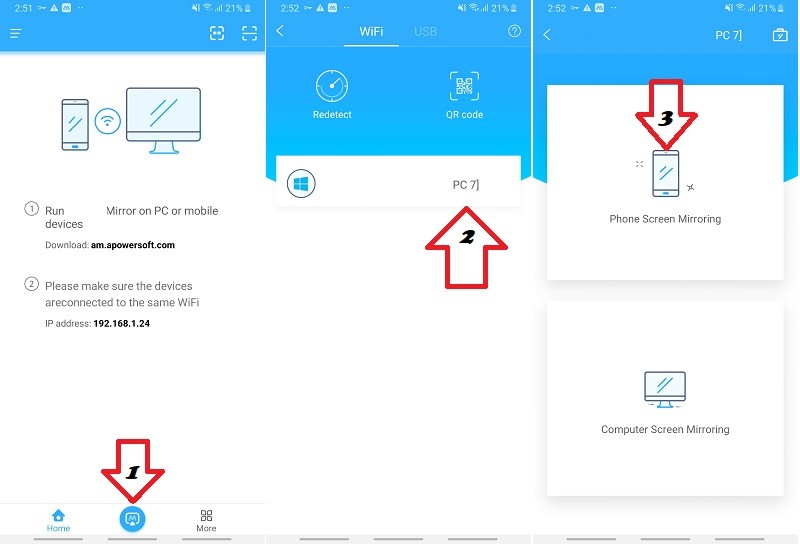
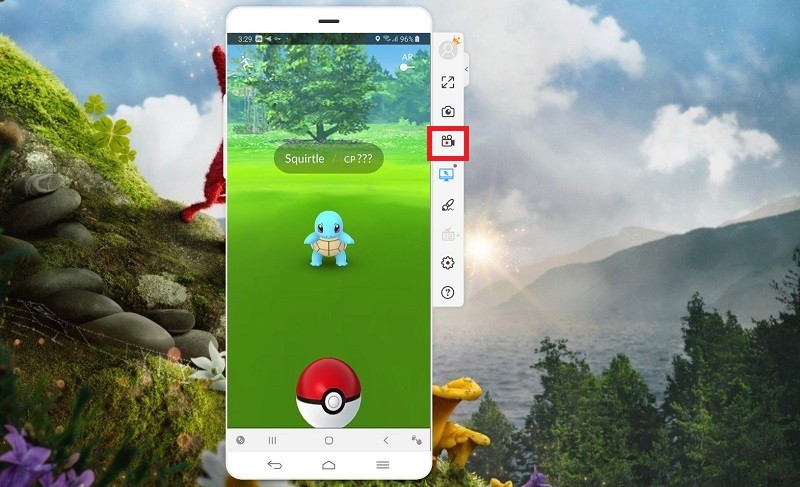
AceThinker Mirror is a versatile tool for you to project your mobile screen to computer via USB cable or Wifi. In so doing, you can enjoy the gameplay, live stream or just anything from your mobile on a much larger screen. Moreover, it comes with handy functions to record mobile screen, capture screenshot and even control mobile with keyboard (this feature is Android only).
Key features:
- Control Android with Mouse & Keyboard.
- Take screenshots.
- Record screen.
- Sync app data.
- Supports Android & iOS mirroring.
System Requirements:
Windows 10/ 8.1/ 8; Mac OS X 10.10 and above
Publisher:
Acethinker SoftwareHomepage:
https://acethinker.com/mobile-mirrorFile Size:
158 MB
Licence details:
1 year license
Price:
$39.95
Featured titles by Acethinker Software
A handy tool for you to record Windows/Mac computer screen along with webcam, sounds and more. It provides a robust toolbar for you to control over the screencast while you can annotate on screen in real time. It also features a scheduler for automatic screen recording, video converter, built-in player and more.

AceThinker Online Video Downloader enables you to download videos from 100+ platforms by simply entering the link. It’s 100% free with no restriction to duration of the the video or others. Within a few clicks, you can save the video in the desired resolution and format in a few minutes.

A collection of free PDF converter apps for you to easily turn PDF documents into other formats including JPG, PNG, Word, PPT, Excel and so on. These tools also enable you to publish various files into PDF with pages arranged in sequence.
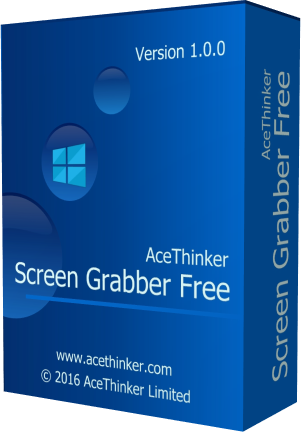
The online app which provides screen capture, image editor and uploader. Simply click to launch this app from your browser and you’re able to capture any part of the screen with ease. You can also touch up your screenshot before saving it to local drive or sharing via social network.
GIVEAWAY download basket




Comments on AceThinker Mirror 1.4.8.5 (Win&Mac)
Please add a comment explaining the reason behind your vote.

iPhone app giveaways »




Android app giveaways »





Hello Everyone,
Thanks for your interest in AceThinker Mirror (Windows & Mac). On behalf of tech support team, we would like to express our sincere gratitude to you. In order to help you better use this tool, we just place this post here with useful guides and more. Also, if you have any suggestions or questions regarding this product, you could either send your feedback here or post in the support center as mentioned below.
Note: Please follow the instructions of Giveaway of the Day to install this software on your computer. Once registered, you will get a full license with free update for one year. Please beware that it’s for one year only, but we provide free tech support for you during this time.
Important!
Learn how to register this software (choose one that suits you below)
3.Registration guide:
https://acethinker.com/mobile-mirror/how-to-register.html
3. Step by step text guide:
• Get installation file as well as instruction file from Giveaway of the Day (click the green button at the beginning of this web page), and then install the program properly on your computer.
• Follow the instruction to obtain keycode from AceThinker campaign page (https://acethinker.com/giveaway). Once clicking “Get giveaway Version” button, you’ll see a pop-up window which contains keycode.
• Now go to run the software, click “Active” on the welcome window (or click the user’s icon on top-right menu), and then enter your registration keycode directly into the field.
• Click “Confirm” to finish your registration and enjoy!
User Guide:
https://acethinker.com/mobile-mirror/how-to-use-acethinker-mirror.html
IMPORTANT: Don’t worry if you’re not able to register the software, just send your email address associated with the user account to us and we’ll help you unlock it. Our support team will help you within 24 hrs: support@acethinker.com or https://acethinker.com/support/contact-us.
AceThinker Support Team
Save | Cancel
After reading the comments I think I will stick with BlueStacks, free and dead easy to setup and run.
Save | Cancel
Not ready for Prime Time. Not by a long shot.
Save | Cancel
Yeah, I did get registered, but what a mess !!!
Save | Cancel
I have tried a number of times to activate the program. I get a verification code but no activation code. I've spent too much time trying to get the program to work after installing it. Program removed.
Save | Cancel
I am having trouble getting this to work. I downloaded it from here but I don't see anywhere to put in the code at. Also couldn't find it in google play store. I read one of the comments to use apowermirror. I installed it but I don't see what else to do. I enabled debugging. My phone is connected to my Windows 10 pc. I am so confused right now and I am afraid I will not get an answer tonight and it will be too late to activate it because it runs out in a few hours. Please someone help me. Thank you.
Save | Cancel
Linda Walker, please send an email to support@acethinker.com and we'll help.
Save | Cancel
I have an iPhone 11 Pro Max and an HP Pavilion laptop. I installed the software on my laptop and installed the ApowerMirror app on my iPhone. When I open the app and click on Mirror it says swipe up to get to the Control Center. But on my phone you swipe down for the upper right corner. And then there is a Screen Mirroring link. But when I click on it it just spins on and on and doesn't show any devices. It's not working. Thanks for any help.
Save | Cancel
BCE, And when I try to scan the QR code it just brings up a search in Google for that and doesn't find anything. And when I click on more solutions or whatever it is it goes to you site and brings up something else not related to this. Maybe you didn't think all this through. Doesn't work.
Save | Cancel
Nevermind. Somehow it started working now. I rebooted my laptop and restarted my phone before and it didn't work. But now it is.
Save | Cancel
Now I turned it off and back on and it's not connecting. Oh, well.
Save | Cancel
I can't find Ace Thinker Mirror app in Google Play either. Can the software company please tell people how they find this app as it appears to be a repeated question? Activated program no problem, just be careful to follow all instructions (agree with all it's way more complicated than most programs!). I'm on an iphone 6.
Save | Cancel
Maddy, please send an email to support@acethinker.com and we'll help.
Save | Cancel
To emphasize what hg said in comment #9, go to play.google.com, download and install "ApowerMirror - Mirror&Control".
That worked on my Samsung S9.
Save | Cancel
I am very interested in using this. But, I can not find where to put the registration key> Please help.
Save | Cancel
Morgan Pierce, please send an email to support@acethinker.com and we'll help.
Save | Cancel
Wasted a good hour trying to get this to work before eventually giving up. Software should work straight out of the box and (depending of the software) allow you to tweak it. Not install it then have to contact support, wait for them to come back to you with a possible solution, which might or might not fix the issue(s), hate to say it but this product isn't really ready for general release yet.
Save | Cancel
Well I made the decision; it wouldn't connect so the app and the windows program are uninstalled.
Wasted an evening on it.
I remember MyPhoneExplorer I had on a previous Android mobile, it was a mature product that did all required.
Save | Cancel
If I can't get it to work soon, I'll uninstall.
I've managed the code for 'full-feature one year'
I looked in Windows Firewall for "ApowerMirror" as in the troubleshooting, but that entry is absent; however "AceThinker Mirror" is present and allowed.
My PC is on "The Same Network" as the Android phone, but the PC connection is WIRED, that shouldn't make a difference surely?
The Android app displays the PC's name for connecting to, but on the PC clicking the 'Mirror' button doesn't initiate mirroring.
Save | Cancel
I'm sure there are many reasons for this application use cases, but for simple linking and screen casting access to Android phone, I use "Your Phone" in the Microsoft Store for Win 10.
Save | Cancel
Once installed and registered the software does a great job of mirroring my Android LG G7, including the swipe jestures, and keyboard input, so I'm quite impressed! Regarding the setup, after reading other's comments below i offer a few tips: Once you run the pc software, connect a USB cable to your phone, and enable USB debugging the software should transfer the necessary app to your phone (you don't need to visit the app store) and you can start the screen mirroring in trial mode. As the registration instructions explain, go the the user icon, and select login - this will then take you to the "create an account" screen which will then allow you to enter your giveaway key to upgrade to VIP mode. Hope this helps!
Save | Cancel
Learning more as I go... I have also found that USB Debug must be enabled, and USB connnection type must be set to "Photo Transfer"
Also, the app can also be downloaded from Google Play, under the name ApowerMirror-Mirror&Control.
Save | Cancel
I couldn't get this to work on 3 different phones and 2 different computers. I went directly to the provider's website and tried installing it from them to see if the GiveAway version was buggy. No luck there also. I have been installing and evaluating software for about 20 years and rarely found anything I would not be able to find a work around solution, but this appears to be one of them. I did find easier mirror solutions online, so I will uninstall this and continue to use other applications instead.
Save | Cancel
I can't get it to work. I'm a fairly experience computer user. I was able to get it installed on my desktop and registered. but getting it onto my phone, an android, is proving to be a problem. The app "acethinker mirror" is not to be found on google play. Interesting sounding software, I'd like to try it.
Save | Cancel
mike, there's no need to search for the mobile app on Google Play or Apple store. You just need to install the desktop version on your computer. Once done with installation, please run it and follow the wizard to connect your mobile to computer. It will then automatically pop-up a QR code/link for you to install the app on your mobile.
Save | Cancel
This is exactly the same software as Apowermirror (same interface, same logo etc."Apowersoft is our cooperator") currently given away at another website, except on that one I could not get the PC mouse work on the phone screen. This one works very well, no issues. The registration process is a nag, but manageable, I could not find Acethinker mirror on google play, you have to install it from the phone screen menu. USB debugging has to be enabled on the phone.
Save | Cancel
hg, Does this work on an Android tablet or just a phone?
Save | Cancel
Rubycat, I only tested it on Android phone
Save | Cancel
After about 20-30 steps and creating an account and trying to find out how to download the Google Play app ( it's not there or anywhere) for my phone etc etc I got it to work. I have a few screen mirror apps and download GOD programs almost daily. Other than the super painful process to get it to function keep trying. When I was screen mirroring a photo I could draw on that photo etc pretty cool.
Save | Cancel
Their support does not even mention AceThinker Screen Mirror so I can't ask what or where the Android App is. Very complicated registration too.
Save | Cancel
Rubycat, sorry for the issue. Any question submitted via online form or email (support@acethinker.com) will be answered by our support team, thanks.
Save | Cancel
Difficult registration Process. Cannot even find the option where to put the Code in.
Save | Cancel
Dee, please send your question to support@acethinker.com and we'll help you activate it.
Save | Cancel
Dee, Really difficult but I did do it. I can't finAceThinker Screen Mirror app on Google Play Store tho.
Save | Cancel
Has anybody used this app
Save | Cancel
I wasted so much time on this. I cannot get it to work, why make it so difficult to activate?!?
Save | Cancel
Miss Pita, please send your question to support@acethinker.com and we'll help you activate it.
Save | Cancel
AceThinker, It is difficult to "everything" and I still can't figure it out. No app that I ca find for Android. I am on a tablet, not a phone, and it will not connect.
Save | Cancel
Miss Pita, As mentioned by their support team, just go to https://acethinker.com/giveaway and you will get the code in the next step in just one second which you have to paste in the Get VIP section of the software.
So, the registration process is fairly easy, unlike some other giveaways.
Save | Cancel
What happens after a year?
Save | Cancel
Hi there,
I’m not sure if I wasted my time for it?
After complex registration process,
Its not recognizing my wifi, (and I can’t use my USB as an option),
Its not recognizing QR code either.
What else can be done to recognize my wifi, (and I can’t use my USB as an option),
and QR code???
Please advice.
Save | Cancel
shaw,
You need to either plug your phone into your computer and install the app on your phone. My problem is that I could not find the app for my Android in the PlayStore.
Save | Cancel
CP,
I installed and registered it ok. downloaded aps from playstore ok.
I use my phone/sim internet thru wifi into my laptop.
this AceThinker Mirror opens up fine, it accepts the code too;
but
Its not recognizing my wifi, (and I can’t use my USB in my laptop as an option), and
Its not recognizing QR code either.
need some help with recognizing my wifi and QR code.
Save | Cancel
CP, I can't find AceThinker Screen Mirror app either.
Save | Cancel
shaw, please send your question to support@acethinker.com and we'll help you with connection issue.
Save | Cancel
CP, I could not find AceThinker Screen Mirror app either.
Save | Cancel
Rubycat, normally the app will be installed on your mobile automatically when it's connected to your computer. The software on computer can recognize your device and remind you to install the mobile app. You may find detailed instruction at https://acethinker.com/mobile-mirror/how-to-use-acethinker-mirror.html. However, if you cannot work it out, please send question to support@acethinker.com for further assistance. Thanks.
Save | Cancel
AceThinker, I also messed up with the same wifi network connection issue, please post if there is any solution in this reply.
(my Android can detect my PC, but it always prompt "please grant mirroring permission from your PC" at the bottom while try mirroring, I didn't find any option about this in PC-Windows 7)
Rubycat, after installation and open the software, it will ask you to install the app for your iPhone/Android with QRcode / URL, just follow it and download from iTunes/Play Store
Save | Cancel
Will Chan, I have not seen such issue before, would you please send a screenshot to support@acethinker.com? I may need some time to check with the developers and let you know. We provide tech support for all giveaway users after this campaign and in future, thanks.
Save | Cancel