Every day we offer FREE licensed software you’d have to buy otherwise.
Giveaway of the day — Your Monster Voice 1.0
Your Monster Voice 1.0 was available as a giveaway on June 28, 2009!

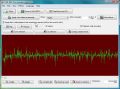
Create you own crazy voice effects. Speak into the microphone and hear your voice at the same time through the speakers. But it will not be your voice. It will be the voice of a monster, killer, alien or any crazy voice you can think of. You can save your recorded voice as mp3 or wav file. You can read in existing mp3 files or music CDs.
The program ships with a couple of predefined effects. But you will be able to create new effects using simple formulas to map one frequency to another frequency.
The formular for the build in robot voice is:
x*(1- stark)+((len / 2-1-x)*x / (len / 2))*stark
for example. Simply try to change the existing formulas to create your own effects and your own monster voice.
System Requirements:
Windows 95, 98, ME, NT 4.x, 2000, XP, 2003, Vista
Publisher:
CAD-KAS Kassler Computersoftware GbRHomepage:
http://www.cadkas.com/monster-voice.phpFile Size:
850 KB
Price:
$19
Featured titles by CAD-KAS Kassler Computersoftware GbR
Edit PDF files now! You can write annotations, add text, change the text (correct spelling errors, change old phone numbers...) or delete words completely. Add or delete pictures and vector graphics and add text in any font you want! Select, move and copy and paste text, picture and vector graphic objects with the pointer tool.
Comments on Your Monster Voice 1.0
Please add a comment explaining the reason behind your vote.

iPhone app giveaways »





Android app giveaways »





Love it! I just wish it had more presets. I think it turns my voice into a male one very nicely. Doing video editing and other projects, it's nice not needing a full cast. Anyone know where I might find some more ready made formulas?
Save | Cancel
It worked just fine on Vista Premium. A neat toy.
Save | Cancel
Badly coded. I downloaded it, but I think, I'll remove it.
Save | Cancel
The setup did not install in my machine (Windows XP Home SP3).
First, the screen showed a wrong folder for the source file. But irrespective of specifying the correct folder for the source file (viz: setup.exe), extraction of file after file showed an error message. Ultimately even though there was NO file extracted in the specified target folder the program announced 'successful activation' !!!
Great Giveaway !!!
Save | Cancel
It is ok. Very useful for people who are writing some simple games or game modules as a hobby. Re: formula changing: it can not be easier than it is now. Just double click on it and change any numbers, for example. I actually liked this program and already used it in one of my apps(no, not commersial or for any kind of profit). Thank you, GAOTD.
Save | Cancel
Application stops after some time.Vista home.
Save | Cancel
For those interested, I wrote the authors of the program.
These are the variables:
x
stark
len
random100
The only true variable is the mathematical formula you decide to use with the variables.
Hope this helps.
Save | Cancel
@17 & others wanting to view a ? website
I too am warned off some websites that I would like to visit without fear. "AdMuncher" seems much more sensitive to unknown websites than do any of the firewalls or antivirus, spyware, nondescript Malware programs that I have tried.
My solution is been to use "Sandboxie" because you can close the program whenever you wish and not have to reset the computer to return to unprotected functions. I have used half a dozen other virtual programs that work in a similar fashion but most require resetting the computer to get back to normal computer operation. The "Acronis True Image" program works in a similar fashion to Sandboxie in that normal computer operation can be restored without rebooting the computer.
Save | Cancel
Although I had some initial challenge is on my first install, I read downloaded it from the mirror site and reinstalled it and it works just fine. I'm glad I was able to get this program working it's a lot of fun. Thanks!
Save | Cancel
Thanks! I host a playstation podcast so this could help! thanks!
Save | Cancel
The novelty wore off after about 30 seconds - sounds like a Chipmonks song remake - and a bad one. No problem with it crashing, closing, etc (XP sp3, installed ok too). That worked ok. One noticeable problem - it didn't ask if I wanted a desktop icon during install - so I had to find the program after and make my own desktop shortcut. I'll probably keep it, but not sure why...
Save | Cancel
useless program.. did not work properly on my XP SP2..
Save | Cancel
Well it works about 2 minutes and then it crashes. When it does work, it's kinda cool, but with out of all of the crashes so far, it's not worth the trouble.
6 crashes in 5 minutes on Vista 64. I'd be a bit upset if I paid for this, but since it's free, I suppose I can't complain too much.
Save | Cancel
Installed and ran on Vista64.
My Lord what a complete waste of MB's. It comes loaded with a few presets that sound virtually the same. Then asks you to edit a Algebraic formula to find other sounds without having any idea of what the formula does or what part affects what.
No uninstall, but windows uninstaller did the job.
Save | Cancel
For the developer - Thanks for the offering, but it crashed on two different systems, one with Vista 32bit Home Premium and one on Windows XP Pro. I was hoping it would work on one or the other. Both systems have Creative sound cards for what that is worth.
Thanks anyway and good luck.
Exploro
Save | Cancel
By the way, anyone who wants to change their voices can do that by using "Pitch change" [+ FX] with one of the many Audio editors offerd here lately.
Save | Cancel
Very cool...Will you also be offering the document editor that makes your letters look like monster or alien handwriting? I'm trying to complete my entire Monster/Alien program collection.
Save | Cancel
I really wish there could be a program like this for professionals who would like to do their own voiceover work without the expensive option of having to hire a pricey voiceover talent for each project/product that comes along. There are certain voices that are upbeat and sell a product better, male or female, and wish I could speak into the mic yet have any other voice I want, come out in the recording.
I don't want monster voices. How incredibly useful a normal everyday set of professional voices would be. I have paid up to $70 or so dollars for this quality aim in mind, and find just jokes out there. Please create something for the professionals. Normal upbeat, cheery voices programmed, where I speak and sound like them. Willing to pay for quality. I read through all the posts here to hopefully glean some from other's comments of knowledge about any other such program in existance.
This is not a joke kind of software, but desperately needed for showing and speaking to people over the web in a personable way to sell something through video as a business, where people respond to easily being shown how to do something, rather than read a long sales letter that could leave room to interpretation, than just showing them easily through "appealing" sight & sound.
Save | Cancel
dont know if anyone else got this problem but after install keeps on giving me a runtime violation and program is all in german . will not let me change to english . had to uninstall . pity really wanted to try it !
Save | Cancel
Installed on Windows XP Pro SP3 no problem but I can't get the play while recording feature to work, anyone else having this problem? it is a fun program though, thanks GAOTD.
Save | Cancel
The idea sounded silly enough to be fun. I installed it. Tried mic input --> terrible quality / nonfunctional. Tried opening an mp3. The wave image appeared but playing (regardless of settings) still bleu. Blasted the code off my disk. Thanks anyway GAOTD, but not this time.
Save | Cancel
Installed in dual boot eee 1000HE running Windows 7 and XP Home sp3, and in a couple of Acer and Asus laptops running Vista Ultimate, and mic worked everytime with default settings, just hitting the record button. If I had a mic for my desktop, I would install this there too. The voices are novel but reproducible in any audio editor, and there isn't much in the way of options, but it's still fun to play with.
Bottom line, just another one of those apps you have to try at least once, and then keep installed because you never know when you might have something useful to do with it, like make yourself smile.
Save | Cancel
Total crapola program! Wouldn't work, would close. Had to end program through Task Master. Uninstalled post haste. My advice avoid.
Save | Cancel
Installed okay on XP-SP3 but nothing but static (same as #22 above) when I tried it.
:(
Thanks anyway GOTD.
Save | Cancel
Program didn't pick up my voice, only in spurts. Made sure it wasn't a hardware problem by trying Windows' Sound Recorder, and it worked fine. I was looking forward to playing with this program too.
Save | Cancel
#28 - And I don't have one... :-)
Save | Cancel
How do you save something without have to close the whole program. There has got to be a better way. Does someone know how?
Save | Cancel
Vista and Win7, installed, works. For what it does, it is OK. Don't think I would ever buy this kind of software, but it does work.
I can use it for my Halloween voice over intro for my annual light/music show.
Save | Cancel
installed fine on xp media edition but CRASHES almost every time i record something. I think it needs some work, which means it isnt even worth a dollar. But thanks anyways
Save | Cancel
look for the other titles from this very company
they are interesting and useful as well.
Dr Nitin
Save | Cancel
Hey guys /....
Installed fine - but has lot's of problems working .....
The voice keeps stuttering on the Alien or any other setting .....
in other words the voice effect is unintelligible- even on a low effects setting
I don't think this is correct
system: windows XP, HP pavilion 3 GHz system
appeared to install OK
Too bad ... sounded like a lot of fun
Save | Cancel
Simple to use! Sounds good!
But I agree w/ # 13. No documentation on how to write new formula???
"Undo" button would be nice.
Save | Cancel
#2: FunnyVoice ONLY does pitch-shifting. And for the record, CNET didn't seem very impressed by it. But as you said, it IS free.
#12: Let me guess... the kids have been making you cranky today, huh?
#17: Don't know why ZoneAlarm complains about the maker's site. I use Comodo Personal Firewall, avast! antivirus, and Spybot S-n-D and none of them complained about the maker's site in any way (nor does the MS Anti-Phishing tool in IE). This sort of thing is just one of the many reasons I dumped ZoneAlarm years ago.
#25: Agreed: MorphVOX is quite fun.
#27: Blaze Audio Voice Cloak can ONLY process real-time microphone input: it CAN'T apply effects to pre-recorded files.
If you're working with recorded files (as I usually am), I'd also partly recommend audio4fun MP3 Player Morpher (http://www.audio4fun.com/mp3-player/mp3-player-morpher.htm), which actually can load WAVs as well as MP3s, but it's a bit quirky and can go 'strange' sometimes requiring close and re-open.
OK, back to today's giveaway. It's not a bad little morpher program, and there are some extra effects in the menus (like speed up, slow down, play backwards, add echo, etc.
To everyone baffled by the formulas, try this: click New Effects..., New Effect..., Edit Effect... then look at the dialog box, which explains the variables in the formulas. If you don't want to change anything, just cancel and close your way back to the main window. Naturally, this type of effect construction isn't for everyone, but at least you now know what all the variables mean, right? (Lesson for today: please do TRY everything in a program before you maon that it isn't documented properly!)
For me, this is a keeper. I do lots of radio and ad. production work (but not for profit, it's for community radio) and any little tricks I can add to my bag (unlike #28, I don't have the money for a Digitech effects processor :P) are welcome. If you do the same sort of thing, I would recommend that you grab this GOTD while you can. I hope this answers the question of why there is a good REASON for having and indeed creating programs like this!
Many thanks to GOTD and to the developer for sharing this one with us!
Save | Cancel
I tried the program and uninstalled it.
After trying the program I found out better results are obtainable and more adjustable in Winamp by enabling it's plugin to change the audio, it's also better in Audacity by changing the pitch, speed, bass, etc. Both Winamp and Audacity have nice little sliders without having to learn some new formula, and they're both free everyday.
The LAME mp3 encoder (lame_enc.dll) that's included is crippled which is a funny thing to have to write about the fully customizable LAME encoder. Your Monster Voice only allows it to encode at bitrates up to 160 kbps, why no vbr, abr, or joint stereo?
I think if the developers unlock/unrestrict LAME's full potential by allowing vbr, abr, joint stereo, and what ever bitrate the user desires, and put in sliders to control pitch, speed, etc., they'll have a more polished program that justifies it's everyday price. That and please allow the changing of the program background color.
Save | Cancel
Bahahaha. Why? Regardless of the inanity of the product, I'm totally downloading it.
Save | Cancel
Wow, so it's like every plugin to every other free and good sound editing program. No thanks.
Save | Cancel
Downloaded and installed ok on windows 64 bit...
seems a bit spotty...kinda plain jane and iffy.
but at least i did download it and use it BEFORE i wrote a comment about it...unlike #12(Mr.Reviews)..(irony).. as others do also.
Also i wanted to comment on yesterdays (yet another) video ripper/converter/aurthorer..But it's still running...
Thanx as always GAOTD for the free stuff....
Save | Cancel
#17 - My zonealarm allows me to their site and does not warn of such spyware.
Save | Cancel
i agree with #23 (Ian)..."sounds pointless, i'm downloading it"
that made me laugh... thanx
Save | Cancel
It's funny, especially the Alien voices, but it don't worth 20 bucks!
Save | Cancel
Works on Vista 64. Seems to pick up so much ambient noise that the voice effects are overshadowed, but of course I am just using the built in mic. Might be nice to try with little kids, but I would suggest that the price is way too high for so simple a program. $10 or less seems more fair.
Save | Cancel
Crashed on first attempt to use. The sound effect is rather silly and options for modification dirfficult. This is not one for me
Save | Cancel
I don't have anything that does this! WOW! Want some fun? Run a Mariah Carey song through it. When you finally stop laughing, go relieve yourself in the bathroom. Those with no sense of humour should avoid this one. I will find a way to put some of these sounds on my web site.
Happy Dae·
Save | Cancel
Well, at least there doesn't seem to cause many complaints about the program installing on Vista. Oh! I forgot to look at the top of the page, unlike yesterday's give-a-way, this one says that it is Vista compatable, but I better not look at the CAD-KAS Kassler website because it might not be Vista compatable there.
Save | Cancel
Nice to see a very different kind of programme here on offer today.
Not for me, though, this one, but with 365 days in a year there's more then my computer can handle anyway.
Thanks.
Save | Cancel
Well, it's a bit buggy yet. Crashed the program one way or another almost every time on Vista Home Premium X64. It's much better than My Funny Voice and has a lot more potential because of the formulas and the ability to put random values into the effect - though many of your formulas are going to result in only clicks and static as the results put the frequencies out of reproducible range. Also being able to apply different effects to different portions of the recorded voice.
They could really use a "New" option that would clear the old recording. And an ability to undo the application of echo and cross-fade. Also, I'd rather see the button layout done vertically rather than the right-to-left layout they've got now.
I think this program is going to be a lot of fun after another couple of versions.
Save | Cancel
NICE SOFT....HA HA HA..SO FUNNY...
Save | Cancel
#2, Based on the docs for "Funny Voice", that is more of a pitch changer than adding the additional harmonics and algorithmic processing that this is doing, and did not claim to be able to open files, streaming audio only - without having played with it, I'm not sure I would consider it competition.
Some formant changes available, and the ability to create your own algorithms is a plus, However: Definitely in the "toy" class. As noted by #28, Digitech, TC-Helicon, and others have better audio quality (lots of pops and clicks coming through on this) hardware and software that is significantly easier to use (you can actually control the harmonics, formant, pitch adjustment, etc).
I was unable to open a standard wav file created by SoundForge. MP3 worked fine. Otherwise it installed and ran fine on XP SP3.
I'll have to give it a thumbs down. It's not good enough for a pro-level user, and too hard to use for a sandbox toy. Lack of docs is an absolute killer. It just doesn't fit nicely into any demographic, and doesn't do enough for the retail cost.
Save | Cancel
Interesting, but not brilliant.
The effects seem to be soley, or at least predominantly, based around a Ring Modulator which means that anybody with a decent audio editor (Audacity, Audition etc) can recreate these sounds without the need for complex formulae.
Just open your audio editor, load a Ring Mod (onboard effect or vst) and tweak the controls.
Try saying "I am a dalek" into both this app and a Ring Mod... :~D
Save | Cancel
THis products okay since its free. The cool effects like it said are just too slow.
Save | Cancel