Every day we offer FREE licensed software you’d have to buy otherwise.
Giveaway of the day — TNT Screen Capture 2.1
TNT Screen Capture 2.1 was available as a giveaway on May 7, 2008!

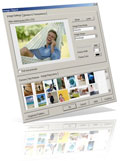
Create dazzling graphics on the fly with TNT Screen Capture! While you capture it, TNT enhances your screen shot and applies a professional, photorealistic touch.
And despite its many features, it is so simple to use that you can't do wrong. 3 different screen capture modes cover everything from application interfaces to popup menus. What makes TNT stand out from the myriads of capture tools available, is the quality of the built-in image filters and add-ons. TNT Screen Capture is a very versatile tool, helpful in many situations. What you can do with this software is only limited by your own imagination.
NB: TNT 2.1 is not completely Vista compatible, because it includes a screen capture wizard that is based on a Winhelp (.hlp) file. That help file format is not supported by Vista anymore, at least not unless the user manually downloads and installs support for this help format. This is a limitation, but not a big one: TNT works without wizard guidance just as well. Apart from that, TNT should work as advertised on Vista. The setup file, which used to deny installation on Vista, now warns that the OS is not supported, but lets the user install though.
System Requirements:
Windows 9x/ME/NT 4/2000/XP/2003 Server/Vista
Publisher:
EC SoftwareHomepage:
http://www.tntscreencapture.comFile Size:
5.79 MB
Price:
$39.90
Featured titles by EC Software
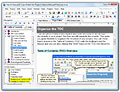
Create Windows help files and technical documentation with Help & Manual! Help & Manual is a stand-alone full featured help file editor for HTML Help, Winhelp, HTML pages and PDF user manuals. Instead of wasting countless hours editing your help files you can focus all your energy on actually writing your documentation, so that all your working time is productive time. Technical documentation has never been easier!
GIVEAWAY download basket


Comments on TNT Screen Capture 2.1
Please add a comment explaining the reason behind your vote.


iPhone app giveaways »





Android app giveaways »




It good but for free MW Snap is better for most thing's yes it will do some thing's like built-in image filters you can do that with out this.
Save | Cancel
Whoa! Just got back here in time to grab this nice little program. There's a review at this site:
http://www.writersua.com/articles/capturetools/index.html
along with 6 other screen capture tools and a comparison chart. I believe it is the one JM (#129) was talking about. It convinced me to try it out.
Thanks again GAOTD for another fine offering. And thank you to EC Software.
Save | Cancel
thumbs down.
Not very intuitive. can't delete objects that still float over the main image. Screen capture process is very easy. The filters are too irregular looking, and the torn paper is the same "shape" every time. No variation, which will drive the eye crazy having to look at it all all the time.
for screen caps I recommend either IrfanView or WinSnap.
Save | Cancel
Thanks, this is great software. Much more than just a screenshot tool, it's a graphics editor as well with lots of special effects, you will be sorry if you missed this or passed it by as I almost did. Thanks Again.
Save | Cancel
#119--the proper spelling is "lo and behold," not "low," and the correct word (unless you intended a personal insult) is "complaint," the beef or gripe, and not "complainant," the person complaining. The original beef or gripe seems to be well grounded on principles or evidence, so just because you don't like it doesn't make it invalid.
#129--your link ("Click Here") does not appear to be working.
Save | Cancel
Installed fine on XP. Had to restart (probably because I had too much other crap going on at the same time)
Went thru the wizard to try it out. Scared the s**t out of me when it captured the screen!! My speakers were turned up kind of loud, and it made the shutter sound and then the crowd roared >:0 Wasn't expecting that!
Clip looked really good. Think this will be a keeper. I got Evernote when it was offered, but I haven't really figured it out too well. I'm thinking today's program will be much simpler.
As always, thank you GOTD.
Save | Cancel
Hi, I'm JM. I was #129. For some reason, the link I posted didn't work on that particular post. Hopefully, It will function properly this time 'round. My apologies, folks! :)
To get the full picture on TNT Screen Capture (pardon the pun), click here.
Save | Cancel
Crashed my system. Running xp sp2. Uninstalled and everything ok.
Save | Cancel
I'm really liking this. The edge features, like torn paper and drop shadow create some really eyecatching effects. I use OneNote screencap all the time, but this is really a step up. Thanks!
My XP Machine install went flawlessly. After installing on my Vista Machine it works, but Help is available, unless you spring for Microsoft's Help Patch, and Microsoft Genuine Advantage nonsense. Maybe there's more how-to detail on the publisher's website for Vista users?
Save | Cancel
This is the best program you must download it it will be for your pleasure and very tidy and nice. Please be taking this great great softwares. thank you thank you
Save | Cancel
I can capture a free region (2nd optipn), but not a window or fixed region (1st or 3rd option). I just don't get a red rectangle at all.
Has anyone else had this problem?
Save | Cancel
Hi all,
This works fine on my Vista PC after I download WinHlp32.exe for Vista from Microsoft. The link to the direct download is here: http://www.microsoft.com/downloads/details.aspx?FamilyId=6EBCFAD9-D3F5-4365-8070-334CD175D4BB&displaylang=en. You also need to check out the Microsoft KB 917607 for Windows Server 2008 and other known issues at: http://support.microsoft.com/kb/917607.
Thanks,
Jaloola
Save | Cancel
I haven't used this program much, just tinkered with it a bit to see what was required to take a screen shot, it's not as "instant" as GrabClipSave which is my current screen shot program (just hit print screen key and BAM - saves the pic, but you do have to crop it later). I do like choosing the size of the screen shot and I do like some of the effects you can make with this program, so I'm keeping it around. My only concern was it stating: Congratulations on your successful screenshot! I bet you're so impressed you want to buy TNT now! Right?
I can show you how... How to buy TNT... <-- which makes me think I don't have the full version but seeing others comment about receiving the same message I don't feel so left out ;-) I'm using it on WinXP(SP2). Thanks GOTD and the makers of TNT Screen Capture (I changed the folder name - from the company name to TNT Screen Capture when I installed it as a previous poster mentioned, I also don't remember company names but I do remember program names).
Thumbs up!
Save | Cancel
It's in the Task Manager, under TNT.EXE, that how I shut this thing down. The right way - hit the ESC key to cancel the capture order first - then you can click on "Exit" ect.
Save | Cancel
XPProSP2 working fine - a keeper.
#52, #114 Options Menu - Customize TNT allows selection of .jpg, .png amongst others and auto minimizing to tray setting gives you fast serial capturing.
#83 thanks for the heads up - think I'll continue to hold off on SP3 for a while more.
Save | Cancel
Does anyone know if you have a choice as to whether you captures the whole screen or just the active window?
Not too much time left to install, so I'd appreciate a comment from anyone who has played with it.
Save | Cancel
The program is another nice give away which makes 2 in a row so thank you GAOTD & EC Software.
Save | Cancel
It will not capture screen! Just screen capturing of the window bars, but not of a web page. Downloaded and installed easily, but does capture web page or any part of it, just the window bars.
Save | Cancel
Wow, why doesn't this thing just have a mode to capture the contents of whatever is being displayed on your monitor?? That seems like pretty basic functionality that this software is ignorant of. It's nice for specific functions, but it fails at a basic, general screengrab... It would sure be nice to find one of these that will actually just do everything. :)
Save | Cancel
Worked fine on Vista for me after installing the winhelp executable from the Microsoft site. Saves the hassle of pulling up Paint to save images if you usually do the old 'alt-print-screen' for your captures. I tried it first under returnil, it looked OK, so installed. No complaints.
Save | Cancel
The following was from a Web site comparing various Screen Capture Tools. It includes tips on:
• What You Should Look For in a Screen Capture Tool.
• A comparative feature table of 7 screen capture
programs (including TNT Screen Capture).
• And it also gives a synopsis of TNT Screen Capture.
As well as listing its "Strengths" and "Weaknesses."
Below is a brief snippet of the TNT review:
TNT Screen Capture 2 (EC Software)
TNT has the least extensive and simplest interface
of all the tools reviewed in this article. However,
it is very well designed, and despite its simplicity,
offers a range of features and options that will
satisfy the needs of most authors.
To get the full picture (pardon the pun),
click here.
Save | Cancel
Sorry..it DOES NOT work with Vista and is like a tropical disease to rid.
Nice idea~~ too bad.
Who makes software not Vista friendly these days? hmm...
Cursed Vista
Thumbs down to the creater..thx anyhow GAOTD ..thumbs down
Save | Cancel
How do you shut this DAMN thing down? Every time I try to get rid of the program it wants to capture the screen, even the 'Exit Screen Capture'doesn't work, you can't click on it, it only wants to 'Capture it'. It's totally out of control.
It isn't in the Task Manager, so I guess I'll do a restart of my system to get rid of the thing AND THEN UNINSTALL IT!
PrintKey 2000 works flawless in the Background AND it's FREE all the time.
NO THANKS
Save | Cancel
Downloaded and installed easily, as most Give Away of the Day offerings. Using Windows XP, program ran fine and is worthwhile. But for quick screen capturing without a lot of bells and whistles, I will still be using the Gadwin PrintScreen program, which was also a GAOTD offering.
Thank you GAOTD!
Save | Cancel
Wow, this is an awesome screen capture program... the effects are amazing, especially the 3d ones. The graphics look so professional. A very easy program to use.
Thanks.
Save | Cancel
REVIEW - Installed and Tested, it's good - I will be using this as my secondary capture tool for a while as a test to see if it will beat my beloved ScreenHunterFree tool. It's 2nd because it's not fast to use when multi capturing.
++ One definite update / patch required immediately is:
Minimize to tray on press of the [Esc] key, "Escape" key.
Capturing needs to be FAST... imagine we need to capture many portions of one web page or presentation... would it be easy or hard with this application??
++ Have an option to not display the TNT window after capture.
++ New option: On canceling a capture, don't show the TNT window.
++ Add an option: Minimize to tray when clicking the "Close" button.
Secondary annoying multi cap method: Even if I capture a window, then use TNT tools to copy areas and "past as new image" (good thing to have)...
++ well the annoying part is Ctrl+i to paste as new image :o? (Who thought of that?) Ctrl+Shift+V would be much better, or Ctrl+B (must be a left hand short cut as my right hand is on the mouse :oP)
++ Add a "Customize Keyboard short cuts" window that works to speed up any menu item or option.
Very Cool - TNT tool works on any screen, note I have 2 monitors. This is a very good thing as some tools only capture from main monitor.
Without some of these simple options that are available in ScreenHunterFree this TNT Tool will be my secondary screen capture application.
:o}
Save | Cancel
Rubbish! I'll stick with SnagIt.
Save | Cancel
-deleted-
#117--that v. 5.3 of FastStone Capture was the last free version; it is now shareware. I use it to grab any size entire scrolling window.
Save | Cancel
Jing is a nice freeware. It doesn't have many options, but has the necessary tools..
Save | Cancel
As per comment 83:
“ERROR cannot start screen capture!”
It simply did not work on my set up (win XP). And it did not give a meaningful message so I could analyze the failure.
Uninstalled.
Save | Cancel
What world do you live in #114? I download, installed and checked C:\ Program Files. Low & Behold, the file on my computer is "TNT Screen Capture", not EC Software! How about that?
Might be, you installed it on Vista? Besides, were not in the 90's anymore. Many programs, good ones by known reputable vendors install in a folder with the company name. Examples: Webroot instead of Spy Sweeper & VS Revo Group instead of Revo Uninstaller are just two examples.
Whats the gripe anyway? Use it or don't! If you don't like how it installs, get rid of it, Complainants like this are not valid in any shape or form!
Program itself isn't bad at all. Simple to use on Windows XP Pro. As to installing it on my Vista systems, I wouldn't! If that needs further explanation, do some on line research.
Save | Cancel
This thing is a waste of money in my opinion. I can use window's built-in ctrl + print screen function and edit that with many of the freeware image editing programs to achieve the same effect if not better effects.
Save | Cancel
If you missed this, there's an freeware tool with less functions called FastoneCapture http://www.pcworld.com/downloads/file_download/fid,64857-page,1-c,downloads/download.html It's still useful as a screen capture tool and good enough quality. And it's free.
Save | Cancel
To Anya (#107):
A password for what? All you need to do is download, unzip, and click the setup.exe. This will install a full version of the program for you. No need for a password.
Save | Cancel
Minor Beef - I have a minor beef with this program & many others. I have not used enough to comment upon performance etc. My Beef is how the installer loads the program in Program Files. They load their program in a directory with the manufactures name. Way Back in Win 3.1 this was appropriate since FAT then could hold a very limited # of subdirectories. But, ever since Win95 this has not been an issue.
So why not load the program into a directory with program name rather than company name? Let's be honest. Other than M$, who knows or cares what the software developers company name is. If we need to access the program directory for some reason, we need to be able to find it in Program Files. Who remembers company names? Even if I buy 2+ programs from same company, it does not matter if each program is loaded in its own directory. I remember programs, not company names.
Save | Cancel
If they would just add scrolling capability to this it would be great
Save | Cancel
You could also try these alternatives:
press the PrintScrn key to capture the entire screen to the clipboard
press Alt+PrintScrn to capture the current window to the clipboard
Then paste into your word processor or image editor.
I can't imagine why I'd need a special program to do this.
Save | Cancel
I love this program!
I like it a lot better then Microsoft One Note 2007,
and it is sooo much better to use! It is neat how you can add
the 3d effects to it too. Thank you giveawayoftheday.com! This
is something I will be using for awhile now :-)
Save | Cancel
Just loaded TNT Screen Capture on windows vista ultimate 32 with sp1 and wind on like a charm., the program is so easy to use and you can do loads with it as it's my first time using it.
Save | Cancel
Installed well both under Windows XP SP2 and Windows Vista Ultimate.
This program is not Vista incompatible, per se. To get the WinHelp32.exe program that Microsoft refuses to let vendors distribute (since the Vista release date) for Vista or Windows Server 2008, use the link below to the official Microsoft "We've decided to make it hard for developers who don't want to update their tools to our new pricey tools" web page:
http://support.microsoft.com/kb/917607
This is actually a pretty nice utility. The above rant aside, I would advise the developers to make an embedded web page or a Windows property sheet wizard and stop saying they are incompatible.
-The program allows you to capture regions of the screen, with or with menus and cursors.
-It is easy to use and gives you quick special effects that other products will make you work hard to create.
-Built in editor allows you to work with your captures and even put multiple captures in the same document.
Cons:
-When CTRL+Click is used to initiate capture, you need to avoid manipulating the GUI with a control-click. Timed setup or configurable click would be nicer.
-Using free region capture doesn't allow you to open menus, etc. It works on first click. Why not support CTRL+Click here, too. Inconsistent.
-Multi-monitor support requires to you run the program on the monitor that you want to capture from.
-The TNT icon gives no clue that it is a screen capture utility. (Okay, that is cosmetic...)
SnagIt! will do a much better job and be more versatile. SnagIt! costs $38.95 and TNT costs $39.95, but you cannot argue with today's price. To compete, the program should sell for less than $19.95, but that's my opinion. Thanks GAOTD!
Save | Cancel
Have tried several times to download TNT Screen Capture 2.1 and it downloads about 1,945 KB and gives "download complete" box. Only file in zip is "Setup.exe" showing a size of 6,034 KB. There is no "read me" file or "activate" file that is normally included. Also get an error message stating an error has been encountered and it has to close.
Save | Cancel
@voidScribe #77, #102:
The software was to be adapted from the demo on the original site.
There the remark about buying does make sense.
But in the adapting proces for GAotD they must have forgotten to remove the buy remark (or if you want to reinstall, it makes sense afther this give away day).
Save | Cancel
I didn't receive a password, is one not needed for this wonderful application?
Save | Cancel
Installs and works fine on Vista. A neat little toy but kind of useless. In the end though, I'll be keeping it because I know that if I uninstalled it then I'd have a need for screenshots haha. Thanks GOTD!
Save | Cancel
I like it.
Save | Cancel
@TekBudda #90:
GAotD negociated to give away licenced software for just one day.
This is why your setup-file has to check if this is the right day.
If not the right day, it will not setup anymore.
The check wil not be against your pc-clock because you could tamper with the date. That is als why you MUST connect through the internet with a GAotD-server to verify the current date. You can not tamper with that beacuse you don't control the GAotD-server.
This answers your question:
"Why GAOTD would use such a bunged activation process is beyond me? If anyone has any suggestions, let me know"
Sometimes you cannot connect to the GAotD-server for whatever reason (it might be very busy at that moment) Just try again a bit later.
This is what the message was telliing you:
"Software activation is not possible at the moment. Please try again later or check your firewall settings."
Save | Cancel
Vista users already have Screen capture Utility built in called Snipping Tool. So for those who are having compatiblety problems using TNT Screen Capture 2.1, they can use Snipping Tool from Start- Accessories- Snipping Tool.
Save | Cancel
#86 and anyone else following this...
I re-screened all the comments and eventually found my way to the About section which DOES state Free GOTD registration. However comma...
It still asks me to BUY software which was freely given as a promotion to possible future purchases.
As a blogger with a review/recommend slant I must have all the answers. Otherwise, the developers won't get the coverage they deserve. Thanks Funkster, I do have full Admin, with multiple security/recovery options too. (Thanks in large part to GOTD and its sometimes rabid fans) Keep it up.
BTW - I'm still "playing" with this one and having fun so doing.
Save | Cancel
#96, Flattop, there are more Vista issues than your limited quote indicates. I gave a link, which most people have clearly ignored, way back at comment #18.
Save | Cancel
This is a really nice program. It will enhance any publication process that requires on screen capture. Great Job GAOTD!
Save | Cancel