Every day we offer FREE licensed software you’d have to buy otherwise.
Giveaway of the day — Easy Macro Recorder 3.68
Easy Macro Recorder 3.68 was available as a giveaway on March 27, 2008!

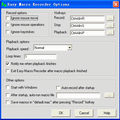
Easy Macro Recorder is a handy utility that makes your computers automatically do tasks for you. It records all operation of mouse and keystrokes and saves them as macros, then Easy Macro Recorder can play back the recorded macros to automate your work any number of times. It works on any Windows applications.
Easy Macro Recorder is very easy to use, just three steps: record, save and playback. It doesn't require any programming experience.
Key Features:
- Record all events of mouse and keystrokes of any Windows applications;
- Repeat playing back macros for any number of times;
- Allow you to do things that are tedious or time-consuming without actually doing them yourself;
- Play back macros at schedule time;
- Easy to use macro editor with several commands;
- Easy to use and don't need any programming knowledge.
System Requirements:
Windows 98/SE/ME/NT/2000/XP/2003 Server/Vista, Pentium 166MHz or higher, 32 MB of available RAM (64 MB recommended) plus 1 MB of available disk space for installation
Publisher:
GoldSolution SoftwareHomepage:
http://www.flashplayerpro.com/MacroRecorder/File Size:
1.73 MB
Price:
$29.95
Featured titles by GoldSolution Software
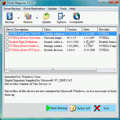
Driver Magician offers a professional solution for device drivers backup, restoration, update and removal in Windows operating system. It identifies all the hardware in the system, extracts their associated drivers from the hard disk and backs them up to a location of your choice
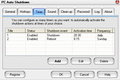
PC Auto Shutdown is a handy software that helps you automatically shutdown, power off, reboot, hibernate, suspend or log off computers at schedule time you specifies. It can shut down computers at schedule time when no user is logged in or when computers are in suspended power conservation mode. It gives you different ways to schedule the shutdown event for your needs, such as daily, weekly and only once.
GIVEAWAY download basket




Comments on Easy Macro Recorder 3.68
Please add a comment explaining the reason behind your vote.


iPhone app giveaways »





Android app giveaways »





Coming to compare utilities is pretty difficoult because they are too similar or too different or do provide additional features and same tasks are accomplished in different ways. But #44 has a sure proof method to choose a good one... according to him in fact: "Free security programs are for the poor and the ignorant only." So, just as an example, Easy Macro Recorder is good choice for the simple reason that (unless you got it thatks to GOTD) you have to pay for it!
So what about some freeware mentioned here above which is much better than EMR?! Wanna try something interesting? Have a look at RoboTask; they even provide a free "light" version.
Comments appreciated.
Thanks, Giorgio
Ohh, a last comment: I have the feeling that many commenters misunderstood the subtile but quite different use, funtionalities and purpose of keyloggers and macro recorder utilities!
Save | Cancel
After figuring out how to disengage ALT-CNTL-S keyboard shortcut (as requested by EMR) EMR would not respond to mouse click on the desktop shortcut or to clicks on the executable file. I appreciate the tips and referrals to alternatives made by previous commenters.
Save | Cancel
Excellent program, especially for those who are promoting a home based business. I was able to place 100's of ads on MSN and Yahoo groups..between taking a shower, eating dinner, and watching a movie. The program does take some finessing, in order to make it work, such as not using the wheel on your mouse to navigate to "send" buttons..but instead using the keyboard arrows instead.
THank You...this program rocks.
Ted
Save | Cancel
I find it interesting that the developer, GoldSolution Software, only offers Easy Macro Recorder here on GOTD, but they have another macro recorder, My Macros, which they sell elsewhere for the same price (at the time of this post, on sale for half price on Bits du Jour). I don't have time to compare them, you can download trials. My Macros does support hotkeys.
There are many task automation utilities, they all have different features and capabilities. People have mentioned AutoHotkey. Another earlier giveaway was xStarter. There was another task automation giveaway which I don't recall the name of right off. One that I particularly liked which was given away earlier was AutomationBox MouseRobot. Most people completely misunderstood its capabilities and how to use it (unfortunately, one of the very few instances where I think BladedThoth blew the review). It has some problems and needs some improvement (there was an update which fixed some things after the giveaway), but it can do things which I haven't been able to accomplish with any other automation tool.
Save | Cancel
I can't get this to work on Vista (Home Premium)...I set it to run, named the macro, then everything "freezes" (in programming lingo, it's like the recorder "takes focus") --the type of thing that happens when you have something comes up that keeps you from clicking on anything else. It doesn't lock up or crash, but you can't click on anything, use keystrokes, etc., except Ctrl+Alt+S (or Ctrl+Alt+Del). So you can't record any macros! :(
Not sure what's going on. It worked fine on my XP computer.
Oh and I checked out AutoIt-v3 that some recommended. I've sure it's very good, but it doesn't track keystrokes, mouse-movements, etc. You HAVE to program it which is going to be beyond most folks.
Save | Cancel
Program installed on Vista OK but when I record a macro the mouse cursor disappears until I stop recording which makes it pretty useless for me.
Anyone else got this problem.
Save | Cancel
I agree completely!!Using direct access and this program maks the ultimate combo... that sounded nerdy -snort-
Anyay, I've tried it, I like the features. I am new to this whole messing aroundwith my computer thing so I think its pretty cool...
slsoI dont think anyone is going to see my opinioon since its at the bottome of the page...
Save | Cancel
Would something like this work for a game? I like fishing games, but would like to set my rod and leave the computer, but have it auto-strike when a fish bites. Normally I have to just hit a key.
Save | Cancel
This is a very good Macro recorder if you are constantly logging on to different systems (whether internet or not). I had version 3.61 on a previous computer and it worked flawlessly in fast playback mode (BTW if you have a previous version uninstall it before installing this version).
There are some limitations (no scripts etc) but for basic, repetitive keystrokes and mouse clicks, where the input fields are in the same positions on the screen each time, it is excellent. Thanks GOTD and GoldSolution Software.
Save | Cancel
NUMBER21.. Just what i was thinking, I downloaded that DirectAccess Prog too and its cool, and could make this macro prog work much easier..
Save | Cancel
#17, instead of recording where they go, why don't you have a discussion with them and advise them not to go to those sites and then setup your browsers and firewall to disallow those websites to be loaded?
Much better, easier and simpler to do.
Save | Cancel
Thank you for your expertise #43 but I'm not one who uses many free programs of any type (with the exception of Revo uninstaller, IM and my web browsers), no less security software. It's possible that #39's virus alert was triggered by some junk like AVG free but I never claimed virus, I simply stated that I have no need of any type key logger be in inocent or not and that my security (KIS 7)flashed several warnings. Just so we're clear, I use KIS 7 on my XP system & ESET Smart Security on my Vista system. Free security programs are for the poor and the ignorant only. But thanks for the point made. Maybe it will help someone else!
Save | Cancel
#25 and anyone else freaking out about AV warnings from this proggie: it's a macro recorder. That means it records keystrokes, just like a keylogger. If it can't record keystrokes, how is it going to save them to a macro?
While it's certainly possible that the file contains malware, considering the type of program it is and the alerts you're getting, I'd guess you're getting a false positive. Happens more often than you'd think with AV programs, particularly the freeware ones.
Save | Cancel
Let me start by saying I don't run down the Giveaways. In fact this is my first post, but I read so many comments re the lack of keyboard shortcuts that I felt I could offer something.
Like Lou - #31, I've used Hot Keyboard for several years but what he didn't mention was that it doesn't have the learning curve which makes AutoHotKey so difficult for some.
With HotKeyboard you allocate each macro its own keyboard shortcut. Enter the macro details simply press -say- CTRL/ALT + A, press OK and it's there until you wish to change. If it conflicts with another it will tell you.
AND there is a protable version available.
Hot Keyboard costs $30 but it IS worth every cent. It's especially useful for auto-replacing text. Any often used text can be inserted automatically. ^a for instance could insert your address.
Definitely worth a look.
www.hot-keyboard.com
Save | Cancel
i dunno....hotkeys are kinda lacking, but you can always just click the script file and run it. Make a shortcut to it and you're set. I do like the functionality and flexibility of it
Save | Cancel
VIRUS ALERT
After download my system (VISTA) keeps recording a VIRUS ALERT for something called is-IROR1.exe, which does not want to go away.
HELP or ADVISE please.
Save | Cancel
This has the same problem that I came across back in the original Windows: You cannot be guaranteed that items will be exactly placed at the same locations on the screen to be able to use a mouse logging recorder to develop useful macros…
Save | Cancel
#17: I strongly disagree with you! If the child finds out that you use such a program, the trust between you and the child will be destroyed. You just have to have some confidence in your (foster) child - even if the child "doesn't deserve it".
The programs you describe are called keyloggers. Don't use them!
Save | Cancel
#30
thanks so much ^_^
thats was defiantly it :) will purchase license when i get home :P
Save | Cancel
Why bother recording key strokes if you can’t use them directly to carry out an action? ~ #12
This is why I was wondering about hotkeys in my earlier post, #3. Because without them, the time saved by macros seems to be lost again. I’m puzzed that they are still not included in the new v.
To 3 and 12. If I understand what your saying, your looking for a way to create the macros and then have some sort of hot key that would run them without having to do the sequence that plays the macro? If that is the case I have discovered a way. When you go to play a macro it opens a directory of saved macros. If you right click the one you want and then send to desktop as short cut, you can then just run the macro right from your desktop without doing the sequence to open the players list of macros.
Make sense?
Save | Cancel
#28... the "freeware" actual key logger given away by GATD is only good for 40 minutes... after that you have to buy it.
Save | Cancel
This program would be excellent for me to go open Firefox, go to giveawayoftheday.com, check out the currently offered giveaway, realize that is not worth downloading, then exit out of Firefox. Brilliant!
Save | Cancel
I used the previous version of this software and found it VERY helpful. I liked how easy it was to simply press the record button and it will record your mouse movements for playback later. No scripting knowledge was required. I wanted it to be simple and straightforward, and this app did just that!
I'll be downloading this as well.
Save | Cancel
I installed and used this when it was offered previously, and it does work as advertised very well. I found lacking compared with a much more feature-rich program I've used for years called Hot Keyboard, which does what this program does but also much more. They don't get along running together on the same computer so I didn't keep EMR.
Save | Cancel
#6 I think the wallpaper changing program you're referring to is Wire Changer v.3.6.5 from June 29th, 2007. I hope this helps.
Save | Cancel
How do I register this software once it's installed?
Save | Cancel
#17 oceantrails --- GOTD already offer this. A quick search in their freeware library finds Actual key logger.
Today's giveaway isn't really one for me as I currently prefer AutoHotKey
Save | Cancel
#11 and #20: AutoHotKey is based on, and supersedes, AutoIt. Go straight for AutoHotKey, which also runs AutoIt scripts.
#17: There are a number of programs that either (a) record keystrokes and screen activities in a hidden log so you can see where the user has been and what he or she has done, or (b) block access to lists of objectionable sites that you, or the program, or both, compile. Your browser might also include a simple version of the latter "parental blocking" function. Names of such separate programs escape me at the moment, but a quick search in various software sites (download.com, snapfiles.com, tucows.com, filehippo.com, etc.) should turn some up. Most probably are shareware, that is, you have to pay for them.
I hope this is helpful.
Save | Cancel
I had the previous version of this software installed in my PC for months and didn't find any use for it so I uninstalled it. (Uninstall worked fine as I remember). So, I will pass on this. If I get to have a need of automating tasks in the way this soft offers, I will comeback to the comments on this software and install some of the free alternatives offered here. Thanks again GAOTD commenters!. Regards,
Save | Cancel
People actually pay for a key logger? How stupid! When trying to install this thing, my security software went nuts. Why pay for or use the best security programs to fight with them over a not needed program at give away? Or is it useful to the lazy? I'll be darned if I would have use for a key logger which is exactly what this is any way you paint at it!
Save | Cancel
This is the nicest macro recorder I've come across so far. All possible options can be customized. These are the ones I like most:
- Once you've tested your recording at normal speed, you can set playback to "very fast" for the next thousand repetitions, which means those little unnecessary movements or hesitations that happened during recording will fly by unnoticed.
- The fact that you can choose whether it records output from the keyboard or mouse or both really puts you in control.
IF you know how to use it, it can save you thousands of keystrokes and mouseclicks, but -- like any power-tool -- it might cause havoc in the hands of the inexperienced.
Those who never have to repeat the same tasks over and over again don't need this, and those who occasionally want to automate routines at start-up might get along without it.
But for specialized repetitive operations, this little gem is PRICELESS!
For those who are still wondering what this software could be used for (any artists among you? - take notes...) here's one example of a routine where I'll definitely be using and appreciating Easy Macro Recorder very often:
When packaging my ArtStarters collections for usage in Poser and DAZ|Studio (freeware, btw), I have to create thumbnails that are exactly 91x91 pixels. If I make the original picture smaller, it looks horrible, and important details are lost. So I select a detailed 91x91px square from the original picture, copy it to the clipboard, paste it to a new file, apply a fancy effect to the edges, save the new file, close the original file, open the next picture, and repeat the process.
With each collection containing between 300 and 500 pictures, I'm almost dead with boredom from the 10th picture onwards and it seems to take forever.
Now I don't have to do this manually anymore - I can "teach" Easy Macro Recorder to click and type all the necessary stuff and repeat it for every picture in my collection.
And while it's busy doing the boring part of my work for me, I can have fun choosing pictures for the next collection, thus boosting my production time and preserving my sanity.
So here's a gigantic THANK YOU! for a utility that I've been wishing for for a long time. Blessings to GoldSolution Software and GAOTD.
`_~
Save | Cancel
Worked like a champ first try even with simple tasks such as initiating webmai, calendar applications and a program or two I use upon startup. Gives me time to grab my coffee while it's bringing my day to a start. Nice.
Save | Cancel
Other good option.... only 2.1 MB (Windows) and is free...
http://www.phraseexpress.com
Save | Cancel
Todays giveaway does record macros but has no shortcuts. I suggest that it can be overcome with using Direct Access (giveaway here on Jan 21, 2008) So, record a complicated macro, save it. Enter an abbreviation in Direct Access to run the saved macro. Done! ;)
Save | Cancel
I agree with #11 AutoIt is free and WAY more powerful
Save | Cancel
I didn't like this because it is unable to do the assigned task at "infinite" (OK, the maximum possible) speed. It is too slow for any repetitive task eg. in editing a specific text file with some pattern.
Save | Cancel
Works, but recording mouse and key movements is a more awkward process than it sounds. It records in real time, with all the little bungled movements one does every day, and all the pauses. Not useful unless you have some very complicated set of commands or tasks all at once and often used. And, of course, it takes a couple of steps to play the macro in the first place.
Save | Cancel
It would be wonderful if gotd would find a free program to check key strokes that can be secretly put on home computers to watch where kids go and keep kids out of dangerous areas on the web I guess what I am saying is as a Foster sister and grandmother such a free program to check keystrokes and help protect our kids as well as Foster kids while they are in state coustody.This kind of program would be useful to mom as a foster parent with this kids would still be allowing the ones who like games to be allowed to play online without the worry of them going to unsafe or un allowed sites . Thanks
Save | Cancel
Phineas #2: What's the difference between a plugin and an automate? Isn't 'automate' a plugin?
Save | Cancel
Does NOT record scroll wheel movement. Must click and drag. Some other useful free alternatives:
http://www.autohotkey.com/ - powerful but not for novices- also write and run scripts and autoit v2 scripts.
http://www.pssoftlab.com/pshl_info.phtml -simple hotkey creator
http://qliner.com/hotkeys/overview.htm - simple, international keyboard support but needs .net framework to run.
http://www.bayden.com/SlickRun/ - has a text box for hotwords instead of pressing a hotkey
Save | Cancel
Some programs are a waste of time, this one requires you to type in what you can do with out all the typing.
Save | Cancel
> Why bother recording key strokes if you can’t use them directly to carry out an action? ~ #12
This is why I was wondering about hotkeys in my earlier post, #3. Because without them, the time saved by macros seems to be lost again. I'm puzzed that they are still not included in the new v.
Save | Cancel
I can't see the point of this program. You set up key strokes to carry out a task, like opening a program. Then you have to go to the file that records this action and run the file to open the program! Why bother recording key strokes if you can't use them directly to carry out an action?
Save | Cancel
AutoIt is free and WAY more powerful
Save | Cancel
Garbage. Set it up to do Maintanenance,and it brought up my Photoshop like a drunken sailor.
Good for Laughs!
Richard
Save | Cancel
My first task was
- open the explorer
- open this site
- scroll to the 'User Comments' and show
- go to the 'Leave a comment'
- write 'My first task'
- stop
... and it worked like magic !
Then I edited the macro to remove some mouse jitter and tried again...
... and it still worked !
Thanks :-)
Save | Cancel
It would be great if it worked "portable". From an USB memory, I mean.
Save | Cancel
Re #3. Follow link above to Flashplayerpro for changes.
Save | Cancel
at 3 and anyone else asking about whats different this was taken from there site
'What's new
January 21st, 2008 Easy Macro Recorder Version 3.68 released
Fix a bug of right-mouse click in Macro Editor
Fix a bug in macro command "Run Macro"
Some minor tweaks'
enjoy:)
oh and on a side note a LONG time ago there was a giveaway for a wallpaper program, it autochanges your wallpaper, you can add 'notes' to it, and a few other things, i have reformatted my harddrive recently but completely forgot to write the name of this program down, any ideas?
Save | Cancel
Thanks for another good one, GOTD. A previous version (3.65) was an earlier giveaway, and I have used it and liked it. Grab it while you can. However, anyone who misses today's giveaway or prefers a freeware alternative should consider AutoHotKey, which is a bit more versatile than today's giveaway but also a bit harder to learn. I guess it's high time I did a full roundup of macro scripting utilities in my blog.
Save | Cancel