Every day we offer FREE licensed software you’d have to buy otherwise.
Anyplace Control 4.9 was available as a giveaway on January 5, 2009!
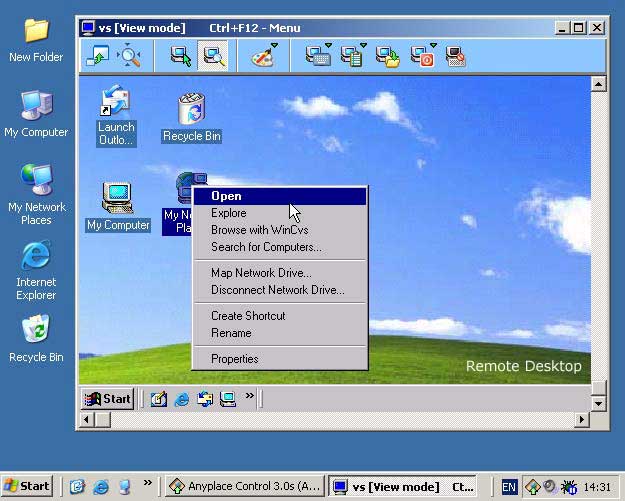
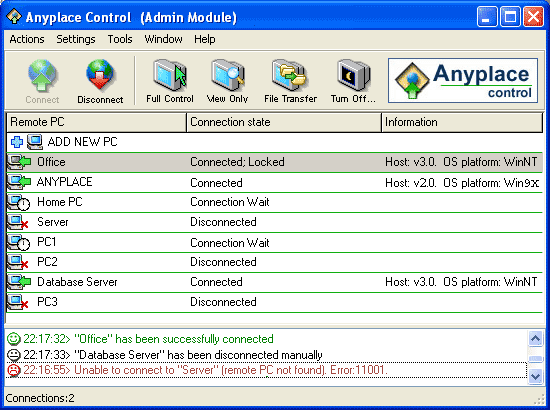
Anyplace Control is a universal program for remote PC control that gives a solution for a wide range of tasks. Home users can use the program to get access to their office PCs and work from home or check their own PC while being away from home. It also helps when you need to quickly resolve some problem or share files in the home network. Anyplace Control is also the right choice for remote assistants and network admins.
Anyplace Control is a remote control software, that allows you to control a remote PC over LAN or Internet.
The program displays the remote computer's desktop on your local screen and lets you use your mouse and keyboard to control that PC remotely. In other words, using this program you can operate a remote PC just as if you were sitting in front of it, right from where you are, no matter where you actually are.
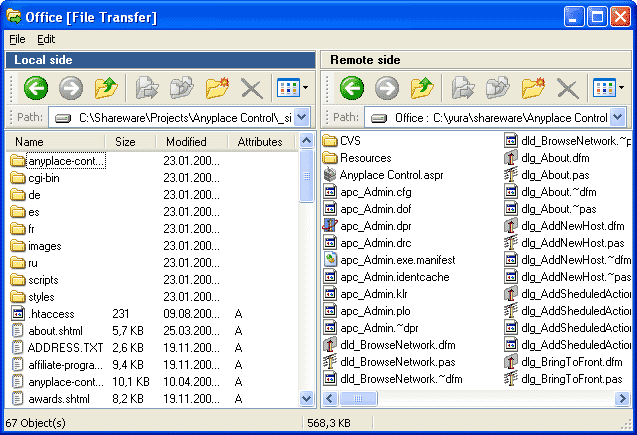
The built-in File Transfer feature provides an easy way to transfer files to and from a remote computer.
System Requirements:
CPU 200 MHz or higher; Windows 95 / 98 / Me / NT4 / 2000 / XP / 2003 / Vista; Network card, modem or some other communication device; TCP/IP protocol installed; Connection with 56 Kb/s or faster
Publisher:
Anyplace Control SoftwareHomepage:
http://www.anyplace-control.com/index.shtmlFile Size:
3.31 MB
Price:
$39.99
GIVEAWAY download basket




Comments on Anyplace Control 4.9
Please add a comment explaining the reason behind your vote.


iPhone app giveaways »





Android app giveaways »





@72
I found a program that offers all the features you asked for, called
Net Spy Pro:
http://www.acespy.com/nsporder.html
Also NetControl 2:
I also found this program that claims a lot of the features you asked
for, except that I don't think it shows all the screens at once, but
instead allows easy switching. It also hasn't had a new release in a
few years. It's called UserMonitor:
I found mention of a program from Hong Kong called Snetclass, but I
can't find any links to actually download or purchase it.
Save | Cancel
#97 "friendly user" and other talking about the apparent lack of a "full" install (vs. "trialware"):
If you actually install and use it (and read the installer messages), then you'll see that Anyplace provides for two types of connections between your machine running the "Admin" module, and the remote target machine running the "host" module you wish to monitor or control.
There is NO time limit on the "direct" computer-to-computer connection method which requires that you already know the IP address of the target "host" machine.
The time limit is on their other "paid/registered account" type of connection which helps solve the problem of NOT knowing the IP address of the remote "host" machine. This is primarily for those "host" machines with occasionally-changing dynamically-assigned IP addresses, which is typical for residential ISP service.
This second method is similar to how GoToMyPC and other similar services work, so you get both in this one package. Sure, they could have "donated" an entire year's worth of service, but getting several months for free beyond a typical 15-30 day trial is not a bad deal for a business trying to make a profit.
Save | Cancel
Well I gave this program a try. Easy install and configuration on all systems 95 and up, Firewall, router, cable, etc. Any body can do this, and it worked even at 28k dial-up speed. One big problem with this program is. IT is a GOTD program that means full version for free with no time limited, not trial-ware. This is trial-ware and GOTD should fix this problem.
Save | Cancel
Just installed the admin (controller) module. And see that I need to download and install the Host app to target machine... OK, makes sense.
(a) Except that I have not got target machine available to me this day. Does that mean that I am stuck in limbo and cannot use because the one-day GOTD had to be installed on BOTH machines today only?
If so, this is totally bogus arrangement.
(b) I see there is a non-tech install to remote machine via setting up an account. Have not done that. Is it part of the free use or does that require money paid?
(c) I pull up the About info on Admin module I just installed, registered with assigned GOTD id and serial. But screen states:
License holder: giveawayoftheday; number of licenses: 2;
License type: Time limit (5.2009)
So, as reported by others, this is almost useless since
(a) you have to have the second PC apparently setup today only -- and their instructions are a joke: walk over to the target host machine and install there. Well wtf, if I could walk over to the target machine and install software I would NOT NEED this remote control application.
(b) this Anyplace Control is a 4-month trial software and will (apparently) expire in May 2009.
Add to all this, that McAfee SiteAdvisor popped up warning stating that it has the AnyPlace download on their list of undesirable software... It all leaves a very bad feeling about the company, their product, their lack of clear information on what is being provided, and GOTD for not helping to provide any clarity.
What a waste of time, and now the trouble of removing it all...
Save | Cancel
Installed fine on the Windows XP computers. Looks better than Real VNC.
Couldn't get it to install on the Windows 2000 computer...couldn't connect to GAOTD and complete the set up.
Couldn't install it to the Vista computers as they are presently down. :-)
Save | Cancel
Broken English!!!!!! At least they try and if you don't understand it and you don't like it delete it. Maybe they should just produce it it their native language, about the time that happens think about how many great programs might be missed just because you don't like the broken English. Start up companies may not have the funding to have instructions provided in perfect English so give them a break. I agree sometimes it may be hard to understand it but that doesn't give anyone the right to slam them. How many of you can even speak a little Korean, Chinese, Italian, Russian etc. Probably not that many bet there are a lot more from people from countries outside the US that at least try to speak and write English and most can be understood if you at least try. I've been around the world and have lived in many different countries and usually their broken English is much better than me trying to speak their language. Better get off my soap box, just had to release a little tension. GAOTD thanks for another release didn't need it myself but others may have. There is always something better so it is nice getting opinions of others for different programs. Looking forward to your other releases as they occur thanks a million.
Save | Cancel
To 80: I have to access several of my client's computers nightly. Speak to your office's IT group about installing a VPN or you can look at a commercial service such as GoToMyPC or Cisco's Webex. There is a monthly fee but it could be worth it. As a Quickbooks Pro Advisor I have access to up to 4 Webex connections but my clients had already installed the software themselves so I haven't used any of my access accounts as yet.
The offered software looks good and would be very handy for me to debug my daughter's computer (her kids are always downloading things that mess it up) but I will pass due to the trial period and continue to trouble shoot by phone :)
Save | Cancel
#72 THIS IS _NOT_ repeat _NOT_ "VPN" software. Use Google, use Wikipedia and teach yourself the difference.
Remote access software SHOULD BE run over some kind of VPN, for security purposes. That's why, if you're going to use RealVNC, or Remote Desktop... fire them up over a Hamachi connection first. www.hamachi.cc Hamachi (same folks who make LogMeIn) creates an easy VPN tunnel that will keep your remote desktop communication safe. Otherwise, you're a sitting duck. If you don't want to mess with any of that - use LogMeIn or GoToMyPC - security is built in.
Save | Cancel
#86:
Thanks for the link to VNC Thumbnail Viewer, it looks very interesting. I found a VNC broadcaster that claims to work with it:
http://code.google.com/p/vnc-easy-broadcast/
Save | Cancel
#72 Our school uses Synchroneyes, by Smart. Its pretty good, and offers all the features you need. as far as price, im not sure.
Save | Cancel
Installed on 3 systems, all on same LAN behind a wired/wireless router/switch. Only testing so far was on the LAN. Used an "Admin privilege" account on the XP systems:
Wirelessly-connected Windows XP MCE (HP dv9000 series notebook w NvidiaGeForce Go 7600, 256MB, 1440x900 32bit);
another wireless Windows XP Home (Compaq Presario desktop w Nvidia GeForce 7600 GT KO, 256MB, 1680x1050 32bit); and
Wired/cabled Windows ME (Dell Inspiron 5000e notebook w ATI Rage Mobility 128, (16MB?), 1280x1024 32bit).
Had trouble with Host Module settings on XP Home: could not get the following Host "Start" setting to work/stick under any account, even when running in "Safe Mode": "System service, automatically starts with Windows (recommended)". Finally resorted to using the less desirable setting "Automatically starts after user's logon".
Could "connect" the Admin module back and forth between any two of the 3 machines. However, I had different experiences when remotely viewing-only or full-controlling them from one another (and this was after I had reduced running software/services to only one admin-host pair of connection software running/active at a time to try and prevent interference and improve results):
Windows ME running the Admin:
1) Although could see the cursor move, was only able to display a blank white rectangle for the XP Home, no matter the settings: color (auto, low, med, high) connection speed (dialup, broadband, LAN), remove wallpaper on or off, or reduce screen refresh frequency.
2) Was able to both view-only and full-control the XP MCE just fine.
Windows XP MCE running the Admin:
3) Although could see the cursor move, was only able to display a blank white rectangle for the XP Home, with occasional brief glimpses of the remote host's display (if running standard Windows applications, not game screens), no matter the setting changes (as mentioned above).
4) Was NOT able to bring up any display of the Windows ME system -- instead the warning notification would appear upon successful connection, but after choosing either view-only or full-control, no viewing window would appear at all on the XP MCE admin system, and on the ME system the host software would begin consuming 87% cpu cycles until the connection was disconnected (then return to near zero).
Windows XP Home running the Admin:
5) Same problem as before: was NOT able to bring up any display of the Windows ME system -- instead the warning notification would appear upon successful connection, but after choosing either view-only or full-control, no viewing window would appear at all on the XP MCE admin system, and on the ME system the host software would begin consuming 87% cpu cycles until the connection was disconnected (then return to near zero).
6) Was able to both view-only and full-control the XP MCE just fine.
Perhaps there are some settings or OS system interactions preventing this from working right for me, but so far only limited success. Also, I don't yet know how this compares with other VNC titles like UltraVNC as others have mentioned, but I'll likely be finding out as I would like to find a workable solution.
Save | Cancel
Better late than never.....
I forgot to post details of yesterday’s games which IMO were excellent games. They are called Light of Dreams an ethereal adventure game in the third person perspective and a first Person Shooter supported by the American National Guard called Prism: Guard Shield:
http://www.giveawayoftheday.com/forums/topic/4564
Also I’ve posted today’s games, a third person fighting game called Eco Warriors: Invasion of the Nercobots and a Penguin platform shooter called Tagap:
http://www.giveawayoftheday.com/forums/topic/4558
Full details and video footage where able are available on all games. Eco Warriors and Prism: Guard Shield may be too large for dial up users, but the secondary games will ba able to be downloaded by all.
Finally,
The webmaster has posted his weekly dose of DOS games. This week he has a great Sims game called Sims Tower as well as a Racing Game called Ford Simulator (yes it was made developed for Ford to promote the cars that were available back then. You can find details and download links for both games via the following link:
http://www.giveawayoftheday.com/forums/topic/4562
That’s six games for you to enjoy, and further winding down the Christmas and New Years celebrations. Things will now return back to normal, with only one game a day, unless I feel like posting more, lol. Actually for at least two days of the week you will get at least two of us posting on any one day, so you’re guaranteed several games every week.
Save | Cancel
for 21 JJ vastiau
On your Linux Desktop enable Desktop Sharing (give password)
note IP address of computer [going through a router see Step 2]
TERMINAL type ifconfig gives linux box IP ADDRESS
Step 1 (no router)[ or on SAME LAN ]
if you have VNC client enter IP ADDRESS (or router see step 2)
or web http://ipaddress:5800 (or 5900)
enter password
step 2
if linux box connected to a router
in router foward ports 5800-5900 to LINUX box IP address
note status of router (ip connection )
hope that helps
Save | Cancel
to 72
This might be similar to LanSchool
http://thetechnologyteacher.wordpress.com/vncthumbnailviewer/
http://www.giveawayoftheday.com/remoteobserver-20/
Remote desktop control requires from you to know the IP of the computer you wont to connect to (which is not static in my case)
My grandfather lives in another country and It was very easy for me to guide him to install teamviewer support version. It works very well for remote control; unfortunately it was a bit slow maybe because of his upload limit ( for instance it could take a few seconds to see an updated screen after I would change something on his screen) and there was no improvement when we disconnected the skype session
So does Anyplace Control 4.9 or any other solution can provide faster control than teamviewer?
Save | Cancel
so let me get this straight (help me!!). If you use the giveaway you can only install it on 2 computers and you don't need a account? also if you don't need the account then if you put in the ip address it will link?
Save | Cancel
@30: Logmein.com free and works on mobile! You just cant control the mobile but you can control other computers with it. To access the mobile, just go to logmein.com.
Also as #1 said, orb.com is great beacause you can view webcams, videos, audio, docs, pics and other stuffs. From any computer with web access from mycast.orb.com! It rocks.
CYA!
Save | Cancel
#72:
The only program I've seen that has feature #3 is RemoteObserver, which was a previous giveaway:
http://www.giveawayoftheday.com/remoteobserver-20/
That program also has chat (#4). It also says it allows execution or programs, but it doesn't mention termination. Sadly, it doesn't allow mouse/keyboard control.
If the PC are all Windows Pro, you can configure remote admin WMI and use WMI Asset Logger (AKA Open Asset Logger) to terminate processes:
http://sourceforge.net/projects/openassetlogger/
As for broadcasting of a single screen, you may need a separate piece of software for that too, such as Screen Broadcast:
http://www.download.com/NetFast-Screen-Broadcast/3000-2051_4-10569335.html
Note that aside from WMI Asset Logger, I haven't personally used the software I mentioned.
Save | Cancel
Folks, this is a fantastic program. Not only does it work through corporate firewalls if you go to the web site you can generate a link to send to another person to remote control their machine. The free alternatives are not as robust in functionality. Check this out; don't rely on the comments of others.
Save | Cancel
I have went through these comments and thought about how my mother or sister had called me to guide them through something on there pc over the phone. I have not downloaded this because it is a limited trial version but looking at the other that people have suggested I tried VNC and could not understand how to set it up or how to work it. I could not find any help on that. but the others looks ok but here is the problem I would like to access my works pc from home to finish up on reports or other designs i may be doing at that time. What program would i use to where i would not haft to have some one on the other end typing an access code in every time i wanted to get on to that one computer.?? I am lost so i hope some one can help!
Save | Cancel
Sorry, wrong site:
http://www.kpym.com/eevee/
Save | Cancel
Try also eevee.com It is small and quick (and free) but it is not very secure because it uses unencrypted HTTP for the remote control. However, I still use it for small tasks.
Save | Cancel
Having played around with this now (and looked at the license)
I see it only lasts until May this year then expires, A bit more info showed the price for one program on 1 pc as 39.99 then it goes slightly cheaper for each PC you install it on (That is going to work out pretty expensive)
Wonder if the GOTD team could comment on this being only a 4 month trial?
Such a shame really as this is a really good program :-(
Save | Cancel
Thanks for the many good & useful comments on this site. In my view at least 1/2 the value of GAOTD is in the comment section. I read all of the comments above & followed all of the links for my non-commercial use of just helping a few friends, 1 of whom may be on a Mac, it seems that TeamViewer free, is for me. Thanks again to all of you.
http://www.teamviewer.com/
Save | Cancel
#47: You are incorrect, GAOTD has given several video editing/conversion programs that all died within 3 months saying that the trial had run out.
One major factor that everyone needs to consider, if you are using this to assist non technical users, then it does not help, because after this is not available then you are stuck finding a free solution.
My dad is far from tech saavy, he had problems and he was not understanding my instructions. So I had him d/l TeamViewer and I just did all of the work and explained to him what I was doing and why. He was happier than a pig in sh... If we had a paid program, he would have had to buy it for me to help him out..
When you are on disability like me, free is the way to go. I did fork over the money for Acronis True Image 2009 and love it to death.
Wojo
Save | Cancel
Just a simple request of GOTD if i might. Please don't offer trial ware even in an extended version. I'm passing because of that & the fact that theres plenty of good, free alternatives.
I wouldn't pay for any program of this type anyway so why should I go through the learning curve? I use one of these programs so little, it wouldn't make sense to buy one. They do come in handy at times so I will refrain from voting on the offer & comments today.
Extended trials shouldn't be considered give aways, regardless of the softwares quality.
Save | Cancel
A Question for all those who use VPN software such as this one.
I currently use LogMeIn Free to access computers remotely, one-on-one.
I'm running a computer classroom. I'm looking for a less expensive option to LANSchool. It works like today's giveaway, but also:
1. allows the user to push/display their own desktop to demonstrate a task on all connected PCs, selected PCs, or just one PC
2. allows the user to take control of another's PC to shut down inappropriate actions (i.e., playing Solitaire or surfing when they're supposed to be doing something else)
3. THIS IS THE BIGGIE allows the user to view in a matrix all selected desktops at a time to monitor what the users are doing
4. Chat between the user and the remote users.
Most VPN SW I've seen other than LanSchool (and there's another that is used in schools, but I've blanked on the name) the view is one-on-one. What I need is the one-on-many. At least one program also allows the teacher to push a remote desktop to be viewed on the other remote desktops.
Any ideas? I've reviewed most of those already suggested above. But I could have missed something.
Thanks a bunch.
Save | Cancel
Rather than commenting, I've downloaded this and it's a GREAT program!
I've installed on my four PC's and my laptop.
Nice to be to sit in a warm room and make sure all my PC's are update and have any installs done from one PC.
I'd give this 5 stars for ease of use...no need to remember I.P numbers, just log in with Email address and a password, Then simply connect to the host and input it's password to ocnnect...Love it for it's simplicity!
Save | Cancel
Have not tried the giveaway, but can comment on the alternatives:
Logmein is very aggressive and obtrusive. It installs many dlls and garbage that are not regularly used, and even when off add significant strain to the system. Trying to disable the startup entries it adds can blow the system.
Mesh, according to MS, is heading towards a pay per use model. The rdp protocal has some serious drawbacks, especially considering using sound applications (to remotly play music on your home computer is not correctly supported.) It also wont support a connection to Linux or Mac without mussing.
VNC is good, but not up to speed. literaly. Ditto with ultraVNC.
Crossloop is really really good, but it requires a person on the receiving computer to accept your connection.
FogCreek's and Radware each have good that is not free.
Have not used TeamViewer.
If the producer is not trustworthy, dont ever install such software as a trial - there is no way to know if the manufacturer is pilfing info - none of the regular cues are there.
Good luck. Thanks GAOTD
Save | Cancel
I don't think that trialware should be classified as a giveaway at all! GAOTD promotes its giveaways as being FULL apps, not trialware. If the developer didn't disclose up front that they intended to pass of trialware as a giveaway of a FULL app, then GAOTD was swindled.
Save | Cancel
this program seems nice.. i personally don't need this but still..
i notice all these people whine about how u can get this and that for free well... this is free for a day... yes its similar to others.. isnt 90% of them basically the same with a lil extra here and there?
if i didn't have my pc's already setup with RA i would use this... seems simple and u can view the list of all pc's to connect to...
thumbs up for this program!
i also support free over paid but still... it takes a long tie to code stuff..
you got to first think of the product.. figure out the protocols,etc.. then put it together WITHOUT it crashing every 10 minutes then make it simple enough to work (for the customer)..
so even though there are free alternatives you still alot of the time get the best support via paid products (except for Linux...face it Microsoft....sucks at that)
Save | Cancel
#4 is for LAN only.
Save | Cancel
I have two household desktop computers and a laptop computer. Only one of these has a printer installed. I would like to be able to use of the computers with no printer and remotely access the computer attached to the printer and type and print a document on this domputer. Can I do this with the any of the other free programs mentioned here or with this GAOTD. Thanks.
Save | Cancel
They're all ripoffs of PCAnywhere which was written in the 90' It maybe expensive, but it supports all OS's All Windows (Except 3.1, for that guy who keeps asking) including Mac, All versions of Linux, Mobile, Palm Pc, Phone, and Nokia N series Palmtops
I have been using PCAnywhere since Windows 98/NT. I ran a server which I needed remote access to. The server ran on NT, and I was able to do anything I needed to do even remote reboot and run on bootup. Which you usually needed a tech to do. At 3AM when your server software crashes yet the CPU is up, it was nice having PCA around.
The new PCA can offer many security options the free ones don't
But like I said its not cheap. And don't buy it from Symantec! They want $199! Get a copy on sale on eBay or your "favorite" discount softwate store.
Check around. I've seen them go for the price of this cheesy software
Froogle it. Don't steal it. Let's not forget why we get new software.
Many hundreds if not thousands of man hours of coding.
Besides piracy usually embeds trojans, worms, virus in their Warez. Just to teach you a lesson or get "remote access" without your knowledge.
I'm a coder I know. How would you feel if someone stole your hard work, after you spent months if not years perfecting your product. And then some hacker/cracker steals your code and offers it on P2P sharing or crack/serial/warez sites for free?
Save | Cancel
The products good or not, one thing I really like about this site is the feed back part. The reason I like it is because of the fact that everyone not only leaves feed back but everyone leaves links or information on a similar product. Thanks GAOTD and your users.
Save | Cancel
Giovi69
WITHOUT ANY LIMITATIONS save for those mentioned in Terms and Conditions.
See the statement "save for those mentioned in Terms and Conditions."
The idea of releasing these professional programs is to get you to buy a license to use it for commercial use. This is why they offer these programs, to get you to buy them for commercial use but to still offer the program to those who use it for personal use. By doing this someone will mention the program to their boss or if you are the boss you may buy the program.
This is called marketing and it works very well.
Save | Cancel
One question. Security.
I noticed some of the programs mentioned run on the programs web servers and not a direct connection from say your laptop to your home pc like a true VNC. This brings an issue that should be considered.
Which programs run directly connected to your pc's and which use the programs web site such as Window's Mesh, Be In Sync, etc.
Windows Mesh will also sync your files between pc's and other peoples pc's that you and the owner of the other pc allows.
Save | Cancel
Today's giveaway looks very promising for a Windows-only remote desktop control program. I went to all of the sites for all the other free programs mentioned today, and tried to compare features. Conclusion in a nutshell - they ALL have good and not-so-good points, strong suits and weak ones, and probably the best way to decide what will or won't work best is to: know WHAT you want to do, HOW you want to do it, and WHERE you want to do it.
For one example, Anyplace Control looks like a strong contender for mixed home LANs, like my Win98-WinXP setup - but if you have a 'Nix box in your mix, TightVNC looks like the winner, because most of the programs listed here today are Windows-only solutions. (ACS has a feature comparison page here, where they show how it stacks up aginst 3 other professional offerings like Laplink Gold (something I've used before), and it compares very well, but I decided to stick with comparisons to free programs for my opinion here.)
If you need a really small footprint and strong encryption for security, Anyplace probably isn't the one I'd choose - LogMeIn looks much better, but the free version doesn't do file transfers. I'm wary of Net/browser based remote apps because of security concerns, as others have already stated, so a few of the other programs are out, too. Anyplace only uses 128-bit encryption, but it's automatic; for my LAN that's more than enough, and it might suffice for others as well, unless you transfer sensitive data, in which case you'd probably want 256-bit.
For sheer ease of use when handling files, several programs mentioned might make users happy, but again Anyplace can't get much easier, with its dual-pane approach (NOT browser-based, by the way) - but it doesn't do normal simultaneous multiple file transfers the way others do - instead, they can be combined as a "single network message" and sent - for overall speed, that approach can't be beat by the others mentioned, especially when paired with Anyplace's dynamic buffer control. So with a little planning, virtually any type of file transfers can be done quickly and easily, making Anyplace rise to the top. In addition, some of the others suffer from noticeable overall lag, like Windows Remote Desktop and VNC - in comparison, Anyplace has a very tiny lag.
Almost every program is pretty similar in remote control functionality and remote desktop viewing, so that choice might depend on your personal preference or a particular need you might have, and you'd have to explore each program's feature list to decide. For example, UltraVNC has an embedded JAVA viewer for the remote desktop and its data stream encryption is optional, not native like Anyplace and some others - again, you'd have to decide how important those features are for you.
And to everyone who questioned today's offering for workplace situations - why even bother asking if your network is controlled by IT Admins? Almost no one would permit such an application to be installed on their company computer network anyway; besides, Anyplace seems much more suited to a small home network as offered, and the free license precludes large-scale WAN installs anyway. That free license does NOT expire, by the way, but you need to understand that there are 2 types of connections possible - one is direct, or box to box, and that is completely free. The other is ported online through company servers as an "Account Connection" for a monthly fee, and that feature is only free for a few months - to continue after that expires you would have to suscribe. Again, this would depend on your personal needs.
I hope this clears up some confusion about features, and makes your choice whether to download today's Giveaway somewhat easier; I'd hate to see a good software package get shot down simply because people don't understand the features and limitations, or end up comparing two packages that don't really have the same feature-set. Anyplace Control should work very well for those people who can make use of its strengths, while others are turned off by its weaknesses, but anyone considering a desktop remote app would do well to keep this one on their short list - in my book, it's a thumbs up and thanks to ACS and GAOTD for a fine offering.
Save | Cancel
I keep getting an error message when I open the Setup.exe saying "Failed to connect, please try again later."
HELP??
Save | Cancel
What happened to reviewing the software that is given away here???
Someone always mentions this but it seems to get lost in the shuffle as normal. All the freeware thats listed is an awesome thing to do but you still need to write a review of the product that is posted each day. Saying that this freeware is better than whats given today is lame, How is it different?? What improvements does the freeware have that this don't?? How can today's publisher improve their product??
OK With all that said I apologize if I put a bur in anyones shorts.
It just seems that all of us forget why GAOTD post the programs here.
Good downloading and have a great week.
Save | Cancel
I've used CrossLoop with great success, so I'll pass on this GAOTD, thanks.
Save | Cancel
While I don't usually comment on these things...I feel compelled to comment today for this application.
First, yes, there are many alternatives to paid software. Open Office is one, VNC is another. While they do what you would expect, some users are willing to pay for support/service that you don't get out of open source apps.
Second, a huge gripe with this program is the broken English. If English isn't your first language, then either get someone who can speak it fluently to help translate it, or skip making the program in English all together. This program contains numerous grammatical errors that any QA department should have caught.
Third, the connection speed (from two machines on the same LAN) is ridiculously slow. I connect at a quicker speed from my desktop at work to my server at home over RDP exponentially faster.
Fourth, and this is a huge concern, why in the APC-Host.log file do I see an FTP transfer. The log specifically says "Remote PC 208.109.218.216 has tried to open File Transfer session"
Is this some backdoor, or what exactly is going on.
Last, but not least, like others have mentioned, is this an extended evaluation of the product, or do we actually get to use it longer than 5 months?
Thanks!
Save | Cancel
I have been using the free version of Logmein for years and it works great and is simple to use. No spyware. Very handy for accessing PC's that are not in your own home. But the fastest and easiest way to transfer files from one pc to another in your own home is a flash drive, you don't have to install anything just plug it in drag & drop the files you want to transfer then plug it into the other pc and drag & drop where you want them. They are cheap and can be used forever. Less clutter on your pc's with nothing to install.
Save | Cancel
Ms remote desktop cannot bypass firewall - if you're behind a firewall and don't have permission to configure the port used by your remote desktop on that firewall, you won't be able to use it.
Teamviewer is nice but if there is not person on the other end and assign you permission to access that computer, you won't be able to access it and control it.
Logmein is good one. I used to use it.
Save | Cancel
Hmm, link didn't work. The link should go to http://www.realvnc.com/products/download.html. Apparently I left off the http://. :)
Save | Cancel
I use Instant Housecall that seems to do everything this does and its free, also great tech support if needed.
freeremotesupport.com is where the program is for you to download and register, once you have your user name anyone can have you on their computer in minutes.
Save | Cancel
To access Linux from a PC, I use VNC. Just google your version of linux and VNC for the server download (I.E. Redhat VNC). You can access it from most vnc clients on your PC. I use REALVNC .
For accessing home Windows from work Windows, I use Remote Desktop. You may have to open port 3389 on your home network and if you are smart, you will restrict it to the IP range of your work network so not just anyone can get to it.
Save | Cancel
I have tried many remote control programs. I support most of my family PC's. My father in law seems to get into daily trouble. TEAMVIEWER (free for non-commercial use) is the very best. Has all the options I need to help others. Please check out this jewel.
Father in law now runs in a virtual environment called RETRUNIL. Now when he gets into PC HELL all he needs to do is reboot and he is back to his clean starting point. Saves me hundreds of hours. :)
Save | Cancel
I've used Anyplace Control for years and it is a great program. It's much easier and safer than UltraVNC and I like it better than LogMeIn. I use it to help out a friend who lives 250 miles away. We use the direct connection method rather than the 'account method' so the information goes directly between our pc's and it's quite fast--plus no recurring charge. I am sure the 'time limitation' people referred to is for the account-based version, which is easier to set up but a little slower and does incur a monthly fee.
Microsoft's built-in remote desktop stuff is not easy to use with different versions of Windows (my friend's pc's run Win2k and I run Vista).
I do like TeamViewer as an alternative to the account version of Anyplace Control--because it is always free for non-commercial use. When someone in my family--for instance my cousin in Minnesota (I'm in Florida)--needs help I get him to load the TeamViewer client and I can instantly get on his computer.
Hope this helps someone. This type of software is a great way for those of us who usually know what we are doing to help out our friends when they get stuck with a problem on a pc.
Save | Cancel
God bless the man/group who came up with this idea. I can't believe it's free. Anyway, I have started downloading already. I hope it works as the name implies!
Save | Cancel
I will also pass on this one. I have used Logmein Hamachi, TightVNC, UltraVNC, but none have been as good as Teamviewer3 which can transfer multiple files, bypass firewall setup, switch from remote to host, very fast connection, encrypted fast transfers . Can be installed with permenant password, which allows access to remote automatically with known password, or just run without installation and given a random four digit password everytime which changes each time it is run. The drawback there is that the remote computer owner has to run the the program and let you know the temp password to gain access. On home network one password would suffice for all youir network.
Save | Cancel